Multi-Level Graph Layout on the GPU Frishman et al 2007 - - PowerPoint PPT Presentation

multi level graph layout on the gpu frishman et al 2007
SMART_READER_LITE
LIVE PREVIEW

Multi-Level Graph Layout on the GPU Frishman et al 2007 - - PowerPoint PPT Presentation

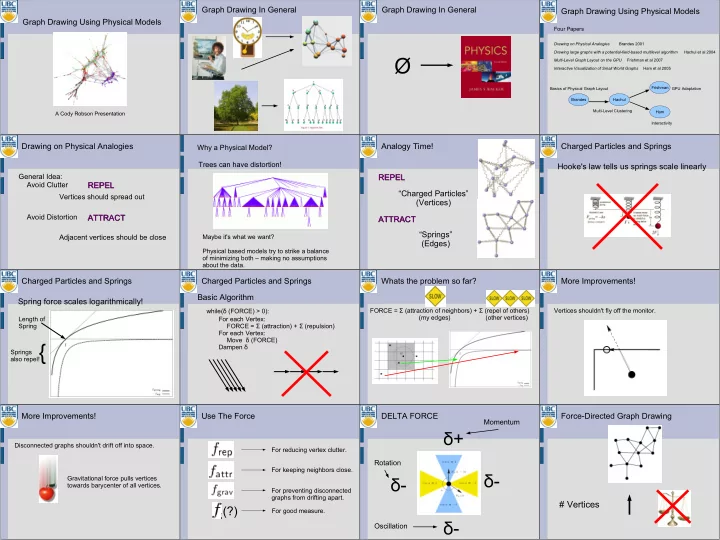
Graph Drawing In General Graph Drawing In General Graph Drawing Using Physical Models Graph Drawing Using Physical Models Four Papers Drawing on Physical Analogies Brandes 2001 Drawing large graphs with a potential-field-based multilevel


slide-1
SLIDE 1

Graph Drawing Using Physical Models

A Cody Robson Presentation

Graph Drawing In General Graph Drawing In General

Ø

Graph Drawing Using Physical Models

Four Papers

Drawing on Physical Analogies Brandes 2001 Drawing large graphs with a potential-field-based multilevel algorithm Hachul et al 2004 Multi-Level Graph Layout on the GPU Frishman et al 2007 Interactive Visualization of Small World Graphs Ham et al 2005 Brandes Hachul Frishman Ham Basics of Physical Graph Layout Multi-Level Clustering GPU Adaptation Interactivity

Drawing on Physical Analogies

General Idea: Avoid Clutter Avoid Distortion Vertices should spread out Adjacent vertices should be close

ATTRACT ATTRACT REPEL REPEL

Trees can have distortion!

Maybe it's what we want? Physical based models try to strike a balance

  • f minimizing both – making no assumptions

about the data.

Why a Physical Model?

Analogy Time! REPEL REPEL ATTRACT ATTRACT “Charged Particles” (Vertices) “Springs” (Edges) Charged Particles and Springs Hooke's law tells us springs scale linearly Charged Particles and Springs Spring force scales logarithmically!

Length of Spring Springs also repel!{

Charged Particles and Springs Basic Algorithm

For each Vertex: FORCE = Σ (attraction) + Σ (repulsion) For each Vertex: Move δ (FORCE) Dampen δ while(δ (FORCE) > 0):

Whats the problem so far?

FORCE = Σ (attraction of neighbors) + Σ (repel of others) (my edges) (other vertices)

More Improvements!

Vertices shouldn't fly off the monitor.

More Improvements!

Disconnected graphs shouldn't drift off into space. Gravitational force pulls vertices towards barycenter of all vertices.

Use The Force

(?)

For reducing vertex clutter. For keeping neighbors close. For preventing disconnected graphs from drifting apart. For good measure.

DELTA FORCE

δ+ δ- δ- δ-

Oscillation Rotation Momentum

Force-Directed Graph Drawing

# Vertices

slide-2
SLIDE 2

Energy Based Placement

Use similar force model, build an energy equation. Solve with typical optimization methods.

  • Better overall placement with small graphs
  • Scales worse than force-directed placement

Fast Multipole Multilevel Method (FM3)

O(BAD) O(V log V)

Fast Multipole Multilevel Method (FM3) Coarsening: Lets us compute smaller set. Partitioning: Lets us approximate forces. Multiple Levels G : Our Huge Graph L : Layout of our huge graph

G0 G1 G2 ... Gk

simplify simplify simplify simplify simplify

L0 ... Lk-2 Lk-1 Lk

initial guess initial guess initial guess initial guess initial guess

Force Directed Layout From Scratch

Coarsening Edge Collapse

Image Courtesy of Prof Sheffer!

Analogy Time!

Group vertices into “solar systems” Sun: Central vertex in a solar system. Planet: Vertex neighbors of a sun. Moon: Vertex neighbors of a planet. G1 is the graph of solar systems in G0 G2 is the graph of solar systems in G1 And so on...

Multiple Levels (Coarsening)

Gi Gi+1

Multiple Levels (Coarsening)

Layout the simple graph with traditional force directed layout. Expand the solar systems roughly how we collapsed them. Run force directed layout now that we're close to a solution.

Multipoles (Partitioning)

Repulsion force calculation is sped up with partitioning. Approximate all force of particles in C1 acting on particles in C0

Multipoles (Parititioning)

Partitions created with “Reduced Quadtrees”

Multi-Level Graph Layout on the GPU FM3 GPU 101

A modern graphics card gives us two things:

Shader Processors

X 128

Memory from the future!

GPU 101

Writing a shader program...

Input Arrays (Texture) Computation (Rendering) Output Array (Texture)

Each texture element can hold four elements (Red, Green, Blue, Alpha). We can use multiple textures as input, but only one as output (four output values per computation).

Multi-Level Graph Layout on the GPU

FM3 constructs simplified levels iteratively. G0 G1 G2 G3 Errors propagate from stage to stage. This approach uses the most detailed graph for each simplification. G1 G0 G2 G3 This technique is called “Spectral Graph Partitioning”

Spectral Graph Partitioning

Idea: Partition the original graph into two equal sized pieces as many times as necessary. Use a “Normalized Cut” to find the weakest link that can cut the graph into two equal sized pieces.

Same Normalized Cut from Image Processing!

Spectral Graph Partitioning

Problem: Normalized Cut partitioning takes way too long. Use standard edge collapsing to coarsen the graph. Do normalize cut

  • n coarse graph and use as initial

guess for each finer iteration of the graph.

Seeing a pattern?

Big Graph Coarsen Coarsen Layout Edge Collapse Partitioning

slide-3
SLIDE 3

Coarsening and Partitioning

FM3 For Each LOD: Partition: Calculate forces, layout GPU For Each LOD: Calculate Multi Level Partitions For Each Partition: Calculate forces, layout Vertex = Location Texture

Multi-Level Graph Layout on the GPU

Edge = Neighbors + Adjacency Textures Two Partition Textures:

Multi-Level Graph Layout on the GPU

Partition Information Texture:

  • Index of the location texture of the start of the partition
  • Width and Height of partition block in location texture
  • Number of nodes in the last row of the partition

Partition Center of Gravity Texture:

  • Holds current (x,y) location of center of gravity of

partition. Force Calculation Output:

Multi-Level Graph Layout on the GPU

Attractive Force Texture Repulsive Force Texture Both hold 2D force for each vertex in the location texture.

Putting It All Together...

Shaders Textures

Results

GPU sans GPU = 2-4 times faster than FM3 GPU with CoreDuo = 3-6 times faster than FM3 GPU with GPU = ~22 times faster than FM3

FM^3 GPU

Interactive Visualization

  • f Small World Graphs

+ Use a better force model for small world graphs. + Use clustering for layout as well as visualization!

“Small World”

  • Small Average Edge Length
  • High Degree of Clustering

Small World Forces

Problem: Springs do not discriminate. Ideally, we'd like springs in our cluster to mean more than springs linking us to other clusters. Strangely, using constant force for springs seems to work pretty well!

= 1

Allows Intra-Cluster edges to shrink while inter-cluster edges grow.

Small World Forces

Too good to be true? This force model is highly susceptible to bad looking local minima. Use another approach first, use results as initial guess!

Small World Visualization

Clustering done by same edge-collapse

  • process. Clusters drawn as constant-sizes

spheres. Clustering can be dynamically updated by a Degree of Abstraction variable.

Degree of Abstraction

Linear versus Exponential Interpolation

Degree of Abstraction

Focus + Context Returns!

Focus + Context Example

In the absence of high-level information of our data...

Physical-based graph layout models produce good results and scale well with recent methods!

Formal Conclusion

If what you want is too slow... ...use something that works as an initial guess!

Informal Conclusion

= 1