Chapter 4 Classic Algorithms Bresenhams Line Drawing Doubling - - PDF document

chapter 4 classic algorithms
SMART_READER_LITE
LIVE PREVIEW

Chapter 4 Classic Algorithms Bresenhams Line Drawing Doubling - - PDF document

Chapter 4 Classic Algorithms Bresenhams Line Drawing Doubling Line-Drawing Speed Circles Cohen-Sutherland Line Clipping SutherlandHodgman Polygon Clipping Bzier Curves B-Spline Curve Fitting 2006 Wiley


slide-1
SLIDE 1

1

  • 2006 Wiley & Sons

Bresenham’s Line Drawing Doubling Line-Drawing Speed Circles Cohen-Sutherland Line Clipping Sutherland–Hodgman Polygon Clipping Bézier Curves B-Spline Curve Fitting

Chapter 4 Classic Algorithms

  • 2006 Wiley & Sons

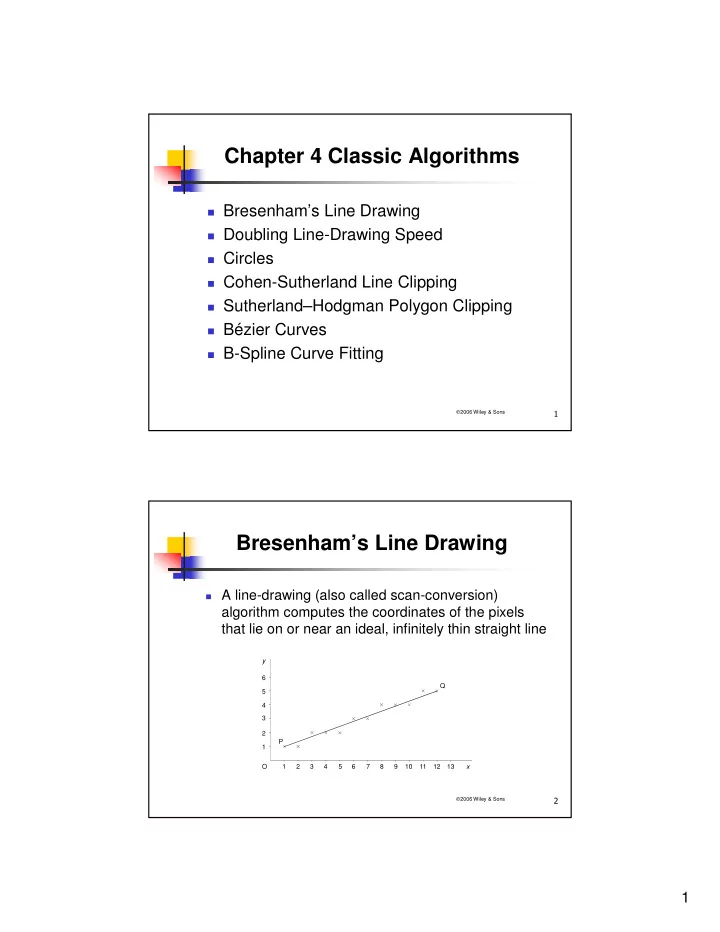
Bresenham’s Line Drawing

A line-drawing (also called scan-conversion)

algorithm computes the coordinates of the pixels that lie on or near an ideal, infinitely thin straight line

O 1 2 3 4 5 6 7 8 9 10 11 12 13 1 2 3 4 5 6 P Q x y

slide-2
SLIDE 2

2

  • 2006 Wiley & Sons

Bresenham’s Line Drawing (cont’d)

For lines -1 slope 1, exactly 1 pixel in each column. For lines with other slopes, exactly 1 pixel in each row. To draw a pixel in Java, we define a method

void putPixel(Graphics g, int x, int y) { g.drawLine(x, y, x, y); }

  • 2006 Wiley & Sons

Basic Incremental Algorithm

Simplest approach:

Slope m = y/x Increment x by 1 from leftmost point (if -1 m 1) Use line equation yi = xim + B and round off yi.

But inefficient due to FP multiply, addition,

and rounding

slide-3
SLIDE 3

3

  • 2006 Wiley & Sons

Basic Incremental Algorithm (cont’ed)

Let’s optimize it:

yi+1 = mxi+1 + B = m(xi + x) + B = yi + mx So it’s called incremental algorithm:

At each step, increment based on previous step

1 x y yexact

  • 2006 Wiley & Sons

Basic Incremental Algorithm (cont’ed)

  • For -1 m 1:
  • int x;
  • float y, m = (float)(yQ - yP)/(float)(xQ - xP);
  • for (x= xP; x<=xQ; x++) {
  • putPixel(g, x, Math.round(y));
  • y = y + m; }
  • Because of rounding, error of inaccuracy is
  • 0.5 < yexact - y 0.5
  • If |m| >1, reverse the roles of x and y:
  • yi+1 = yi +1, xi+1 = xi + 1/m
  • Need to consider special cases of horizontal, vertical, and

diagonal lines

  • Major drawback: one of x and y is float, so is m, plus rounding.
slide-4
SLIDE 4

4

  • 2006 Wiley & Sons

Breshenham Line Algorithm

Let’s improve the incremental algorithm

To get rid of rounding operation, make y an integer

1 x y d m yexact

  • 2006 Wiley & Sons

Breshenham Line Algorithm (cont’d)

d = y – round(y), so -0.5 < d 0.5 We separate y’s integer portion from its fraction

portion

  • int x, y;
  • float d = 0, m = (float)(yQ - yP)/(float)(xQ - xP);
  • for (x= xP; x<=xQ; x++) {
  • putPixel(g, x, y); d = d +m;
  • if (d > 0.5) {y++; d--; }
slide-5
SLIDE 5

5

  • 2006 Wiley & Sons

Breshenham Line Algorithm (cont’d)

To get rid of floating types m and d, we

double d to make it an integer, and multiply m by xQ – xP

We thus introduce a scaling factor

C = 2 * (xQ – xP) (why can we do this?)

So:

M = cm = 2(yQ – yP) D = cd

  • 2006 Wiley & Sons

Breshenham Line Algorithm (cont’d)

We finally obtain a complete integer version of the

algorithm (variables starting with lower case letters):

  • int x , y = yP, d = 0, dx = xQ - xP, c = 2 * dx, m = 2 * (yQ - yP);
  • for (x=xP; x<=xQ; x++) {
  • putPixel(g, x, y);
  • d += m;
  • if (d >= dx) {y++; d -= c;}
  • }

Now we can generalize the algorithm to handle all

slopes and different orders of endpoints

slide-6
SLIDE 6

6

  • 2006 Wiley & Sons

Doubling Line-Drawing Speed

Bresenham algorithm:

Determines slope Chooses 1 pixel between 2 based on d

Double-step algorithm:

Halves the number of decisions by checking for next

TWO pixels rather than 1

P P P P

  • 2006 Wiley & Sons

Double-Step Algorithm

Patterns 1 and 4 cannot happen on the same

line

U M B L1

Patterns 2, 3, & 4 P a t t e r n s 1 , 2 , & 3

L A

slide-7
SLIDE 7

7

  • 2006 Wiley & Sons

Double-Step Algorithm (cont’d)

For slope within [0, ½):

Pattern 1:

4dy < dx

Pattern 2:

4dy dx AND 2dy < dx

Pattern 3:

2dy dx

Algorithm:

Set d initially at 4dy-dx, check in each step

d < 0:

Pattern 1 d = d+4dy

d 0, if d < 2dy

Pattern 2 d = d + 4dy - 2dx d 2dy Pattern 3 d = d + 4dy - 2dx

x = x + 2

  • 2006 Wiley & Sons

Circles

How do we implement a circle-drawing

method in Java

drawCircle(Graphics g, int xC, int yC, int r)

A simplest way is

  • x = xC + r cos ϕ
  • y = yC + r sin ϕ

where

  • ϕ = i × (i = 0, 1, 2, ..., n – 1)

for some large value of n.

But this method is time-consuming …

slide-8
SLIDE 8

8

  • 2006 Wiley & Sons

Circles (cont’d)

According to circle

formula

x2 + y2 = r2

Starting from P, to

choose between y and y-1, we compare which

  • f the following closer to

r:

  • x2 + y2

and

  • x2 + (y – 1)2

O 1 2 3 4 5 6 7

  • 1

2 3 4 5 6 7 8 y x (r =) P Q

  • 2006 Wiley & Sons

Circles (cont’d)

To avoid computing squares, use 3 new variables:

  • u = (x + 1)2 – x2 = 2x + 1
  • v = y2 – (y – 1)2 = 2y – 1
  • E = x2 + y2 – r2

Starting at P

  • x = 0 and y = r, thus u = 1, v = 2r – 1 and E = 0
  • If |E – v| < |E|, then y-- which is the same as
  • (E – v)2 < E2 v(v – 2E) < 0

v is positive, thus we simply test

v < 2E

slide-9
SLIDE 9

9

  • 2006 Wiley & Sons

Circles (cont’d)

Java code for the arc PQ:

void arc8(Graphics g, int r) { int x = 0, y = r, u = 1, v = 2 * r - 1, e = 0;

  • while (x <= y)
  • { putPixel(g, x, y);
  • x++; e += u; u += 2;
  • if (v < 2 * e){y--; e -= v; v -= 2;}
  • }

}

  • 2006 Wiley & Sons

Line Clipping

Clipping endpoints

For a point (x, y) to be inside clip rectangle defined by

xmin/xmax and ymin/yman:

xmin ≤

≤ ≤ ≤ x ≤ ≤ ≤ ≤ xmax AND ymin ≤ ≤ ≤ ≤ y ≤ ≤ ≤ ≤ ymax

Brute-Force Approach

If both endpoints inside clip rectangle, trivially accept If one inside, one outside, compute intersection point If both outside, compute intersection points and check

whether they are interior

Inefficient due to multiplication and division in

computing intersections

slide-10
SLIDE 10

10

  • 2006 Wiley & Sons

Cohen-Sutherland Algorithm

Based on “regions”, more line segments could

be trivially rejected

Efficient for cases

Most line segments are inside clip rectangle Most line segments are outside of clip rectangle

  • 2006 Wiley & Sons

Cohen-Sutherland Algorithm (cont’d)

  • !

" # $ % % % %

&'()*

Check for a line

  • 1. If OutcodeA = OutcodeB = 0000,

trivially accept

  • 2. If OutcodeA AND OutcodeB ≠ 0,

trivially reject

  • 3. Otherwise, start from outside

endpoint and find intersection point, clip away outside segment, and replace outside endpoint with intersection point, go to (1)

Order of boundary from

  • utside:

Top

  • bottom
  • right
  • left
slide-11
SLIDE 11

11

  • 2006 Wiley & Sons

Cohen-Sutherland Algorithm (cont’d)

  • !

" # $ % % % %

&'()*

Consider line AD:

OutcodeA = 0000,

OutcodeD = 1001, neither accept nor accept

Choose D, use top edge to

clip to AB

Find OutcodeB = 0000,

according to (1), accept AB

  • 2006 Wiley & Sons

Cohen-Sutherland Algorithm (cont’d)

  • !

" # $ % % % %

&'()*

Consider line EI:

OutcodeE = 0100,

OutcodeI = 1010,

Start from E, clip to FI, neither

(1) nor (2)

Since OutcodeF = 0000,

choose I

Use top edge to clop to FH OutcodeH = 0010, use right

edge to clip to FG

According to (1), accept FG

Same result if start from I

slide-12
SLIDE 12

12

  • 2006 Wiley & Sons

Polygon Clipping

Sutherland-Hodgman Algorithm: divide & conquer

General – a polygon (convex or concave) can be clipped

against any convex clipping polygon

  • 2006 Wiley & Sons

Sutherland-Hodgman Algorithm

Clip the given polygon against one clip

edge at a time

slide-13
SLIDE 13

13

  • 2006 Wiley & Sons

Sutherland-Hodgman Algorithm (cont’d)

  • The algorithm clips every polygon edge against each clipping line
  • Use an output list to store newly clipped polygon vertices
  • With each polygon edge, 1 or 2 vertices are added to the output list

+

,*',' "+) &'+) *',' , "+) &'+)

+

, "+) &'+)

+ +

,*',' "+) &'+) *',' ','+ ',' ',' ','

  • 2006 Wiley & Sons

Sutherland-Hodgman Algorithm (cont’d)

  • Output vertices I, J, K, L, F, and A,

A B C D E F I J K L

slide-14
SLIDE 14

14

  • 2006 Wiley & Sons

Bézier Curves

2 endpoints + 2 control points -> a curve segment

P0 and P3 are endpoints P1 and P2 are control points

P2 P1 P3 P0

  • 2006 Wiley & Sons

Bézier Curves (cont’d)

C1 is the point for drawing the curve

  • #
  • #
  • #
  • #
slide-15
SLIDE 15

15

  • 2006 Wiley & Sons

Bézier Curves (cont’d)

Analytically

A(t) = P0 + t*P0P1 (0 t 1, t may be considered time) A(t) = P0 +t(P1 – P0) = (1 – t)P0 + t*P1

Similarly

B(t) = (1 – t)P2 + t*P3 C(t) = (1 – t)P1 + t*P2 A1(t) = (1 – t)A + t*C B1(t) = (1 – t)C + t*B C1(t) = (1 – t)A1 + t*B1

So

C1(t) = (1 – t)((1 – t)A + t*C) + t*(1 – t)C + t*B) ,,,,,, C1(t) = (1 – t)3P0 + 3(1 – t)2t*P1 + 3t2(1 – t)P2 + t3*P3

  • 2006 Wiley & Sons

Bézier Curves (cont’d)

  • void bezier1(Graphics g, Point2D[] p)
  • { int n = 200;
  • float dt = 1.0F/n, x = p[0].x, y = p[0].y, x0, y0;
  • for (int i=1; i<=n; i++)
  • { float t = i * dt, u = 1 - t,
  • tuTriple = 3 * t * u,
  • c0 = u * u * u,
  • c1 = tuTriple * u,
  • c2 = tuTriple * t,
  • c3 = t * t * t;
  • x0 = x; y0 = y;
  • x = c0*p[0].x + c1*p[1].x + c2*p[2].x + c3*p[3].x;
  • y = c0*p[0].y + c1*p[1].y + c2*p[2].y + c3*p[3].y;
  • g.drawLine(iX(x0), iY(y0), iX(x), iY(y));
  • }
  • }
slide-16
SLIDE 16

16

  • 2006 Wiley & Sons

Bézier Curves (cont’d)

Further manipulation:

C1(t) = (-P0+3P1–3P2+P3)t

+ (P0–2P1+P2)t – 3(P1–P0 ))t + P0

./)0) ,1(+2-'$34, 5' 67 89'' 6:; (6%,34:<,34:% ,34:,34: (6%,34:<,34:% ,34:,34: (6<,34:% <,34:,34: (6<,34:% <,34:,34: (6<,34:% ,34: (6<,34:% ,34: (6,34: (6,34: 6,34:6,34:7 8' 67=67 589' '6<'7 6767 6(<'(<'(<'(7 6(<'(<'(<'(7 2:>?)7 @ @

  • 2006 Wiley & Sons

Bézier Curves (cont’d)

C1(t) is the position of the curve at time t, its derivative

C1’(t) is velocity:

C1’(t) = -3(t-1)2P0+3(3t-1)(t-1)P1–3t(3t-2)P2+3t2P3

P1 P2 P0 P3 B'(0) B'(1) t = 0 t = 1 So:

C1’(0) = 3(P1 - P0) C1’(1) = 3(P3 – P2)

slide-17
SLIDE 17

17

  • 2006 Wiley & Sons

Bézier Curves (cont’d)

When two Bézier curves a (P0P3) and b (Q0Q3) are

combined, to make the connecting point smooth,

C1a’(1) = C1b’(0)

i.e. the final velocity of curve a equals the initial velocity of curve b

The condition is guaranteed if P3 (=Q0) is the midpoint of line P2Q1

  • 6A

A

  • A

A

  • 2006 Wiley & Sons

B-Spline Curve Fitting

Number of control points = number of curve

segments + 3

slide-18
SLIDE 18

18

  • 2006 Wiley & Sons

B-Spline Curve Fitting (cont’d)

For example, following curve consists of 5

segments, 8 control points (left 2 repeated)

Smooth connections between curve segments

  • 2006 Wiley & Sons

B-Spline Curve Fitting (cont’d)

The mathematics for B-splines (first 1st curve

segment) can be expressed as (0 t 1):

[ ]

B( ) t t t t = 1 6 P P P P

1 2 3 3 2

1 1 3 3 1 3 6 3 3 3 1 4 1 − − − −

  • [

]

B( ) t t t t = 1 6 P P P P 3P P P 3P P P P P

1 1 3 2 1 2 3 2 2 2

1 3 3 6 3 3 4 − + − + − + − + + +

slide-19
SLIDE 19

19

  • 2006 Wiley & Sons

B-Spline Curve Fitting (cont’d)

B( ) t t t t = 1 6 ( P P P P ) + 1 2 (P P P ) + 1 2 ( P P ) + 1 6 (P P P )

3 1 1

− + − + − + − + + + 3 3 2 4

1 2 3 2 2 2 2

  • 2006 Wiley & Sons

B-Spline Curve Fitting (cont’d)

  • void bspline(Graphics g, Point2D[] p)
  • { int m = 50, n = p.length;
  • float xA, yA, xB, yB, xC, yC, xD, yD,
  • a0, a1, a2, a3, b0, b1, b2, b3, x=0, y=0, x0, y0;
  • boolean first = true;
  • for (int i=1; i<n-2; i++)
  • { xA=p[i-1].x; xB=p[i].x; xC=p[i+1].x; xD=p[i+2].x;
  • yA=p[i-1].y; yB=p[i].y; yC=p[i+1].y; yD=p[i+2].y;
  • a3=(-xA+3*(xB-xC)+xD)/6; b3=(-yA+3*(yB-yC)+yD)/6;
  • a2=(xA-2*xB+xC)/2; b2=(yA-2*yB+yC)/2;
  • a1=(xC-xA)/2;

b1=(yC-yA)/2;

  • a0=(xA+4*xB+xC)/6; b0=(yA+4*yB+yC)/6;
  • for (int j=0; j<=m; j++)
  • { x0 = x; y0 = y;
  • float t = (float)j/(float)m;
  • x = ((a3*t+a2)*t+a1)*t+a0; y = ((b3*t+b2)*t+b1)*t+b0;
  • if (first) first = false;
  • else g.drawLine(iX(x0), iY(y0), iX(x), iY(y));
  • }
  • }
slide-20
SLIDE 20

20

  • 2006 Wiley & Sons

Basic concepts Viewing Transformation Perspective Transformation A Cube Example Some Useful Classes Wire-Frame Drawings

Chapter 5 Perspective

  • 2006 Wiley & Sons

Perspective Concepts

A B C D E F G Vanishing point Horizon Vanishing point H

Viewpoint Parallel (orthographic) projection Perspective projection

slide-21
SLIDE 21

21

  • 2006 Wiley & Sons

Perspective Concepts (cont’d)

B9(')+>>0>C $ D)>2'+8' )(')+))0)C $

  • )+,)('.)'+8'

E())(')+C $

  • 2006 Wiley & Sons

Viewing Transformation

E O

  • yE

zE xE zw yw xw

xw xe zw E O yw ze ye

slide-22
SLIDE 22

22

  • 2006 Wiley & Sons

Viewing Transformation (cont’d)

y x xw yw zw z E O

  • T

x y z

E E E

= − − −

  • 1

1 1 1

  • 2006 Wiley & Sons

Viewing Transformation (cont’d)

y x xw yw zw z E O

  • Rz

= − − ° − − ° − − − ° − − °

  • =

− − −

  • cos(

) sin( ) sin( ) cos( ) sin cos cos sin θ θ θ θ θ θ θ θ 90 90 90 90 1 1 1 1

slide-23
SLIDE 23

23

  • 2006 Wiley & Sons

Viewing Transformation (cont’d)

Rx 1 = − − − − −

  • =

  • cos(

) sin( ) sin( ) cos( ) cos sin sin cos ϕ ϕ ϕ ϕ ϕ ϕ ϕ ϕ 1 1 1 V TR R

z x

= = − − − −

  • sin

cos cos sin cos cos cos sin sin sin sin cos θ ϕ θ ϕ θ θ ϕ θ ϕ θ ϕ ϕ ρ 1

  • 2006 Wiley & Sons

Perspective Transformation

E Image d P1 P2 P1′ P2′

  • Object

O

122((12),)+,)('.): "'/)()+,99)9,F)('86G

slide-24
SLIDE 24

24

  • 2006 Wiley & Sons

Perspective Transformation (cont’d)

$)'+9'29)+A-H&-*

P Q EQ = PR ER '

,,9)'%) %) )9'+1,*

X d x z = −

X d x z = − ⋅ Y d y z = − ⋅ d ρ = image size

  • bject size
  • 2006 Wiley & Sons

A Cube Example

1 2 3 4 5 6 7 O x y z

Draw a cube in perspective, given the

viewing distance and object size.

slide-25
SLIDE 25

25

  • 2006 Wiley & Sons

A Cube Example (cont’d)

Implementation

Class Obj contains 3D data and transformations

World coordinates for the cube – 3D ObjectSize = SquareRoot(12) Viewing distance r = 5 * ObjectSize

Prepare matrix elements Transformations (viewing and perspective) Draw cube (in paint)

Find center of world coordinate system d – r*ImageSize/ObjectSize Transformations Draw cube edges according to screen coordinates

  • 2006 Wiley & Sons

Some Useful Classes

Input: for file input operations Obj3D: to store 3D objects Tria: to store triangles by their vertex

numbers

Polygon3D: to store 3D polygons Canvas3D: an abstract class to adapt

the Java class Canvas

Fr3D: a frame class for 3D programs

slide-26
SLIDE 26

26

  • 2006 Wiley & Sons

Wire-Frame Drawings

X 1 2 3 4 5 6 z y O

Using all the previous classes, implement the following: