Beyond the Single main() Method } Many classes can be written using - - PowerPoint PPT Presentation

beyond the single main method
SMART_READER_LITE
LIVE PREVIEW

Beyond the Single main() Method } Many classes can be written using - - PowerPoint PPT Presentation

Beyond the Single main() Method } Many classes can be written using only one method: main(), containing all of the code } Many classes will have more than one method } Some classes we write wont have a main() method } Much code you have written


slide-1
SLIDE 1

1

Class #25: Writing Multiple Methods

Software Design I (CS 120): D. Mathias

Beyond the Single main() Method

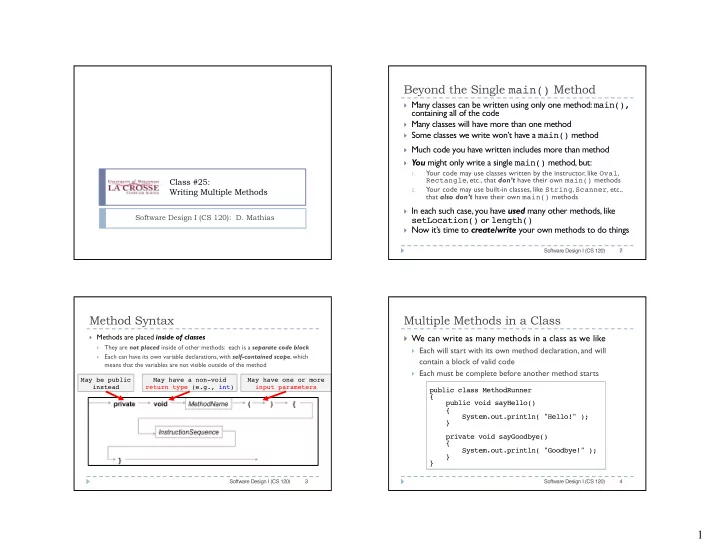
} Many classes can be written using only one method: main(),

containing all of the code

} Many classes will have more than one method } Some classes we write won’t have a main() method } Much code you have written includes more than method } You might only write a single main() method, but:

1.

Your code may use classes written by the instructor, like Oval, Rectangle, etc., that don’t have their own main() methods

2.

Your code may use built-in classes, like String, Scanner, etc., that also don’t have their own main() methods

} In each such case, you have used many other methods, like

setLocation() or length()

} Now it’s time to create/write your own methods to do things

Software Design I (CS 120) 2

Method Syntax

} Methods are placed inside of classes

}

They are not placed inside of other methods: each is a separate code block

}

Each can have its own variable declarations, with self-contained scope, which means that the variables are not visible outside of the method

Software Design I (CS 120) 3

May be public instead May have a non-void return type (e.g., int) May have one or more input parameters

Multiple Methods in a Class

} We can write as many methods in a class as we like

} Each will start with its own method declaration, and will

contain a block of valid code

} Each must be complete before another method starts

Software Design I (CS 120) 4

public class MethodRunner { public void sayHello() { System.out.println( "Hello!" ); } private void sayGoodbye() { System.out.println( "Goodbye!" ); } }

slide-2
SLIDE 2

2 private vs. public Methods

} Methods can be either public or private

} This does not affect compiling the code at all } This does not affect what the code actually does at all } Instead, it affects where we can legally access (i.e., call) it

Software Design I (CS 120) 5

public class MethodRunner { public void sayHello() { System.out.println( "Hello!" ); } private void sayGoodbye() { System.out.println( "Goodbye!" ); } }

A method with public access A method with private access

private vs. public Method Access

} If we make a method in a class C private, it can only

be called from within the class C itself

} If we make a method in C public, it can be called:

1.

from within the class C itself

2.

by any other object of type C (created using the C() constructor)

Software Design I (CS 120) 6

public vs. private Method Access

} In this example, the public

method can be called in any

  • ther class in the usual way:

1.

Instantiate object of class type

2.

Call method we wish to use

Software Design I (CS 120) 7 public class MethodRunner { public void sayHello() { // code here } private void sayGoodbye() { // code here } } public class Foo { public static void main( String[] args ) { MethodRunner runner = new MethodRunner(); runner.sayHello(); } }

Since sayHello() is public, we can call it here in the separate Foo class

public vs. private Method Access

} A private method can’t be

called in any other class, even if we create objects and try

Software Design I (CS 120) 8 public class MethodRunner { public void sayHello() { // code here } private void sayGoodbye() { // code here } } public class Bar { public static void main( String[] args ) { MethodRunner runner = new MethodRunner(); runner.sayGoodbye(); // ERROR!! } }

sayGoodbye() is private, and so we can’t call it here This code results in a compile error

slide-3
SLIDE 3

3 public vs. private Method Access

} Inside a single class, it doesn’t

matter whether methods are public or private

} Any other code can call every

method in the same class

} Since we are inside the same

class, we don’t need an object to call the method

} The compiler/JVM

automatically looks for any methods we call this way inside the class itself

Software Design I (CS 120) 9

public class MethodRunner { public void sayHello() { // code here } private void sayGoodbye() { // code here } public void sayBoth() { sayHello(); sayGoodbye(); } } Here, we can directly call both of the other methods

Exercise

} Download the code example for Class 25. } Open the code as Non BlueJ. } Create a new Java class called MethodRunner3 } Using MethodRunner as a template, write methods in

your new class. It must include at least two methods, each of which prints something to the screen. One should be public and the other private.

} In Main.java, create a MethodRunner3 object and call your

  • methods. Observe what happens.

Software Design I (CS 120) 10

DrawingGizmo

<<constructor>>

DrawingGizmo() <<update>> void moveForward() void turnClockwise() void turnCounterclockwise() void dontDraw() void draw() void delay2Sec()

Constructors

} Constructor method

} Used to create an object } Has same name as class } Has no return type – this is

NOT the same as void

Software Design I (CS 120) 11

Constructor

Using Constructors

} How do you call a

constructor?

} You’ve already done so

many times!

} Use new

These are calls to the constructors for the Oval, Random, Window, String, and Car classes.

} Oval o = new Oval(); } Random rand = new Random(); } Window win = new Window(); } String s = new String(); } Car Giulia = new Car(); Software Design I (CS 120) 12

slide-4
SLIDE 4

4

DrawingGizmo

<<constructor>>

DrawingGizmo() DrawingGizmo(Color, Color) <<update>> void moveForward() void turnClockwise() void turnCounterclockwise() void dontDraw() void draw() void delay2Sec()

Multiple Constructors

Software Design I (CS 120) 13

} Can have multiple

constructors in a class:

} Must have different

parameter lists

} Java “knows” which one to

use based on the parameter list you provide in the call.

Multiple Constructors

Car Giulia = new Car();

Software Design I (CS 120) 14

Car MC40 = new Car(“Mini”, “Cooper S”, 2004, 25000, 180, 190); Calls a constructor that takes no parameters. Calls a constructor that takes six parameters: String, String, int, int, int, int

Multiple Constructors

Car(){ … }

Software Design I (CS 120) 15

Car(String, String, int, int, int, int){ … } A constructor that takes no parameters. A constructor that takes six parameters: String, String, int, int, int, int