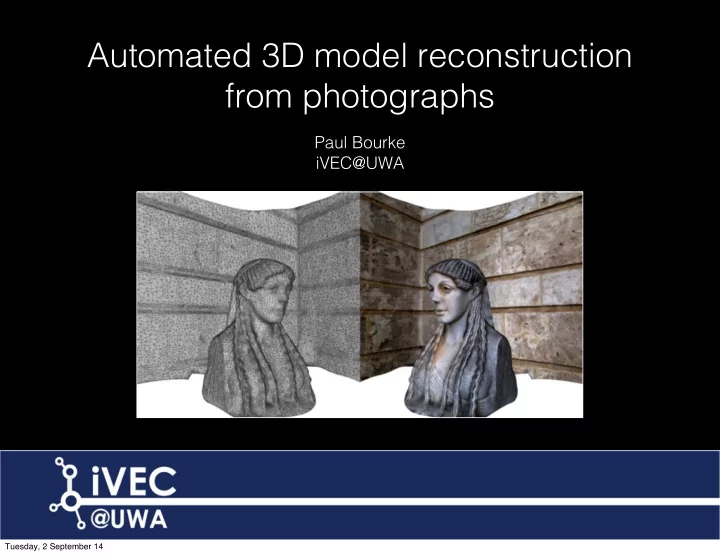
Automated 3D model reconstruction from photographs Paul Bourke - - PowerPoint PPT Presentation

automated 3d model reconstruction from photographs
SMART_READER_LITE
LIVE PREVIEW

Automated 3D model reconstruction from photographs Paul Bourke - - PowerPoint PPT Presentation

Automated 3D model reconstruction from photographs Paul Bourke iVEC@UWA Tuesday, 2 September 14 Tuesday, 2 September 14 Tuesday, 2 September 14 Rock shelter, Weld Range Derived from 350 photographs Tuesday, 2 September 14 Movie Rock


slide-1
SLIDE 1

Automated 3D model reconstruction from photographs

Paul Bourke iVEC@UWA

Tuesday, 2 September 14
slide-2
SLIDE 2

Tuesday, 2 September 14

slide-3
SLIDE 3

Tuesday, 2 September 14

slide-4
SLIDE 4

Rock shelter, Weld Range Derived from 350 photographs

Tuesday, 2 September 14

slide-5
SLIDE 5

Rock shelter, Weld Range Derived from 350 photographs Movie

Tuesday, 2 September 14

slide-6
SLIDE 6

Outline

  • Introduction, Outcomes, Motivation
  • Software
  • Photography
  • Example 1: 2.5D
  • Geometry processing
  • Example 2: 3D
  • Other related topics
  • Limitations and challenges
  • Worked example 3: Grinding stone
  • Additional applications
  • Questions and discussion

These slides will be made available online at http://paulbourke.net/ecu2014b/ Sample datasets available on request.

Tuesday, 2 September 14

slide-7
SLIDE 7

Outcomes

  • Familiarity with the state of the technology.
  • Knowing what questions to ask.
  • Understand the terminology.
  • Familiarity with the software and tools.
  • Some expectations of the limitations.
  • Knowledge of a range of applications/research the technology is being applied to.
  • Will not be overly technical but happy to discuss further after the formal part.

Tuesday, 2 September 14

slide-8
SLIDE 8

3D reconstruction from (ad hoc) photographs

  • Goal: Automatically construct 3D geometry and texture based solely upon a number
  • f photographs.
  • Similar to traditional photogrammetry but employs different algorithms.
  • Creating richer objects (compared to photographs) for recordings in archaeology

and heritage.

  • Create geometric models suitable for analysis, eg: in geology or geoscience.
  • Wish to avoid any in-scene markers required by some solutions.

Often impractical (access) or not allowed (heritage).

  • Want to target automated approaches as much as possible.

[Current site surveys recorded 100’s of objects].

  • Will present a selection of applications from the presenters work.

Tuesday, 2 September 14

slide-9
SLIDE 9

Applications : Virtual worlds, Serious gaming

  • Creating 3D assets for virtual environments, serious games.
  • Removes the need for time consuming 3D modelling.
  • Removes the interpretation that occurs when modelling organic / complicated

shapes.

Beacon Island Movie

Tuesday, 2 September 14

slide-10
SLIDE 10

Applications : Assets for virtual heritage

Beacon Island

Tuesday, 2 September 14

slide-11
SLIDE 11

Applications : Teaching in medicine

  • Medical applications.
  • Non intrusive capture can have advantages.
  • Capture of 3D objects for forensic analysis.

Pathology, QE II

Tuesday, 2 September 14

slide-12
SLIDE 12

Movie

Tuesday, 2 September 14

slide-13
SLIDE 13

Tuesday, 2 September 14

slide-14
SLIDE 14

Applications : Geoscience

  • Capturing geological structures for analysis.
  • Often in difficult terrain and remote locations.

Department of Mines and Petroleum Movie

Tuesday, 2 September 14

slide-15
SLIDE 15

Applications : Mining

  • Capture rock volume removed in mining operations.
  • Advantages from a safety perspective, don’t have to close down operations to allow

surveyors on site.

Centre for Exploration Targeting, UWA Movie

Tuesday, 2 September 14

slide-16
SLIDE 16

Applications : Artefacts in cultural heritage

Ngintaka, South Australia Museum Movie

Tuesday, 2 September 14

slide-17
SLIDE 17

Applications : Digital capture in heritage

Dragon Gardens, Hong Kong Movie

Tuesday, 2 September 14

slide-18
SLIDE 18

History

  • Photogrammetry is the general term given to deriving geometric information from a

series of images.

  • Initially largely used for aerial surveys, deriving landscape models.

Originally only used a stereoscopic pair, that is, just two photographs.

  • More recently the domain of machine vision, for example: deriving a 3D model of a

robots environment.

  • Big step forward was the development of SfM algorithms: structure from motion.

This generally solves the camera parameters and generation of a 3D point cloud.

  • Most common implementation is called Bundler: “bundle adjustment algorithm

allows the reconstruction of the 3D geometry of the scene by optimizing the 3D location of key points, the location/orientation of the camera, and its intrinsic parameters”.

Tuesday, 2 September 14

slide-19
SLIDE 19

Other technologies

  • In some areas it is starting to replace technologies such

as laser scanning. LIDAR - light detection and ranging.

  • particularly so for capture in difficult locations
  • only requires modest investment
  • Another technology are so called depth cameras.
  • Primesense (eg: Kinect)
  • Structured light techniques (eg: Artec Scanner)
  • Both in theory can give more accurate results.

Subject to debate.

  • Both also have limitations around lighting conditions and

range.

  • Future: Light field cameras (plenoptic camera).
  • Captures an array of images from a grid of positions

LIDAR Structured light

Tuesday, 2 September 14

slide-20
SLIDE 20

Software (some examples only)

  • Processing pipeline from a number of opensource projects
  • SiroVision
  • PhotoScan
  • PhotoSynth
  • PhotoModeller Scanner
  • 123D Catch
  • Visual SfM (Structure from Motion)
  • Apero (not yet evaluated)
  • AdamTech solution (Evaluating now)
  • iWitness Pro (not yet evaluated)

Movie

Tuesday, 2 September 14

slide-21
SLIDE 21

Software : Pipeline components

  • Perform lens calibration (only done once, increasingly optional optional).
  • Read images, correct for lens, and compute feature points between them.

(eg: SIFT - scale invariant feature transform)

  • Compute camera positions and other intrinsic camera parameters.

(eg: Bundler, SfM - Structure from Motion, http://phototour.cs.washington.edu/ bundler/)

  • Create sparse 3D point cloud, called “bundle adjustment”.

(eg: PMVS - Patch-based Multi-view Stereo, http://www.di.ens.fr/pmvs/)

  • Create dense point cloud.

(eg: CMVS - Clustering Views for Multi-view Stereo, http://www.di.ens.fr/cmvs/)

  • Form mesh from dense point cloud.

(eg: ball pivoting, Poisson Surface Reconstruction, Marching Cubes)

  • Reproject images from camera positions to derive texture segments.
  • Optionally simplify mesh (eg: quadratic edge collapse decimation) and fill holes.
  • Export in some suitable format (eg: OBJ files with textures).

Tuesday, 2 September 14

slide-22
SLIDE 22

Software : Typical pipeline

SIFT for key point extraction between images SfM software package Bundler to generate a sparse 3D point cloud PMVS2 (Patch-based Multiview Stereo software) to reconstruct the model of the imaged scene as dense point cloud Convert point cloud to mesh Re-project textures

Tuesday, 2 September 14

slide-23
SLIDE 23

Software : Pipeline - Photographs

  • Don’t take two photos from the same position.
  • Obviously can’t reconstruct what is not photographed.
  • In general, more is better. Can always analyse just a subset of the images.

Tuesday, 2 September 14

slide-24
SLIDE 24

Software : Pipeline - Sparse point cloud

  • Find matching points between photographs, feature point detection.

SIFT - scale invariant feature transform

  • Compute camera positions and other intrinsic camera parameters.

Bundler, SfM - Structure from Motion

Tuesday, 2 September 14

slide-25
SLIDE 25

Software : Pipeline - Dense point cloud

  • CMVS - Clustering Views for Multi-view Stereo.

UWA Geography Building

Tuesday, 2 September 14

slide-26
SLIDE 26

Software : Pipeline - Dense point cloud

Tuesday, 2 September 14

slide-27
SLIDE 27

Software : Pipeline - Mesh generation

  • Various algorithms: Ball pivoting, Poisson Surface Reconstruction, Marching Cubes.
  • Optionally simplify mesh (eg: quadratic edge collapse decimation) and fill holes.

Tuesday, 2 September 14

slide-28
SLIDE 28

Software : Pipeline - Texture mesh

  • Re-project photographs from derived camera positions onto mesh.

UWA Geography Building

Tuesday, 2 September 14

slide-29
SLIDE 29

Software : Pipeline - Export

UWA Geography Building Movie

Tuesday, 2 September 14

slide-30
SLIDE 30

Software : Sirovision (http://sirovision.com)

  • Captured from 2 images only, stereo pairs but with wide base line separation.
  • With in-scene markers and calibrated lens claims 3 to 5cm accuracy at 100m

distance.

  • Targeted mining industry, developed by CSIRO.

Textured Mesh Surface

Tuesday, 2 September 14

slide-31
SLIDE 31

Software : PhotoSynth

  • Microsoft, MSWindows only (obviously)

http://photosynth.net

  • Based upon Bundler. GUI front end,

computed remotely.

  • Provides a “image effect” based upon

reconstructed surface.

  • Can be useful for identifying image sets for
  • ther pipelines.
  • Not possible to extract the mesh/texture data

from within the online software.

  • Synth Export

http://synthexport.codeplex.com/ Provides point cloud and camera parameter

  • export. Would need to reconstruct mesh by
  • ther means.
  • Not a leading edge tool any more.

Tuesday, 2 September 14

slide-32
SLIDE 32

Software : PhotoSynth

Tuesday, 2 September 14

slide-33
SLIDE 33

Software : PhotoSynth

Tuesday, 2 September 14

slide-34
SLIDE 34

Software : PhotoModeller Scanner

  • From EOS systems.
  • http://www.photomodeler.com/
  • Comes in two flavours, the standard package is for human driven extraction of

rectangular objects such as building facades.

  • PhotoModeller Scanner is for more organic shapes.
  • Claims to be capable of very accurate results, generally has a more rigorous

procedure.

  • Generally seems to require more manual interaction.
  • MSWindows only.
  • A contender to PhotoScan but to date have not had better results.
  • VERY slow compared to almost everything else.

Tuesday, 2 September 14

slide-35
SLIDE 35

Software : PhotoModeller

Tuesday, 2 September 14

slide-36
SLIDE 36

Software : PhotoModeller Scanner

Tuesday, 2 September 14

slide-37
SLIDE 37

Software : 123D Catch

  • From AutoDesk.
  • Free.
  • Cloud based so requires an internet connection.
  • Reasonable rate of success but no option to change algorithm parameters if things

don’t work.

  • Does not provide access to intermediate data, such as the point cloud.
  • No option for camera calibration.
  • MSWindows only GUI.
  • No longer a leading edge solution.

Tuesday, 2 September 14

slide-38
SLIDE 38

Software : 123D Catch

Tuesday, 2 September 14

slide-39
SLIDE 39

Software : 123D Catch

Tuesday, 2 September 14

slide-40
SLIDE 40

Software : Visual SfM - Bundler

  • From the University of Washington.
  • An open source distribution of Bundler (MSWindows, Mac, Linux).
  • Includes a GPU accelerated implementation.
  • Matches images, derives camera attributes, and computes a point cloud.
  • Dense point cloud and mesh generation needs to be performed elsewhere.
  • http://www.cs.washington.edu/homes/ccwu/vsfm/
  • Bundler on Mac OS X called easyBundler.
  • http://openendedgroup.com/field/ReconstructionDistribution
  • A good place to start if interested in OpenSource pipelines.

Tuesday, 2 September 14

slide-41
SLIDE 41

Software : PhotoScan

  • From AgiSoft.
  • http://www.agisoft.ru/products/photoscan.
  • A series of individual steps (pipeline) one follows.
  • Good mixture between low level control and automation.

Generally “just works” but can tuned for problematic cases.

  • Available for Mac and MSWindows.
  • Two versions
  • Standard is quite affordable
  • Pro version largely for georeferencing and other features important for the

surveying community.

  • Under rapid development ... regularly improving.
  • Very stable.
  • Fast, all parts of the pipeline seem to load balance well over cores.

Tuesday, 2 September 14

slide-42
SLIDE 42

Software : PhotoScan

Tuesday, 2 September 14

slide-43
SLIDE 43

Software : PhotoScan

Tuesday, 2 September 14

slide-44
SLIDE 44

Software : PhotoScan

Tuesday, 2 September 14

slide-45
SLIDE 45

Software : Distinguishing features

  • Degree of human guidedness and interaction required.
  • Degree of control over the process, options that support fixing errors.
  • Big difference between the need to reconstruct one object vs hundreds.

My bias is towards largely automated processes.

  • Requirement or opportunity for camera calibration.

Should result in higher accuracy, questionable for a single fixed focal lens.

  • Sensitivity to the order the photographs are presented.
  • The number of photographs and resolution that can be handled.
  • Degree to which one needs to become an “expert”, learning the tricks to get good

results.

  • There are a potentially a large number of variables
  • Trade off between simplicity and control
  • 123D Catch is at one end of the scale, PhotoModeller Scanner at the other end
  • Ability to create high resolution textures, larger than 4Kx4K, or multiple textures.

Tuesday, 2 September 14

slide-46
SLIDE 46

Photography : Lenses

  • Preferred: fixed focal length lens, also referred to as a “prime lens”.
  • Depends on the software, but generally recommended.
  • Generally have some minimum focus distance and small aperture.
  • EXIF: generally software reads EXIF data from images to determine focal length,

sensor size, and in some cases lens make/model for calibration curves.

  • Most “point and click” cameras have a fixed focal lenses because they require no

moving parts, don’t require electronics (not drawing extra power).

  • I use Canon 5D 111 with prime lenses: 28mm, 50mm, 100mm macro.

Sigma 50mm, Canon mount Sigma 28mm, Canon mount

Tuesday, 2 September 14

slide-47
SLIDE 47

Photography : shooting guide

  • Obviously one cannot reconstruct what one does not capture.
  • Aim for plenty of overlap between photographs (Can always remove images).
  • For 2.5D surfaces as few as 2 shots are required, more generally 6.
  • For 3D objects typically 20 or more. ~ 10 degree steps.

Repeat at one or more levels if the object is concave vertically.

  • For extended objects and overlapping photographs perhaps hundreds.

1/3 to1/2 image overlap ideal.

  • Generally works better for the images to be captured in order moving around the
  • bject (may no longer be the case for latest algorithms).
  • Generally no point capturing multiple images from the same position!

The opposite of panoramic photography for example.

  • Camera orientation typically doesn’t matter, this is solved for when computing

camera parameters in the Bundle processing.

  • Calibration: Most of the packages that include accuracy metrics will assume a

camera calibration.

Tuesday, 2 September 14

slide-48
SLIDE 48

Photography : Camera calibration

  • Camera/lens characteristics derived from Bundler process.

Can perform on idealised patterns beforehand.

  • Different procedures depending on the software.
  • Calibration pattern used by PhotoModeller shown here: printed A1 sheet.

Tuesday, 2 September 14

slide-49
SLIDE 49

Photography : Camera calibration

  • 4 photographs captured (one from each direction).
  • Repeated with the camera in three orientations (rotated 90, 0, -90).

Tuesday, 2 September 14

slide-50
SLIDE 50

Camera calibration : Photoscan

  • Provides a separate utility called “lens”.
  • Estimates
  • focal length in both directions
  • principle point components in both directions
  • radial and tangential distortion coefficients
  • fx, fy, cx, cy, K1,K2,K3, P1,P2
  • Produces a display on screen to photograph from different directions.
  • Generally doesn’t solve for focal length, reads from EXIF.

EXIF focal length: 50 fx = 8026.46 +- 1.5152 fy = 8027.75 +- 1.42957 cx = 2877.05 +- 1.13418 cy = 1906.64 +- 0.814478 skew = -0.806401 +- 0.151285 k1 = -0.176187 +- 0.00377854 k2 = 0.285354 +- 0.0770751 k3 = 0.300547 +- 0.619451 p1 = 0.000219219 +- 2.64764e-05 p2 = -0.000172641 +- 3.58682e-05

Tuesday, 2 September 14

slide-51
SLIDE 51

Camera calibration : Photoscan

Tuesday, 2 September 14

slide-52
SLIDE 52

Photography : shooting guide

UWA

Tuesday, 2 September 14

slide-53
SLIDE 53

Photography : shooting guide

Dragon Gardens, Hong Kong

Tuesday, 2 September 14

slide-54
SLIDE 54

Photography : shooting guide

Manipal, India

Tuesday, 2 September 14

slide-55
SLIDE 55

Photography : shooting guide

Dragon Gardens, Hong Kong

Tuesday, 2 September 14

slide-56
SLIDE 56

Photography : 2.5D example

Terrenganu, Malaysia

Tuesday, 2 September 14

slide-57
SLIDE 57

Photography : 360 degree

Socrates, UWA

Tuesday, 2 September 14

slide-58
SLIDE 58

Photogaphy : Linear reference objects

  • Assists processing if there is a linear reference object in the scene.
  • They need not be part of the final reconstruction if slightly outside the object of

interest.

  • Reference colour bars also useful if colour representation is important.

Tuesday, 2 September 14

slide-59
SLIDE 59

Example 1 : Motifs, Indian Temple

  • A relatively low number of photographs are required for 2.5D surfaces.
  • Degree of concavity determines the number of photographs required.

Can’t reconstruct what cannot be seen.

  • Facades and engravings (low concavity) can require as few as 3 to 6 images.
  • 20cm high engraving on doors, 200+ engravings to capture.
  • Photographs can be orientated at any angle.
  • Each object takes perhaps 15 sec to capture, 10 minutes (on average) to process.
  • Able to process in the field and redo any that failed.
  • This example uses an iPhone.

Tuesday, 2 September 14

slide-60
SLIDE 60

Example 1 : Motifs, Indian Temple

Chaturmukha, India

Tuesday, 2 September 14

slide-61
SLIDE 61

Tuesday, 2 September 14

slide-62
SLIDE 62

Example 1 : Motifs, Indian Temple

Chaturmukha, India Movie

Tuesday, 2 September 14

slide-63
SLIDE 63

Geometry post processing

  • Generally dealing with

unstructured meshes

  • Mesh simplification
  • Hole closing
  • Removing shrapnel
  • Per vertex editing
  • Mesh thickening
  • Meshlab
  • Blender
  • File formats

Tuesday, 2 September 14

slide-64
SLIDE 64

Geometry processing : MeshLab

  • There are a number of packages that can be used to manipulate the resulting

textured mesh files.

  • Meshlab is the free package of choice.
  • It is cross platform with a high degree of compatibility.
  • Very general tool for dealing with textured meshes.
  • Has a large collection of algorithms and is extensible.
  • Unfortunately not all algorithms are “reliable”.
  • In cases where raw Bundler is used to create a point cloud, Meshlab can be used to

construct the mesh using one of a number of algorithms.

  • Ball pivot (my general choice)
  • Marching Cubes
  • Poisson surface reconstruction

Tuesday, 2 September 14

slide-65
SLIDE 65

Geometry processing : MeshLab

Tuesday, 2 September 14

slide-66
SLIDE 66

Geometry processing : Blender

  • Largely used for per vertex editing.
  • “Big hammer to crack a small nut”, takes some time to learn the interface.
  • For example, not uncommon to get single vertex “spikes”.
  • Contains it’s own mesh simplification and thickening algorithms.
  • Also used to export in a myriad of additional formats.

For example fbx for Unity3D, not available in MeshLab.

Tuesday, 2 September 14

slide-67
SLIDE 67

Geometry processing : Blender

Socrates, UWA

Tuesday, 2 September 14

slide-68
SLIDE 68

Geometry processing : Blender

Tuesday, 2 September 14

slide-69
SLIDE 69

Geometry processing : Mesh simplification

  • Meshes directly from the reconstruction (generated from the dense point cloud) are

generally inefficient. Often need to reduce them for realtime applications and/or web based delivery.

  • Also used to create multiple levels of details (LOD) for gaming and other realtime

applications.

  • The goal is easy to understand: remove mesh density where it will make minimal

impact on the mesh appearance. For example, don’t need high mesh density in regions of low curvature.

  • Most common class of algorithm is referred to as “edge collapse”, replace an edge

with a vertex.

  • A texture and geometry approximation ... need to estimate new texture coordinate at

new vertices.

  • Need to preserve the boundary.
  • This has been a common topic in computer graphics research and is still a huge

topic in computer graphics, see Siggraph over the last few years.

Tuesday, 2 September 14

slide-70
SLIDE 70

Geometry processing : Mesh simplification

  • Most edge collapse algorithms involve replacing an edge with a vertex
  • How to choose the edges to remove is the “trick”.
  • Where to locate the new vertex so as to minimise the effect on the surface.
  • How to estimate the new texture coordinate.
  • Number of triangles reduces by 2 on each iteration.
  • Can calculate the deviation of the surface for any particular edge collapse.

Choose edges that result in the smallest deviation. For example: remove edges on flat regions, retain edge in regions of high curvature.

Red edge removed, results in two fewer triangles

Tuesday, 2 September 14

slide-71
SLIDE 71

Geometry processing : Mesh simplification

1,000,000 triangles 100,00 triangles

Tuesday, 2 September 14

slide-72
SLIDE 72

Geometry processing : Mesh simplification

1,000,000 triangles 100,00 triangles

Tuesday, 2 September 14

slide-73
SLIDE 73

Geometry processing : Mesh thickening

  • Cases exist where one does not want idealised “infinitely thin” surfaces.
  • Double sided rendering in realtime APIs is not quite the same visual effect as

physical thickness.

  • Required to create physical models, see rapid prototyping later.
  • Perhaps the most common algorithm is known as “rolling ball”.

Thin joints arise at regions of high curvature Get “poke-through” with sharp concave interiors

Tuesday, 2 September 14

slide-74
SLIDE 74

Geometry processing : Mesh thickening

  • Solution is called “rolling ball” thickening.
  • Imagine a ball rolling across the surface, form an external mesh along the ball path.
  • Implemented in Blender as a modifier called “solidify”.

Tuesday, 2 September 14

slide-75
SLIDE 75

Geometry processing : Mesh thickening

Infinitely thin surface Unrealisable Thickened “realisable” surface

Tuesday, 2 September 14

slide-76
SLIDE 76

Geometry processing : Mesh thickening

  • “Solidify” modifier in Blender.
  • Modifiers are elegant since they don’t permanently affect the geometry, can change

later.

Tuesday, 2 September 14

slide-77
SLIDE 77

Geometry processing : Removing shrapnel and hole closing

  • Very common for there to be extraneous

geometry.

  • Remove reconstructed parts of the scene that

are not of interest.

  • Not uncommon for meshes to contain small

holes, may be closed automatically by some reconstruction packages.

  • Typically use MeshLab for hole closing.
  • Also supported in some reconstruction

packages, for example: PhotoScan.

  • Don’t usually contain texture information, holes

usually due to regions not visible in any photograph.

Indigenous marking stones

Tuesday, 2 September 14

slide-78
SLIDE 78

Geometry processing : Removing shrapnel and hole closing

Tuesday, 2 September 14

slide-79
SLIDE 79

Geometry processing : Removing shrapnel and hole closing

Tuesday, 2 September 14

slide-80
SLIDE 80

Geometry processing : Removing shrapnel and hole closing

Tuesday, 2 September 14

slide-81
SLIDE 81

Geometry processing : Removing shrapnel and hole closing

Tuesday, 2 September 14

slide-82
SLIDE 82

Geometry processing : File formats

  • Requirements: unstructured triangular mesh.
  • mesh (vertices - edges - triangles - polygons)
  • texture coordinates
  • image based textures
  • Common options
  • 3ds (3DStudioMax)
  • vrml, x3d
  • obj (Wavefront)
  • dae (collada)
  • Pretty much standardised on obj, desirable characteristics.
  • text only so human readable
  • relatively easy to parse by software for post processing or custom utilities
  • well supported by commercial 3D applications (import/export)
  • shared vertices so no chance of numerical holes
  • supports multiple texture materials and images
  • [Poorly formed obj files by 123D Catch]

(x,y,z,u,v) Shared vertices Mesh Quad Triangle

Tuesday, 2 September 14

slide-83
SLIDE 83

Geometry processing : File formats

  • Anatomy of an OBJ file. Consists of 3 parts
  • vertex, face, normals, texture coordinates
  • materials file
  • texture image files

mtllib ./stone.obj.mtl v 7.980470 5.627900 3.764240 v 8.476580 2.132000 3.392570 v 8.514860 2.182000 3.396990 : : vn -0.502475 -1.595313 -2.429116 vn 1.770880 -2.076491 -5.336680 vn -0.718451 -4.758880 -3.222428 : : vt 0.214445 0.283779 vt 0.213670 0.287044 vt 0.211291 0.287318 : : usemtl material_0 f 5439/4403/5439 5416/4380/5416 7144/6002/7144 f 5048/4013/5048 6581/5437/6581 5436/4400/5436 f 5435/4399/5435 5049/4014/5049 5436/4400/5436 : : newmtl material_0 Ka 0.2 0.2 0.2 Kd 0.752941 0.752941 0.752941 Ks 1.000000 1.000000 1.000000 Tr 1.000000 illum 2 Ns 0.000000 map_Kd stone_tex_0.jpg filename material name vertices normals texture coordinates triangles vertex index normal index texture coordinate index

Tuesday, 2 September 14

slide-84
SLIDE 84

Example 2 : Diotima (UWA)

  • Require significantly more images ... a full 3D object.
  • 16 images in this case, a relatively low number for a full 3D object.
  • Some algorithms perform better if the images are captured in sequence with the

best matches at the start of the bundle adjustment.

  • Depends on whether the software does a compare between all images.
  • Diffuse lighting conditions so no strong shadows, see later on limitations.
  • “Bald” spot because no photographs from above, see later on limitations on access.
  • My test subject for comparing algorithms and capture.

Tuesday, 2 September 14

slide-85
SLIDE 85

Example 2 : Diotima

Tuesday, 2 September 14

slide-86
SLIDE 86

Example 2 : Diotima

Diotima (Mistress of Pericles) 16 images Movie

Tuesday, 2 September 14

slide-87
SLIDE 87

Example 2 : Diotima - Accuracy

  • No absolute scale but use one length

as reference.

  • Subsequent measurements accurate

to 2mm, most 1mm.

Tuesday, 2 September 14

slide-88
SLIDE 88

Example 2 : Diotima - Comparisons

Original photograph Reconstructed model Shaded to emphasise surface variation

Tuesday, 2 September 14

slide-89
SLIDE 89

Example 2 : Diotima - Comparisons

Original photograph Reconstructed model Shaded to emphasise surface variation

Tuesday, 2 September 14

slide-90
SLIDE 90

Example 2 : Diotima - Comparisons

Original

Tuesday, 2 September 14

slide-91
SLIDE 91

Other topics

  • Resolution: real vs apparent
  • Resolution: Geometric vs texture
  • Relighting
  • Rendering
  • Annotation
  • Texture editing

Tuesday, 2 September 14

slide-92
SLIDE 92

Other topics : resolution

  • Actual mesh resolution vs apparent mesh resolution.
  • Texture resolution rather than geometric resolution.
  • Requirements vary depending on the end application.
  • Realtime environments require low geometric complexity and high texture detail
  • Analysis generally requires high geometric detail
  • Digital record wants high geometric and texture detail

Geometric resolution Texture resolution Gaming Low High Analysis High Don’t care Education Medium High Archive/heritage High High Online Low/Average Low/average

Tuesday, 2 September 14

slide-93
SLIDE 93

Other topics : resolution

Apparent high resolution Low resolution mesh

Tuesday, 2 September 14

slide-94
SLIDE 94

Other topics : resolution

Example from 2010

Tuesday, 2 September 14

slide-95
SLIDE 95

Other topics : resolution

Example from 2014

Tuesday, 2 September 14

slide-96
SLIDE 96

Other topics : Relighting

  • We have a 3D model, can “relight” it.

For example: cast shadows, adjust diffuse/specular shading.

  • Obviously works best with diffuse lit models.
  • See later for baked on texture limitations.
  • Interesting in the archaeology context since it is well known that some features are

“revealed” in different lighting conditions.

  • Cannot replicate effects of dyes but can replicate effects due to shading/shadowing
  • f fine details.

Tuesday, 2 September 14

slide-97
SLIDE 97

Other topics : Relighting

Terrenganu, Malaysia Movie

Tuesday, 2 September 14

slide-98
SLIDE 98

Other topics : Relighting

Movie

Tuesday, 2 September 14

slide-99
SLIDE 99

Other topics : Rendering

Movie

Tuesday, 2 September 14

slide-100
SLIDE 100

Other topics : Analysis

1000 Buddha temple, Manipal, India Movie

Tuesday, 2 September 14

slide-101
SLIDE 101

Other topics : Annotating

  • Textures from the reconstruction algorithms are often “interesting”.
  • Exact form of the texture depends to some extent on the software being used

Can often identify the software based upon the appearance of the texture maps.

  • They are derived from re-projection of the image from the derived camera position
  • nto the reconstructed mesh, hence potentially very high quality (perceived

resolution).

  • Can generally still be drawn on, treated as an image for image processing in

PhotoShop, etc.

Tuesday, 2 September 14

slide-102
SLIDE 102

Other topics : Annotating

Texture map 1 Texture map 2

Tuesday, 2 September 14

slide-103
SLIDE 103

Other topics : Annotating

Textured mesh 1 1 u v

Tuesday, 2 September 14

slide-104
SLIDE 104

Other topics : Annotating

1 1 u v

Tuesday, 2 September 14

slide-105
SLIDE 105

Other topics : Annotating

Movie

Tuesday, 2 September 14

slide-106
SLIDE 106

Other topics : texture editing

  • Some texture mapping modes are easier to edit than others
  • Can be difficult for per camera reprojected textures (left)
  • Easier for orthographic texture maps (right), but not always a supported option.

Tuesday, 2 September 14

slide-107
SLIDE 107

Other topics : texture editing

  • Can obviously do colour correction/grading on the texture post reconstruction.

Tuesday, 2 September 14

slide-108
SLIDE 108

Other topics : colour grading

Tuesday, 2 September 14

slide-109
SLIDE 109

Limitations and Challenges

  • Occluders - Problematic
  • Movement in the scene
  • Thin structures
  • Baked on shadows
  • Lighting changes during capture
  • Access to ideal vantage points
  • Online and database access
  • High level queries for geometric
  • Reflective surfaces

Tuesday, 2 September 14

slide-110
SLIDE 110

Limitations : Occluders

  • Algorithms seem to be generally poor at handling foreground occluders.
  • For example: columns in front of a building.
  • Reason: a small change ins camera position results in a large difference in visible
  • bjects.
  • Capturing the backdrop behind an object.
  • Often better, assuming possible, to capture them separately

Tuesday, 2 September 14

slide-111
SLIDE 111

Limitations : Occluders

St Lawrence, Manipal, India

Tuesday, 2 September 14

slide-112
SLIDE 112

Limitations : Movement

  • Objects to be reconstructed obviously need to be stationary across photographs.
  • Grass moving in the wind is a common problem for field work.
  • Solution is to create a camera array for time simultaneous photography.

Movie

Tuesday, 2 September 14

slide-113
SLIDE 113

Limitations : Thin structures

  • Difficult to reconstruct objects approaching a few pixels in the images (sampling

theory).

  • Example of grasses in the rock art reconstruction.

Not 3D structure but grass texture on rock face

Tuesday, 2 September 14

slide-114
SLIDE 114

Limitations : Thin structures

Grass not resolved Movie

Tuesday, 2 September 14

slide-115
SLIDE 115

Limitations : Baked on shadows

  • Shadows obviously become part of

the texture maps.

  • Can be alleviated somewhat by

photographing in diffuse light.

  • For outside objects can sometimes

choose times when object is not directly lit.

  • Can sometimes choose diffuse lit

days, cloudy.

Grass shadows

Tuesday, 2 September 14

slide-116
SLIDE 116

Limitations : Baked on shadows

HMAS Sydney Cairn, Canarvon Movie

Tuesday, 2 September 14

slide-117
SLIDE 117

Limitations : Lighting changes and access

  • For field work access to preferred positions for photographs may be problematic.
  • Similarly capturing photographs from above the object, elevated positions.
  • When capturing 30+ photographs for 3D objects the lighting conditions may change

eg: clouds passing overhead. Processes generally insensitive to this except for variations in resulting textures.

  • Shadows of the photographer.

Tuesday, 2 September 14

slide-118
SLIDE 118

Limitations: Reflective surfaces

  • Mirror surfaces can provide a non-linear reflection of the world that will influence the

feature point detection.

  • Gives rise to a new art form.
  • Photogrammetry that goes wrong in “interesting” ways.

Fort Canning, Singapore Movie

Tuesday, 2 September 14

slide-119
SLIDE 119

Limitations : database/online representations

  • Claim that the need to store these higher level

forms of data capture will increase.

  • Will this replace the need for storing photographic

data?

  • Surprisingly (depressingly) even after all these

years of online delivery there are still no entirely satisfactory ways of distributing 3D data.

  • Options
  • VRML, x3d : very poor cross platform support
  • 3D PDF : dropped by Adobe some years back
  • WebGL? HTML5 / Canvas?
  • Key missing components:
  • progressive texture
  • progressive geometry

Gommateswara, Manipal, India Movie

Tuesday, 2 September 14

slide-120
SLIDE 120

Example 3: Grinding stone

  • Will do a full worked example based upon grinding stone from the Ngintaka story
  • 22 photographs around the stone
  • Example of light/colour changes due to polarising filter and angle to sun direction

Tuesday, 2 September 14

slide-121
SLIDE 121

Example 3: Grinding stone

Tuesday, 2 September 14

slide-122
SLIDE 122

Tuesday, 2 September 14

slide-123
SLIDE 123

Tuesday, 2 September 14

slide-124
SLIDE 124

Tuesday, 2 September 14

slide-125
SLIDE 125

Tuesday, 2 September 14

slide-126
SLIDE 126

Tuesday, 2 September 14

slide-127
SLIDE 127

Tuesday, 2 September 14

slide-128
SLIDE 128

Tuesday, 2 September 14

slide-129
SLIDE 129

Tuesday, 2 September 14

slide-130
SLIDE 130

Tuesday, 2 September 14

slide-131
SLIDE 131

Tuesday, 2 September 14

slide-132
SLIDE 132

Tuesday, 2 September 14

slide-133
SLIDE 133

Additional applications

  • Underwater
  • Aerial photography
  • Rapid Prototypes

Kormoran

Tuesday, 2 September 14

slide-134
SLIDE 134

Additional applications : Underwater

  • Capture of underwater object more challenging.
  • How to compensate for the light absorption through a column of water.
  • Example: HMAS Sydney in 2.5KM of water.

HMAS Sydney

Tuesday, 2 September 14

slide-135
SLIDE 135

Additional applications : Underwater

Movie

Tuesday, 2 September 14

slide-136
SLIDE 136

Additional applications : Underwater Archaeology

Tuesday, 2 September 14

slide-137
SLIDE 137

Additional applications : Aerial photography

  • Capturing inaccessible geological formations.
  • Also building structures out of reach.
  • Vibration and rolling shutter issues.

Tuesday, 2 September 14

slide-138
SLIDE 138

Additional applications : Aerial photography

Movie

Tuesday, 2 September 14

slide-139
SLIDE 139

Additional applications : Rapid prototypes

  • Can complete the loop:

capture a real object photographically - reconstruct it - generate a real object.

  • Requires a solid object (thickened), with enough structural integrity.
  • Models need to be “watertight”, hence hole closing algorithms.
  • Main printer for colour prints is the ZCorp.
  • http://www.zcorp.com/
  • Recommend using online services such as Shapeways.

http://www.shapeways.com

Tuesday, 2 September 14

slide-140
SLIDE 140

Additional applications : Rapid prototypes

Infinitely thin surface Unrealisable Thickened “realisable” surface

Tuesday, 2 September 14

slide-141
SLIDE 141

Additional applications : Rapid prototypes

Tuesday, 2 September 14

slide-142
SLIDE 142

Reading / references

  • Barazzetti, L., Scaioni, M. and Remondino, F. (2010), Orientation and 3D modelling from markerless terrestrial images: combining

accuracy with automation. The Photogrammetric Record, 25: 356–381. doi: 10.1111/j.1477-9730.2010.00599.x

  • Percoco, G. (2011), Digital close range photogrammetry for 3D body scanning for custom-made garments. The

Photogrammetric Record, 26: 73–90. doi: 10.1111/j.1477-9730.2010.00605.x

  • Remondino, F., Rizzi, A., Girardi, S., Petti, F. M. and Avanzini, M. (2010), 3D Ichnology—recovering digital 3D models of dinosaur
  • footprints. The Photogrammetric Record, 25: 266–282. doi: 10.1111/j.1477-9730.2010.00587.x
  • Bill Jeffery. (2006), From Seabed to Computer Screen—digital mapping of submerged and shipwreck sites. Bulletin of the

Australian Institute for Maritime Archaeology, 23:86-94

  • Bryan, P

. G. and Clowes, M. (1997), Surveying Stonehenge By Photogrammetry. The Photogrammetric Record, 15: 739–751. doi: 10.1111/0031-868X.00082

  • Barazzetti, L., Remondino, F. and Scaioni, M. (2009) Combined use of photogrammetric and computater vision techniques for

fully automated and accurate 3D modelling of terrestrial objects. SPIE Optics+Photonics, 7447, 2-3 August, San Diego, CA, USA.

  • Barthelsen, J., Mayer, H., Hirschmuller, H., Kuhn, A, Michelini, M. 92012) orientation and dense reconstruction from bordered

wide baseline image sets. PFG 2012.

  • Besl, P

. McKay, N. (1992) A method for registration of 3D shapes. IEEE Transactions on pattern analyse and machine intelligence. PAMI 14 (2).

  • Cignoni, P

., Callieri, M., Corsini, M., Dellepaine, M., Ganovelli, F., Ranzuglia, G., (2008). MeshLab: an opensource mesh processing

  • tool. Eurographics Italian Chapter Conference, The Eurographics Association, 129-136.
  • C. Wu, 2011. "VisualSFM: A

Visual Structure from Motion System", http://homes.cs.washington.edu/~ccwu/vsfm/ (31 Jan. 2013)

  • Courchay, J., Pons, J.P

., Monasse, P ., Keriven, R., (2010). Dense and accurate spatio-temporal multiview stereovision. Computer Vision ACCV 2009, Lecture notes in computer Science, 5995, 11-22.

Tuesday, 2 September 14

slide-143
SLIDE 143

Reading / references

  • Noah Snavely, Steven M. Seitz, Richard Szeliski. Photo Tourism: Exploring image collections in 3D. ACM Transactions on Graphics

(Proceedings of SIGGRAPH 2006), 2006.

  • Noah Snavely, Steven M. Seitz, Richard Szeliski. Modeling the World from Internet Photo Collections. International Journal of

Computer Vision, 2007.

  • M. Favalli n, A. Fornaciai, I. Isola, S. Tarquini, L. Nannipieri. Multiview 3D reconstruction in geosciences. Computers &

Geosciences, 44 (2012) 168–176

  • Besl, P

.J., McKay, N.D., 1992. A method for registration of 3-D shapes. IEEE Transactions on Pattern Analysis and Machine Intelligence 14, 239–256.

  • de Matı ́as, J., de Sanjose ́, J.J., Lo ́pez-Nicola ́s, G., Sagu ̈e ́s, C., Guerrero, J.J., 2009. Photogrammetric methodology for the

production of geomorphologic maps: application to the Veleta Rock Glacier (Sierra Nevada, Granada, Spain). Remote Sensing 1, 829–841.

  • Dowling, T.I., Read, A.M., Gallant, J.C., 2009.

Very high resolution DEM acquisition at low cost using a digital camera and free

  • software. In: Proceedings of the 18th World IMACS/MODSIM Congress, Cairns, Australia.
  • Furukawa,

Y., Ponce, J., 2007. Accurate, dense, and robust multi-view stereopsis. In: Proceedings, IEEE Conference on Computer Vision and Pattern Recognition CVPR 2007, pp. 1–8.

  • Furukawa,

Y., Ponce, J., 2009. Accurate camera calibration from multi-view stereo and bundle adjustment. International Journal of Computer Vision 84, 257–268.

  • Hartley, R.I., Zisserman, A., 2004. Multiple

View Geometry in Computer

  • Vision. Cambridge University Press.
  • Levoy, M., Pulli, K., Curless, B., Rusinkiewicz, S., Koller, D., Pereira, L., Ginzton, M., Anderson, S., Davis, J., Ginsberg, J., Shade, J.,

Fulk, D., 2000. The Digital Miche- langelo Project: 3D scanning of large statues. Computer Graphics (SIGGRAPH 2000 Proceedings).

Tuesday, 2 September 14

slide-144
SLIDE 144

Reading / references

  • Lourakis, M., Argyros, A., 2008. SBA: A generic sparse bundle adjustment C/Cþþ package based on the Levenberg-Marquardt
  • algorithm. /http://www.ics.forth. gr/lourakis/sbaS.
  • Mikhail, E.M., Bethel, J.S., McGlone, J.C., 2001. Introduction to Modern Photogrammetry. John Wiley & Sons, Inc., New

York.

  • Nister, D., 2004. Automatic passive recovery of 3D from images and video. In: Proceeding of the Second IEEE International

Symposium on 3D Data Proces- sing, Visualization and Transmission, pp. 438–445.

  • Snavely, N., Seitz, D., Szeliski, R., 2007. Modeling the world from internet photo collections. International Journal of Computer

Vision 80, 189–210.

  • Triggs, B., McLauchlan, P

., Hartley, R., Fitzgibbon, A., 2000. Bundle adjustment—A modern synthesis. in: Triggs, W., Zisserman, A., Szeliski, R. (Eds.), Vision Algorithms: Theory and Practice, LNCS, Springer–Verlag, pp. 298–375.

  • T. P

. Kersten and M. Lindstaedt, Automatic 3D Object Reconstruction from Multiple Images for Architectural, Cultural Heritage and Archaeological Applications Using Open-Source Software and Web Services. Photogrammetrie - Fernerkundung - Geoinformation, Heft 6, pp. 727-740.

  • S. Lowe. 2004. Distinctive Image Features from Scale-Invariant Keypoints. International Journal of Computer
  • Vision. 60 (2), pp

91-110.

  • Agarwal, N. Snavely, I. Simon, S. M. Seitz and R. Szeliski, Building Rome in a Day. International Conference on Computer

Vision, 2009, Kyoto, Japan.

  • M. Jancosek and T. Pajdla, 2011. Multi-View Reconstruction Preserving Weakly-Supported Surfaces, IEEE Conference on

Computer Vision and Pattern Recognition 2011

  • M. Hanif and A. Seghouane, 2012. Blurred Image Deconvolution Using Gaussian Scale Mixtures Model in Wavelet Domain. IEEE

2012 International Conference on Digital Image Computing Techniques and Applications

Tuesday, 2 September 14

slide-145
SLIDE 145

Summary for high quality reconstruction

  • High quality SLR camera (and know how to use it)
  • Good quality prime lens
  • Perform lens calibration
  • Err on the side of taking more images
  • Distinguished reference objects in shot can assist reconstruction
  • Select best software currently on the market

(PhotoScan is hard to beat at time of writing)

  • Results benefit from crisp high resolution photographs

Not particularly sensitive to colour detail

Tuesday, 2 September 14

slide-146
SLIDE 146

Questions / discussion

The new digital tourist?

Tuesday, 2 September 14