Alabama Community College Placement testing Diagnostic testing - - PowerPoint PPT Presentation

alabama community college
SMART_READER_LITE
LIVE PREVIEW

Alabama Community College Placement testing Diagnostic testing - - PowerPoint PPT Presentation

12/3/2015 What is ACCUPLACER? A program from College Board that provides: Rigorous, reliable, and valid test content Alabama Community College Placement testing Diagnostic testing System and ACCUPLACER A robust test delivery


slide-1
SLIDE 1

12/3/2015 1

Alabama Community College System and ACCUPLACER

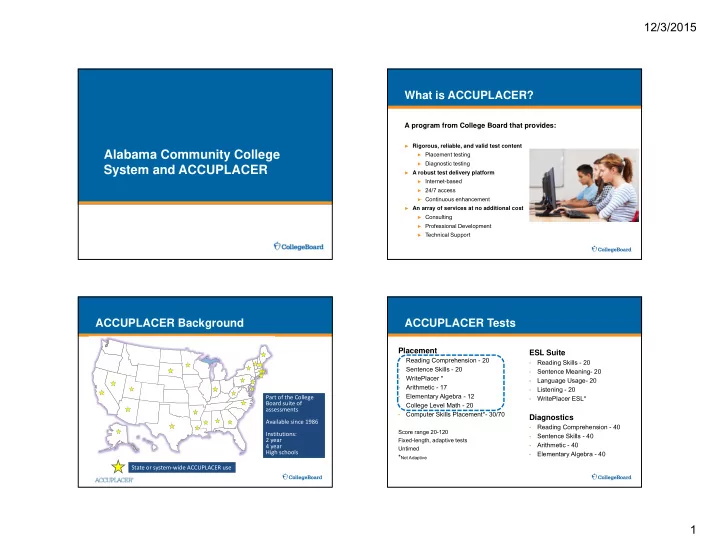
What is ACCUPLACER?

A program from College Board that provides:

► Rigorous, reliable, and valid test content ► Placement testing ► Diagnostic testing ► A robust test delivery platform ► Internet-based ► 24/7 access ► Continuous enhancement ► An array of services at no additional cost ► Consulting ► Professional Development ► Technical Support

ACCUPLACER Background

State or system‐wide ACCUPLACER use Part of the College Board suite of assessments Available since 1986 Institutions: 2 year 4 year High schools Part of the College Board suite of assessments Available since 1986 Institutions: 2 year 4 year High schools

Placement

  • Reading Comprehension - 20
  • Sentence Skills - 20
  • WritePlacer *
  • Arithmetic - 17
  • Elementary Algebra - 12
  • College Level Math - 20
  • Computer Skills Placement*- 30/70

Score range 20-120 Fixed-length, adaptive tests Untimed

*Not Adaptive

ESL Suite

  • Reading Skills - 20
  • Sentence Meaning- 20
  • Language Usage- 20
  • Listening - 20
  • WritePlacer ESL*

Diagnostics

  • Reading Comprehension - 40
  • Sentence Skills - 40
  • Arithmetic - 40
  • Elementary Algebra - 40

ACCUPLACER Tests

slide-2
SLIDE 2

12/3/2015 2

Delivers a customized testing experience by using prior answers to estimate which items the student is likely to answer successfully.

Computer Adaptive Testing

Decreased Difficulty Decreased Difficulty Increased Difficulty Increased Difficulty Middle Difficulty Middle Difficulty Score is calculated and the next best item is selected based on:

  • Difficulty
  • Content
  • Test Specifications
  • Adaptive for both

placement and diagnostics Score is calculated and the next best item is selected based on:

  • Difficulty
  • Content
  • Test Specifications
  • Adaptive for both

placement and diagnostics

Placement content categories are:

  • Identifying Main Ideas
  • Secondary / Supporting Idea
  • Inference
  • Applications
  • Sentence Relationships

Diagnostic content categories are:

  • Main Idea
  • Supporting Detail
  • Sentence Relationships
  • Inference
  • Author's Purpose/Rhetorical

Strategies

Reading Comprehension

Placement = 20 items Diagnostic = 40 items

Placement content categories are:

  • Recognizing Complete

Sentences

  • Coordination/Subordination
  • Sentence Relationship

Sentence Skills

Diagnostic Content Categories are:

  • Agreement
  • Modifiers
  • Diction/Logic
  • Sentence Structure
  • Sentence Boundaries

Placement = 20 items Diagnostic = 40 items

WritePlacer 8-point holistic scoring rubric with 6 dimensions:

  • Purpose and Focus
  • Organization and Structure
  • Development and Support
  • Sentence Variety and Style
  • Mechanical Conventions
  • Critical Thinking

13 prompts available

WritePlacer Options:

  • Timed or Untimed
  • In 10 minute increments up to 2 hours
  • Clock
  • On or off
  • Count down or count up
  • Word count
  • On or off
  • Timing alert
  • On or off
  • 10 minutes left
  • 5 minutes left

Essay Writing

slide-3
SLIDE 3

12/3/2015 3

Placement content categories are:

  • Whole numbers and

Fractions

  • Decimals and Percents
  • Applications

Arithmetic

Diagnostic content categories are:

  • Computation with Integers and

Fractions

  • Computation with Decimal

Numbers

  • Problems Involving Percent
  • Estimation, Ordering, and

Number Sense

  • Word Problems and Applications

Placement = 17 items Diagnostic = 40 items

Placement content categories are:

  • Integers and Rationals
  • Algebraic Expressions
  • Equations, Inequalities, and

Word Problems

Elementary Algebra

Diagnostic content categories are:

  • Real Numbers
  • Linear Equations, Inequalities,

and Systems

  • Quadratic Expressions and

Equations

  • Algebraic Expressions and

Equations

  • Word Problems and Applications

Placement = 12 items Diagnostic = 40 items

College Level Math Placement content categories are:

  • Algebraic Operations
  • Solutions of Equations and Inequalities
  • Coordinate Geometry
  • Applications and Other Algebra Topics
  • Functions
  • Trigonometry

Each student is administered a total of 20 items (placement test only).

College Level Math

Calculators

  • Recommend students

not allowed to use hand-held calculators

  • Calculators are

available in the platform

  • n item-appropriate

basis

  • Applies to all Math tests

ACCUPLACER Key Features

  • Fully Internet-based, no downloads or

registrations required

  • One click system check to confirm

computer set-up

  • Local control of welcome screen, report

messages, and student directions

  • Standardized accessibility formats

(online & paper/pencil)

  • 24/7 access with 99.75% platform

reliability

  • Robust on-demand reporting
  • Retest policy support
  • Student practice tests
slide-4
SLIDE 4

12/3/2015 4

Account Hierarchy

Institutional Administrator Main Campus Second Campus Demo Site High School Testing #1 High School Testing #2 Institution settings flow to campuses

  • Background Questions
  • Branching Profiles
  • Placement Rules
  • Multiple Measures

Data flows up to the Institution level All ACCS institutions can be “grouped” to facilitate set – up, communication and reporting.

User Permission Levels

► Institutional Administrator

Controls the entire institution account

► Site Manager

Controls an individual testing site

► Proctor

Tests and prints Individual Score Reports

► Proctor Reporter

Tests and generates reports

► Reporters

  • Institutional or Site Reporters

Generates reports

  • Institutional or Site Score Reporters

Reprints Individual Score Reports

  • WritePlacer Reporters

Prints essays written during testing

Account Hierarchy

College Board Level Group Administration Institution A Testing Site A Testing Site B Institution B Testing Site A Testing Site B

The College Board level provides resources to all users in the ACCUPLACER platform including default settings and tests. The Group Level can be used for system or statewide implementations to provide centralized account setup and data access. Most institutions are not part of a Group. The Institution Level is used for individual campuses

  • r systems. New accounts are created at this level.

The Testing Site Level is used to test students and manage student data and results. An Institution Administrator creates Testing Sites.

Data flows to higher levels Settings, Branching Profiles, Placement Rules flow to lower levels

COMPANION: Accessibility Formats

 Pencil/paper versions  Braille version  Large print version  Audio CDs  Scannable answer sheets—upload to

ACCUPLACER platform

 Additional ACCUPLACER Features to expand

  • nline testing options:

 Compatible with reading software programs  Accessibility Wizard feature for visually

impaired testers. Note: All test are untimed

slide-5
SLIDE 5

12/3/2015 5

Flexible Technical Requirements

Windows, Mac, and Mobile Supports tablet testing Vouchers

  • Pre‐register students in advance
  • Designed for group testing on or off campus

Flexible Test Administration

On Demand Testing

  • No scheduling or pre‐planning required
  • Walk in testing on campus

Fast Track Test Administration

  • No scheduling or pre‐planning required
  • Designed for group testing on or off campus

Remote Testing Network

  • Pre‐register students in advance
  • Testing at participating colleges

Remote Virtual Proctoring

  • Pre‐register students in advance
  • 24/7 virtual proctoring anywhere

Virtual Remote Proctoring

Allows Students to test at a time that is convenient for them: working adults

  • n‐line students

home bound students International students Saves travel time to a campus Four students per Virtual Proctor

Test Set Up – Branching Profiles

Branching Profiles include:

► Test Settings ► Background Questions ► Tests ► Conditions to control tests given

Statewide Branching Profiles

► Set up consistent testing practices ► Save time ► Avoid mistakes

Use background questions to:

► Get pertinent information ► Determine testing start point ► Reduces excess testing

slide-6
SLIDE 6

12/3/2015 6

Branching Profiles: Background Questions

What was the highest math course you’ve passed in the last five years? Algebra College Level Math

Arithmetic

Algebra I or Algebra II Pre‐Calculus Trigonometry Calculus Arithmetic Pre‐Algebra

Diagnostic Testing Diagnostic Testing Diagnostic Testing Arithmetic Arithmetic Placement Placement Arithmetic Placement Elementary Algebra Placement

70-90

Elementary Algebra Placement

70-90

College Level Math College Level Math Placement Placement College Level Math Placement

Robust Support of Multiple Measures

Placement Background Questions Test Scores External Data

  • Did you pass Algebra in

High School?

  • How often do you use math

in your life outside of school?

  • Do you read for pleasure?
  • SAT/ACT Scores
  • High School GPA
  • Non-Cognitive

An Example: Fine Tuning Placement

Test Score + Background Question Responses

Scores barely above the cut Background responses indicate less desirable characteristics Scores barely below the cut Background responses indicate highly desirable characteristics

slide-7
SLIDE 7

12/3/2015 7

Reporting Features

►On-Demand reports ►Multiple report options available (11)

  • Including Custom Reports

►Exportable file formats

  • Excel
  • XML
  • CSV
  • Delimited Text

►Web Score Service for automatic data export

► Available to the student at the

conclusion of testing

► Customizable to institutional

specifications

► Can display:

  • Test scores
  • Testing times
  • Course Placements
  • Custom Messages
  • Background Question responses

Individual Score Report Diagnostic Individual Score Report

Scores Domain scores range from 1 to 15. Category scores

  • Needs Improvement (1-4)
  • Limited Proficiency (5-9)
  • Proficient (10-15)

► Automatically transfer data from

ACCUPLACER to a specified location

► Select download interval ► Select file Format ► Can be setup on a per campus

basis and also system-wide

Web Score Service

slide-8
SLIDE 8

12/3/2015 8

Student Engagement and Preparation Student Engagement and Preparation

  • Downloadable PDF
  • Questions with Answer Key

Sample Questions for Students

  • Free to students as of mid‐May
  • Scored mini‐tests with overall and strand scores
  • Rationale on answering each question

Web Study App

  • Interpret Diagnostic scores
  • Assign topics for study based on Diagnostic scores
  • Plan individual intervention or design curriculum

Remediation Planner

  • Results from Diagnostic provide individualized learning paths
  • Online content available 24/7

MyFoundationsLab

Web Study App

ACCUPLACER Pricing

slide-9
SLIDE 9

12/3/2015 9

► All tests are 1 unit except WritePlacer (2), WritePlacer ESL (2) and

ESL Listening (2.5 units)

► Unit Pricing is

► Basic $2.20 per unit ► College Board Members $2.05 per unit ► System‐wide adoption $1.85 per unit

► There are no additional costs beyond the unit price. The following

are included in the unit cost:

Unit-Based Pricing

 Consulting  Training  Set‐Up Specialists  Maintenance  Multiple Measures  Licensing  Unlimited Sites/Users  Validity Studies  Background Questions  Student Records

Implementation

Ability to Benefit Testing

►Immediate implementation of testing

►Training and access are available now ►Testing could start as soon as a week

►Concurrent usage with Compass

Scope of Work

►Proctor certification ►Purchase Units

Scaled Implementation – Step 1

Replacement for Compass Placement Testing

►Allow colleges to begin usage when they are ready ►Custom training arranged after discussion of goals,

policies

►Testing could start for summer or fall or spring

2017

Joint Scope of Work

►Placement policies and cut scores ►Test set up and staff training

Scaled Implementation – Step 2

slide-10
SLIDE 10

12/3/2015 10

System-wide review current placement practices

►Allow time for thoughtful consideration of what is best

for a more robust placement process

►Identify the meaningful aspects to include ►Add Multiple measures when colleges are ready

Joint Scope of Work

►Varies depending on solution ►Full support for options and set up provided ►Validity Study

Scaled Implementation – Step 3

► Getting Started with ACCUPLACER ► ACCUPLACER User’s Guide ► ACCUPLACER Program Manual

Resources Inside ACCUPLACER

►Live webcasts held on selected special topics ►Recorded sessions on a variety of topics ►ACCUPLACER Account Setup presentation

  • Setup process overview
  • Step by step instructions
  • Links to video demonstrations

http://accuplacer.collegeboard.org/professionals/professional- development

Professional Development Resources

The Outreach Team

► Senior Assessment Managers ► Provide service to institutions at the

campus, system, and state levels

► Consultation, training, professional

development, and advocacy

► On campus, face-to-face service ► Virtual service via webcast and

phone ACCUPLACER Support

► Staff dedicated to troubleshooting,

problem solving, Q/A

► Available 12 hours/day – 6 days/week ► Phone: 866-607-5223 ► Email: info@accuplacer.org ► Live chat

ACCUPLACER Outreach and Support Teams

slide-11
SLIDE 11

12/3/2015 11

Thank You

Keith Henry Senior Assessment Manager For additional information or questions, contact: Suzanne McGurk 843/513-3915 smcgurk@collegeboard.org