Agenda Introductions Overview 2013-2014 Data Reporting Course - - PDF document

agenda
SMART_READER_LITE
LIVE PREVIEW

Agenda Introductions Overview 2013-2014 Data Reporting Course - - PDF document

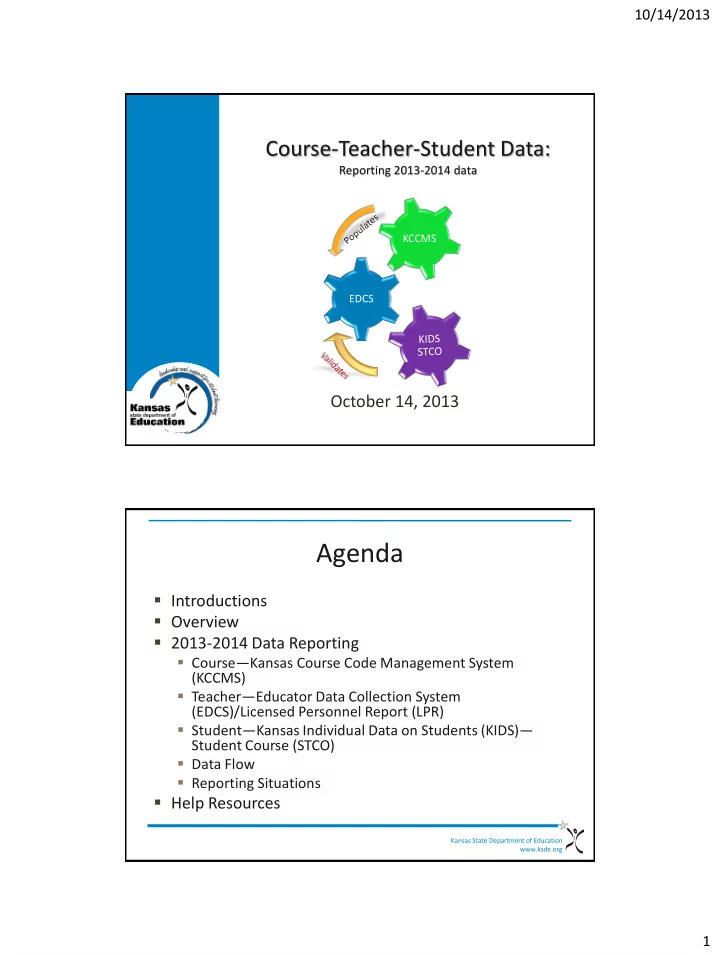
10/14/2013 Course-Teacher-Student Data: Reporting 2013-2014 data KCCMS EDCS October 14, 2013 Agenda Introductions Overview 2013-2014 Data Reporting Course Kansas Course Code Management System (KCCMS) Teacher


slide-1
SLIDE 1

10/14/2013 1

Course-Teacher-Student Data:

Reporting 2013-2014 data

October 14, 2013

EDCS KCCMS

Kansas State Department of Education www.ksde.org

Agenda

  • Introductions
  • Overview
  • 2013-2014 Data Reporting
  • Course—Kansas Course Code Management System

(KCCMS)

  • Teacher—Educator Data Collection System

(EDCS)/Licensed Personnel Report (LPR)

  • Student—Kansas Individual Data on Students (KIDS)—

Student Course (STCO)

  • Data Flow
  • Reporting Situations
  • Help Resources
slide-2
SLIDE 2

10/14/2013 2

Kansas State Department of Education www.ksde.org

Introductions

  • Jeannette Nobo – Kansas Course Code

Management System (KCCMS)

  • Lori Adams and Shane Carter – Educator Data

Collection System (EDCS)

  • Kimberly Wright – KIDS Student Course (STCO)

Kansas State Department of Education www.ksde.org

Overview

  • This is a joint informational presentation incorporating

KSDE representatives from:

  • Kansas Course Codes (KCCMS)
  • Teacher Education and Licensure (EDCS)
  • Kansas Individual Data on Students (KIDS)
  • This presentation will provide a brief overview of each

system, but it is not designed to serve as training for any individual application.

  • The presentation is intended to bring the shared

reporting components of each application together and provide a greater understanding of how they are all interconnected for the 2013-2014 school year.

slide-3
SLIDE 3

10/14/2013 3

Kansas State Department of Education www.ksde.org

2013-2014 Data Reporting

EDCS KCCMS

Kansas State Department of Education www.ksde.org

2013-2014 – KCCMS

  • What is the KCCMS?
  • A repository for all the courses that your district
  • ffers Pre-K – 12
  • What is the purpose of the KCCMS?
  • Develop a state standard course code information

system that can be used by schools on student transcripts

  • Maintain longitudinal student records

electronically

KCCMS

slide-4
SLIDE 4

10/14/2013 4

Kansas State Department of Education www.ksde.org

2013-2014 – KCCMS

  • Purposes (continued):
  • Transmit course taking information from one

student information system to another (electronic transcripts)

  • Meet federal reporting requirements
  • What courses should be on the KCCMS?
  • Any and all courses that students have taken and

may need to be part of their student’s transcript

KCCMS Kansas State Department of Education www.ksde.org

2013-2014 – KCCMS

KCC SCHEMA

  • Title
  • Course Description
  • Course Level
  • High School Credit
  • Sequence

KCC SCHEMA

  • Grade
  • Targeted Program
  • Delivery Type
  • College/Career
  • Qualified Admissions

KCCMS

slide-5
SLIDE 5

10/14/2013 5

Kansas State Department of Education www.ksde.org

2013-2014 – KCCMS

  • Importance of Mapping
  • State Transcripts
  • Historical Information
  • Auditing
  • Reporting
  • EDCS
  • STCO
  • Pathways

KCCMS Kansas State Department of Education www.ksde.org

2013-2014 –

The unique identifier given to each course the district has mapped in the Kansas Course Code Management System (KCCMS). This identifier includes all the course attributes indicated for the individual course during the mapping process in KCCMS.

KCC Identifier example for a first semester general Algebra I course: 02052G0.501214GGN

02 052 G 0.50 1 2 14 G G N

Subject Area Code Course Identifier Course Level Credits Sequence Sequence Total Grade Level (course) Targeted Program Delivery Type College/ Career

slide-6
SLIDE 6

10/14/2013 6

Kansas State Department of Education www.ksde.org

2013-2014 – EDCS

  • Purpose:
  • Collect information about the professional and

demographic characteristics of district staff across the state of Kansas.

  • Data is collected at the individual level and compiled in

aggregate form for use by educational researchers, school districts, the KS Board of Education, and the United States Department of Education.

  • The FTE Assignments will not allow a particular course

code until the district has mapped their local courses in the Kansas Course Code Management System (KCCMS).

EDCS Kansas State Department of Education www.ksde.org

Training Data

slide-7
SLIDE 7

10/14/2013 7

Kansas State Department of Education www.ksde.org

EDCS

Kansas State Department of Education www.ksde.org

2013-2014 – EDCS

EDCS

slide-8
SLIDE 8

10/14/2013 8

Kansas State Department of Education www.ksde.org

2013-2014 – KIDS: STCO

  • Kansas Individual Data on Students (KIDS)
  • Student-level data collection system
  • School and/or district-level staff submit data to

KIDS several times a year

  • Batch upload process based on data in local SIS—

no direct data entry

  • Student Course (STCO)
  • Gathers data on the courses students are enrolled in
  • Provides a course outcome for each course

KIDS STCO Kansas State Department of Education www.ksde.org

2013-2014 – KIDS: STCO

  • STCO records are used to populate multiple

applications to provide a link between teachers, courses, and students

  • STCO Records are used to report the students’
  • utcomes (pass, fail, etc.) in courses taught by

staff reported in EDCS

  • Current STCO Records, Current Year Credit by

Student, Info for STCO, and the Student Course Discrepancy Report are available to verify data submitted on STCO records

KIDS STCO

slide-9
SLIDE 9

10/14/2013 9

Kansas State Department of Education www.ksde.org

2013-2014 – KIDS: STCO

  • The STCO Submission Window will close on August

15, 2014.

  • However, important items to consider:
  • STCO records for students completing Pathways courses

should be submitted by 6/15/2014 to be populated into the Pathways application in time for career and tech ed. staff to finish CTE reporting.

  • Any teacher/course modifications that need to be made in

EDCS after the LPR snapshot is taken must be made before EDCS closes July 15, 2014 and KCCMS closes for updates in July.

KIDS STCO Kansas State Department of Education www.ksde.org

2013-2014 – KIDS—STCO

Validating Association of:

  • School Identifier
  • State Educator Identifier
  • KCC ID
  • Local Course ID

KIDS STCO

slide-10
SLIDE 10

10/14/2013 10

Kansas State Department of Education www.ksde.org

2013-2014 Data Flow

EDCS KCCMS

Kansas State Department of Education www.ksde.org

2013-2014 Data Flow

EDCS

Possible Batch Upload

Local SIS KCCMS KIDS STCO

Possible Batch Upload

Your local Student Information System (SIS) is the master source for all of your data that you report to KSDE.

slide-11
SLIDE 11

10/14/2013 11

Kansas State Department of Education www.ksde.org

2013-2014 Data Flow

EDCS KIDS

State Subject Area Codes State Course ID Local Course ID

STCO KCCMS

Available for selection

Validates against Building/Educator ID/KCC ID/Local Course ID

Confirm for STCO Educator ID KCC ID Building Local Course ID

Kansas State Department of Education www.ksde.org

slide-12
SLIDE 12

10/14/2013 12

Kansas State Department of Education www.ksde.org

2013-2014 Reporting Situations

EDCS KCCMS

Kansas State Department of Education www.ksde.org

2013-2014 – Reporting Dual Credit Course (including KAMS and CTE)

  • KCCMS: Each course should be mapped in KCCMS and

marked as dual credit in the college/career section. If the course is a dual credit pathway course, then it should have the appropriate dual credit pathway code.

  • EDCS: assign to person at the district responsible for that

course or program.

  • The responsible person might be a counselor, principal or other

licensed person in charge of overseeing that course or program.

  • Be sure to indicate a course as Dual Credit when it is a course

taught by a college professor and the student receives both high school credit and college credit.

  • KIDS—STCO: submit record with person assigned to the

course in EDCS.

slide-13
SLIDE 13

10/14/2013 13

Kansas State Department of Education www.ksde.org

CTE Only Course Mapping Designations

DESIGNATION .5 FUNDED APPROVED IN PATHWAY EARNS COLLEGE CREDIT

F Yes Yes No L No Yes Yes X No Yes No T No No No R No No Yes

Kansas State Department of Education www.ksde.org

2013-2014 – Example of Dual Course in EDCS

slide-14
SLIDE 14

10/14/2013 14

Kansas State Department of Education www.ksde.org

Jobs for American Graduates (JAG)

  • KCCMS
  • If credit is being offered to students for courses in

the JAG program, the following is a list of courses that the state has identified as aligned with the JAG program. These courses were identified after conversation with JAG. These courses are: 22204 – Dropout Prevention Program 22151 – Career Exploration 22151 – Employability Skills 22999 – Miscellaneous Other

Kansas State Department of Education www.ksde.org

Jobs for American Graduates (JAG)

  • EDCS
  • Report using the same steps as other non-licensed

personnel (military personnel teaching ROTC)

  • Select one of three assignments listed under

Subject Area“22” Miscellaneous Course Codes

  • A “JAG” checkbox will be added in EDCS
slide-15
SLIDE 15

10/14/2013 15

Kansas State Department of Education www.ksde.org

2013-2014 – Reporting Non-licensed Educators Responsible for a Course

  • When a non-licensed educator is reported in

EDCS, the educator’s Social Security Number (SSN) is reported because an educator ID is not generated.

  • Example: when military personnel are hired to teach

ROTC courses, they are entered in EDCS with their SSN instead of an Educator ID.

  • KIDS—STCO: Submit record indicating the teacher

SSN in the F23: Educator ID field so that the record aligns with what has been reported in EDCS.

Kansas State Department of Education www.ksde.org

2013-2014 – Reporting Special Education

  • EDCS
  • Any district that has an educator physically

working in the district will need to report that educator in EDCS.

  • Special education teachers must be licensed in a

content area if they are going to be assigned to a content specific course.

  • KIDS—STCO: submit record indicating teacher

who is assigned to the course in EDCS.

slide-16
SLIDE 16

10/14/2013 16

Kansas State Department of Education www.ksde.org

2013-2014 – Reporting Special Education

If the SPED (or ESOL) teacher is issuing grades for CONTENT area: 1. Select Educator type 4: SPED/ESOL 2. Select the specific subject teacher is teaching (ex: mathematics) 3. Select the course (ex: general math)* *Course must be mapped appropriately in KCCMS to display in SPED/ESOL educator type

Kansas State Department of Education www.ksde.org

2013-2014 – Reporting Special Education

If the SPED (or ESOL) teacher is providing support services and NOT issuing grades: 1. Select Educator Type 4: SPED/ESOL 2. Select Subject Area 94: SPED/ESOL 3. Select the appropriate course 4. Select additional SPED/ESOL code if drop box appears

slide-17
SLIDE 17

10/14/2013 17

Kansas State Department of Education www.ksde.org

2013-2014 – Reporting Course from one Building with Student from Another Building

  • It is common for students to attend another

building to take a course that is not available to them at their building.

  • Example: 8th grade students that typically attend

the middle school are frequently allowed to take a 9th grade course at the high school.

  • KCCMS: Map the course at the lowest grade level

the course is offered.

  • EDCS: At the high school building, assign the

course to the educator that teaches the course.

Kansas State Department of Education www.ksde.org

2013-2014 – Reporting Course from one Building with Student from Another Building

  • KIDS—STCO: The high school will send the

STCO record with the following:

  • F2: Student’s Accountability School Identifier =

middle school

  • F14: Student’s Attendance School Identifier =

Either the middle school or the high school

  • F16: Educator School Identifier = high school
slide-18
SLIDE 18

10/14/2013 18

Kansas State Department of Education www.ksde.org

2013-2014 Secondary Education Courses

EDCS KCCMS

Kansas State Department of Education www.ksde.org

2013-2014 – Reporting Secondary Education Course Outcomes

  • When reporting on a KIDS-STCO record the
  • utcome (Pass/Fail, percent, or mark) earned

in a course by a student, it is important that the data be consistent with what has been mapped in the Kansas Course Code Management System (KCCMS).

  • This may require that courses be remapped in

KCCMS or changes be made to the way courses are set up in your SIS.

slide-19
SLIDE 19

10/14/2013 19

Kansas State Department of Education www.ksde.org

2013-2014 – Reporting Secondary Education Course Outcomes

  • Sample Situation

Situation: Analysis Situation A:  In KCCMS, course is mapped as two courses

  • Course one: credit is 0.50 and sequence is 1 of 2 –

01001G0.501214GGN

  • Course two: credit is 0.50 and sequence is 2 of 2 –

01001G0.502214GGN  In the SIS, English/Language Arts I has two separate courses (one for each semester)

  • A separate grade is given for each semester

 In KIDS

  • Two STCO records are sent to KIDS
  • One for semester 1—passed course with an 85%–

01001G0.501214GGN

  • One for semester 2—passed course with an 88%–

01001G0.502214GGN The data will show:  The student earned 1.0 credits of English/Language Arts I  0.50 credit passed with 85%  0.50 credit passed with 88%

Kansas State Department of Education www.ksde.org

2013-2014 – Reporting Secondary Education Course Outcomes

  • Sample Situation

Situation: Analysis Situation B:  In KCCMS, course is mapped as one course

  • Course credit is 1.00
  • Sequence is 1 of 1
  • 01001G1.001114GGN

 In the SIS, English/Language Arts I has two distinct grading terms (one for each semester)

  • A separate grade is given for each semester

 In KIDS

  • Two STCO records are sent to KIDS
  • One for semester 1—passed course with an

85% – 01001G1.001114GGN

  • One for semester 2—passed course with an

78% – 01001G1.001114GGN The data will show:  The student earned 1.00 credits of English/Language Arts I  One credit passed with 78% Possible solutions:  Map as two courses in KCCMS with sequence 1 of 2 and 2 of 2 and 0.50 credit  Update and assign both courses to the educator in EDCS  Submit STCO with sequence 1 of 2 and 2 of 2 OR  Set up a one course in the SIS and send

  • ne STCO record with the final

cumulative grade
slide-20
SLIDE 20

10/14/2013 20

Kansas State Department of Education www.ksde.org

2013-2014 – Reporting Secondary Education Course Outcomes

  • Sample Situation

Situation: Analysis Situation C:  In KCCMS, course is mapped as one course

  • Course one: credit is 0.50 and sequence is 1 of 1 –

01001G0.501114GGN  In the SIS, English/Language Arts I is two separate course instances (one for each semester)

  • A separate grade is given for each semester

 In KIDS

  • Two STCO records are sent to KIDS
  • One for semester 1—passed course with an 90%–

01001G0.501114GGN

  • One for semester 2—passed course with an 78%–

01001G0.501114GGN The data will show:  The student earned 0.50 credits

  • f English/Language Arts I

 0.50 credit passed with 78% Possible solution:  Change the course sequence in KCCMS to 1 of 2 and 2 of 2  Update and assign both courses to the educator in EDCS

Kansas State Department of Education www.ksde.org

2013-2014 – Troubleshooting Data Reporting Errors

EDCS KCCMS

slide-21
SLIDE 21

10/14/2013 21

Kansas State Department of Education www.ksde.org

2013-2014 – Troubleshooting Data Reporting Errors

  • When an STCO record is submitted to KIDS,

there is one error message that is provided when data is not in alignment with what has been reported in EDCS.

The teacher/course combination does not match between EDCS and STCO .

Kansas State Department of Education www.ksde.org

2013-2014 – Troubleshooting Data Reporting Errors

Training Data

View Data Errors (KIDS)

slide-22
SLIDE 22

10/14/2013 22

Kansas State Department of Education www.ksde.org

2013-2014 – Troubleshooting Data Reporting Error in KIDS

  • Use the “Info for STCO” report to troubleshoot

STCO errors in KIDS.

Training Data

Kansas State Department of Education www.ksde.org

2013-2014 – Troubleshooting Data Reporting Error in KIDS

Use these fields from the “Info for STCO” report to troubleshoot STCO errors in KIDS.

Training Data

slide-23
SLIDE 23

10/14/2013 23

Kansas State Department of Education www.ksde.org

2013-2014 – Troubleshooting Data Reporting Error in KIDS

“Info for STCO” Report

Training Data

“View Data Errors” file in KIDS

Kansas State Department of Education www.ksde.org

2013-2014 – Troubleshooting Data Reporting Error in KIDS

“Info for STCO” Report

Training Data

“View Data Errors” file in KIDS

slide-24
SLIDE 24

10/14/2013 24

Kansas State Department of Education www.ksde.org

2013-2014 Data Analysis

EDCS KCCMS

Kansas State Department of Education www.ksde.org

2013-2014 Data Analysis

  • STCO records sent to KIDS will be used in

additional applications in the coming months, so accurate data is becoming more important.

  • Start with your own data analysis of what you

provide on a student’s transcript (or student record for prior to secondary students).

  • Use the student’s transcript as a way to

determine how to map courses in KCCMS.

slide-25
SLIDE 25

10/14/2013 25

Kansas State Department of Education www.ksde.org

Training Data

Kansas State Department of Education www.ksde.org

2013-2014 Data Analysis

  • KCCMS:
  • If two distinct outcomes are reported and the course

instances are connected, map as two course instances utilizing the sequence: 1 of 2 and 2 of 2.

01 001 G 0.50 1 2 14 G G N State Subject Area Code State Course Identifier Course Level Credits Sequence Sequence Total Grade Level (course) Targeted Program Delivery Type College/ Career 01 001 G 0.50 2 2 14 G G N State Subject Area Code State Course Identifier Course Level Credits Sequence Sequence Total Grade Level (course) Targeted Program Delivery Type College/ Career

slide-26
SLIDE 26

10/14/2013 26

Kansas State Department of Education www.ksde.org

2013-2014 Data Analysis

  • KCCMS:
  • If two distinct outcomes are reported and the course

instances are not connected, map as two courses.

  • Sequence should not be utilized.

04 051 G 0.50 1 1 14 G G N State Subject Area Code State Course Identifier Course Level Credits Sequence Sequence Total Grade Level (course) Targeted Program Delivery Type College/ Career 04 053 G 0.50 1 1 14 G G N State Subject Area Code State Course Identifier Course Level Credits Sequence Sequence Total Grade Level (course) Targeted Program Delivery Type College/ Career Kansas State Department of Education www.ksde.org

2013-2014 Data Analysis

  • Run the Current Year Credit by Student Report

in KIDS

  • Look at the data and compare the credits

displayed to the amount of credits displayed on the student’s transcript.

  • This analysis will show you where, if any,

discrepancies in your data can be found.

slide-27
SLIDE 27

10/14/2013 27

Kansas State Department of Education www.ksde.org

7.5 Credits

Transcript

Training Data

Kansas State Department of Education www.ksde.org

7.5 Credits

Transcript

Training Data

slide-28
SLIDE 28

10/14/2013 28

Kansas State Department of Education www.ksde.org

2013-2014 Course-Teacher-Student Help Resources

EDCS KCCMS

Kansas State Department of Education www.ksde.org

KCCMS Help Resources

  • Website www.ksde.org
  • Academic Standards webpage
  • Kansas Course Codes (right side of the page)
  • Direct Link: http://www.ksde.org/Default.aspx?tabid=2439
  • Resources Available:
  • File Specifications
  • KCCMS Updates (PowerPoints)
  • (Vendor) Export File Layout
  • Kansas Course Code Levels
  • Career Standards and Assessment Services (CSAS) Help

Desk:

  • 785-296-2078
  • kccms@ksde.org

KCCMS

slide-29
SLIDE 29

10/14/2013 29

Kansas State Department of Education www.ksde.org

EDCS Help Resources

Website www.ksde.org

  • Educator Licensure webpage
  • “Licensed Personnel” under Administrator Info (right side of the

page)

  • Direct Link: http://www.ksde.org/Default.aspx?tabid=322
  • Resources Available:
  • Licensed Personnel Guide
  • LPR-EDCS User Manual 2013-2014
  • School Codes for the Exchange of Data (SCED) Listing

EDCS

Kansas State Department of Education www.ksde.org

KIDS—STCO Help Resources

  • Website www.ksde.org/kids
  • “Documents” tab
  • Submission Details Document: STCO
  • KIDS 2013-2014 Collection System File Specifications
  • “FAQs” and select “STCO Collection”
  • KIDS HelpDesk:
  • 785-296-7935 or kids@ksde.org

KIDS STCO

slide-30
SLIDE 30

10/14/2013 30

Kansas State Department of Education www.ksde.org

Course-Teacher-Student Help Resources

  • Website:

http://www.ksde.org/Default.aspx?tabid=5151

  • Resources Available:
  • Course-Teacher-Student Data Reporting

Responsibility Decision Tree

  • Course-Teacher-Student Data Reporting Timeline

2013-2014

  • Abbreviations, Acronyms, and Terms
  • Course-Teacher-Student Data Flow 2013-2014