8: IP Basics IP protocol Routing protocols addressing conventions - - PDF document

8 ip basics
SMART_READER_LITE
LIVE PREVIEW

8: IP Basics IP protocol Routing protocols addressing conventions - - PDF document

The Internet Network layer Host, router network layer functions: Transport layer: TCP, UDP 8: IP Basics IP protocol Routing protocols addressing conventions path selection datagram format Network RIP, OSPF, BGP packet


slide-1
SLIDE 1

4: Network Layer 4a-1

8: IP Basics

Last Modified: 3/5/2003 2:11:15 PM

4: Network Layer 4a-2

The Internet Network layer

routing table

Host, router network layer functions:

Routing protocols

  • path selection
  • RIP, OSPF, BGP

IP protocol

  • addressing conventions
  • datagram format
  • packet handling conventions

ICMP protocol

  • error reporting
  • router “signaling”

Transport layer: TCP, UDP Link layer physical layer

Network layer

4: Network Layer 4a-3

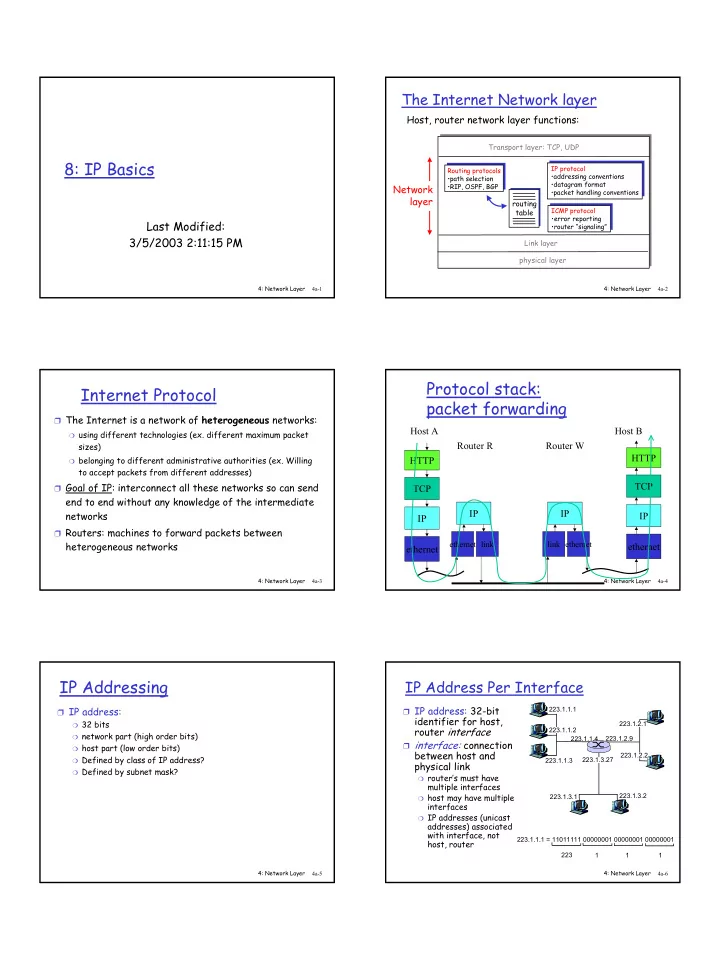
Internet Protocol

❒ The Internet is a network of heterogeneous networks:

❍ using different technologies (ex. different maximum packet

sizes)

❍ belonging to different administrative authorities (ex. Willing

to accept packets from different addresses) ❒ Goal of IP: interconnect all these networks so can send

end to end without any knowledge of the intermediate networks

❒ Routers: machines to forward packets between

heterogeneous networks

4: Network Layer 4a-4

Protocol stack: packet forwarding

HTTP TCP IP ethernet Host A IP

ethernet

Router R

link

HTTP TCP IP ethernet Router W Host B IP

ethernet link

4: Network Layer 4a-5

IP Addressing

❒ IP address:

❍ 32 bits ❍ network part (high order bits) ❍ host part (low order bits) ❍ Defined by class of IP address? ❍ Defined by subnet mask? 4: Network Layer 4a-6

IP Address Per Interface

❒ IP address: 32-bit

identifier for host, router interface

❒ interface: connection

between host and physical link

❍ router’s must have

multiple interfaces

❍ host may have multiple

interfaces

❍ IP addresses (unicast

addresses) associated with interface, not host, router

223.1.1.1 223.1.1.2 223.1.1.3 223.1.1.4 223.1.2.9 223.1.2.2 223.1.2.1 223.1.3.2 223.1.3.1 223.1.3.27 223.1.1.1 = 11011111 00000001 00000001 00000001 223 1 1 1

slide-2
SLIDE 2

4: Network Layer 4a-7

IP Addressing

How to find the networks?

❍ device interfaces with

same network part of IP address?

❍ can physically reach

each other without intervening router?

223.1.1.1 223.1.1.3 223.1.1.4 223.1.2.2 223.1.2.1 223.1.2.6 223.1.3.2 223.1.3.1 223.1.3.27

223.1.1.2

223.1.7.0 223.1.7.1 223.1.8.0 223.1.8.1 223.1.9.1 223.1.9.2

Interconnected system consisting

  • f six “networks”
  • r one network

(223.1.*.*)?

4: Network Layer 4a-8

IP Addresses (Classes)

0network host 10 network host 110 network host 1110 multicast address

A B C D class

1.0.0.0 to 127.255.255.255 128.0.0.0 to 191.255.255.255 192.0.0.0 to 223.255.255.255 224.0.0.0 to 239.255.255.255

32 bits

given notion of “network”, let’s re-examine IP addresses: “class-full” addressing

Unicast Multicast 1111 reserved

E

240.0.0.0 to 255.255.255.255

Reserved

4: Network Layer 4a-9

Hosts per Class

❒ Class A has ~224 hosts (16777216) ❒ Class B has ~216 hosts (65536) ❒ Class C has ~28 hosts (256) ❒ What class do you think everyone wants?

❍ Suppose you are a company/university etc. Do

you expect to need 16777216 hosts? Do you expect to need more than 256?

4: Network Layer 4a-10

IP Address Space Allocation

CAIDA 1998

4: Network Layer 4a-11

Current Allocation

❒ Interesting to exam current IP address

space allocation (who has class A’s ? Etc)

❍ Who has A’s? ❍ Computer companies around during initial

allocation (IBM, Apple)

❍ Universities (Stanford, MIT) ❍ Have A and still use other IP address blocks?

❒ CAIDA has info on complete allocation

4: Network Layer 4a-12

IP addressing: CIDR

❒ Class-full addressing:

❍ inefficient use of address space, address space exhaustion ❍ e.g., class B net allocated enough addresses for 65K hosts,

even if only 2K hosts in that network

❒ CIDR: Classless InterDomain Routing

❍ network portion of address of arbitrary length ❍ address format: a.b.c.d/x, where x is # bits in network

portion of address

11001000 00010111 00010000 00000000

network part host part

200.23.16.0/23

slide-3
SLIDE 3

4: Network Layer 4a-13

Recall: How to get an IP Address?

❒ Answer 1: Normally, answer is get an IP address

from your upstream provider

❍ This is essential to maintain efficient routing!

❒ Answer 2: If you need lots of IP addresses then

you can acquire your own block of them.

❍ IP address space is a scarce resource - must prove you

have fully utilized a small block before can ask for a larger one and pay $$ (Jan 2002 - $2250/year for /20 and $18000/year for a /14)

4: Network Layer 4a-14

How to get lots of IP Addresses? Internet Registries

RIPE NCC (Riseaux IP Europiens Network Coordination Centre) for Europe, Middle-East, Africa APNIC (Asia Pacific Network Information Centre ) for Asia and Pacific ARIN (American Registry for Internet Numbers) for the Americas, the Caribbean, sub-saharan Africa Note: Once again regional distribution is important for efficient routing! Can also get Autonomous System Numbers (ASNs) from these registries

4: Network Layer 4a-15

Classful vs Classless

❒ Class A = /8 ❒ Class B = /16 ❒ Class C = /24

4: Network Layer 4a-16

How to get a block of IP addresses?From upstream provider

Network (network portion):

❒ get allocated portion of ISP’s address space:

ISP's block 11001000 00010111 00010000 00000000 200.23.16.0/20 Organization 0 11001000 00010111 00010000 00000000 200.23.16.0/23 Organization 1 11001000 00010111 00010010 00000000 200.23.18.0/23 Organization 2 11001000 00010111 00010100 00000000 200.23.20.0/23 ... ….. …. …. Organization 7 11001000 00010111 00011110 00000000 200.23.30.0/23

4: Network Layer 4a-17

Hierarchical addressing: route aggregation

“Send me anything with addresses beginning 200.23.16.0/20”

200.23.16.0/23 200.23.18.0/23 200.23.30.0/23

Fly-By-Night-ISP Organization 0 Organization 7 Internet Organization 1 ISPs-R-Us “Send me anything with addresses beginning 199.31.0.0/16”

200.23.20.0/23

Organization 2

. . . . . .

Hierarchical addressing allows efficient advertisement of routing information:

4: Network Layer 4a-18

Hierarchical addressing: more specific routes

ISPs-R-Us has a more specific route to Organization 1

“Send me anything with addresses beginning 200.23.16.0/20”

200.23.16.0/23 200.23.18.0/23 200.23.30.0/23

Fly-By-Night-ISP Organization 0 Organization 7 Internet Organization 1 ISPs-R-Us “Send me anything with addresses beginning 199.31.0.0/16

  • r 200.23.18.0/23”

200.23.20.0/23

Organization 2

. . . . . .

slide-4
SLIDE 4

4: Network Layer 4a-19

IP Address Allocation

❒ CIDR is great but must work around existing

allocations of IP address space

❍ Company 1 has a /20 allocation and has given out sub portions of it to

  • ther companies

❍ University has a full class B address ❍ Company 2 has a /23 allocation from some other class B ❍ ALL use the same upstream ISP – that ISP must advertise routes to all

these blocks that cannot be described with a simple CIDR network ID and mask!

❒ Estimated reduction in routing table size with CIDR

❍ If IP addresses reallocated, CIDR applied to all, IP addresses reallocated

based on geographic and service provider divisions that current routing tables with 10000+ entries could be reduced to 200 entries [Ford, Rekhter and Brown 1993]

❍ How stable would that be though? Leases for all?

4: Network Layer 4a-20

IP addresses: how to get one? One more time ☺

❒ Hard-coded by system admin in a file

❍ Long with subnet mask, default gateway and DNS

server ❒ DHCP: Dynamic Host Configuration Protocol: dynamically get network identity and neighborhood info dynamically, “plug-and-play”

4: Network Layer 4a-21

DHCP

❒ Automated configuration of IP addresses ❒ DHCP server hands out IP addresses to

hosts in a administrative domain

❒ Relieves burdens of system administrators

  • major factor in lifetime cost of computer

systems!

❒ Runs over UDP (ports 67 and 68) ❒ RFC 2131

4: Network Layer 4a-22

Finding the DHCP server?

❒ Wouldn’t be big improvement if had to

configure each host with address of DHCP server!

❍ A little better because at least every machine

in a local network gets same info ❒ Hosts send special DHCPDISCOVER

message to the special IP address 255.255.255.255

❍ This is a special IP broadcast address and all

  • ther nodes on that network will receive

❍ We’ll see more about special addresses like this

4: Network Layer 4a-23

DHCP Discover/Offer

❒ Host broadcasts “DHCP discover” msg

❍ Sent to 255.255.255.255 from 0.0.0.0 ❍ Contains a client ID to uniquely identify the client in that

network

❍ Usually use MAC address ❍ DHCP server can be configured with a “registered list” of

MAC addresses to accept ❒ DHCP server responds with “DHCP offer” msg

❍ Sent from IP address of DHCP server to

255.255.255.255

❍ Includes ip address, subnet mask, DNS servers, default

gateway, length of lease

4: Network Layer 4a-24

DHCP server on every network?

❒ If there is a DHCP server on the local

network to receive the broadcast, then it can respond the host with its IP address, its default router, etc.

❒ Alternatively, can have a DHCP relay agent

  • n each network that knows the address of

the DHCP server and will forward the DHCPDISCOVER message

slide-5
SLIDE 5

4: Network Layer 4a-25

Leases

❒ DHCP doesn’t *give* each client an IP address,

just lease them for a while

❍ IP addresses aren’t reserved by clients not currently

connected to the network ❒ Clients can keep their address by renewing their

leases

❍ Some DHCP servers will hand out new address each time

(especially to prevent customers running servers)

❍ Dynamic DNS?

❒ Clients typically start renewing ½ way through

lease period

❒ Internet wide DHCP to enforce efficient CIDR?

4: Network Layer 4a-26

Renew lease

❒ Host requests IP address: “DHCP request”

msg

❍ Once know the IP address of the DHCP server

then just send a request message directly to them ❒ DHCP server sends address: “DHCP ack”

msg

❍ Contains same info as an offer

4: Network Layer 4a-27

DHCP other

❒ DHCP servers and DNS ❒ DHCP servers and routers

❍ What if some machine choose their own IP

address in the proper range? Doesn’t stop data from flowing to them (see ARP later) ❒ DHCP and BOOTP ❒ Security problem – attach to network and

act like DHCP server – give out all duplicate IPs

4: Network Layer 4a-28

Unicast vs Broadcast vs Multicast

❒ Unicast Addresses

❍ IP Datagram destined for single host ❍ Type of IP address you normally think of ❍ Class A-C + some special IP addresses

❒ Broadcast

❍ IP Datagram sent to all hosts on a given network ❍ Some unicast network id + special host id ❍ Some part of reserved E class

❒ Multicast

❍ IP Datagram sent to a set of hosts belonging to a

“multicast” group or group of interested receivers

❍ Class D ❍ We will return to IP multicast later 4: Network Layer 4a-29

Broadcast

❒ All ones like * ❒ Limited Broadcast

❍ 255.255.255.255 ❍ *.*.*.* ❍ Not forwarded!

❒ Net-directed Broadcast

❍ netid.* ❍ All bits in host portion 1’s ❍ 128.1.2.255 is a subnet-directed broadcast with

subnet mask 255.255.255.0 but not with 255.255.254.0

4: Network Layer 4a-30

Other special addresses

❒ Loopback ❒ Specify this host

slide-6
SLIDE 6

4: Network Layer 4a-31

Special Address Summary

Description Can be dest? Can be source? Host ID Subnet ID net ID

All subnets directed broadcast to netid Y N

  • 1
  • 1

Netid Subnet directed broadcast to netid, subnetid Y N

  • 1

Subnetid Netid netid.255.255.255 Net directed broadcast to netid Y N

  • 1

Netid 255.255.255.255 Limited broadcast (do not forward!) Y N

  • 1
  • 1

Loopback Y Y Any 127 Specified host on this net N Y Hostid This host on this net N Y

Note: -1 = all 1’s

4: Network Layer 4a-32

Note

❒ Broadcast and multicast make sense for

UDP and not for TCP

❍ telnet 255.255.255.255 doesn’t make sense ❒

4: Network Layer 4a-33

IP datagram format

ver length 32 bits

data (variable length, typically a TCP

  • r UDP segment)

16-bit identifier Internet checksum time to live 32 bit source IP address IP protocol version Number header length max number remaining hops (decremented at each router) for fragmentation/ reassembly total datagram length (bytes) upper layer protocol to deliver payload to head. len type of service “type” of data flgs fragment

  • ffset

upper layer 32 bit destination IP address Options (if any) E.g. timestamp, record route taken, pecify list of routers to visit.

4: Network Layer 4a-34

IP Header: Version and Header Length

❒ Version number (4-bit )

❍ 4 for IPv4, 6 for IPv6 ❍ Fields that follow can vary based on this

number ❒ Header length (4-bit )

❍ Number of 32 bit words (24-1 32 bits = 60

bytes)

❍ Includes length of options (40 bytes max)

4: Network Layer 4a-35

IP Header: TOS

❒ Type-of-service (TOS) field ( 8 bits)

❍ 3 Bit precedence field ❍ 4 TOS bits (only one may be turned on)

  • Minimize delay
  • Maximize throughput
  • Maximize reliability
  • Minimize monetary cost

❍ 1 unused bit

❒ Many implementations ignore; most

implementations don’t allow application to set this to indicate preference anyway

4: Network Layer 4a-36

IP Header

❒ Total length field (16 bits)

❍ Length in bytes ❍ Max Total length 216-1 = 65535 bytes ❍ Max Data = 65535 –Header Length

❒ Can you really send that much?

❍ Link layer might not be enough to handle that

much; Various link layer technologies have different limits

❍ As pass over various link layers, IP datagram

will be fragmented if necessary

❍ Total length field will change when fragmented

slide-7
SLIDE 7

4: Network Layer 4a-37

IP Fragmentation & Reassembly

network links have MTU (max.transfer size) - largest possible link-level frame.

❍ different link types,

different MTUs

❍ Ex. Ethernet maximum is

1500 bytes, FDDI maximum is 4500 bytes

large IP datagram divided (“fragmented”) within net

❍ “reassembled” only at final

destination (even if pass

  • ver other links that could

handle larger datagram)

❍ May be fragmented

multiple times

❍ One fragment dropped =>

entire datagram dropped

fragmentation: in: one large datagram

  • ut: 3 smaller datagrams

reassembly

4: Network Layer 4a-38

IP Header: Fragmentation

❒ Fields to manage fragmentation

❍ Identification (16 bits)

  • “Unique ID” for datagram
  • Original spec said transport layer would set
  • Usually set to value of variable in IP layer that is

incremented by one for each datagram sent from that host (regardless of destination)

  • Would wrap every 65535 datagrams

❍ Flags ( 3 bits)

  • 1 bit used to say whether there are more fragments

following this one in the original datagram

  • 1 bit used to say “do not fragment” (drop and send error

message back to source if need to fragment)

❍ Fragment Offset (13 bits)

  • Give offset of data in this fragment into original datagram

4: Network Layer 4a-39

IP Fragmentation and Reassembly

ID =x

  • ffset

=0 fragflag =0 length =4000 ID =x

  • ffset

=0 fragflag =1 length =1500 ID =x

  • ffset

=1480 fragflag =1 length =1500 ID =x

  • ffset

=2960 fragflag =0 length =1040 One large datagram becomes several smaller datagrams each with their own IP header!! Note: TCP/UDP header with port numbers etc only in 1st fragment

4: Network Layer 4a-40

Alternatives to Fragmentation?

❒ IP wants to be able to run anywhere: Make

packet size as small as the minimum packet size anywhere along a route

❍ Detection? Min Increases after detection?

Least common denominator? ❒ Look before you leap?

❍ Path MTU Discovery = To avoid overhead of

fragmentation and reassembly in network, hosts

  • ften send a series of probe packets to

determine the smallest MTU along a route

4: Network Layer 4a-41

Path MTU Discovery in TCP

❒ If doing Path MTU Discovery, start with

minimum of receiver’s specified MSS or local MTU and set the Don’t Fragment Bit

❒ If ICMP message received indicating that

fragmentation was required, then segment size will be reduced

❒ Periodically (every 10 min or so), TCP will

try a higher segment size up to the receiver’s MSS to see if new route is being used that would allow larger segments

❒ Not all implementations support this

4: Network Layer 4a-42

Path MTU Discovery in UDP

❒ Not like TCP where sender sends stream in chunks

as they see fit and receiver reads in chunks as they see fit

❒ With UDP, the size of the UDP packet is much

more visible to the application

❒ May send with DF bit off ❒ May send with DF bit on and if get ICMP messages

then IP on host may fragment before sent but not exposed to application layer to encourage smaller amounts of data sent

❒ Again not all implementations support

slide-8
SLIDE 8

4: Network Layer 4a-43

Exercise

❒ Trace a TCP connection and look at the IP

headers

❒ Trace a UDP traffic

❍ Hint: DNS or DHCP good sources of UDP

traffic ❒ Questions

❍ Is the Do Not Fragment Bit on? ❍ Look at the Identification flag of subsequent

IP datagrams

4: Network Layer 4a-44

Path MTU Discovery

❒ Look in Ethereal at TCP segments, will see

Do Not Fragment Bit is set

❍ If on Ethernet, don’t usually see adjustment ❍ Ethernet has one of the smaller MTUs so never

get an ICMP error saying needs to be smaller

❍ If sent from local network with larger MTU

might see this activity

4: Network Layer 4a-45

IP Header: TTL

❒ Time-to-live field / TTL (8 bits)

❍ Initialized by sender; decremented at each hop ❍ If reaches zero, datagram dropped ❍ Limits total number of hops from source to

destination (28-1 = 255)

❍ Prevents things like infinite routing loops ❍ Usually set to 32 or 64

  • Look at TTL field in Ethereal for incoming traffic and

for outgoing traffic

❍ Used by traceroute (more later)

4: Network Layer 4a-46

IP Header: Protocol

❒ Identifies which upper layer protocol to

which IP should pass the data

❒ 8 bits: 28-1 = 255 max number protocols

❍ 1= ICMP ❍ 2= IGMP ❍ 6 = TCP ❍ 17 = UDP ❍ 135-254: Unassigned

❒ Who do you think assigns these numbers?

❍ http://www.iana.org/assignments/protocol-

numbers

4: Network Layer 4a-47

IP Header

❒ Header Checksum

❍ Calculated over IP header ❍ 16-bit one’s complement ❍ When change TTL, checksum updated

❒ Source and destination IP addresses ❒ Options: variable length

❍ Security options ❍ Record route/timestamp (alternative to traceroute) ❍ Loose (strict? )source routing - source can say path it

would datagram to take; routers need not support

❍ Options must end on 32 bit boundary – pad of 0 if

necessary

4: Network Layer 4a-48

ICMP: Internet Control Message Protocol

used by hosts, routers, gateways to communication network-level information like error notification or querying network conditions

network-layer “above” IP:

❍ ICMP msgs carried in IP

datagrams

ICMP message: type, code, checksum plus typically first 8 bytes of IP datagram causing error Contents depends on type 8-bit type 8-bit code 16-bit checksum ICMP Message Format

slide-9
SLIDE 9

4: Network Layer 4a-49

Error Conditions

❒ Some error conditions flagged by ICMP

❍ unreachable host, network, port, protocol ❍ Need to fragment and can’t; TTL expired ❍ Source Quench

  • Intended for congestion control but not used

4: Network Layer 4a-50

ICMP also for Query/Response

❒ ICMP also used to request IP related info ❒ Query/Response

❍ Address mask request/reply ❍ Timestamp request/reply

❒ Reply echos identifier from query so they

can be matched

4: Network Layer 4a-51

Ping uses ICMP

❒ Sends ICMP echo request to a host and

looks for ICMP echo reply (like locating ship with sonar)

❒ Used to measure RTT ❒ Most implementations support ping directly

in the kernel; no “ping server”

4: Network Layer 4a-52

Experiment

❒ Try tracing ping with Ethereal

❍ Ping host on same LAN ❍ Ping host across Internet (drops, duplication,

larger variance in RTT)

❍ Ping loopback vs ethernet interface

  • Does this work?

❍ Ping of broadcast addresses

  • Does this work?

4: Network Layer 4a-53

ICMP Router Discovery

❒ Instead of configuring machine to know

default gateway can use ICMP to find routers

❒ Broadcast an ICMP router solicitation

request

❒ Routers that hear respond with ICMP

router advertisements

❍ Advertisements contain the IP address(es) of

available routers ❒ Routers also send periodic router

advertisement

4: Network Layer 4a-54

ICMP Redirection

❒ ICMP used to tell source that it sent a

datagram through an inefficient path

❍ If router sends datagram out the same

interface, that it can in on then inefficient routing

❍ Send ICMP redirect error

❒ Simple dynamic routing (more on dynamic

routing soon)

slide-10
SLIDE 10

10

4: Network Layer 4a-55

ICMP Type/Code List

Type Code description 0 0 echo reply (ping) 3 0 dest. network unreachable 3 1 dest host unreachable 3 2 dest protocol unreachable 3 3 dest port unreachable 3 6 dest network unknown 3 7 dest host unknown 4 0 source quench (congestion control - not used) 8 0 echo request (ping) 9 0 route advertisement 10 0 router discovery 11 0 TTL expired 12 0 bad IP header

4: Network Layer 4a-56

Cascading ICMP messages?

❒ To avoid “broadcast storms” of ICMP

messages

❒ Do not send an ICMP message in response

to:

❍ Datagram sent to special IP addresses

(broadcast, multicast, loopback,..)

❍ Fragment other than the first ❍ Other ICMP error messages

4: Network Layer 4a-57

traceroute /tracert

❒ Uses UDP, Relies on TTL + ICMP ❒ Send series of IP datagrams with increasing TTL

fields

❍ Source sets TTL =1, will get an ICMP TTL expires

message from the first hop

❍ Source sets TTL=2, will get an ICMP TTL expires

message from second hop ❒ Essential tool for exploring network core ❒ Trace route servers;Triangulating the Internet (?) ❒ Limitations

❍ Subsequent datagrams may take different paths

❒ Ping –R (record route IP option)

4: Network Layer 4a-58

Experiment

❒ Try tracing traceroute with Ethereal

❍ Look for the increasing TTL fields ❍ Look for the ICMP error messages

4: Network Layer 4a-59

Roadmap

❒ Done with IP basics

❍ IP addressing ❍ IP datagram format ❍ ICMP

❒ Next major topic: routing ❒ But first...IP’s datagram model is not the

  • nly choice for a network layer model

4: Network Layer 4a-60

Virtual circuits

❒ call setup, teardown for each call before data can flow;

associates VC identifier with the path

❒ each packet carries VC identifier (not destination host OD) ❒ every router on source-dest path s maintain “state” for

each passing connection

❍ transport-layer connection only involved two end systems

❒ link, router resources (bandwidth, buffers) may be

allocated to VC

❍ to get circuit-like performance

“source-to-dest path behaves much like telephone circuit”

❍ performance-wise ❍ network actions along source-to-dest path

slide-11
SLIDE 11

11

4: Network Layer 4a-61

Virtual circuits: signaling protocols

❒ used to setup, maintain teardown VC ❒ setup gives opportunity to reserve resources ❒ used in ATM, frame-relay, X.25 ❒ not used in today’s Internet

application transport network data link physical application transport network data link physical

  • 1. Initiate call
  • 2. incoming call
  • 3. Accept call
  • 4. Call connected
  • 5. Data flow begins
  • 6. Receive data

4: Network Layer 4a-62

Datagram networks: the Internet model

❒ no call setup at network layer ❒ routers: no state about end-to-end connections

❍ no network-level concept of “connection”

❒ packets typically routed using destination host ID

❍ packets between same source-dest pair may take different

paths ❒ Best effort

application transport network data link physical application transport network data link physical

  • 1. Send data
  • 2. Receive data

4: Network Layer 4a-63

Best Effort

What can happen to datagrams?

❒ Corrupted at the physical level ❒ Datagrams dropped because of full buffers ❒ Destination unreachable ❒ Routing loops

4: Network Layer 4a-64

Datagram or VC network: why?

Datagram

data exchange among computers

❍ “elastic” service, no strict

timing req.

“smart” end systems (computers)

❍ can adapt, perform control,

error recovery

❍ simple inside network core,

complexity at “edge”

many link types

❍ different characteristics ❍ uniform service difficult

Virtual Circuit

❒ evolved from telephony ❒ human conversation:

❍ strict timing, reliability

requirements

❍ need for guaranteed

service

❒ “dumb” end systems

❍ telephones ❍ complexity inside

network