1 PREVENT ISSUES ANALYZE ISSUES WWi Corrective Action Graphs and - - PowerPoint PPT Presentation

1
SMART_READER_LITE
LIVE PREVIEW

1 PREVENT ISSUES ANALYZE ISSUES WWi Corrective Action Graphs and - - PowerPoint PPT Presentation

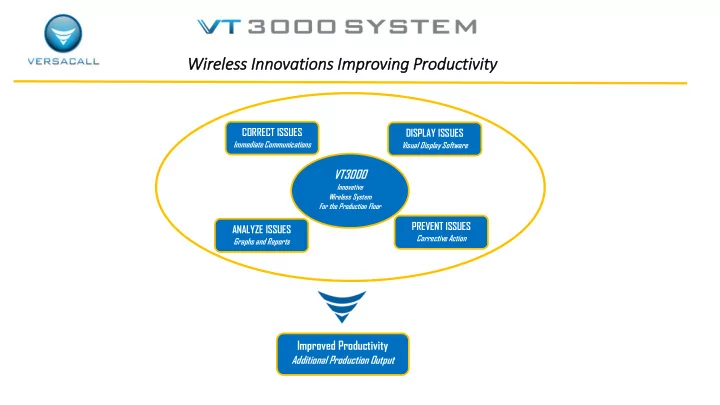
Wir ireless Inn Innovations Im Impr proving Pro roductivity 2 CORRECT ISSUES DISPLAY ISSUES Immediate Communications Visual Display Software VT3000 Innovative Wireless System For the Production Floor 1 PREVENT ISSUES ANALYZE ISSUES


slide-1
SLIDE 1

Wir ireless Inn Innovations Im Impr proving Pro roductivity

1

2

Improved Productivity

Additional Production Output CORRECT ISSUES

Immediate Communications

DISPLAY ISSUES

Visual Display Software

ANALYZE ISSUES

Graphs and Reports

PREVENT ISSUES

Corrective Action

VT3000

Innovative Wireless System For the Production Floor

WWi

slide-2
SLIDE 2

Immediate Communications Visual Management Automatic Data Collection Visual & Audio Andons Real Time Performance Visibility

Factory Floor Communication • Andons • Real Time Performance Screens • Visual Factory • Automated Data Capture • OEE

slide-3
SLIDE 3

Elim limin inate Pro roduction Lo Looses

Recover Lost Production Time

  • Minimizing Production Disruptions – Reduce Downtime
  • Identifying & Immediately Correcting Production Abnormalities
  • Immediate Communications of Production Issues

Visual Management

  • Performance Feedback to Line Operators
  • View Equipment or Production Station Status
  • View Line Status & Plant Status
  • Enterprise Status

Easily Identify Process Bottlenecks/ Areas for Improvement / Track Week to Week Improvements Automatically Capture Performance Data

Significantly Improving the Accuracy /Timeliness/Consistency/Completeness of the Data

Factory Floor Communication • Andons • Real Time Performance Screens • Visual Factory • Automated Data Capture • OEE

slide-4
SLIDE 4

VersaCall’s Customer’s include …

Factory Floor Communication • Andons • Real Time Performance Screens • Visual Factory • Automated Data Capture • OEE

slide-5
SLIDE 5

Sup Support rts All ll Man anufacturi ring Envir ironments Machine Centers Moving Assembly Lines & Stationary Assembly Operations Packaging Line Cell Manufacturing Process Flow Lines Production Lines

Factory Floor Communication • Andons • Real Time Performance Screens • Visual Factory • Automated Data Capture • OEE

slide-6
SLIDE 6

Ver ersaCall ll Suc Success St Stories

Turning Lost Downtime Into Productive Time Qualifying Root Cause of Issues for Process Improvement Visual Management - One Screen Complete Line Visibility Efficient and Timely OEE Reports Improves Output

Factory Floor Communication • Andons • Real Time Performance Screens • Visual Factory • Automated Data Capture • OEE

8 Hours of Downtime Turned Into Productive Time – 1st Month 250 Calls 1st Week - 70% Related to Material Issues

Individual Assembly Line Status

  • Line Output
  • Takt Time Performance Actual vs. Target
  • Lost Production Time
  • Individual Work Zone Status

Eliminated All Manual Data Collection – Immediate OEE Reports

slide-7
SLIDE 7

Fin Financial l Return – Pay ayback 2 2 to 6 6 Months

Financial Paybacks Are Realized From:

Reducing Downtime – Immediate Communications of Issues Reducing Set-Up Time Automated Data Collection Real Time Monitoring of Production Status – Identifying Abnormalities

Complete System Start at $7,500

Customer Example –System & Payback

VT3000 System - $10,100

  • Control Unit [Server] with Receiver
  • 10 Input Modules – Call Stations
  • 1 Repeater
  • Large Screen Display Software
  • 2 Way Radio Transceiver

Financial Payback – 3.2 Months (Annual Return $37,500)

  • 30 Incidents [10 Per Shift] – Total Plant – All Shifts - 4 Minute Savings Per Incident
  • 3 Employees Affected Per Incident

Templates at Available For Calculating ROI

Factory Floor Communication • Andons • Real Time Performance Screens • Visual Factory • Automated Data Capture • OEE

slide-8
SLIDE 8

New Andon Technology Un- Paralleled Performance Visibility

LED Light is completely Programmable

Inn Innovations in in Vis isual l Man anagement

1

Factory Floor Communication • Andons • Real Time Performance Screens • Visual Factory • Automated Data Capture • OEE

slide-9
SLIDE 9

System Over ervie iew

1

Factory Floor Communication • Andons • Real Time Performance Screens • Visual Factory • Automated Data Capture • OEE

System Repeater

Wireless Powered

System Receiver Input Modules VT 3000 Std Control Unit / Server

REAL-TIME SCREENS SMART PHONES, TABLETS & REPORTS

TOUCH INPUT MODULE

slide-10
SLIDE 10

Cal all l St Station Inp Input Mod

  • dule

Call Station - Battery or Powered

Captures Response Time to Issues  Introduces a Whole New Concept of Support Accountability Also Escalates and Routes Messages Until Acknowledgement  Every Request for Support is Logged in Database [Time and Date Stamped ]  Provides Visibility of Support Personnel Response Performance to the Production Floor  Innovative Zigbee Wireless “Mesh” Technology  NEMA 4-sealed housing / Membrane Switch Buttons  Contains 4 Switch Contacts  Up to 1,500 Units per System – 6000 Monitoring Points in Control Unit [Server]  Communication Path for Each Individual Button is Programmable

Factory Floor Communication • Andons • Real Time Performance Screens • Visual Factory • Automated Data Capture • OEE

DigiMesh Technology Forms It's Own Network

slide-11
SLIDE 11

BSC SC Inp Input Module le - Fle Flexib ible an and d Sim Simple le

BSC Module – Programmable Buttons

Factory Floor Communication • Andons • Real Time Performance Screens • Visual Factory • Automated Data Capture • OEE

Touch Screen I/O Module

  • Choose Button Type, Color, Size & Quantity
  • Flexible Layouts
  • Programmable
  • Link Multiple Screens
  • Immediate Communications
  • Simple & Flexible
slide-12
SLIDE 12

Tou

  • uch Inp

Input Mod

  • dule - Vis

isual l St Status Ind Indic icators

Programmable & Configurable Touch Screen Displays Number of Individuals to Call – Programmable 20+ Immediate Communications -Response Time & Escalations Captures Counts & Downtime With Reasons Full Touch Screen Keyboard & Key Pad

Factory Floor Communication • Andons • Real Time Performance Screens • Visual Factory • Automated Data Capture • OEE

Touch Input Module – 7” Screens

slide-13
SLIDE 13

Pro roduction St Status Module le – Touch Screen [10” Screen] & I/O Module

Module Features

  • Configurable Touch Screen Display
  • Captures the Responding Individual w/ NFC Technology
  • Module Retrieves Data for Look Up List
  • Wireless Configuration Set-Up & Changes
  • Supports Wireless Bar Code Scanners
  • Clear Alarms/Actions from Different Modules
  • Full Communication Capabilities
  • Full Touch Screen Keyboard & Key Pad

Factory Floor Communication • Andons • Real Time Performance Screens • Visual Factory • Automated Data Capture • OEE

Completely Configurable Screens

VESA Mounting Patterns Supports

Multiple Stand Options

Bench Stands Floor Stands

Equipment Mounts

Articulating Arms

slide-14
SLIDE 14

Touch Inp Input Module les

Touch Screen Applications

Verification of Certified Operator or Trained Operator

Verifies that the operator has been trained on the equipment . Can Set-Up so Operator Must Perform Function Before Starting Equipment. Can have immediate communications to floor supervisor when there is an issue.

Check List

Can Set-Up so Operator Must Perform Function Before Starting Equipment. Can be a Dynamic List –Change by Location or Station or Part Number

Request Material Including Quantities

Operator Pushes “Material Button” – List appears & operator select the material required. Material List is can be a “Dynamic List” - it can be different by locations or Part Number being produced. Options to request the quantities required.

Run Jobs or Production Runs In Sequence

Production runs or job numbers that are to be run are loaded into the system by line management. Job sequence is shown on the touch screen.

Touch Screen Programmable Indicator Status

8 Programmable Indicator Status On the Screen - Each Screen Can Have It’s Own Indicators – Colors Change to Reflect Status

Factory Floor Communication • Andons • Real Time Performance Screens • Visual Factory • Automated Data Capture • OEE

slide-15
SLIDE 15

Add ddit itional l Mod

  • dules
  • Unit

Factory Floor Communication • Andons • Real Time Performance Screens • Visual Factory • Automated Data Capture • OEE

Wireless Switch Contact Module – Input Module Moving Assembly Module

1Wireless

  • Simple Inputs
  • Normally

Open/Closed

  • Fully Programmable

Repeater Wireless Controls Module I / O Module

1Wireless

  • Full Communications
  • Simple to Use – One Button to

Signify Work Complete

  • Captures Assembly Performance

within Assembly Line

  • Automatically Resets

1Wireless

  • Machine Interface
  • 4 Inputs
  • 7 Outputs
  • Inputs Can Control Outputs

1Wireless Activation

  • Lights
  • Horns
  • Speakers

Inputs Can Control Outputs Program remotely

1Computer Screen Modules PC Modules

For LAN Connected PC’s Touch Screen or Mouse PC Call Station

Add’l Buttons Can Be Added

PC Input Module

Flexible –Layout Completely Configurable

slide-16
SLIDE 16

Prim rimary App ppli lications

1

Factory Floor Communication • Andons • Real Time Performance Screens • Visual Factory • Automated Data Capture • OEE

Machine Monitoring Applications

  • Captures Lot Number or Production Run Performance Information
  • Captures Scrap by Reason Code / Downtime by Reason Code

Andons & Communications

  • Audio & Visual Andons
  • Immediate Communications of Issues
  • Wired & Wirelessly Activated Modules

Moving Assembly Line

  • Simple – Operator Input
  • Measures Each Segments Performance
  • Identifies Pacing Segment

Stationary Assembly Operations

  • Measures Assembly Activity Against Standards
  • Visibility Status of Assembly Activity
  • Immediate Communications of Issues

OEE

  • Complete System – Data Capture to Reporting
  • Eliminates Manual Data Collection
  • Critical Visibility for Addressing Issues
slide-17
SLIDE 17

Inn Innovativ ive So Software re tha that Expa pands The he System Cap apabil ilit ities Software Tools That Allows Customers to Easily Modify & Reconfigure Their System’s Operation VT3000 Advanced Monitoring Software – AMS

What It Provides The AM Software provides the capability to monitor for a status or a condition. When this status or condition

  • ccurs specific pre-defined actions are initiated.

AMS - Powerful Tool for Easily Developing Custom System Solution

VT3000 Advanced Scheduling Software

What It Provides The AS Software provide the capability to schedule predefined specific actions. These actions can be for set times or linked to shifts.

Factory Floor Communication • Andons • Real Time Performance Screens • Visual Factory • Automated Data Capture • OEE

slide-18
SLIDE 18

Inn Innovativ ive App pproach for Cap apturin ing Ope perational l Per erformance – Accompli lishment

Measure Performance Status by Measuring Accomplishment

Applies to Manufacturing That Does Not Have Standard Performance Measurement

One of a Kind Production – Custom – Large Unit Assembly

Allows You to Measure What You Have Not Been Able to Measure in the Past

  • Immediate Visibility of Unit Completion Status
  • Customizable & Adaptable to Any Type of Unit or Version of the Unit
  • Simple – Measure Accomplishment or Task Completion
  • Line Personnel Simply Checks a Box When Individual Task

is Completed or Accomplished

  • Flexible – Can Be Utilized for End Units or Sub-Assemblies Units
  • Instant Communication of Issues

Factory Floor Communication • Andons • Real Time Performance Screens • Visual Factory • Automated Data Capture • OEE

slide-19
SLIDE 19

Mul ultip iple Outp utputs Opti tions s

1

Factory Floor Communication • Andons • Real Time Performance Screens • Visual Factory • Automated Data Capture • OEE

Audio Andons - Wireless Horns

MP3 Player - Up to 105 dB Any Sound / Tune / Music

Andon Lights

Sizes Up to 100MM Poles up to 10’ +

Vehicle Mounted Display Forklifts, Tuggers, Lift Trucks

Wireless

2 Way Radios & Transceiver

Supports Up to 8 Channels

On- Site Paging Transmitter On-Site Pagers

2 Lines - Easy to Read

E-Mail

1

Desktop & Cell Phones

slide-20
SLIDE 20

Completely Integrated Visual Andon Systems

A New Dimension in Visual Communications for the Production Floor - Virtual Panel IV Display Software

Fully Integrated Andon Systems From Input Modules to Displays

Factory Floor Communication • Andons • Real Time Performance Screens • Visual Factory • Automated Data Capture • OEE

Input Modules

Production Schedule Production Activity Status Communications Support Request

Virtual Panel IV Software New Panel Software

  • Systematic Panel Generation Process
  • Wizard Guides Panel Development
  • Significant Reduction in Panel Creation Time
  • Improved Options in Panel Development Choices
  • Easy Correction Feature

VP IV Software Right Sizes to Device – Same Screen on a Smart Phone as Large Screen Display

slide-21
SLIDE 21

Visual Management – Real Time Production Status Visibility

Linking Communications With Visual & Audio Andon Notification Un-Paralleled Performance Visibility

Factory Floor Communication • Andons • Real Time Performance Screens • Visual Factory • Automated Data Capture • OEE

Operator / Cell / Equipment Performance Material Support Line Performance – Stack Lights Production Floor - White Boards Android & iPad Tablets Smart Phone KPI’s

slide-22
SLIDE 22

Vis isual l Man anagement

Unique Visual Management Solutions

Updating Graphs & Real Time Performance Information

Factory Floor Communication • Andons • Real Time Performance Screens • Visual Factory • Automated Data Capture • OEE

slide-23
SLIDE 23

Virtual Panel IV Software

Andon – Messaging- Performance – Plant Layout – Informational

VP IV Software

Multiple Layout Options / Flexibility

  • Type of Information Displayed

Plant Wide Information Messages Factory Floor/ Line Performance Status Real Time Performance Status

  • What is Displayed

Text, Images, Scrolling Messages, Counts, Duration Calculations, Conditional Messages, States, Formulas

  • How Information is Displayed

Choose Font Size, Font Types, Font Color, Flashing Panel or Flashing Letters, Real Time Update Rates

  • Where / Sequence of Information

Target Specific Areas Entire Plant

  • User Friendly Tools –On Line

Factory Floor Communication • Andons • Real Time Performance Screens • Visual Factory • Automated Data Capture • OEE

Interactive On-Line Session

Design Your Own Screen Layouts

  • Start With Example Templates

Andons / Messaging / Informational / Performance / Combo

  • Using Step by Step Wizards

Develop Screen Layouts

Process Takes 20 Minutes Final Layout that Fits Your Needs

  • Alternative - Developing Custom Screens

Layout Solutions

Andons Messaging Informational Combo Performance Plant Layouts
slide-24
SLIDE 24

VersaCall Reporting Software II

Software That Produces Trend and Comparison Graphs & Reports That Are Easy to Create and Change

Template Approach Provides Rapid Report Generation

Other Features

  • Automatic Report Generation Feature

Reports Automatically Created for Shift , Day , Week - Sent Directly to Your E-mail

  • Clear /Concise Graphs & Report Formats

Immediately Spot Issues & Root Causes – Simple Red/ Yellow / Green Designations

  • Financial Performance Impacts Feature

Reports that Profile the Cost of Downtime & the Cost of Scrap

  • Configure Custom Reports & Graphs

Adding In Your Own Title & Logo

  • Apply Standards & Target References

Pull Reference Standards for Existing Databases or Look Up Tables Using Data Look Up Manager

  • Step by Report Generation Using Wizards & Choosing Templates

Factory Floor Communication • Andons • Real Time Performance Screens • Visual Factory • Automated Data Capture • OEE

slide-25
SLIDE 25

Summary of Additional System Features and Capabilities

Verification of Certified or Trained Operators On Machines – immediate communication to floor supervision when there is a issue. Lock Out – Reason Code must be selected before the equipment can be re-started Secondary Communications – After a defined period has lapsed, then a secondary communication path is initiated for an incident Integration with Existing Software System – Non Invasive – Site is in complete control Look Up Tables – Flexibility to set up varying shifts , Breaks , Lunch Period Advance Monitoring Software – Predefine a set of parameter triggers & actions – system monitors for the parameters Advanced Scheduling Software – Predefined trigger based upon a date, time or a count, System monitors for the date, time or count Preventative Maintenance Packaging is in Development System Monitoring Software - Software That Insures Your VT3000 System is Operational

Factory Floor Communication • Andons • Real Time Performance Screens • Visual Factory • Automated Data Capture • OEE

slide-26
SLIDE 26

Moving Forward - Identifying Your Application

Step 1 -

Start Small - Identify One or Two Critical Problem Areas

Step 2 -

Clearly Identify the Results You Want To Achieve - Define Your System Solution – Metric Visibility

Visual Performance Visibility Trend & Analysis Reports and Graphs - Performance Information That Makes a Difference

Step 3 -

Work with VersaCall to Develop an Application Profile

Lay Out a Solution for Addressing the Problem Areas - Including the Modules & Financial Justification Also Installation & Configuration Packages Available

Factory Floor Communication • Andons • Real Time Performance Screens • Visual Factory • Automated Data Capture • OEE

For Developing a System Solution – We want to start where you want to end.

Performance Messaging Communications Information Andons Design You Own Layout Downtime Trends Performance Download to Excel