1 September 11, 2001 September 11, 2001 Broader Importance of - - PDF document

1
SMART_READER_LITE
LIVE PREVIEW

1 September 11, 2001 September 11, 2001 Broader Importance of - - PDF document

CPS 196 Overview CPS 196 Overview 1. Some philosophy Breadth-first Bottom-up Broad systems view: architecture and complexity CPS 196 CPS 196 Focus on principles, apply to many contexts 2. Topics 3. Reading: [SK]


slide-1
SLIDE 1

1

CPS 196 CPS 196

Systems and Networks Jeff Chase Spring 2006

CPS 196 Overview CPS 196 Overview

  • 1. Some philosophy
  • Breadth-first
  • Bottom-up
  • Broad systems view: architecture and complexity
  • Focus on principles, apply to many contexts
  • 2. Topics
  • 3. Reading: [SK]
  • 4. Labs
  • Picking a hammer and a nail
  • 5. What do you want to get out of this course?

Systems: Surfing the Technology Wave Systems: Surfing the Technology Wave

  • 1. Innovation happens.
  • 2. Things change.
  • 3. Things change fast.
  • Moore’s Law
  • Internet
  • 3. Change ripples through systems.
  • [SK]: “incommensurate scaling” rule: “changing any

system parameter by a 10x requires a new design”.

  • 4. Different things change at different rates.

Example: memory and disk storage Example: memory and disk storage

Trends of annual improvement:

  • Capacity per $ = 50% per year (more for personal disks)
  • Bandwidth improvement = 28%
  • Latency improvement: 7% to 9%

Exponential growth is a wonderful thing:

  • Time for bandwidth to double = 2.9 years
  • Every 3 years, bandwidth doubles, capacity improves by 3x
  • But latency improves by 20% for memory and 30% for disk.
  • Implications?

[Patterson04]

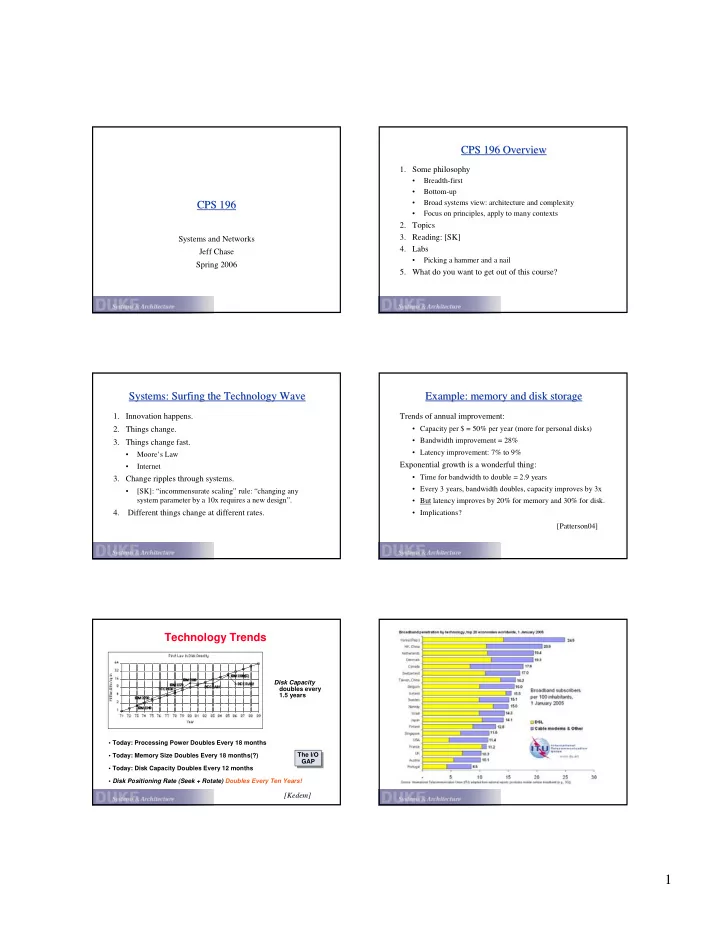
Technology Trends

Disk Capacity doubles every 1.5 years

  • Today: Processing Power Doubles Every 18 months
  • Today: Memory Size Doubles Every 18 months(?)
  • Today: Disk Capacity Doubles Every 12 months
  • Disk Positioning Rate (Seek + Rotate) Doubles Every Ten Years!

The I/O GAP The I/O GAP

[Kedem]

slide-2
SLIDE 2

2

Broader Importance of Distributed Software Technology Broader Importance of Distributed Software Technology Today, the global community depends increasingly on distributed information systems technologies. There are many recent examples of high-profile meltdowns of systems for distributed information exchange.

  • Code Red worm: July 2001
  • denial-of-service attacks against Yahoo etc. (spring 00)
  • stored credit card numbers stolen from CDNow.com (spring

00) People were afraid to buy over the net at all just a few years ago!

  • Network Solutions DNS root server failure (fall 00)
  • MCI trunk drop interrupts Chicago Board of Exchange

(summer 99)

These reflect the reshaping of business, government, and society brought by the global Internet and related software.

We have to “get it right”!

September 11, 2001 September 11, 2001

The 9/11 load spike at CNN.com:

  • complete collapse
  • scramble to manually deploy new servers

How can we handle “flash crowds”?

  • Buy/install enough hardware for worst-case load?
  • Block traffic?
  • Adaptive provisioning?
  • Steal resources from less critical services?

That Other September 11 That Other September 11

This is a graph of request traffic to download the Starr Report on Pres. Clinton’s extracurricular pursuits, released on 9/11/98.

The Importance of Authentication The Importance of Authentication

EMLX

This is a picture of a $2.5B move in the value of Emulex Corporation, in response to a fraudulent press release by short-sellers through InternetWire in

  • 2000. The release was widely disseminated by news media as a statement

from Emulex management.

[reproduced from clearstation.com]

Manageability Manageability

Today, “cost” has a broader meaning than it once did:

  • growth in administrative overhead with capacity
  • no interruption of service to upgrade capacity

“24 * 7 * 365 * .9999”

vendor 5% staff 40% facility 5% 50% vendor 40% staff 40% facility 20%

Old World New World Where does the money go?

[Borrowed from Jim Gray]

Self Self-

  • Managing Systems

Managing Systems

IBM’s Autonomic Computing Challenge

slide-3
SLIDE 3

3

Complexity Complexity

Growth and Change Complexity ??? The operating system (OS) defines an interface between programs and machines. An OS implements a sort of virtual machine that is easier to program and share than the raw hardware.

Operating Systems: The Classical View Operating Systems: The Classical View

[McKinley]

machine interface

User Applications Operating System Architecture

system call interface

Studying Operating Systems Studying Operating Systems

This course deals with “classical” operating systems issues:

  • the services and facilities that operating systems provide;
  • OS implementation on modern hardware;

(and architectural support for modern operating systems)

  • how hardware and software evolve together;
  • the techniques used to implement software systems that are:

large and complex, long-lived and evolving, concurrent, performance-critical.

The World Today The World Today

Internet

LAN/SAN Network

Servers database file web ...

mobile devices Internet appliances

desktop clients Server farms (clusters)

The Machine The Machine

Let’s start from where we left off in CPS 104…

The OS and the Hardware The OS and the Hardware

The OS is the “permanent” software with the power to:

  • control/abstract/mediate access to the hardware

CPUs and memory I/O devices

  • so user code can be:

simpler device-independent portable even “transportable”

I/O Bus

Memory Bus

Processor Cache Main Memory Disk Controller Disk Disk Graphics Controller Network Interface Graphics Network interrupts I/O Bridge

slide-4
SLIDE 4

4

The OS and User Applications The OS and User Applications

The OS defines a framework for users and their programs to coexist, cooperate, and work together safely, supporting:

  • concurrent execution/interaction of multiple user programs
  • shared implementations of commonly needed facilities

“The system is all the code you didn’t write.”

  • mechanisms to share and combine software components

Extensibility: add new components on-the-fly as they are developed.

  • policies for safe and fair sharing of resources

physical resources (e.g., CPU time and storage space) logical resources (e.g., data files, programs, mailboxes)

Overview of OS Services Overview of OS Services

Storage: primitives for files, virtual memory, etc.

control devices and provide for the “care and feeding” of the memory system hardware and peripherals

Protection and security

set boundaries that limit damage from faults and errors establish user identities, priorities, and accountability access control for logical and physical resources

Execution: primitives to create/execute programs

support an environment for developing and running applications

Communication: “glue” for programs to interact

The Big Questions The Big Questions

  • 1. How to divide function/state/trust across components?

reason about flow of data and computation through the system

  • 2. What abstractions/interfaces are sufficiently:

powerful to meet a wide range of needs? efficient to implement and simple to use? versatile to enable construction of large/complex systems?

  • 3. How can we build:

reliable systems from unreliable components? trusted systems from untrusted components? unified systems from diverse components? coherent systems from distributed components?

Video: an old-timer’s view. (If time and inclination.)

Questions about (Operating) Systems Questions about (Operating) Systems

  • What makes an OS good or not? What are the most

important dimensions of “goodness”?

  • What are the parts of an operating system? Where is the

boundary between “the system” and the applications?

  • What makes an OS different from any other big program? Is

it any harder to build an OS that “doesn’t suck” than it is to build anything else?

Unyielding foundations rule

  • We can build bridges that does not fall down, why not an

OS?

The Four Faces of Your Operating System The Four Faces of Your Operating System

  • service provider

The OS exports commonly needed facilities with standard interfaces, so that programs can be simple and portable.

  • executive/bureaucrat/juggler

The OS controls access to hardware, and allocates physical resources (memory, disk, CPU time) for the greatest good.

  • caretaker

The OS monitors the hardware and intervenes to resolve exceptional conditions that interrupt smooth operation.

  • cop/security guard

The OS mediates access to resources and grants/denies requests.

slide-5
SLIDE 5

5

Classical View: The Questions Classical View: The Questions

The basic issues/questions in this course are how to:

  • allocate memory and storage to multiple programs?
  • share the CPU among concurrently executing programs?
  • suspend and resume programs?
  • share data safely among concurrent activities?
  • protect one executing program’s storage from another?
  • protect the code that implements the protection, and

mediates access to resources?

  • prevent rogue programs from taking over the machine?
  • allow programs to interact safely?

Where Do We Go From Here? Where Do We Go From Here?

  • Unix
  • Virtual machines
  • Linux and Xen
  • Network system calls
  • Internet servers and Web servers
  • Threads and concurrency