Workplace Wellbeing - Tennessee Chapter Agenda - WellBeing OverOne - - PowerPoint PPT Presentation

workplace wellbeing tennessee chapter
SMART_READER_LITE
LIVE PREVIEW

Workplace Wellbeing - Tennessee Chapter Agenda - WellBeing OverOne - - PowerPoint PPT Presentation

Workplace Wellbeing - Tennessee Chapter Agenda - WellBeing OverOne Day in the Workplace Findinga Healthy Space in the Office FindingHealthResources in the Office OptimizingBuildingPerformance to Combat Transmission 3 Elements of Well


slide-1
SLIDE 1

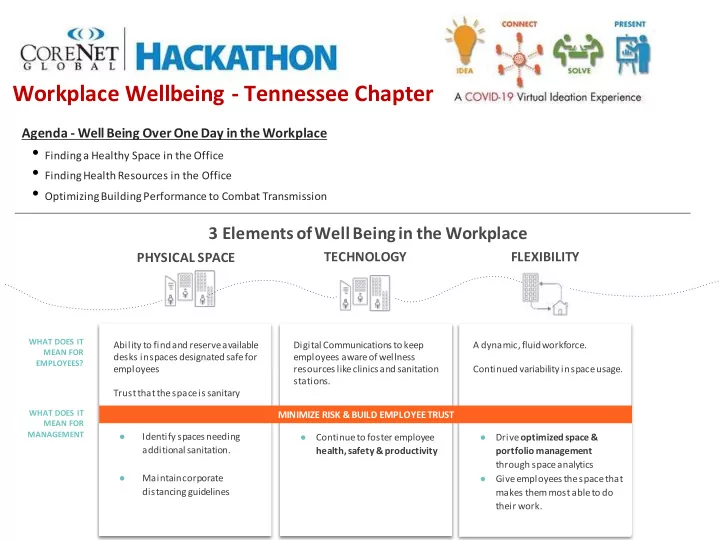
Workplace Wellbeing - Tennessee Chapter

3 Elements of Well Being in the Workplace

  • Continue to foster employee

health, safety & productivity

TECHNOLOGY PHYSICAL SPACE

WHAT DOES IT MEAN FOR MANAGEMENT

  • Drive optimized space &

portfolio management through space analytics

  • Give employees the space that

makes them most able to do their work.

WHAT DOES IT MEAN FOR EMPLOYEES?

A dynamic, fluid workforce. Continued variability in space usage.

FLEXIBILITY

Ability to find and reserve available desks in spaces designated safe for employees Trust that the space is sanitary

  • Identify spaces needing

additional sanitation.

  • Maintain corporate

distancing guidelines Digital Communications to keep employees aware of wellness resources like clinics and sanitation stations. MINIMIZE RISK & BUILD EMPLOYEE TRUST

Agenda - WellBeing OverOne Day in the Workplace

  • Findinga Healthy Space in the Office
  • FindingHealthResources in the Office
  • OptimizingBuildingPerformance to Combat Transmission
slide-2
SLIDE 2

Ok, looks like my group is going into the office

  • tomorrow. I’ll book an
  • pen desk.

I’m going to place a lunch

  • rder and avoid the Cafe.

Is it open? How do I know my desk is safe and sanitary? I don’t have anymore meetings, going to work from home Before I leave for the day, I want to check density across the buildings I manage.

A DAY IN THE LIFE

*Visual from ComfyApp

slide-3
SLIDE 3

And I’ll check the latest policy updates. I need to book an open room on this floor with enough space for 2 people.

Finding A Desk

Use Workplace App to facilitate Desk Booking:

  • Support social distancing by disabling specific desks for reservation and

hiding them from search

  • Desk availability is visible in the App for each floor, enabling

employees to find and reserve areas to work

  • Reserve desks in advance, for the entire day, to ensure cleaning

schedule compliance (limit one desk, per employee, per day)*

  • Search for and locate colleagues’ workstations for that day
  • Desks can specifically be marked as closed* and/or booked for

multiple days*

  • Send work requests (anonymously or not) directly from desks

Value delivered:

  • Readily manage building capacity and comply with social distancing

layout

  • Employees are able to easily find and reserve available desks
  • Aids staggered workforce and partially opened campuses

Icons can be placed in hot desk areas, explaining that some desks are unavailable for booking to maintain social distancing *Visual from ComfyApp

slide-4
SLIDE 4

Ok, looks like my group is going into the office

  • tomorrow. I’ll book an
  • pen desk in Comfy.

I’m going to place a lunch

  • rder and avoid the Cafe.

Is it open? How do I know my desk is safe and sanitary? I don’t have anymore meetings, going to work from home Before I leave for the day, I want to check density across the buildings I manage.

A DAY IN THE LIFE

*Visual from ComfyApp

slide-5
SLIDE 5

Trusting Your Space

  • 01. Develop people-focused policies and procedures
  • 03. Create spaces that allow people to be “alone together”
  • 02. Assure employee safety and well-being
  • Establish flexible work

strategies such as remote work options, alternate shifts

  • f A/B team schedules, and

phase employees’ return to work in stages.

  • Allocate spaces and tools to

discourage shared usage through assigned seats and dedicated electronics, equipment and meeting spaces.

  • Consider spacious

layouts or stagger users to maintain 6’ minimum distances.

  • Create enclosures or delineate space

through incorporating architectural solutions and/or adding screens, panels, dividers and storage units to define existing workstations.

  • Reduce the

number of people in meeting spaces.

  • Maintain a healthy physical environment. Specify fabric and finishes with

antimicrobial properties and/or bleach-cleanable surfaces.

  • Add sensors and no-touch technology for hands-free operation.
  • Support employee health and wellness through temperature checks,

sponsoring programs for physical and mental well-being, and encourage employees to stay home when not feeling well.

  • Upgrade HVAC Systems to enhance filtration –consider hospital

grade filters.

  • Assure ventilation keeps clean air flowing in and helps direct air

down.

  • Borrow practices and ideas from healthcare/hospital design.
  • Bring in outside air when possible.
  • Investigate potential of UV technologies to enhance overall indoor

air quality.

  • Add a robust and regular cleaning protocol, including daily day –and

nighttime cleanings and scheduled deep cleanings, like electro-static cleaning.

  • Establish a clean desk/clean meeting space policy to enable a

cleaning crew to thoroughly clean all desk and spaces.

  • 04. Upgrade HVAC Systems and Office Cleanliness
slide-6
SLIDE 6

Trusting Your Space

Add taller glass or fabric stackers to existing panels. Add screens to height adjustable tables and increase height or existing spine mounted screens. Add doors or perpendicular panels and returns to existing stations to create barriers along the corridor and open environment. Add enclosure along corridors and between dedicated workspace and

  • pen, ancillary space.

Add dividing screens to benching applications.

  • Reduce number of seats

and large meeting

  • tables. Consider Round

tables to ensure proper distancing.

  • Consider non-

rectangular modular table configurations for greater distancing. Add separation between lounge seating and provide individual, dedicated work surfaces.

  • Repurpose formerly shared

meeting areas as dedicated team spaces.

  • Create distinct zones for small

teams.

  • Use desktop screens to

indicate maximum occupancy and seating pattern.

  • Reduce the number of
  • ccupants allowed in meeting

and collaborative spaces.

  • Employ touchless meeting

room technology. Orient lounge chairs away for privacy and proper distancing. *Visual from Knoll

slide-7
SLIDE 7

Ok, looks like my group is going into the office

  • tomorrow. I’ll book an
  • pen desk in Comfy.

I’m going to place a lunch order and avoid the Cafe. Is it open? How do I know my desk is safe and sanitary? I don’t have anymore meetings, going to work from home Before I leave for the day, I want to check density across the buildings I manage.

A DAY IN THE LIFE

*Visual from ComfyApp

slide-8
SLIDE 8

Real Time Communication

Communication Planning:

  • Regional & Site specific
  • Collective buy in from multiple stakeholders – recruit “change

champions”

  • Contingency for how to manage a diagnosed case on campus

Varied Communication Channels:

  • Digital Signage
  • Intranet
  • Workplace Applications with searchable wellness features
  • Stickers in elevator & high traffic areas

Real or Near Real Time Information:

  • Update Employees as state regulations change
  • Keep the status of office amenities- clinics, cafes, gym’s up to date.
  • Clearly indicate that a space has been cleaned and sanitized after
  • use. Draw attention to sanitization stations for employee use.
slide-9
SLIDE 9

Ok, looks like my group is going into the office

  • tomorrow. I’ll book an
  • pen desk in Comfy.

I’m going to place a lunch order and avoid the Cafe. Is it open? How do I know my desk is safe and sanitary? I don’t have anymore meetings, going to work from home Before I leave for the day, I want to check density across the buildings I manage.

A DAY IN THE LIFE

*Visual from ComfyApp

slide-10
SLIDE 10

And I’ll check the latest policy updates. I need to book an open room on this floor with enough space for 2 people.

MEETING DISTANCING GOALS

*Visual from ComfyApp

Use Analytics to Track Occupancy

  • Identify high density areas with sensors or WiFi-based reporting
  • Determine where additional desks or spaces should be added

to reduce density

  • Determine which floors should be opened or closed based
  • n occupancy and traffic patterns
  • Review data to ensure that desks and spaces were not being used
  • utside of specified hours
  • Identify areas which may benefit from additional cleaning periods

based on employee traffic

Value delivered:

  • Plan for opening of additional areas and floors based on data, not

intuition

  • Ensure that cleaning resources are allocated based on usage.
slide-11
SLIDE 11

Ok, looks like my group is going into the office

  • tomorrow. I’ll book an
  • pen desk in Comfy.

I’m going to place a lunch

  • rder and avoid the Cafe.

Is it open? How do I know my desk is safe and sanitary? I don’t have anymore meetings, going to work from home Before I leave for the day, I want to check density across the buildings I manage.

A DAY IN THE LIFE

*Visual from ComfyApp

slide-12
SLIDE 12

And I’ll check the latest policy updates.

Flexibility to Work From Home

Extend and Broaden Work From Home:

  • Follow lead of Tech leaders in extending work from home

to the fall.

  • Reduces obligation to come to office when feeling ill
  • Reduces number of employees in office at any one time.

Create Home Office Ergonomics Program:

  • Equip employees with proper IT devices, task seating,

monitor arms, lighting, and desking to encourage a positive and supportive at-home work environment.

  • Train employees on proper ergonomic practices and habits

to support a healthy environment when working from home.

  • Educate employees on successful WFH and remote work

habits and practices.

  • Educate managers on how to successfully manage a

remote team.

*Visual from Knoll Help employees get the most out of their home office.