When an Object Is Required Methods called outside the object - - PDF document

when an object is required
SMART_READER_LITE
LIVE PREVIEW

When an Object Is Required Methods called outside the object - - PDF document

When an Object Is Required Methods called outside the object definition require an object to More About Objects and precede the method name For example: Methods Oracle myOracle = new Oracle(); //myOracle is not part of the definition


slide-1
SLIDE 1

1 More About Objects and Methods

Chapter 5

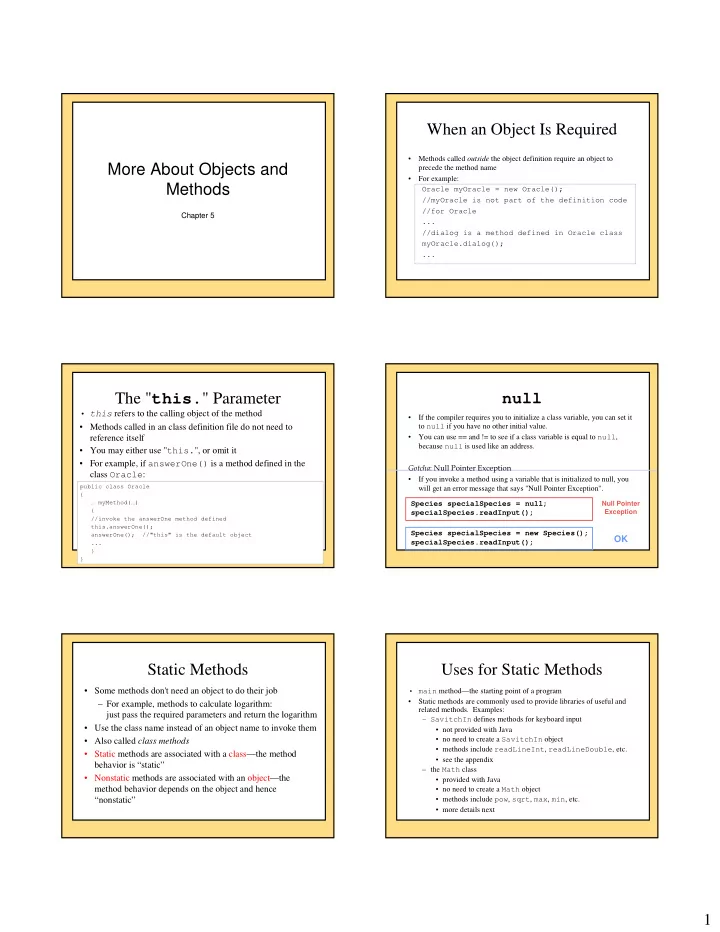
When an Object Is Required

  • Methods called outside the object definition require an object to

precede the method name

  • For example:

Oracle myOracle = new Oracle(); //myOracle is not part of the definition code //for Oracle ... //dialog is a method defined in Oracle class myOracle.dialog(); ...

The "this." Parameter

  • this refers to the calling object of the method
  • Methods called in an class definition file do not need to

reference itself

  • You may either use "this.", or omit it
  • For example, if answerOne() is a method defined in the

class Oracle:

public class Oracle { … myMethod(…) { //invoke the answerOne method defined this.answerOne(); answerOne(); //"this" is the default object ... } }

null

  • If the compiler requires you to initialize a class variable, you can set it

to null if you have no other initial value.

  • You can use == and != to see if a class variable is equal to null,

because null is used like an address.

  • If you invoke a method using a variable that is initialized to null, you

will get an error message that says "Null Pointer Exception". Species specialSpecies = null; specialSpecies.readInput(); Species specialSpecies = new Species(); specialSpecies.readInput();

Null Pointer Exception

OK

Static Methods

  • Some methods don't need an object to do their job

– For example, methods to calculate logarithm: just pass the required parameters and return the logarithm

  • Use the class name instead of an object name to invoke them
  • Also called class methods
  • Static methods are associated with a class—the method

behavior is “static”

  • Nonstatic methods are associated with an object—the

method behavior depends on the object and hence “nonstatic”

Uses for Static Methods

  • main method—the starting point of a program
  • Static methods are commonly used to provide libraries of useful and

related methods. Examples: – SavitchIn defines methods for keyboard input

  • not provided with Java
  • no need to create a SavitchIn object
  • methods include readLineInt, readLineDouble, etc.
  • see the appendix

– the Math class

  • provided with Java
  • no need to create a Math object
  • methods include pow, sqrt, max, min, etc.
  • more details next
slide-2
SLIDE 2

2

The Math Class (p335 4th Ed.)

  • Includes constants Math.PI (approximately 3.14159) and Math.E (base
  • f natural logarithms which is approximately 2.72)
  • Includes three similar static methods: round, floor, and ceil

– All three return whole numbers (although they are type double) – Math.round returns the whole number nearest its argument Math.round(3.3) returns 3.0 and Math.round(3.7) returns 4.0 – Math.floor returns the nearest whole number that is equal to or less than its argument Math.floor(3.3) returns 3.0 and Math.floor(3.7) returns 3.0 – Math.ceil (short for ceiling) returns the nearest whole number that is equal to or greater than its argument Math.ceil(3.3) returns 4.0 and Math.ceil(3.7) returns 4.0

Static Methods

  • Declare static methods with the static modifier, for

example: public static double log(double value) ...

Static/nonstatic methods

public class Person { public static void main(String[] args) // no associated object { } public void setName(String name) // depends on an object { } }

Static Attributes

  • Static attributes are associated with a class

– A constant:

  • public static final double PI

– An attribute shared by all objects in the class

  • private static int objectCounter
  • Keep track of how many objects are created
  • Should not be used as “global variables” within the class ---

any object can inappropriately modify it

  • Non-static attributes are associated with an object

– For describing different objects (instance variables)

  • private String name

– Values are therefore different depending on the object – Constants should not be nonstatic, why?

Static Attributes (Variables)

  • The StaticDemo program in the text uses a static attribute:

private static int numberOfInvocations = 0;

  • Similar to definition of a named constant, which is a special case of

static variables.

  • May be public or private but are usually private for the same reasons

instance variables are.

  • Only one copy of a static variable and it can be accessed by any object
  • f the class.
  • May be initialized (as in example above) or not.
  • Can be used to let objects of the same class coordinate.
  • Not used in the rest of the text.

Static/nonstatic methods/attributes

public class Person { private String _name; // different for each object private static final bool HAS_NOSE = true; // shared constant public static void main(String[] args) // no associated object { } public void setName(String name) // depends on an object { } }

slide-3
SLIDE 3

3

  • A static method doesn’t have a calling
  • bject

– cannot refer to a (nonstatic) attribute of the class. Why? – cannot call a nonstatic method of the class directly

  • unless it creates an object of the class to use

as a calling object.

Static Methods and Attributes Static/nonstatic methods/variables

public class Person { private String _name; // different for each object private static final bool HAS_NOSE = true; // shared constant public static void main(String[] args) // no associated object { _name = “John Jay”; // ??? setName(“John Jay”); // ??? Person jj = new Person(); jj.setName(“John Jay”); } public void setName(String name) // depends on an object { this._name = name; // this. is optional } }

Static/nonstatic methods/variables

class Person HAS_NOSE: true main()

  • bject jj
  • bject mm object cc

_name: “John Jay” setName() _name: “Mary Mott” setName() _name: “Chris Card” setName()

Wrapper Classes

  • Used to wrap primitive types in a class structure
  • All primitive types have an equivalent class
  • The class includes useful constants and static methods, including one

to convert back to the primitive type Primitive type Class type Method to convert back int Integer intValue() long Long longValue() float Float floatValue() double Double doubleValue() char Character charValue()

Wrapper class example: Integer

  • Declare an Integer class variable:

Integer n = new Integer();

  • Convert the value of an Integer variable to its primitive

type, int: int i = n.intValue();//intValue returns an int

  • Some useful Integer constants:

– Integer.MAX_VALUE - the maximum integer value the computer can represent – Integer.MIN_VALUE - the smallest integer value the computer can represent

Wrapper class example: Integer

  • Some useful Integer methods:

– Integer.parseInt("123") to convert a string of numerals to an integer – Integer.toString(123) to convert an Integer to a String

  • The other wrapper classes have similar constants and

methods

  • See the text for useful methods for the class Character

(p. 341 4th Ed.)

slide-4
SLIDE 4

4 Usage of wrapper classes

Wrapper Class

  • variables contain the address of the

value

  • variable declaration example:

Integer n;

  • variable declaration & init:

Integer n = new Integer(0);

  • assignment:

n = new Integer(5); Primitive Type

  • variables contain the value
  • variable declaration example:

int n;

  • variable declaration & init.:

int n = 0;

  • assignment:

n = 5;

There are some important differences in the code to use wrapper classes and that for the primitive types

Designing Methods: Top-Down Design

  • In pseudocode, write a list of subtasks that the method must do.
  • If you can easily write Java statements for a subtask

– you are finished with that subtask.

  • If you cannot easily write Java statements for a subtask

– treat it as a new problem and break it up into a list of subtasks.

  • Eventually, all of the subtasks will be small enough to easily design

and code.

  • Solutions to subtasks might be implemented as private helper methods.
  • Top-down design is also known as divide-and-conquer
  • r stepwise refinement.

Programming Tips for Writing Methods

  • Apply the principle of encapsulation and detail hiding by

using the public and private modifiers judiciously – If the user will need the method

  • declare it public

– If the method is used only within the class definition -- a helper method

  • declare it private

Testing a Method

  • Test programs are sometimes called driver programs
  • Keep it simple: test only one new method at a time
  • If method A uses method B, there are two approaches:
  • Top down

– test method A and use a stub (“dummy method”) for method B – A stub is a method that stands in for the final version and does little actual work.

  • does something as trivial as printing a message or returning a

fixed value (so simple that it can’t have bugs).

  • Bottom up

– test method B fully before testing A

Java Tip: You Can Put a main in Any Class

  • Usually main is by itself in a class definition.

– main method NOT in a class that is used to create

  • bjects
  • Adding a diagnostic main method to a class

– easier to test the class's methods.

  • When the class is used to create objects

– the main method is ignored.

  • main must be static

– can't invoke nonstatic methods of the class in main unless you create an object of the class.

main() in Multiple Classes

class PersonDriver { public static void main() { Person jj = new Person(); doStuff(); } public static void doStuff() { // … } } class Person { private String _name; public static void main() { // for testing Person // starting point if Person is run // *ignored* if PersonDriver is run Person jj = new Person(); } public String getName() //… }

slide-5
SLIDE 5

5 Methods with the Same Name

  • A method depositing some money to an account
  • Allow depositing amounts of different types (e.g. 1.45, “1.45”)
  • We could:

– depositDouble(double amount) – depositString(String amount) – depositDollarsCents(int dollars, int cents)

  • Nicer:

– deposit(double amount) – deposit(String amount) – deposit(int dollars, int cents)

  • “Overloading” a method

Overloading

  • The same method name has more than one definition within

the same class

  • Each definition must have a different “signature” (though the

same method name) – different parameter types – different number of parameters – different ordering of parameter types – return type is not part of the signature

  • cannot be used to distinguish between two methods with the same

name and parameter types

  • If the parameter types are different, return type can be different

Signature

  • combination of method name and number/types/order of

parameters

  • equals(Species) has a different signature than

equals(String)

– same method name, different parameter types

  • myMethod(1) has a different signature than

myMethod(1, 2)

– same method name, different number of parameters

  • myMethod(10, 1.2) has a different signature than

myMethod(1.2, 10)

– same method name and number of parameters, but different order

  • f parameter types

Overloading and Argument Type

  • Accidentally using the wrong datatype as an argument can

invoke a different method

  • For example, see the Pet class in the text

– set(int age) sets the pet's age – set(double weight) sets the pet's weight – You want to set the pet's weight to 6 pounds:

  • set(6.0) works as you want because the

argument is type double

  • set(6) will set the age to 6, not the weight, since

the argument is type int

Overloading and Method Matching

  • set(String name, int age, double weight)
  • obj.set(“Lassie”, 3, 40.1);
  • obj.set(“Lassie”, 3.1, 40.1);
  • obj.set(“lassie”, 3, 40);
  • obj.set(“Lassie”, 3.1, 40);
  • obj.set(“Lassie”, 40, 3);

Gotcha: Overloading and Automatic Type Conversion

  • If Java does not find a signature match, it attempts some automatic type

conversions, e.g. int to double

  • An unwanted version of the method may execute
  • In the text Pet example of overloading:

What you want: name "Cha Cha", age 3, and weight 10 – set(String name, int age, double weight) – But you make two mistakes:

  • 1. you reverse the age and weight numbers, and
  • 2. you fail to make the weight a type double.

– set("Cha Cha", 10, 3) does not do what you want

  • it sets the pet's age = 10 and the weight = 3.0

– Why?

  • set has no definition with the argument types String, int, int
  • However, it does have a definition with String, int, double,

so it promotes the last number, 3, to 3.0 and executes the method with that signature

slide-6
SLIDE 6

6

Gotcha: You Cannot Overload Based on the Returned Type

  • Compiler will not allow two methods with same name, same types and

number of parameters, but different return types in the same class:

  • In a situation like this you would have to change the name of one

method or change the number or types of parameters.

public double getWeight() public char getWeight()

Can't have both in the same class

Constructors

  • A constructor is a special method

– Initialize attributes

  • Automatically called when an object is created using new
  • Has the same name as the class
  • Often overloaded (more than one constructor for the same class

definition) – different versions to initialize all, some, or none of the instance variables – each constructor has a different signature (a different number or sequence of argument types)

Defining Constructors

  • Constructor headings do not include a return type
  • default constructor

– constructor with no parameters.

  • If no constructor is provided

– Java automatically creates a default constructor.

  • If any constructor is provided

– no constructors are created automatically. Programming Tip

  • Include a constructor that initializes all attributes.
  • Include a constructor that has no parameters

– default constructor

Constructor Example from PetRecord

public class PetRecord { private String name; private int age; //in years private double weight; //in pounds . . . public PetRecord(String initialName) { name = initialName; age = 0; weight = 0; } Initializes three instance variables: name from the parameter and age and weight with default initial values. Sample use: PetRecord pet1 = new PetRecord("Eric");

Using Constructors

  • Using the Pet class in text:

Pet myCat = new Pet("Calvin", 5, 10.5);

– this calls the Pet constructor with String, int, double parameters

  • Changing values of attributes after you have

created an object – set methods should be provided for this purpose

Programming Tip: You Can Use Other Methods in a Constructor

public PetRecord(String initialName, int initialAge, double initialWeight) { name = initialName; if ((initialAge < 0) || (initialWeight < 0)) { System.out.println("Error…"); } else { age = initialAge; weight = initialWeight; } }

  • less method invocation
  • verhead

public PetRecord(String initialName, int initialAge, double initialWeight) { set(initialName, initialAge, initialWeight); }

  • shorter
  • possibly more consistent

with other constructors and methods

slide-7
SLIDE 7

7 Types of Constructors

1. Default Constructor

– Default values for attributes – Overriding the one provided by Java – Defining: public Person() – Using: new Person();

2. Regular Constructor

– Initial values for attributes are passed in as parameters – Defining: public Person(String name, int age, …) – Using: new Person(“John”, 12, …);

3. Copy Constructor

– Make a copy of the object passed in as the parameter – Copy the attribute values from the object in the parameter – Defining: public Person(Person original) – Using: new Person(mark);

public static Attributes

  • static: associated with a class
  • public: access from any class
  • public static type name;

– “Global variables” – Bad: points will be deducted unless they are well justified – Laziness is not a good reason, use parameters and return values for communication among methods

  • public static final type name;

– “Global constants” – Good: if the “constants” could be used by any class – Math.PI

private static Attributes

  • static: associated with the class
  • private: access only by the class
  • private static type name;

– “Semi-global variables” – Access by any object in the class – Not ok: points will be deducted; needs to be well justified – Laziness is not a good reason

  • private static final type name;

– “Semi-global constants” – Good: constants used by any object in the class

static Attributes (class level)

Semi-global constants within a class Semi-global variables within a class: not OK (need good justifications) private Global constants Global variables: bad (need very good justifications) public static final static

Non-static Attributes (object level)

Good if you intend each object has a different constant that does not change in its lifespan (the value must be set in the constructor) Good: encapsulation and information hiding private Not ok (lack information hiding) Bad public final (non-static)

private final (non-static) Attributes

public class Person { private final String _name; private int _age; public Person(String name, int age) { _name = name; // assignment must be in constructor // not in a method _age = age; } }

slide-8
SLIDE 8

8 Gotcha: Privacy Leaks

  • Using attributes of a class type takes special care
  • Unlike primitive types, object identifiers contain the object's address,

not its value – returning an object gives back the address, so the called method has direct access to the object – the object is "unprotected" (usually undesirable)

  • One solution: stick to returning primitive types (int, char, double,

boolean, etc.) or String

  • Another solution: use private final for values that should not

be changed

  • Use copy constructor, and return a copy of the object
  • cloning, see Appendix 8 (outside this course)

What is actually private in class Presidency?

public class Presidency { private Person _president, _vp; public Presidency(String p, String vp) { _president = new Person(p); _vp = new Person(vp); } public Person getPresident() { return _president; } public class Person { private String _name; public Person(String name) { _name = name; } public void setName(String name) { _name = name; } public class Demo { public static void main(String[] args) { Presidency pres42 = new Presidency(“Bush”, “Cheney”); Person w = pres42.getPresident(); pres42.print(); w.setName(“Kerry”); pres42.print(); } }

Objects at Different Levels

pres42 (class Presidency) @address123 (class Person) @address456 (class Person) private _president: @address123 private _vp: @address456 _name: “Bush” _name: “Cheney”

Packages

  • A way of grouping and naming a collection of related classes

– they serve as a library of classes – they do not have to be in the same directory as your program

  • The first line of each class in the package must be

the keyword package followed by the name of the package: package general.utilities;

  • To use classes from a package in a program put an import statement

at the start of the file: import general.utilities.*; – note the ".*" notation

Package Naming Conventions

  • Use lowercase
  • The name is the pathname with subdirectory separators ("\"
  • r "/", depending on your system) replaced by dots
  • For example, if the package is in a directory named

"utilities" in directory “general", the package name is: general.utilities

Package Naming Conventions

  • Pathnames are usually relative and use the CLASSPATH

environment variable

  • For example, if:

CLASSPATH=c:javastuff\libraries, and your directory utilities is in c:javastuff\libraries, then you would use the name: utilities – the system would look in directory c:javastuff\libraries and find the utilities package

slide-9
SLIDE 9

9 A Package Name

myjavastuff libraries general utilities AClass.java AnotherClass.java

Display 5.25

Classes in the package \myjavastuff\libraries is a class path base directory general.utilities is the package name

Summary

Part 1

  • A method definition can use a call to another

method of the same class

  • static methods can be invoked using the class

name (or an object name)

  • Top-down design method simplifies program

development by breaking a task into smaller pieces

  • Test every method in a program in which it is the
  • nly untested method

Summary

Part 2

  • Each primitive type has a corresponding wrapper class
  • Overloading: a method has more than one definition in the

same class (but the number of arguments or the sequence

  • f their data types is different)

– one form of polymorphism

  • Constructor: a method called when an object is created

(using new)

– default constructor: a constructor with no parameters