What is a Number? Rational Integer Seminar 2 Types of Numbers - - PowerPoint PPT Presentation

what is a number
SMART_READER_LITE
LIVE PREVIEW

What is a Number? Rational Integer Seminar 2 Types of Numbers - - PowerPoint PPT Presentation

Types of Numbers Complex Russian Dolls Model Real What is a Number? Rational Integer Seminar 2 Types of Numbers Natural Number Systems Representation in Computers C N Z Q R N ine Z ulu Q ueens R uled C hina Natural Numbers


slide-1
SLIDE 1

What is a Number?

Seminar 2 Types of Numbers Number Systems Representation in Computers

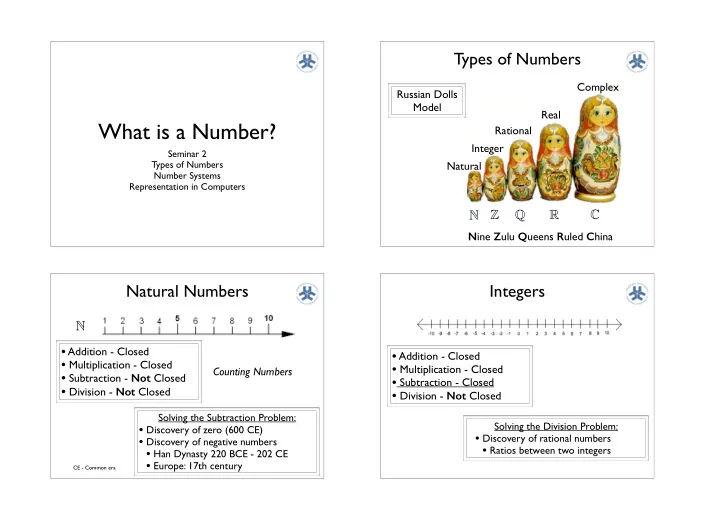
Types of Numbers

Natural Integer Rational Real Complex Russian Dolls Model Nine Zulu Queens Ruled China

N Z Q R C

Natural Numbers

  • Addition - Closed
  • Multiplication - Closed
  • Subtraction - Not Closed
  • Division - Not Closed

Solving the Subtraction Problem:

  • Discovery of zero (600 CE)
  • Discovery of negative numbers
  • Han Dynasty 220 BCE - 202 CE
  • Europe: 17th century

N

Counting Numbers

CE - Common era

Integers

  • Addition - Closed
  • Multiplication - Closed
  • Subtraction - Closed
  • Division - Not Closed

Solving the Division Problem:

  • Discovery of rational numbers
  • Ratios between two integers
slide-2
SLIDE 2

Rational Numbers

  • Addition - Closed
  • Multiplication - Closed
  • Subtraction - Closed
  • Division - Closed

Rational numbers are dense. Between any two of them, you can always find another!

  • Between 0 and 1 there an infinite number of rationals!

Q

Numerator Denominator

Numerator, Denominator are integers The denominator can not be 0

Decimal Representation of Fractions

Fractions are ultimately periodic: after a certain point the infinite sequence of digits consists of some finite sequence of digits repeated indefinitely!

Rational numbers are simple quantities:

  • They can be understood in finite terms;
  • Yet they can be used to represent distances as small or as

large as we please

Decimal Representation

1 3 = 0.333333333 . . . , 29 12 = 2.416666666 . . . , 9 7 = 1.285714285714285 . . . , 237 148 = 1.60135135135 . . .

Are the rationals adequate?

Since the rationals are dense, do we need any other quantity or can we even fit anything more on the number line?

?

What is the length of the diagonal of the unit square?

c2 = a2 + b2 = 12 + 12 = 1 + 1 = 2

c2 = 2 c = √ 2

Can not be expressed as the ratio of two integers! It is an irrational number!

Real Numbers

Real Numbers = Rational Numbers + Irrational Numbers

An irrational number is any number that can not be expressed as a ratio a/b where a and b are integers and b is not equal to 0

√ 2 = 1.4142135623730950488016887 . . .

In decimal notation an irrational number is any number that can not be represented as terminating or repeating decimals. In decimal notation a rational number is any number that can be represented as terminating or repeating decimals.

R

slide-3
SLIDE 3

Real Numbers

Some important irrational numbers in engineering!

π = C

d

π = 3.141592653589793238462643383279 . . . e = 2.7182818284590452353602874713526 . . .

→∞

  • eln(x) = x

ln(ex) = x

Euler’s number

e = 1 + 1

1 + 1 1×2 + 1 1×2×3 + 1 1×2×3×4 + · · ·

× ×

e = limn→∞

  • 1 + 1

n

n

Infinite Processes!

Since they are important numbers, we will want to represent them in a computer!

Countability

Q R

Dense Continuous

∞ N ⊂ Q ⊂ R

Are some infinite sets bigger than others?

Q R

Countable Uncountable

Continuum Hypothesis (Cantor) - There is no set whose cardinality is strictly between
 that of the integers and that of the real numbers.

Number Systems

The base of a system specifies the number of digits used Numbers are written and manipulated using positional notation.

Base-10: Decimal number system: Digits 0-9

Base-2: Binary number system: Digits 0-1 Base-8: Octal number system: Digits 0-7 Base-16: Hexadecimal number system: Digits 0-9, Letters A-F

Number Systems

⊂ ⊂ 7365 = 7 × 10³ + 3 × 10² + 6 × 101 + 5 × 100

Lets generalize from base 10 to any base:

× × × × dn × Bn−1 + dn−1 × Bn−2 + · · · + d2 × B1 + d1

× × · · · × If a number in the base-B number system has n digits, it is represented as the following polynomial, where di represents the digit in the i-th position

slide-4
SLIDE 4

Binary Number System

× × × × dn × Bn−1 + dn−1 × Bn−2 + · · · + d2 × B1 + d1

Decimal: B=10:

×

− ×

· · · × dn × 10n−1 + dn−1 × 10n−2 + · · · + d2 × 101 + d1 ⊂ ⊂ 7365 = 7 × 10³ + 3 × 10² + 6 × 101 + 5 × 100

Binary: B=2:

1101 = 1 × 23 + 1 × 22 + 0 × 21 + 1 × × × dn × 2n−1 + dn−1 × 2n−2 + · · · + d2 × 21 + d1

From Binary to Decimal

× × × dn × 2n−1 + dn−1 × 2n−2 + · · · + d2 × 21 + d1

How about from Decimal to Binary?

Binary Representation of a Positive Integer

  • 1. Divide the value by 2 and record the remainder.
  • 2. As long as the quotient obtained is not 0, continue


to divide the newest quotient by two and record
 the remainder

  • 3. Now that the quotient of 0 has been obtained, the


binary representation of the original value consists


  • f the remainders listed from right to left in the order


they were recorded.


Examples

What is the binary representation of 8? What is the binary representation of 5?

slide-5
SLIDE 5

Hexadecimal system

× × × × dn × Bn−1 + dn−1 × Bn−2 + · · · + d2 × B1 + d1

B=16:

×

− ×

· · · × dn × 16n−1 + dn−1 × 16n−2 + · · · + d2 × 161 + d1

0 0 0000 1 1 0001 2 2 0010 3 3 0011 4 4 0100 5 5 0101 6 6 0110 7 7 0111 8 8 1000 9 9 1001 A 10 1010 B 11 1011 C 12 1100 D 13 1101 E 14 1110 F 15 1111 Hex! Decimal! Binary!

  • Since there are only 10 decimal digits but the


base is 16, we need additional digits: A,B,C,D,E,F

  • Hexadecimal is shorthand notation for long


patterns of bits.

  • Each group of 4 bits can be represented by a 


single symbol.

  • 8 bits: 2 digits, 16 bits: 4 digits, 32 bits, 8 digits

10100011 becomes A3 A 3

Some Examples

What is 11000011 in hexadecimal notation? What is 11111101 in hexadecimal notation? C 3 F D What is E6 in decimal notation? 1110 0110 E*161 + 6*160 = 230 14*161 + 6*160 = 230

Information Storage & Processing

Goal: To understand how all modern computing systems and computation using such systems are based on binary numbers and

  • perations on them!

Computers execute binary computations. Any information we process is ultimately encoded and stored as binary numbers!

Images Video Sound Symbols Text

Any process on data is ultimately encoded and stored as binary numbers!

BITS - Binary Digits

Information in a computer is encoded as patterns of 1’s and 0’s.

Information = Bits + Context

The context provides an interpretation of the bit patterns! The same bit pattern can mean different things.

For instance, a numerical value, character or a program instruction!

Logical Computations 1= true 0= false And, Or Not

Context: logic

Numerical Computations

Addition, Subtraction Multiplication, Division

1

Context: Numbers

slide-6
SLIDE 6

Bits and Bytes

Byte ¡= ¡8 ¡bits ¡

Binary ¡000000002 ¡to ¡111111112 ¡ Decimal: ¡010 ¡to ¡25510 ¡ Hexadecimal ¡0016 ¡to ¡FF16

Most computers use blocks of 8 bits, or bytes, as the smallest addressable unit of memory

0 0 0000 1 1 0001 2 2 0010 3 3 0011 4 4 0100 5 5 0101 6 6 0110 7 7 0111 8 8 1000 9 9 1001 A 10 1010 B 11 1011 C 12 1100 D 13 1101 E 14 1110 F 15 1111 Hex! Decimal! Binary!

Bytes and Words

! Machine(Has(“Word(Size”(

! Nominal(size(of(integer0valued(data(

! Including(addresses(

! Most(current(machines(use(32(bits((4(bytes)(words(

! Limits(addresses(to(4GB( ! Becoming(too(small(for(memory0intensive(applicaDons(

! High0end(systems(use(64(bits((8(bytes)(words(

! PotenDal(address(space(≈(1.8(X(1019(bytes( ! x86064(machines(support(480bit(addresses:(256(Terabytes(

! Machines(support(mulDple(data(formats(

! FracDons(or(mulDples(of(word(size( ! Always(integral(number(of(bytes(

(10004)

Metric Prefixes

What is a Googol?

10100

1080

What is a current estimate

  • f atoms in the

“observable” universe?

Storage: Main Memory

Memory Cell: is a unit of memory (usually a byte), organized in a bit order: Virtual Memory: Programs refer to virtual addresses

  • Conceptually, it is a very large array of bytes.
  • System is actually implemented with a hierarchy of different memory types.

Address: A “name” that uniquely identifies one cell in the computer’s main memory

  • The names are actually numbers.
  • These numbers are assigned consecutively starting at zero.
  • Numbering the cells in this manner associates an order with the memory cells
  • • •!

00•••0 FF•••F

Byte Oriented Memory Organization

slide-7
SLIDE 7

Word Oriented Memory Organization

! Addresses&Specify&Byte&

Loca2ons&

! Address&of&first&byte&in&word& ! Addresses&of&successive&words&differ&

by&4&(328bit)&or&8&(648bit)& 0000 0001 0002 0003 0004 0005 0006 0007 0008 0009 0010 0011 32-bit! Words! Bytes! Addr.! 0012 0013 0014 0015 64-bit! Words!

Addr ! =! ?? Addr ! =! ?? Addr ! =! ?? Addr ! =! ?? Addr ! =! ?? Addr ! =! ?? 0000 0004 0008 0012 0000 0008

Number of Bytes

Measuring Memory Capacity

  • Kilobyte: 210 bytes = 1024 bytes

– Example: 3 KB = 3 times1024 bytes

  • Megabyte: 220 bytes = 1,048,576 bytes

– Example: 3 MB = 3 times 1,048,576 bytes

  • Gigabyte: 230 bytes = 1,073,741,824 bytes

– Example: 3 GB = 3 times 1,073,741,824 bytes My MacBook Pro: 16GB of main memory 750GB of secondary memory (flash disk)

Representing Integers in Computers

B2U(X) = xi ⋅2 i

i=0 w−1

[0001]! [0101]! [1011]! [1111]!

0! 1! 2! 3! 4! 5! 6! 7! 8! 9! 10! 11!12!13!14!15!16!

23 = 8! 22 = 4! 21 = 2! 20 = 1!

Unsigned Integers

BinaryToUnsigned

×

− ×

· · · × B2U(0001) = 0 × 23 + 0 × 22 + +0 × 21 + 1 = 0 + 0 + 0 + 1 = 1 B2U(0101) = 0 × 23 + 1 × 22 + +0 × 21 + 1 = 0 + 4 + 0 + 1 = 5 B2U(1011) = 1 × 23 + 0 × 22 + +1 × 21 + 1 = 8 + 0 + 2 + 1 = 11 B2U(1111) = 1 × 23 + 1 × 22 + +1 × 21 + 1 = 8 + 4 + 2 + 1 = 15

w= # of bits UMin ¡ = ¡ 0 ¡

000…0 ¡

UMax ¡ ¡= ¡ ¡2w ¡– ¡1 ¡

111…1

Numeric Range

w=4

Representing Integers

Decimal: !15213 Binary: 0011 1011 0110 1101 Hex: 3 B 6 D

long int C = 15213;

00 00 00 00 6D 3B 00 00 x86-64! 3B 6D 00 00 Sun! 6D 3B 00 00 IA32!

0x100 0x101 0x102 0x103

01 23 45 67

0x100 0x101 0x102 0x103

67 45 23 01 Big Endian! Little Endian! 01 23 45 67 67 45 23 01

! Big$Endian$

! Least&significant&byte&has&highest&address&

! Li*le$Endian$

! Least&significant&byte&has&lowest&address&

! Example$

! Variable&x&has&47byte&representa9on&0x01234567& ! Address&given&by&&x&is&0x100&

Big Endian Little Endian Byte Byte Byte Byte

slide-8
SLIDE 8

Representing Signed Integers in Computers

X" B2T(X)& B2U(X)& 0000" 0" 0001" 1" 0010" 2" 0011" 3" 0100" 4" 0101" 5" 0110" 6" 0111" 7" –8" 8" –7" 9" –6" 10" –5" 11" –4" 12" –3" 13" –2" 14" –1" 15" 1000" 1001" 1010" 1011" 1100" 1101" 1110" 1111" 0" 1" 2" 3" 4" 5" 6" 7"

Given 4 bits of memory, we can represent 24 unsigned numbers (24 - 1 if 0 is not included)

Suppose we wanted to represent both positive and negative
 numbers in memory....... We would need to find an efficient mapping between

  • ur binary numbers and roughly 24/2 positive numbers

and 24/2 negative numbers

Let’s do that!

Coding -6 in Two’s Complement Notation using 4 bits

Start with the binary representation of 6

Two’s Complement Examples

X" B2T(X)& B2U(X)& 0000" 0" 0001" 1" 0010" 2" 0011" 3" 0100" 4" 0101" 5" 0110" 6" 0111" 7" –8" 8" –7" 9" –6" 10" –5" 11" –4" 12" –3" 13" –2" 14" –1" 15" 1000" 1001" 1010" 1011" 1100" 1101" 1110" 1111" 0" 1" 2" 3" 4" 5" 6" 7"

Comparison with Unsigned

Representing Signed Integers in Computers

Two’s Complement Encoding

B2T(X) = −xw−1 ⋅2w−1 + xi ⋅2i

i=0 w−2

Sign Bit

[0001]! [0101]! [1011]! [1111]!

0! 1! 2! 3! 4! 5! 6! 7! 8!

– 23 = –8! 22 = 4! 21 = 2! 20 = 1!

–8!–7!–6!–5!–4!–3!–2!–1!

× × × B2T(0001) = −0 × 23 + 0 × 22 + +0 × 21 + 1 = 0 + 0 + 0 + 1 = 1 B2T(0101) = 0 × 23 + 1 × 22 + +0 × 21 + 1 = 0 + 4 + 0 + 1 = 5 B2T(1011) = −1 × 23 + 0 × 22 + +1 × 21 + 1 = −8 + 0 + 2 + 1 = −5 B2T(1111) = −1 × 23 + 1 × 22 + +1 × 21 + 1 = −8 + 4 + 2 + 1 = −1

TMin ¡ = ¡ ¡–2w–1 ¡

100…0 ¡

TMax ¡ ¡ = ¡ ¡2w–1 ¡– ¡1 ¡

011…1

Numeric Range

1 = negative Int 0 = positive Int

Half of U -1

w=4

slide-9
SLIDE 9

Representing Signed Integers in Memory

6D 3B 00 00 IA32, x86-64! 3B 6D 00 00 Sun!

int A = 15213;

93 C4 FF FF IA32, x86-64! C4 93 FF FF Sun!

int B = -15213;

Two’s Complement Representation

long int C = 15213;

00 00 00 00 6D 3B 00 00 x86-64! 3B 6D 00 00 Sun! 6D 3B 00 00 IA32! Decimal: !15213 Binary: 0011 1011 0110 1101 Hex: 3 B 6 D Decimal: !-15213 Binary: 1111 1111 1111 1111 1100 0100 1001 0011 Hex: F F F F C 4 9 3

Little Endian Big Endian

Addition/Subtraction converted to Two’s Complement Notation

For addition:

  • Same algorithm as for


binary addition.

  • any extra carry bit

generated on the left is truncated.

  • addition of any combination
  • f signed integers uses the

same algorithm and circuitry!

The Payoff!

For subtraction:

  • negate the number subtracted

and then add both together.

  • subtraction of any combination
  • f signed integers uses the same

algorithm and circuitry for addition plus an additional circuit for negation of an integer!

Example: 7 - 5

Numeric Ranges

Unsigned ¡Values ¡ UMin ¡= ¡ 0 ¡

000…0 ¡

UMax ¡ ¡ = ¡ ¡2w ¡– ¡1 ¡

111…1 ! W" ! 8" 16" 32" 64" UMax" 255! 65,535! 4,294,967,295! 18,446,744,073,709,551,615! TMax" 127! 32,767! 2,147,483,647! 9,223,372,036,854,775,807! TMin"

  • 128!
  • 32,768!
  • 2,147,483,648!
  • 9,223,372,036,854,775,808!

! !

Two’s ¡Complement ¡Values ¡ TMin ¡= ¡ ¡–2w–1 ¡

100…0 ¡

TMax ¡ ¡ = ¡ ¡2w–1 ¡– ¡1 ¡

011…1

For Different Word Sizes Representing Signed Integers in Excess Notation

  • Select pattern length to be used

4

  • Write down all different patterns


in the order they would appear if counting from bottom up.

  • Pick the 1st pattern with 1 as

most significant bit to represent 0

  • Patterns preceding 0 are used 


for -1, -2, -3 ...

  • Patterns proceeding 0 are used 


for 1, 2, 3, ...

If the pattern length is x, the difference between the bit pattern value and the value represented is 2x-1

x=4, excess-8 notation, x= 5, excess-16 notation

slide-10
SLIDE 10

Representing Fractions

Radix Point

2i# 2i$1# 4# 2# 1# 1/2# 1/4# 1/8#

2$j#

bi# bi$1# •••# b2# b1# b0# b$1# b$2# b$3# •••# b$j#

  • • •!

! Representa6on#

! Bits#to#right#of#“binary#point”#represent#frac6onal#powers#of#2# ! Represents#ra6onal#number:#

  • • •!

Representing Fractions

Radix Point

Shifting the binary point 1 position to the left has the effect of dividing the number by 2. Shifting the binary point 1 position to the right has the effect of multiplying the number by 2.

101.11 = 5 3/4 10.111 = 2 7/8 1011.1 =11 1/2

Shifting the decimal point 1 position to the left has the effect of dividing the number by 10. Shifting the binary point 1 position to the right has the effect of multiplying the number by 10. 145.238 14.5238 1452.38

decimal

Representable Numbers

! Limita&on)

! Can)only)exactly)represent)numbers)of)the)form)x/2k) ! Other)ra&onal)numbers)have)repea&ng)bit)representa&ons)

! Value

)Representa&on)

! 1/3

)0.0101010101[01]…2

! 1/5

)0.001100110011[0011]…2

! 1/10

)0.0001100110011[0011]…2

Assuming finite length encodings: Can approximate with increasing accuracy by lengthening the binary representation

So, we must eventually truncate!

Floating Point Representation

Representing a real value in a computer:

  • The sign - positive or negative
  • The mantissa - consists of digits in the value with the radix

point assumed to the left

  • The exponent - which determines how the radix point is

shifted relative to the mantissa (can be positive or negative)

The representation is called floating point because the number of digits is fixed but the radix point floats.

  • a positive exponent shifts the radix point to the right
  • a negative exponent shifts the radix point to the left

Let’s Assume an 8-bit fixed representation (usually much larger 64 bits):

  • sign: 1 bit,
  • exponent: 11 bits,
  • mantissa: 52 bits
slide-11
SLIDE 11

Decoding the value 01101011

1 1 0 1 11

Exponent encoded in excess-4

1 1 1 .

Extract Mantissa

1 1 0

Extract Exponent Interpret in excess-4

2

1 1 1 .

Move radix point to the right 2

2+0+1/2+1/4 = 2 3/4

Translate to decimal form Check sign bit 0 is positive 1 is negative

+ 2 3/4

2.75

Decoding the value 00111100

1 0 1 1 1 0 0

Exponent encoded in excess-4

1 1 0 0 .

Extract Mantissa

0 1 1

Extract Exponent Interpret in excess-4

  • 1

0/2+1/4+1/8 = 3/8

Translate to decimal form Check sign bit 0 is positive 1 is negative

+ 3/8

1 0 0 1

Move radix point to the left 1

.

0.375

Encoding the value 1 1/8 (1.125)

Exponent encoded in excess-4

. 0 1 1

Encode the number
 in binary notation Encode sign bit 0 is positive 1 is negative Copy the pattern into the mantissa (left to right)

Starting with leftmost 1

1 0 1 1 0 1 1 0 1 .

Imagine the radix point to the left of the mantissa value

Determine direction and length to move radix point to recover the

  • riginal binary number

1 to the right (+1)

1 0 1

Encode in exponent field using excess notation

1 0 1

Truncation Errors: Encoding the value 2 5/8 (2.625)

Exponent encoded in excess-4

Encode sign bit 0 is positive 1 is negative

1 1 0 .

Imagine the radix point to the left of the mantissa value

Determine direction and length to move radix point to recover the

  • riginal binary number

2 to the right (+1)

1 1 0

Encode in exponent field using excess notation

1 1 0 1 . 0 1

Encode the number
 in binary notation

1

2+1/2+1/8=2 5/8 Copy the pattern into the mantissa (left to right)

Starting with leftmost 1

1 1 0 1 1 0

Must truncate the rightmost 1 (1/8)

Result: 01101010 = 2 1/2 Truncation or Rounding error!

slide-12
SLIDE 12

Truncation Errors

Can cause significant problems in applications requiring high precision! There are many more repeating decimal numbers in binary than in decimal notation. Example: 1/10 Arithmetic with accumulated rounding errors can be problematic: 8 bit representation: 2 1/2 + 1/8 + 1/8 is not the same as 1/8 + 1/8 + 2 1/2 !!

Topic: Numerical Analysis

Worrying about Precisions

! Single'precision:'32'bits' ! Double'precision:'64'bits' ! Extended'precision:'80'bits'(Intel'only)'

s exp frac 1 8-bits 23-bits s exp frac 1 11-bits 52-bits s exp frac 1 15-bits 63 or 64-bits

10^-37 to 10^38

Precision: 7 decimal digits Single Precision

  • Encodes very small real numbers

and very large real numbers

  • very accurate precision to 7

decimals...

IEEE Floating Point Standard 754

! IEEE#Standard#754#

! Established#in#1985#as#uniform#standard#for#floa;ng#point#arithme;c#

! Before#that,#many#idiosyncra;c#formats#

! Supported#by#all#major#CPUs#

! Driven#by#numerical#concerns#

! Nice#standards#for#rounding,#overflow,#underflow# ! Hard#to#make#fast#in#hardware#

! Numerical#analysts#predominated#over#hardware#designers#in#defining#

standard#

The High Cost of Floating Point Overflow!

Sadly, the primary cause was found to be a piece of software which had been retained from the previous launcher’s systems and which was not required during the flight of Ariane 5. The software was used in the Inertial Reference System (SRI) to calculate the attitude of the launcher. In Ariane 4, this software was allowed to continue functioning during the first 50 seconds of flight as it could otherwise delay launching if the countdown was halted for any other reason, this was not necessary for Ariane 5. Additionly, the software contained implicit assumptions about the parameters, in particular the horizontal velocity that was safe for Ariane 4, but not Ariane 5. The failure occurred because the horizontal velocity exceeded the maximum value for a 16 bit unsigned integer when it was converted from it's signed 64 bit representation. This failure generated an exception in the code which was not caught and thus propagated up through the processor and ultimately caused the SRI to fail. The failure triggered the automatic fail-over to the backup SRI which had already failed for the same reason. This combined failure was then communicated to the main computer responsible for controlling the jets of the rocket, however, this information was misinterpreted as valid commands. As a result of the invalid commands, the engine nozzles were swung to an extreme position and the launcher was destroyed shortly afterwards. Ariane 5 was designed by the European Space Agency (ESA) as a replacement for the successful Ariane 4 launcher. The intention was to create a reliable, high capacity, launch vehicle for ESA that could be used to support their contribution to the International Space Station as well as a range of other commercial and scientific launches. On June 4, 1996, the US$500 million space craft was launched for the first time

slide-13
SLIDE 13

Additional Slides if extra time

Storing Text/Symbols

ASCII American Standard Code for Information Interchange

ASCII Character Set Originally used 7 bits/character + 1 bit used as a check bit

Extended Ascii Character Set

Extended ASCII Character Set Uses 8 bits/character 256 characters

Additional accented and other special symbols

ASCII Character Set

+

Enough for english but not for other languages!

Unicode Character Set

Goal: To represent every character in every language

  • n the planet, including ideograms, archaic languages,

all symbols, etc.

  • Includes extended ASCII with same encoding
  • Generally uses 16 bits per character (65536 chars)
  • Used by most modern programming languages today
slide-14
SLIDE 14

Representing Strings

! Strings(in(C(

! Represented)by)array)of)characters) ! Each)character)encoded)in)ASCII)format)

! Standard)79bit)encoding)of)character)set) ! Character)“0”)has)code)0x30)

– Digit)i))has)code)0x30+i)

! String)should)be)null9terminated)

! Final)character)=)0)

! Compa.bility(

! Byte)ordering)not)an)issue)

char S[6] = "18243";

Linux/Alpha! Sun! 31 38 32 34 33 00 31 38 32 34 33 00

Hex

Storing Images

  • A photograph is an analogue representation of an image
  • it is continuous across its surface and colors blend into each other.
  • Digitizing an image involves representing it as a collection of individual

dots called pixels (picture elements)

  • each pixel is composed of a single color
  • the number of pixels used in an image is called its resolution
  • if the resolution is high enough the human eye is tricked into

thinking it is viewing a continuous picture.

  • Apple: New retina displays
  • Two types of formats
  • Raster graphics format - pixel by pixel representation. (BMP

, GIF, JPEG, PNG)

  • Vector graphics format - describe in terms of lines and geometric

shapes (FLASH, SVG)

Storing Images - Raster Graphics

A Digital Image is a 2D array (matrix) of numbers

  • Intensity Images: Photographic like images encoding light intensities. 


Sensors: cameras, infrared

  • Range Images: Shape like images encoding shape and distance. 


Sensors: sonar, laser

Different resolutions

Pixel - Picture Element
 Bitmap - Collection of encoded pixels


3x3 bitmap using grayscale encoding 1 byte/pixel

Color Images- Raster Graphics Format

RGB Encoding Each pixel is encoded using 3 bytes, each measuring the intensity of the three primary colors, red, green and blue

1000x1000 pixel image = 1MegaPixel Image 3x1000 x 1000 = 3 MegaByte= 24MegaBit! Lots of Data!!!

slide-15
SLIDE 15

Vector Graphics Format

  • An image is described in terms of lines and geometric shapes
  • A vector graphic is a series of commands that describe a line’s

direction, thickness, and color

  • Files sizes tend to be small in this format
  • Each pixel does not have to be described
  • Size is dependent on the number of items in the image
  • Advantages
  • Raster graphic has to be encoded multiple times to account for

different sizes and proportions

  • Vector graphics can be resized mathematically with changes

calculated dynamically if needed.

  • Disadvantages
  • Vector graphics is not good for representing real-world images

Storing Sound

  • Sound is perceived when a series of air compressions vibrate a membrane in our

ear which then sends signals to the brain

  • Sound is defined in nature as an air wave that interacts with the brain
  • Stereo system
  • sends an electrical signal to a speaker to produce sound
  • the signal is an analog representation of the sound wave
  • the speaker receives a signal and causes the membrane to vibrate, which in

turn vibrates the air, which in turn vibrates the airdrum

  • The trick is to recreate the original signal in this manner
  • Representing audio data on a computer
  • The sound wave needs to be digitized
  • An analogue signal varies in voltage continuously
  • To digitize it, we periodically measure the voltage and record the appropriate

numerical value. (We sample the signal)

Storing Sound

Telephone: 8000 samples/second CD Quality: 44,100 samples/second

  • 16 bits/sample (mono)
  • 32 bits/sample (stereo)
  • For stereo: each second of music

requires more than a million bits!

Signal Processing Information Theory

Storing Video

  • A video is a sequence of images. Most often shown at 25 frames per second
  • Due to the large amount of data involved, each image must be compressed in some manner
  • Codec (COmpressor/DECompressor)
  • A video codec refers to the methods used to shrink the size of a movie so it can be played
  • n a computer, streamed or transferred across the network
  • Lossy/Lossless
  • Lossy compression (some data can not be retrieved)
  • Lossless compression (original data can be retrieved)
  • Two types of compression
  • Temporal compression
  • looks for differences between two frames and saves the changes
  • Spatial compression
  • removes redundant information
  • blue sky: store the color and area coordinates instead of all pixels.
  • Some Codecs
  • Sorenson, Cinepak, Real

Video, MPEG

slide-16
SLIDE 16

Data Compression Techniques

  • Run-Length Encoding
  • Huffman Encoding

Where are We?

Bits, Bytes, Words, Representations

Information

Arithmetical & Logical Computations

Computation

Abstraction

Information Theory Discrete Mathematics