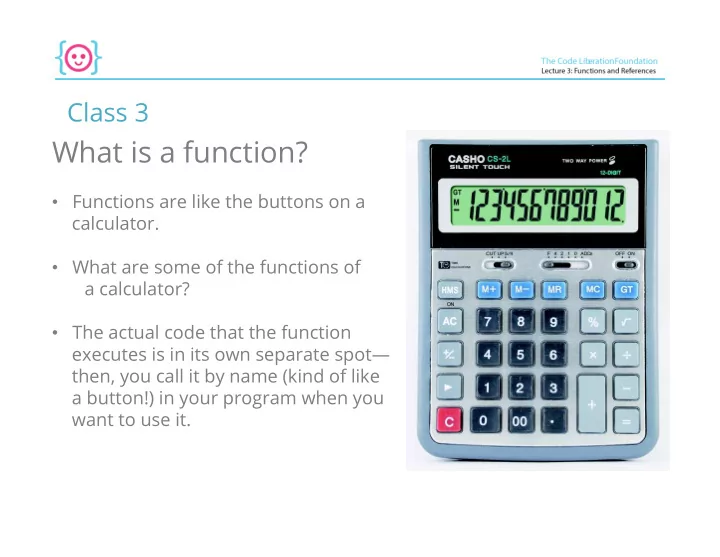
What is a function? Functions are like the buttons on a calculator. - - PowerPoint PPT Presentation

what is a function
SMART_READER_LITE
LIVE PREVIEW

What is a function? Functions are like the buttons on a calculator. - - PowerPoint PPT Presentation

Class 3 What is a function? Functions are like the buttons on a calculator. What are some of the functions of a calculator? The actual code that the function executes is in its own separate spot then, you call it by name (kind of


slide-1
SLIDE 1

Class 3

What is a function?

  • Functions are like the buttons on a

calculator.

  • What are some of the functions of

a calculator?

  • The actual code that the function

executes is in its own separate spot— then, you call it by name (kind of like a button!) in your program when you want to use it.

slide-2
SLIDE 2

#include <iostream> using namespace std;

  • //function declaration (prototype)

void printHello();

  • int main(int argc, const char * argv[])

{ //function call printHello();

  • return 0;

}

  • //function definition

void printHello(){ //ß ßfunction header //function body cout << "Hi there Nina!"; return; }

¡

  • This small program

demonstrates a simple function called printHello().

  • Good function are simple,

concise and have clear names.

  • When the function is called

in main, the program jumps to the code within the function body below and runs it.

  • Once the function is done

running, the program jumps back to main and continues.

Hi there Nina!

slide-3
SLIDE 3

Functions are a form of abstraction.

slide-4
SLIDE 4

Abstraction means that you don’t need to understand how everything works “under the hood” in order to interact with a system.

slide-5
SLIDE 5

#include <iostream> using namespace std;

  • //function declaration (prototype)

void printHello();

  • int main(int argc, const char * argv[])

{ //function call printHello();

  • return 0;

}

  • //function definition

void printHello(){ //ß ßfunction header //function body cout << "Hi there Nina!"; return; }

Building a function:

  • 1. Declare your function outside of any
  • ther functions or brackets using a

prototype*.

*It’s actually optional, but definitely recommended.

  • Syntax:

returnType functionName(parameters);

  • 2. Define your function.
  • What does your function do?

Syntax: returnTypefunctionName(parameterType parameterName){ Block of code to execute. return; }

  • 1. Where do you want to use your function?
  • I want this greeting to print when I run my

program, so I call printHello() in main.

Hi there Nina!

slide-6
SLIDE 6
  • When do you think functions will be

useful to you?

  • Can you think of any functions you

might want to write?

  • What is the simplest way you can think
  • f to describe what functions do?
slide-7
SLIDE 7

Why should I use functions? Are they versatile? Functions are just like verbs!

slide-8
SLIDE 8

Functions are amazing!

  • 1. They boil down complex instructions into one function call,

like a button.

  • This is great when you need to do one task many times.
  • 1. You can feed them data to work with by using parameters and

arguments.

  • You have seen this with length(string), which counts the

number of characters in the string you specify between the parenthesis.

  • 1. They can spit data back out at you by using return statements.
  • length(string) returns the number of characters in a string.
slide-9
SLIDE 9

#include <iostream> using namespace std;

  • //function declaration (prototype)

void printName(string);

  • int main(int argc, const char * argv[])

{ string nameInput;

  • cout << "Enter your name:\n";

cin >> nameInput;

  • //function call

printName(nameInput);

  • return 0;

}

  • //function definition

void printName(string n){ //function header //function body cout << "Hi there " + n + "!\n"; return; }

¡

  • Func&ons ¡are ¡able ¡to ¡use ¡values ¡from ¡

the ¡outside ¡by ¡defining ¡parameters ¡ (highlighted). ¡ ¡

  • Parameters ¡live ¡in ¡the ¡parenthesis ¡

following ¡a ¡func&on’s ¡name. ¡ ¡

  • You ¡pass ¡arguments ¡to ¡func&ons ¡

according ¡to ¡the ¡parameter’s ¡data ¡

  • type. ¡
  • The ¡func&on ¡makes ¡a ¡copy ¡of ¡the ¡

value ¡you ¡pass ¡to ¡it ¡in ¡order ¡to ¡use ¡it. ¡

Parameters

Enter your name: Emmett Hi there Emmett!

slide-10
SLIDE 10

#include <iostream> using namespace std;

  • //function declaration (prototype)

void printName(string);

  • int main(int argc, const char * argv[])

{ string nameInput;

  • cout << "Enter your name:\n";

cin >> nameInput;

  • //function call

printName(nameInput);

  • return 0;

}

  • //function definition

void printName(string n){ //function header //function body cout << "Hi there " + n + "!\n"; return; }

¡

  • printName() has a string

parameter.

  • printName() accepts nameInput

because it is a string, which matches the parameter type.

  • nameInput is an argument

passed by value into printName() as n.

  • To pass by value means that

nameInput was copied and assigned to n.

Parameters

Enter your name: Emmett Hi there Emmett!

slide-11
SLIDE 11

Newspaper content is passed to a printer, just like a function parameter!

slide-12
SLIDE 12

So…what happens to all of those parameter variables that were passed by value? I hope you didn’t get too attached to that string n we passed to printName(), because…

What t lives ves in a functi tion

  • n, dies

es in a functi tion

  • n.
slide-13
SLIDE 13

Don’t ¡worry—those ¡variables ¡aren’t ¡just ¡lying ¡all ¡over ¡the ¡

  • place. ¡

¡ When ¡a ¡func&on ¡ends, ¡all ¡of ¡the ¡variables ¡declared ¡within ¡ it ¡are ¡cleared ¡from ¡memory. ¡

¡ ¡

slide-14
SLIDE 14

#include <iostream> using namespace std;

  • //function declaration (prototype)

int playerStrength(int);

  • int main(int argc, const char * argv[])

{ int age;

  • cout << "How old are you?\n";

cin >> age;

  • cout << "\nWow, you can carry\n";

//function call cout << playerStrength(age) << " items!\n";

  • return 0;

}

  • //function definition

int playerStrength(int n){ n *= 5; return n; //return value }

Return Values

  • The return statement allows a

function to send data back when it is called.

  • You need to specify your return

type before the function name in both the prototype and function header.

  • Of course, the actual return

value’s data type must also match.

  • playerStrength() returns an int

value.

  • It takes the player’s age input,

multiplies it by 5 and returns the new value.

How old are you? 69 Wow, you can carry 345 items!

slide-15
SLIDE 15

Return Values

Two important notes about return values:

  • 1. The return statement is a stop

sign for the function.

  • 2. You don’t have to return any

data, but you do need to have a return statement.

  • 3. To stop a function without a

return type, you just use: return;

  • 4. This is the old printHello()

example, which is a function that returns “void,” aka, no values.

#include <iostream> using namespace std;

  • //function declaration (prototype)

void printHello();

  • int main(int argc, const char * argv[])

{ //function call printHello();

  • return 0;

}

  • //function definition

void printHello(){ //ßfunction header //function body cout << "Hi there Nina!"; return; }

¡

Hi there Nina!

slide-16
SLIDE 16

Does anyone want to write a function that will add two numbers together and return the sum?

  • 1. Prompt user to enter one number.
  • 2. Prompt user to enter a second number.
  • 3. Output the sum of the two numbers by

passing those two values into a function. Hint: The return type will be an int!

slide-17
SLIDE 17

So what’s all this fuss about parameters and return values—why can’t my program just see ALL of my code?

Well… do you remember abstraction? You don’t need to know what makes a laptop tick, because you can interact with it via UI, a keyboard, a screen, etc.

slide-18
SLIDE 18

“Abstraction saves you from worrying about the details, while encapsulation hides the details from you” (p160). ¡

  • Encapsulation dictates that data is only visible within the scope (aka any set
  • f curly brackets) that it lives in.
  • Think about encapsulation in terms of bundling—each object is a separate

bundle of instructions that are wrapped up and hidden from the user.

  • Functions need return values and parameters so that the user can interact

with a program without having to worry about each line of code required to execute a task.

slide-19
SLIDE 19

Scopes ¡

¡

  • Scopes ¡control ¡visibility ¡within ¡your ¡

program—they’re ¡the ¡locked ¡doors ¡ through ¡which ¡only ¡parameters, ¡return ¡ values ¡and ¡global ¡variables ¡can ¡move. ¡

  • Local ¡Variables: ¡Defined ¡within ¡a ¡scope ¡

and ¡only ¡visible ¡to ¡that ¡scope. ¡ ¡

  • Global ¡Variables: ¡Defined ¡outside ¡of ¡all ¡

scopes, ¡and ¡thus ¡visible ¡to ¡all ¡scopes. ¡

  • Scopes ¡can ¡also ¡be ¡nested: ¡if ¡a ¡func&on ¡

asks ¡for ¡a ¡variable ¡and ¡it ¡can’t ¡be ¡found ¡ within ¡the ¡func&ons ¡scope, ¡that ¡ func&on ¡will ¡travel ¡up ¡through ¡its ¡parent ¡ scopes ¡un&l ¡it ¡finds ¡the ¡variable. ¡

I live in main I'm everywhere I live in my_scope I'm everywhere #include <iostream> using namespace std; void my_scope(); // visible everywhere string glob = "I'm everywhere"; int main(){ string greeting = "I live in main"; cout << greeting << endl; cout << glob << endl; my_scope(); return 0; } void my_scope(){ // same name, different variable string greeting = "I live in my_scope"; cout << greeting << endl; cout << glob << endl; }

slide-20
SLIDE 20

You might be wondering, what about those functions that seem to take multiple types? Like to_string()? to_string() takes ints, floats and even doubles!

But how…

slide-21
SLIDE 21

You can by overloading functions! You overload a function by:

  • Defining and declaring

multiple functions of the same name.

  • The catch is that each time,

you use a different set of parameters.

  • When you call the function,

your program checks the arguments passed in against the sets of parameters in

  • rder to determine which

function to use. This is what makes overloading functions possible.

slide-22
SLIDE 22

int score(int); int score(int, int);

  • int main()

{ score(3); score(3,5);

  • return 0;

}

  • int score(int n){

cout << "int function\n"; return 0; }

  • int score(int f, int i){

cout << ”int function, 2 parameters\n"; return 0; }

Overloading Functions

  • score() is defined

and declared twice, but with different different parameters.

  • Note that return

value can be the same, or different.

  • Only the parameters

need to be different. ¡

int function int function, 2 parameters

¡

slide-23
SLIDE 23

It sounds like functions can do it all, right? But at what cost?

You might not be thinking much about memory yet, but once you start making functions that transform 3D objects, you’ll be cutting every corner to make your program runs as fast as possible.

slide-24
SLIDE 24

Inlining Functions

  • When you call an inlined function, it doesn’t actually do the normal

function call.

  • The program makes a copy of the function in place of the call instead of

jumping to the original function body.

  • They’re most useful for reducing overhead when calling tiny functions,

such as functions that return a value using only a few lines of code.

int main() { Hello(); return 0; }

  • inline void Hello(){

cout << ”Hello!\n"; return; }

Hello!

slide-25
SLIDE 25

What if I want to make a function that can change a variable outside of its scope?

slide-26
SLIDE 26

#include <iostream> using namespace std;

  • void multiplyReference(int&);
  • int main()

{ //define and declare the variable j //and the reference i to the variable j int j = 1; int& i = j;

  • //print what i references (j)

//pass that reference into the function //and print the output (what i references

  • times 10)

cout << i << "\n"; multiplyReference(i); cout << i << "\n";

  • return 0;

}

  • void multiplyReference(int& i){

i *= 10; }

References

  • A reference basically acts

as a nickname for another variable.

  • In this program, i is a

reference to j. Anything done to i also happens to j.

  • In other words, both a

reference and its assigned variable access the same spot in memory.

  • A reference does not

actually hold any value, it can only refer to another variable.

1 10

slide-27
SLIDE 27

#include <iostream> using namespace std;

  • void multiplyReference(int&);
  • int main()

{ //define and declare the variable j //and the reference i to the variable j int j = 1; int& i = j;

  • //print what i references (j)

//pass that reference into the function //and print the output (what i references

  • times 10)

cout << i << "\n"; multiplyReference(i); cout << i << "\n";

  • return 0;

}

  • void multiplyReference(int& i){

i *= 10; }

References

  • You CANNOT assign literal

values to references. A reference can only be instantiated to an existing variable.

  • When declaring, you must

assign a variable immediately or it won’t compile.

  • Reference syntax:

typeName& variableName =variable

  • Pass by Reference: Using a

reference to change a value from within a function.

¡

1 10

slide-28
SLIDE 28

#include <iostream> using namespace std;

  • int multiplyReference(const int&);
  • int main()

{ //define and declare the variable j //and the const reference i to the variable j int j = 1; const int& i = j;

  • //print what i references (j)

//pass that reference into the function //and print the output (what i references

  • times 10)

cout << i << endl; cout << multiplyReference(i) << endl;

  • return 0;

}

  • int multiplyReference(const int& i){

return i * 10; }

Const References

  • Sometimes, you want to

pass by reference to avoid making copies of huge objects, but you don’t want the object to be altered.

  • Remember constants?

You can use a const reference.

  • When you pass a const

reference to a function, that reference is protected and unalterable.

1 10

slide-29
SLIDE 29

Side Note: main(int argc, char *argv[])....??

  • main looks like a function, but what are these two parameters? In
  • ther words, who's calling main?
  • The parameterss hold data that can be passed in at the start of

execution (when you hit Run in Xcode)

  • argc: arg

argument count

  • argv: arg

argument values

  • Most commonly used when running code outside of

Xcode (by using... the terminal D: )

  • Example of providing arguments to main() via terminal:
  • You can specify these arguments (“command line arguments”) in an

Xcode menu

./a.out coding_is_fun //you type this into terminal

  • Then, this stuff happens under the hood:

argc = 2 // counts # of strings in argv array {“./a.out”, “coding_is_fun”} //contents of argv

¡

slide-30
SLIDE 30

Homework

  • Write a small two-player text game where the first player enters a list of 5

things or people they love most, and the second player tries to guess what those things are.

  • Function 1: Greets the players and prints a description of how to play.
  • Function 2: Prompts user input for 5 different things or people, then

receives that input and saves it in an array (or vector, if you want the player to choose how many things they enter). *try figuring out how to hide the player’s input in your console, or just print a bunch of spaces to hide it! J

  • Function 3: Prompt player to guess! Pass that array or vector as a reference

to a function that will check through the list for matches each time the second player guesses. This is a basic outline of an exercise in functions and references, but feel free to be as creative with the gameplay as you want!