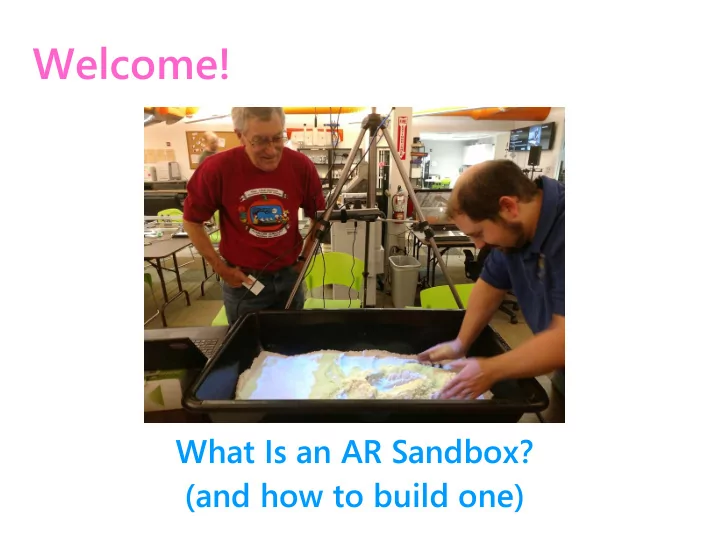
Welcome! What Is an AR Sandbox? (and how to build one) An - - PowerPoint PPT Presentation
Welcome! What Is an AR Sandbox? (and how to build one) An Augmented Reality Sandbox Is: a box filled with white sand a projector mounted over the sand a Kinect depth-sensing camera mounted over the sand a computer that runs
An Augmented Reality Sandbox Is:
- a box filled with white sand
- a projector mounted over the sand
- a Kinect depth-sensing camera mounted over the sand
- a computer that runs software projecting images on the
sand # # # # # # Augmented Reality: Computer-generated media (images, sounds) projected on a real-world scene, which change in response to interaction from players in the real world.
How It Works
Let’s Watch!
System76 “Augmented Reality Sandbox - Weekend Project”
https://www.youtube.com/watch?v=uTPOE2XceEA
UCLA’s Augmented Reality Sandbox
https://www.youtube.com/watch?v=CE1B7tdGCw0
Part A: Hardware
Kinect depth-sensing camera + short-throw digital projector + a computer
This video explains how Kinect works:
https://www.youtube.com/watch?v=uq9SEJxZiUg
Box or tray + 50-100 lbs sand + mounting apparatus for camera & projector
Mortar mixing tray
https://m.acehardware.com/product/index.jsp?pr
- ductId=68302536&KPID=21863410
Sandtastik Play Sand [We went to RSSY in Lorton for sand]
Hardware - Frame
(Choose one)
Tripod Wood pillar Metal carrier
Part B: Software
We are using the Magic Sand software by Thom Wolf and Rasmus Paulsen. This software is Windows-based. How to build a Magic Sandbox: https://imgur.com/gallery/Q86wR
[also here: https://www.boredpanda.com/a-magic-sandbox-i-made-for-my-3-y-o-sons-birthday/ ]
Github page to download software: https://github.com/thomwolf/Magic-Sand/
Magic Sand Software Release: https://github.com/thomwolf/Magic-Sand/releases/tag/v1.5.4.1
Part C: Assembly
- Put your sandbox where you want it. (On a table, on the floor, in a frame)
- Set up the vertical support device for the Kinect camera and the projector.
(Tripod or wood pillar) (If using a tripod, extend it approximately 80 inches above the floor.)
- Set up the horizontal support (mounting board / shelf) that holds the
Kinect and projector. (If the sandbox is 24 inches wide, then the camera and projector should be (2 x 24 = 48) inches above the sand.) Rule of thumb: Projector height is twice sandbox width.
- Fill sandbox with sand (minimum 50 lbs, preferably 80 to 100 lbs)
- Plug in cables. (Wiring diagram follows)
- Run software calibration
- Run Magic Sand software
Linux Instructions / Software for AR Sandbox
UC Davis AR Sandbox Main Page: https://arsandbox.ucdavis.edu/ UC Davis: AR Sandbox Components and Instructions
http://idav.ucdavis.edu/~okreylos/ http://idav.ucdavis.edu/~okreylos/ResDev/SARndbox/Instructions.html ResDev/SARndbox/Instructions.html
How to Install Software Video: https://www.youtube.com/watch?v=R0UyMeJ2pYc KeckCAVES (VRUI software used by the UC Davis sandbox):
http://keckcaves.org/software/start
System76 Kinect sandbox tutorial https://system76.com/weekend-project/arsandbox System 76 software download page
https://launchpad.net/~system76-dev/+archive/ubuntu/weekend-project
Beals Science AR Sandbox https://www.BealsScience.com/ARsandbox Seattle Design Nerds http://www.seattledesignnerds.org/sim-sandbox/
Additional Videos of AR Sandboxes
Adam Hollidge (Nova Labs member) built an AR sandbox in his basement for his 3-yr-old son [1 minute]:
https://www.dropbox.com/s/z6szpzw1fsrib7j/2017-05- 06%2019.14.19.mov?dl=0
The original AR sandbox by Oliver Kreylos at UC Davis: [5.5 minutes] https://m.youtube.com/watch?v=j9JXtTj0mzE Jim Egenrieder, director of Qualcomm’s Thinkabit Lab at Virginia Tech, Falls Church, led high school students in building an AR Sandbox, summer 2017.
Part 1: https://vimeo.com/231886621 Part 2: https://vimeo.com/231885950
Beals Science sandbox: [4.5 minutes]
https://www.youtube.com/watch?v=bA4uvkAStPc
UCLA sandbox
https://m.youtube.com/watch?v=CE1B7tdGCw0
iSandbox Volcano fiery lava effect: [3 mins]
https://m.youtube.com/watch?v=Fg3Xgn5OlTI