Wedge http://patrickbaudisch.com/projects/wedge/ To overcome - - PowerPoint PPT Presentation

wedge
SMART_READER_LITE
LIVE PREVIEW

Wedge http://patrickbaudisch.com/projects/wedge/ To overcome - - PowerPoint PPT Presentation

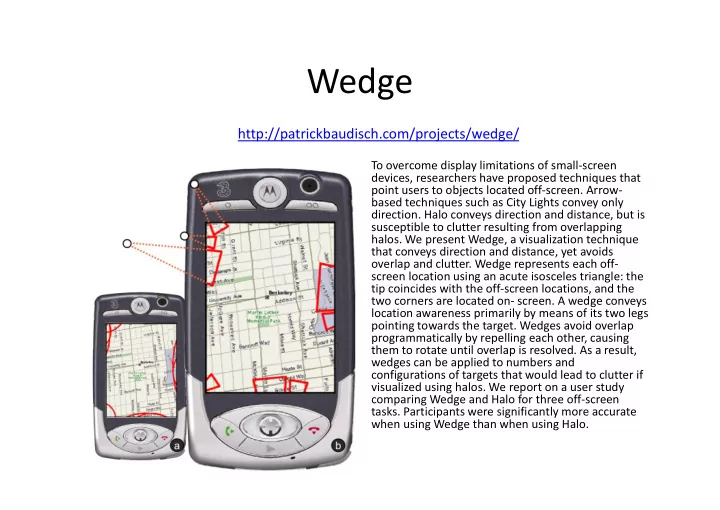
Wedge http://patrickbaudisch.com/projects/wedge/ To overcome display limitations of small-screen devices, researchers have proposed techniques that point users to objects located off-screen. Arrow- based techniques such as City Lights convey


slide-1
SLIDE 1

Wedge

To overcome display limitations of small-screen devices, researchers have proposed techniques that point users to objects located off-screen. Arrow- based techniques such as City Lights convey only

  • direction. Halo conveys direction and distance, but is

susceptible to clutter resulting from overlapping

  • halos. We present Wedge, a visualization technique

that conveys direction and distance, yet avoids

  • verlap and clutter. Wedge represents each off-

screen location using an acute isosceles triangle: the tip coincides with the off-screen locations, and the two corners are located on- screen. A wedge conveys location awareness primarily by means of its two legs pointing towards the target. Wedges avoid overlap programmatically by repelling each other, causing them to rotate until overlap is resolved. As a result, wedges can be applied to numbers and configurations of targets that would lead to clutter if visualized using halos. We report on a user study comparing Wedge and Halo for three off-screen

  • tasks. Participants were significantly more accurate

when using Wedge than when using Halo.

http://patrickbaudisch.com/projects/wedge/

slide-2
SLIDE 2

Related Work

  • Edgeradar
  • Arrows
  • City lights
  • Halo
slide-3
SLIDE 3

3

[Gustafson 07]

edgeradar

slide-4
SLIDE 4

4

simple arrows

[Tecmo Bowl 87]

slide-5
SLIDE 5

5

scaled and stretched arrows

[Burigat 06]

slide-6
SLIDE 6

6

“space-efficient fisheye technique”

city lights

[Mackinlay 03]

slide-7
SLIDE 7

7

[Baudisch 03]

halo

slide-8
SLIDE 8

Related Work

  • Edgeradar
  • Arrows
  • City lights
  • Halo
  • Problem with halo:

– Clutter and corners

slide-9
SLIDE 9

9

slide-10
SLIDE 10

Evaluation

  • 18 subjects, with 2 removed because of high

error rate

– Note: This is OK …

  • Three tasks:

– Locate: Click off-screen where you think the target is – Avoid: Traffic jams are indicated and you need to click the hospital furthest from traffic jams – Closest: Click on halo/wedge corresponding to closest

  • ff-screen location
slide-11
SLIDE 11

Hypotheses

  • Wedge is more accurate
  • Larger improvement in dense condition
  • Larger improvement in corners

– (no hypothesis about task time)

11

slide-12
SLIDE 12

Results

  • No significant difference in task time
  • Participants were significantly more accurate

when using the wedge

12

60 40 20 Sparse Dense Side Wedge Halo Sparse Dense 60 40 20 Sparse Dense Side Corner Wedge Halo

slide-13
SLIDE 13

Locate Task

As can be seen from Figure 11 larger errors were seen in corner trials (mean 51 pixels) than in side trials (mean 30 pixels). There were also larger errors in dense configurations (mean 43) than sparse configurations (mean 38). The overall difference between visualizations was about 10 pixels (Halo mean 45.3 pixels; Wedge mean 35.6 pixels). In addition, there was a significant interaction between Visualization and Position (F1,15=15.36, p=0.001). As shown in Figure 11, the difference between visualization types is considerably larger in corners than on the sides of the screen, which supports our hypothesis that the reduced space in corners causes additional problems for Halo interpretation. There was no interaction between Visualization and Density (F1,15=0.67, p=0.43).

Sparse Dense 60 40 20 Sparse Dense Side Corner Wedge Halo

slide-14
SLIDE 14

Additional Results

Avoid: Figure 13 shows error rates for the different visualizations, densities, and

  • positions. A 2x2x2 ANOVA did not show

any effects of Visualization (F1,15=2.55, p=0.13), Position (F1,15=2.38, p=0.14),

  • r Density (F1,15=0.58, p=0.46). In

addition, there were no interactions between any factors. A 2x2x2 ANOVA showed no effects of any of the three factors on task completion time (Visualization F1,15=0.18, p=0.68; Density F1,15=2.09, p=0.17; Position F1,15=1.58, p=0.23), and no interactions between any factors. Closest Figure 15 shows error rates for the different visualizations, densities, and

  • positions. A 2x2x2 ANOVA showed

significant main effects of Position (F1,15=76.6, p<0.001) ), but not of Visualization (F1,15=1.24, p=0.28) or Density (F1,15=0.12, p=0.73). There was a significant interaction between Density and Position (F1,15=7.33, p=0.016), but no interactions with Visualization. A 2x2x2 ANOVA showed significant main effects of Position (F1,15=5.24, p=0.037), but did not show effects of Visualization (F1,15=0.10, p=0.76) or Density (F1,15=2.89, p=0.11). There was, however, a significant interaction between Visualization and Density (F1,15=6.60, p=0.021).

slide-15
SLIDE 15

Additional Results

Comments made during the trial suggested reasons for the advantages for Wedge over Halo. One user said, “I found that when the rings

  • verlap it is almost impossible to tell which is the right ring. Wedges

just seem natural.” And another stated, “overlapping rings made it very confusing at times. Directional wedges helped a lot, and they also seem to take up less space. More information meant less thinking with the wedges.” Participant’s comments also provided some insight into the reasons why Halo was preferred for the Closest task – that the difference between distant and close off-screen objects was easier to determine with Halo, since there is a large visual difference in this

  • case. One participant stated that, “the sizes of the arcs did not require

too much calculation or thinking to spot the smallest ring.”

slide-16
SLIDE 16

Meta-Level Comments: Experimental Papers

  • A lot of techniques + evaluation
  • Predictable outline:

– Problems with existing techniques – Rationale for new design – Evaluation of new design

  • Usually two or three tasks

– Discussion and implications

slide-17
SLIDE 17

Your thoughts?

slide-18
SLIDE 18

My Problem with Wedge

  • Read the paper
  • For visualization, ONLY LOCATE

had significant differences, and ONLY FOR ERROR

  • But 2 participants were

removed for high error …

  • And note that, IMO,

visualization is only significant for corners

slide-19
SLIDE 19

Second consideration

  • Closest completion time was the only other area of

significance, and only for interactions

  • A 2x2x2 ANOVA showed significant main effects of

Position (F1,15=5.24, p=0.037), but did not show effects

  • f Visualization (F1,15=0.10, p=0.76) or Density

(F1,15=2.89, p=0.11). There was, however, a significant interaction between Visualization and Density (F1,15=6.60, p=0.021).

  • Problem:

– Why not explore this interaction as they do for errors in Locate?

slide-20
SLIDE 20

Concerning because

slide-21
SLIDE 21

Another problem

  • Graphs

– Kept on showing dense-sparse for Halo-Wedge even when no interactions – Particular problem in locate because of interaction between density and position, but not visualization: