Web - - PDF document

web browser
SMART_READER_LITE
LIVE PREVIEW

Web - - PDF document

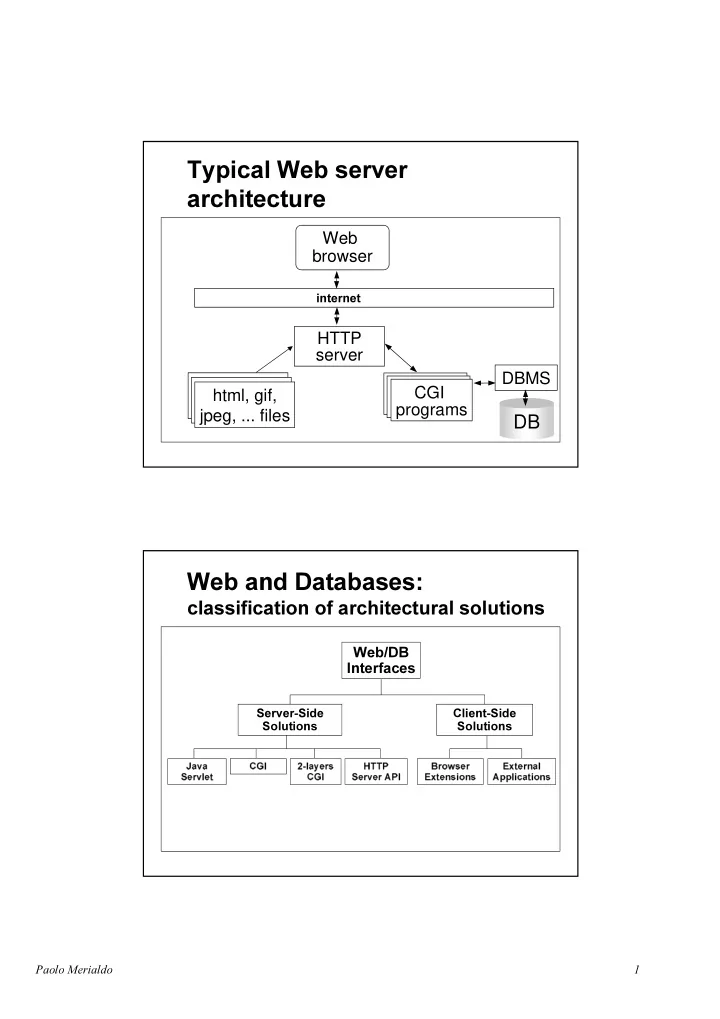
Web browser HTTP server DBMS html, gif, CGI CGI html, gif, CGI html, gif, Programs jpeg,


slide-1
SLIDE 1
  • html, gif,

jpeg, ... files html, gif, jpeg, ... files html, gif, jpeg, ... files

DB

DBMS CGI Programs CGI Programs CGI programs

  • Web

browser HTTP server

  • %URZVHU

([WHQVLRQV ([WHUQDO $SSOLFDWLRQV

  • DYD

6HUYOHW OD\HUV &*, +773 6HUYHU$3, &*,

slide-2
SLIDE 2
  • ◆ Netscape Navigator

◆ Microsoft Internet Explorer ◆ …

slide-3
SLIDE 3
  • ◆ Netscape Enterprise Server

◆ Microsoft Internet Information Server ◆ NCSA ◆ Apache ◆ AOL ◆ ...

  • ◆ ODBC

◆ JDBC ◆ TCP Socket ◆ Proprietary protocols (e.g. Oracle SQL*Net)

slide-4
SLIDE 4
  • 1$0(

(0$,/ 5220 Paolo Atzeni atzeni@dia.uniroma3.it 213 ... Gianni Mecca mecca@dia.uniroma3.it 212 ... ... ... ... ...

ProfList Name ToProf Name E-Mail Room

slide-5
SLIDE 5
  • () {

ProfName[20]; $(DeptDB); $ ProfCursor Name ProfTable; $ ProfCursor; $ ProfCursor :ProfName; printf("<HTML> ...<BODY ...’); printf("<UL>"); (sqlcode==0) { printf(" <LI><A HREF=/cgi-bin/ProfPage?Name=%s> %s </A>", ProfName,ProfName); $ ProfCursor INTO :ProfName; } $ ProfCursor; printf("</UL> ... </BODY></HTML>"); $(DeptDB); } ( argc, * argv[ ]) { Name[20], Email[20], Room[20]; $(DeptDB); ProfCursor * ProfTable Name = argv[1] $ ProfCursor $ ProfCursor :Name, :Email, :Room; printf(" <HTML> ...<BODY … ’); printf(" <B> %s </B> ",Name); printf(" <BR>E-mail: <I> %s </I> ",Email); printf(" <BR>Room: %s ",Room); $ ProfCursor; printf(" ... </BODY></HTML> "); $(DeptDB); }

slide-6
SLIDE 6

◆ ◆ ◆

  • ◆ Changing platform imposes to

re-compile source code

◆ Changing DBMS imposes to update

DBMS accesses and to re-compile source code

◆ Interpreted languages (e.g. Perl, TCL,

etc.) and standard DBMS connectors (e.g. ODBC) partially solve the problem

slide-7
SLIDE 7
  • ◆ Each access needs:

– to load a program in main memory – to open a new connection with DBMS – to execute a (bunch of) query – to close the connection

◆ then

– the DBMS is overloaded – the O.S. is overloaded

  • ◆ Presentation is encoded into source

code

◆ Hypertext structure is encoded into

source code

◆ Data access is encoded into source

code

slide-8
SLIDE 8
  • ◆ It is possible to establish direct and

continuous connections between the DBMS and the HTTP Server

◆ It is possible to maintain connections

throughout Web applications as well as across invocations of Web applications

◆ Since the database connections are

continuous, applications don’t experience the

  • verhead of a connect and subsequent

disconnect from the database

◆ Use specific languages for CGI programs

slide-9
SLIDE 9
  • ◆ Advantages

– Applications are built "within" the HTTP server by means of specific APIs – Persistent applications

◆ Disadvantages

– Portability

slide-10
SLIDE 10
  • ◆ Each client request activates the execution of

a ThinCGI

◆ ThinCGIs generate a session Id and

communicate the request to the CGIPartner

◆ CGIPartner is a demon, with a pool of open

connections to the DBMS

◆ CGIPartner queries the database, format

query’s results, and give them back to a ThinCGI, which ends the process sending the results to the clients

  • ◆ Main Advantages

– (Each) CGIPartner offers a pool of open DBMS connections – (Each) CGIPartner can manage multiple requests – ThinCGIs are “thin” applications: their execution doesn’t overload the O.S. – Session Id can be used to manage connections with the client

◆ Disadvantages

– ODBC is a bottleneck ! – This approach is effective when the DBMS connection is through DBMS vendors API

slide-11
SLIDE 11
  • ◆ protocol and platform-independent

server side components

◆ do not require creation of a new process

for each request

◆ allows for three tier applications

slide-12
SLIDE 12
  • ◆ Products:

– Java Applets – Netscape Plug-Ins – Microsoft ActiveX – Netscape JavaScript

slide-13
SLIDE 13
  • ◆ Advantages

– allow to manage data entry – easy to use – flexible

◆ Disadvantages

– software updates – overload clients

slide-14
SLIDE 14
  • ◆ Examples

– MS Word-Excel-… – Terminal emulators – ...

  • ◆ Advantages

– may be useful for proprietary solutions – audit and security

◆ Disadvantages

– software updates – process control

slide-15
SLIDE 15

– Introduction – Web-based information systems: a database perspective – Architectures

– The Web evolution: XML

◆ ◆

✏ (architectures) ✏ languages ✏ tools

slide-16
SLIDE 16

– generate pages dynamically

– materialize pages (in text files)

– pages are always up to date – easy maintenance

– increases the DBMS overload (but recent

architectures seem to be able to overcome the problem)

– portability (but Java servlets ...)

– supported by most of the tools available on

the market

The pull approach

slide-17
SLIDE 17
  • The push approach

– portability – reduces the DBMS overload (if any)

– needs techniques to maintain consistency

between database and hypertext

– needs a mechanism for URL invention

slide-18
SLIDE 18
  • ( ) {

ProfName[20], Fname[20]; FILE *fp; strcpy(GenerateURL("ProfListPage"), Fname); fp= fopen(Fname, "w"); $(DeptDB); $ ProfCursor Name ProfTable; $ ProfCursor; $ ProfCursor :ProfName; fprintf(fname, "<HTML> ...<BODY … <UL>"); (sqlcode==0) { fprintf(fname, " <LI><A HREF=/ProfPage/%s> %s </A>", GenerateURL(ProfName), ProfName); $ ProfCursor INTO :ProfName; } $ ProfCursor; fprintf(fname, "</UL> ... </BODY></HTML>"); $(DeptDB); } ( ) { ProfName[20], Email[20], Room[20], Fname[20]; FILE *fp; $(DeptDB); ProfCursor * ProfTable $ ProfCursor $ ProfCursor :ProfName, :Email, :Room; (sqlcode==0) { sprintf(Fname, ”/ProfPage/%s”, GenerateURL(”ProfName")); fp= fopen(Fname, "w"); fprintf(Fname, "<HTML> ...<BODY> … "); fprintf(Fname, "<B> %s </B> ",ProfName); fprintf(Fname, "<BR>E-mail: <I> %s </I> ",Email); fprintf(Fname, "<BR>Room: %s ",Room); fprintf(" ... </BODY></HTML> "); $ ProfCursor :ProfName, :Email, :Room; } $ ProfCursor; $(DeptDB); }
slide-19
SLIDE 19
  • ◆ Browser session: a sequence of related

requests from a particular user to a particular application

◆ The HTTP protocol is stateless ◆ It cannot manage a sequence of

requests

  • ◆ E-Commerce applications

◆ Educational applications ◆ ...

– shopping baskets – user navigation track – user-customized presentation – ...

slide-20
SLIDE 20
  • ◆ A “token” is used to represent the

session

◆ the token is passed between browser

and server as:

– part of the URL – hidden field in a form – cookie

  • ◆ Session initialization

– the browser accesses an initialization page (e.g. a login form) able to launch an init program on the server – the init program generates a session id

◆ Session Id transmission

– a page containing the session id is sent back to the browser – every further request will contain the session id

slide-21
SLIDE 21
  • S

e s s i

  • n

Conversation Conversation

  • Session

C

  • n

v e r s a t i

  • n

Session

slide-22
SLIDE 22
  • Browser

1 2 cookie Cookie.txt n cookie

Exec: Set-Cookie(

=pippo =31-12-1999 =www.db.com =/products =12as122)

Web Server www.ai.it Web Server www.db.it

  • – : cookie name

– : expiration date – : domain where to cookie has to be sent – : path where the cookie has to be sent – : indicates that the cookie can be transmitted only through SSL – Other Information (<4k): application data

slide-23
SLIDE 23

✏ HTML Extensions ✏ 4GL Extensions

✏ Tools to support the implementation ✏ Tools to support design activities

✧ 4GL Extensions

✏ add specialized functions to a 4GL ✏ the result of a program execution is HTML

code

slide-24
SLIDE 24

◆ ◆

◆ ◆

TEMPLATE: WORK-LIST <HTML> <BODY BGCOLOR="WHITE"> ... <SYB TYPE=SQL> SELECT lname, fname, title, price FROM authors a, titleauthor ta, titles t WHERE (a.id = ta.id and t.title_id = ta.title_id) </SYS> ... </BODY> </HTML>

  • (source Sybase)
slide-25
SLIDE 25
  • DBMS
  • Templates

DB

Template Interpreter

  • ✧ HTML Extensions

✏ embed SQL statement in specific HTML

tags

✏ writing page templates becomes an

implementation paradigm

✏ add specialized functions to a 4GL ✏ the result of a program execution is HTML

code

slide-26
SLIDE 26

◆ ◆ ◆ ...

  • SELECT UNIQUE

"<TABLE WIDTH=100%><TR> <TD><IMG SRC=Webdriver?LO=" || logo::text || "&Type=“image/gif” " || "<BR>" || <STRONG> " || name || "</STRONG>" <P><B>Birth:</B><EM>” || birth || "</EM><BR>" || <P><B>Death:</B><EM> "||death||" </EM><TD> <TD ALIGN=LEFT><P>" ||biography || " </TD></TR></TABLE><P> " FROM ArtistTable WHERE Name LIKE $$1

  • (source Informix)
slide-27
SLIDE 27
  • <TABLE WIDTH=100%><TR>

<TD><IMG SRC=Webdriver?LO= &Type=“image/gif” <BR> <STRONG></STRONG> <P><B>Birth:</B><EM></EM><BR> <P><B>Death:</B><EM></EM><TD> <TD ALIGN=LEFT><P>

  • </TD></TR></TABLE><P>

✏WYSWYG Editors ✏Provide Database import facilities

✏Export database tables, views, reports, forms for Web publishing ✏Target formats: HTML code (for static pages), HTML or 4GL extension source code (for dynamic page creation)

slide-28
SLIDE 28

✏ provide graphic interface on the content of a Web

site for a tree-like presentation and manipulation

  • f HTML files

✏ utilities to check link consistency

✏ provide support for exporting tables, views, reports

in HTML (or Java)

✏ Assist developers in the construction of interactive

form based applications for accessing and updating data

Tools

✏ provide full support in both the design and

development activities

✏ use a model driven approach

slide-29
SLIDE 29
  • Advertising Sites

Data Hypertext Structure Interactivity

Catalogue Sites

(e.g. Bibliographic sites)

E-Commerce Sites

(e.g. Amazon.com)

DB Front-End

(e.g. www.fs-on-line.com)

WFMSs

slide-30
SLIDE 30
  • =

Web site Characterization: measuring the hypertext complexity

– Several "Unique" pages – Focus on graphic layout of pages – Maintenance: adding, removing unique pages; link consistency

– HTML editors – Site managers

slide-31
SLIDE 31
  • Sites with

large quantities of data and low complexity

– Few page-schemes with "table data" – Focus on data – Maintenance: updating the pages’ contents

– Site managers – Database publishing wizards – Web form editors

Sites with large quantities of data and high complexity

– Several interconnected page-schemes – Focus on data and navigation – Maintenance: updating contents and structure

– RADs – CASE Tools