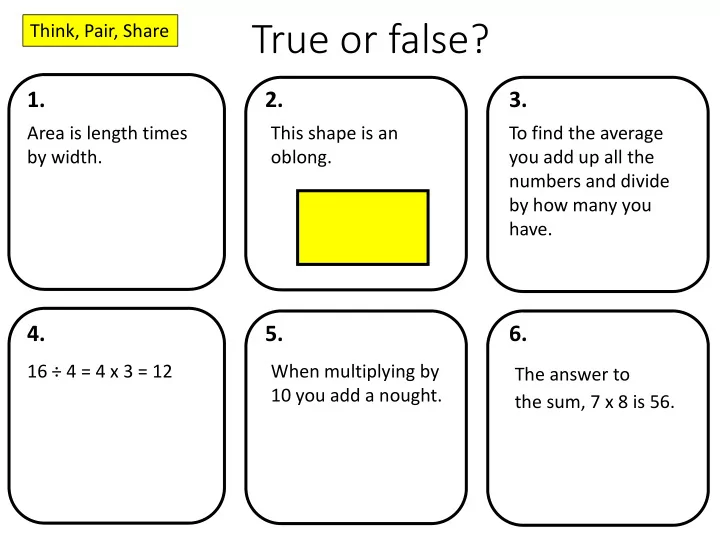
True or false? Think, Pair, Share 1. 2. 3. Area is length times - - PowerPoint PPT Presentation

true or false
SMART_READER_LITE
LIVE PREVIEW

True or false? Think, Pair, Share 1. 2. 3. Area is length times - - PowerPoint PPT Presentation

True or false? Think, Pair, Share 1. 2. 3. Area is length times This shape is an To find the average by width. oblong. you add up all the numbers and divide by how many you have. 4. 5. 6. 16 4 = 4 x 3 = 12 When multiplying by


slide-1
SLIDE 1

2. 1. 3. 5. 4. 6.

True or false?

Area is length times by width. This shape is an

  • blong.

To find the average you add up all the numbers and divide by how many you have. 16 ÷ 4 = 4 x 3 = 12 When multiplying by 10 you add a nought. The answer to the sum, 7 x 8 is 56. Think, Pair, Share

slide-2
SLIDE 2

2. 1. 3. 5. 4. 6.

True or false?

Area is length times by width. This shape is an

  • blong.

To find the average you add up all the numbers and divide by how many you have. 16 ÷ 4 = 4 x 3 = 12 When multiplying by 10 you add a nought. The answer to the sum, 7 x 8 is 56.

slide-3
SLIDE 3

2. 1. 3. 5. 4. 6.

ANSWERS

Area is length times by width. Area is the space inside a shape. This shape is an

  • blong.

Rectangle To find the average you add up all the numbers and divide by how many you have. This is the mean. Mode? Median? 16 ÷ 4 = 4 x 3 = 12 Incorrect use of the equals sign 16 ÷ 4 = 4 4 x 3 = 12 When multiplying by 10 you add a nought. Is 0.2 x 10 = 0.20? Place value is important The answer to the sum, 7 x 8 is 56. Sum means to add.

slide-4
SLIDE 4

27/11/2018

Thousands Thousands Hundreds Hundreds Tens Tens Units Units

3 8 38 x x 10

slide-5
SLIDE 5

27/11/2018

Thousands Thousands Hundreds Hundreds Tens Tens Units Units

6 6 x x 1000

slide-6
SLIDE 6

27/11/2018

Thousands Thousands Hundreds Hundreds Tens Tens Units Units

8 2 82 ÷ 100

slide-7
SLIDE 7

27/11/2018

Mathematical Methods: Times tables

Times tables are the foundation of maths – practice and learn them Strategy x 2, x 3, x 5, Learn these tables first × 10 Move the digits one place to the left x 4 Double and double again × 8 Double, double and double again × 9 Use your fingers × 6 x 3 and double 56 = 7 x 8 ↔ 5,6,7,8 “I ate and I ate until I was sick on the floor” 8 x 8 = 64

slide-8
SLIDE 8

27/11/2018

Mathematical Methods

slide-9
SLIDE 9

27/11/2018

Problem Solving

Sam has 93p and Matthew has £3.75. Matthew gives Sam some money so that they both have the same amount. How much does Matthew give Sam?

slide-10
SLIDE 10

27/11/2018

Sam has 93p and Matthew has £3.75. Matthew gives Sam some money so that they both have the same amount. How much does Matthew give Sam?

93p £3.75

slide-11
SLIDE 11

Fractions Powers Brackets S↔D Move the curser

Efficient use of a calculator

1. 2 × (4 + 3)² = 98

2.

1 2 - 1 3 = 1 6

3.

1.2 + 2 3.4 +5 =

8 21

4.

2π = 6.28 (to 2dp)

slide-12
SLIDE 12

Q1.

3 1 2 1 +

Q2.

4 3 2 × +

Q3.

04 . 2 6 . 4 23 . 4 1 . 3 × ×

Q4.

( )

6 . 1 3 . 6 1 . 3 62 ÷ × − +

Efficient use of a calculator

4 678+2.345×tan 37 2 3− 12+4.13

Challenge Question

Fractions Powers Brackets S↔D Move the curser

slide-13
SLIDE 13

Q1.

3 1 2 1 +

Q2.

4 3 2 × +

Q3.

04 . 2 6 . 4 23 . 4 1 . 3 × ×

Q4.

( )

6 . 1 3 . 6 1 . 3 62 ÷ × − +

ANSWERS (3d.p.)

4 678+2.345×tan 37 2 3− 12+4.13

Challenge Question = 0.877 (3d.p.)

5 6 14 1.397 23.794

The image part with relationship ID rId7 was not found in the file.

Fractions Powers Brackets S↔D Move the curser

slide-14
SLIDE 14

Display a positive attitude towards maths

How can parents support? “I was never any good at maths.”

slide-15
SLIDE 15

How can parents support?

If you hear your child saying: “I can’t do this” say “I can’t do this yet.” “I am not good at this” say “I can get better at this” “I got a poor test result” say “What can I do to improve?”

slide-16
SLIDE 16

How can parents support?

When your child is stuck encourage them to:

  • 1. Read through and follow the notes and examples

in their books

  • 2. Look up the topic on Hegarty Maths
  • 3. Ask a friend and try to work through it with them
  • 4. Ask their teacher
slide-17
SLIDE 17

What does a homework on HegartyMaths look like?

Step 1:

Video where Mr. Hegarty teaches your child everything they need to know about that topic & goes through all the examples that will be in the quiz.

Step 2:

Quiz that will allow your child to practice all the examples in the video for themselves and know whether they understood what was in the video.

slide-18
SLIDE 18

Step 1:

You child needs to watch the video, take notes of all modelled examples.

Your child will turn each video into fantastic notes in their maths books.

slide-19
SLIDE 19

Step 2:

Your child then needs to assess their learning from the video in a quiz.

Your child needs to: 1) Write down every Q 2) Always show all their workings 3) Always mark and self-correct their work

Your child will always show their workings and mark all questions they ever do. If your child can do the question in their head they still need to show their workings as that is part of being a great mathematician.

slide-20
SLIDE 20

Student checklist for great weekly homework

slide-21
SLIDE 21

What to do if your child is stuck on their homework?

1) Watch the video again really carefully ensuring all examples are copied and see if hearing and writing it down a second time helps. 2) Look at your building blocks. These are the lessons that will help you with your current

  • homework. If these are not at 100% or less than the

HegartyMaths avg. then you should redo those them as it will help on your current work. In the picture, the student will struggle with homework 547 as they have only 10% on lesson 546.

slide-22
SLIDE 22

What to do if your child is stuck on their homework?

slide-23
SLIDE 23

What to do if your child is stuck on their homework?

slide-24
SLIDE 24

What to do if your child is stuck on their homework?

slide-25
SLIDE 25

What to do if your child is stuck on their homework?

There will always be an example in video that will cover an almost identical question to the one they are stuck on. They can also pull the video up in the quiz and scrub the video to the place that will help them on the one they’re stuck on.

slide-26
SLIDE 26

Why does your child always have to watch the video?

1) Ensures your child will be successful: Watching the video will ensure your child will do well in the quiz and feel good about their homework and maths. We don’t want your child to feel like they are on their own at home and the videos will give you the support they need to guarantee that they have a successful homework. 2) Helps improve their memory: Copying down modelled examples helps your child remember their maths and get it into their long term memory. 3) Method marks: Copying down modelled examples helps your child practice how to lay out their maths properly to help them get questions correct and get extra method marks in exams even when they make mistakes. 4) Good revision: This is revision. When revising one sometimes has to look over material one already knows – that’s just as important as learning new things as making old learning solid helps prevent students from forgetting things 5) We thinks it’s important as it helps your child be independent: Doing maths at home with these good habits and methods will help your child become more independent and be able to learn on their own (a vital life lesson).

slide-27
SLIDE 27

What happens when students decide not to watch the video?

1) Students get stuck and frustrated: Many students who just do the quizzes get really annoyed and frustrated with themselves as they make lots of mistakes and don’t understand why or how to get better. 2) Students stay at the same level: Students who just practice questions only get questions correct on topics they already know and they get questions wrong for topics they don’t know yet. They never improve. Watching the video means that for things they already know, they will secure that knowledge, and for things they don’t know yet, they can learn and so get better.

slide-28
SLIDE 28

What if your child has completed all homework – what else could they do?

slide-29
SLIDE 29

1) Use their donut to improve their weak areas: Your child can click the red section to find the quizzes they need to improve (quizzes under 70%) and redo them until they are amber (quizzes over 70%) or green (quizzes at 100%). Once they have made everything green or amber go back over the amber and try to get them to green.

Click the red section and it will

  • pen up any lessons your child is

under 70% on for them to redo.

What if your child has completed all homework – what else could they do?

slide-30
SLIDE 30

2) Fix up 5: HegartyMaths remembers every mistake your child has ever made and generates a quiz with 5 questions from different parts of maths that they are weak on so they can re-do them with the video and Fix Up!

What if your child has completed all homework – what else could they do?

slide-31
SLIDE 31

3) Learn a new section: Your child’s teacher may have given them a revision list of clips so they can now use that to find a clip on HegartyMaths that will be something that will help get ahead.

What if your child has completed all homework – what else could they do?

slide-32
SLIDE 32

3) Learn a new section: Your child’s teacher may have given them a revision list of clips so they can now use that to find a clip on HegartyMaths that will be something that will help get ahead.

If your child want to learn Simple interest type clip number 93 into the Search Bar, watch the video and do the quiz in the normal way.

What if your child has completed all homework – what else could they do?

slide-33
SLIDE 33

6 things parents could do at home to help their child…

Action 1 Ask about your child’s homework Ask your child what day the homework was set, when it is due, what clip number and topic it is and when they plan to complete it. 2 Provide your child with a good place to work Provide your child with a quiet, but supervised place to work. As the homework is online, it’s good to be able to monitor that your child is not getting distracted by other online activities. Furthermore, as it’s a written homework, your child will need a desk, table, or flat surface to copy their notes. If there is not a suitable place for your child to work at home, please encourage your child to attend homework club. 3 Get your child the correct equipment Your child will need a blue/black pen or a pencil for all working, a purple pen for marking and corrections, a pencil and ruler for drawing diagrams. They may also require a highlighter for highlighting key points, and some homework may require the use of a calculator or geometry set. 4 Encourage your child to work in the right way Please always check your child has carried out their homework following these three requirements: i) Always watch the video and take notes of all modelled examples provided; ii) Always write each question and show all working; iii) Always mark each questions, correct if necessary and write their score at the end. 5 Encourage your child not to give up if they are making mistakes If your child is making mistakes, tell them that this is ok and they can be learned from. As long as your child is working in the correct way (watching the video, writing notes, showing their workings and self-correcting) then praise them for their hard work and application. 6 Reassure your child if they do not understand If your child completely does not understand the video, watch it with them and try to help them understand. Also look below the video to their building blocks. Redoing these lessons will help your child plug and gaps in their prior learning that are required for the current homework.