
SLIDE 1
Three-Tier Architecture
- !"
! #$!% & ' ( & ')" & '*"
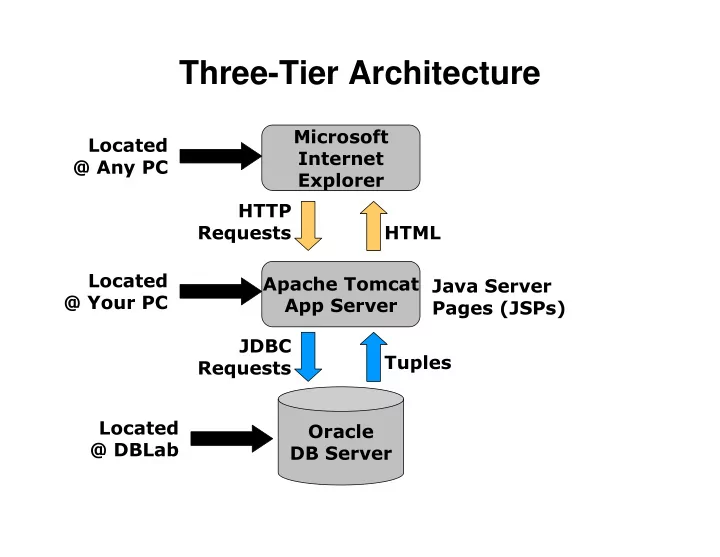
Three-Tier Architecture & - - PowerPoint PPT Presentation
Three-Tier Architecture & '*" &
! #$!% & ' ( & ')" & '*"
When a connection is created, it is in auto When a connection is created, it is in auto When a connection is created, it is in auto When a connection is created, it is in auto-
commit mode. This means that commit mode. This means that commit mode. This means that each individual SQL statement is treated as a transaction and wi each individual SQL statement is treated as a transaction and wi each individual SQL statement is treated as a transaction and wi each individual SQL statement is treated as a transaction and will be ll be ll be ll be automatically committed right after it is executed. automatically committed right after it is executed. automatically committed right after it is executed. automatically committed right after it is executed.
example example example example con.setAutoCommit(false con.setAutoCommit(false con.setAutoCommit(false con.setAutoCommit(false); ); ); ); PreparedStatement PreparedStatement PreparedStatement PreparedStatement updateSales updateSales updateSales updateSales = = = = con.prepareStatement con.prepareStatement con.prepareStatement con.prepareStatement( "UPDATE ( "UPDATE ( "UPDATE ( "UPDATE COFFEES SET SALES = ? WHERE COF_NAME LIKE ?"); COFFEES SET SALES = ? WHERE COF_NAME LIKE ?"); COFFEES SET SALES = ? WHERE COF_NAME LIKE ?"); COFFEES SET SALES = ? WHERE COF_NAME LIKE ?"); updateSales.setInt(1, 50); updateSales.setInt(1, 50); updateSales.setInt(1, 50); updateSales.setInt(1, 50); updateSales.setString(2, "Colombian"); updateSales.setString(2, "Colombian"); updateSales.setString(2, "Colombian"); updateSales.setString(2, "Colombian"); updateSales.executeUpdate updateSales.executeUpdate updateSales.executeUpdate updateSales.executeUpdate(); (); (); (); PreparedStatement PreparedStatement PreparedStatement PreparedStatement updateTotal updateTotal updateTotal updateTotal = = = = con.prepareStatement con.prepareStatement con.prepareStatement con.prepareStatement( "UPDATE ( "UPDATE ( "UPDATE ( "UPDATE COFFEES SET TOTAL = TOTAL + ? WHERE COF_NAME LIKE ?"); COFFEES SET TOTAL = TOTAL + ? WHERE COF_NAME LIKE ?"); COFFEES SET TOTAL = TOTAL + ? WHERE COF_NAME LIKE ?"); COFFEES SET TOTAL = TOTAL + ? WHERE COF_NAME LIKE ?"); updateTotal.setInt(1, 50); updateTotal.setInt(1, 50); updateTotal.setInt(1, 50); updateTotal.setInt(1, 50); updateTotal.setString(2, "Colombian"); updateTotal.setString(2, "Colombian"); updateTotal.setString(2, "Colombian"); updateTotal.setString(2, "Colombian"); updateTotal.executeUpdate updateTotal.executeUpdate updateTotal.executeUpdate updateTotal.executeUpdate(); (); (); (); con.commit(); con.commit(); con.commit(); con.commit(); con.setAutoCommit(true con.setAutoCommit(true con.setAutoCommit(true con.setAutoCommit(true); ); ); );
<b>Data Entry Menu</b> <ul> <li> <a href="courses.jsp">Courses<a> </li> <li> <a href="classes.jsp">Classes<a> </li> <li> <a href="students.jsp">Students<a> </li> </ul>
<html> <body> <table> <tr> <td> <jsp:include page="menu.html" /> </td> <td> Open connection code Statement code Presentation code Close connection code </td> </tr> </table> </body> </html>
<%-- Set the scripting language to java and --%> <%-- import the java.sql package --%> <%@ page language="java" import="java.sql.*" %> <% try { // Load Oracle Driver class file DriverManager.registerDriver (new oracle.jdbc.driver.OracleDriver()); // Make a connection to the Oracle datasource Connection conn = DriverManager.getConnection ("jdbc:oracle:thin:@feast.ucsd.edu:1521:source", “user", “pass"); %>
<% // Create the statement Statement statement = conn.createStatement(); // Use the statement to SELECT the student attributes // FROM the Student table. ResultSet rs = statement.executeQuery ("SELECT * FROM Student"); %>
<table> <tr> <th>SSN</th> <th>First</th> <th>Last</th> <th>College</th> </tr> <% // Iterate over the ResultSet while ( rs.next() ) { %> Iteration Code <% } %> </table>
<tr> <%-- Get the SSN, which is a number --%> <td><%= rs.getInt("SSN") %></td> <%-- Get the ID --%> <td><%= rs.getString("ID") %></td> <%-- Get the FIRSTNAME --%> <td><%= rs.getString("FIRSTNAME") %></td> <%-- Get the LASTNAME --%> <td><%= rs.getString("LASTNAME") %></td> <%-- Get the COLLEGE --%> <td><%= rs.getString("COLLEGE") %></td> </tr>
<% // Close the ResultSet rs.close(); // Close the Statement statement.close(); // Close the Connection conn.close(); } catch (SQLException sqle) {
} catch (Exception e) {
} %>
<html> <body> <table> <tr> <td> Open connection code Insertion Code Statement code Presentation code Close connection code </td> </tr> </table> </body> </html>
// Check if an insertion is requested String action = request.getParameter("action"); if (action != null && action.equals("insert")) { conn.setAutoCommit(false); // Create the prepared statement and use it to // INSERT the student attrs INTO the Student table. PreparedStatement pstmt = conn.prepareStatement( ("INSERT INTO Student VALUES (?, ?, ?, ?, ?)")); pstmt.setInt(1,Integer.parseInt(request.getParameter("SSN"))); pstmt.setString(2, request.getParameter("ID")); … pstmt.executeUpdate(); conn.commit(); conn.setAutoCommit(true); }
<table> <tr> <th>SSN</th> <th>First</th> <th>Last</th> <th>College</th> </tr> Insert Form Code <% // Iterate over the ResultSet while ( rs.next() ) { %> Iteration Code <% } %> </table>
<tr> <form action="students.jsp" method="get"> <input type="hidden" value="insert" name="action"> <th><input value="" name="SSN" size="10"></th> <th><input value="" name="ID" size="10"></th> <th><input value="" name="FIRSTNAME" size="15"></th> <th><input value="" name="LASTNAME" size="15"></th> <th><input value="" name="COLLEGE" size="15"></th> <th><input type="submit" value="Insert"></th> </form> </tr>
<html> <body> <table> <tr> <td> Open connection code Insertion Code Update Code Delete Code Statement code Presentation code Close connection code </td> </tr> </table> </body> </html>
// Check if an update is requested if (action != null && action.equals("update")) { conn.setAutoCommit(false); // Create the prepared statement and use it to // UPDATE the student attributes in the Student table. PreparedStatement pstatement = conn.prepareStatement( "UPDATE Student SET ID = ?, FIRSTNAME = ?, " + "LASTNAME = ?, COLLEGE = ? WHERE SSN = ?"); pstatement.setString(1, request.getParameter("ID")); pstatement.setString(2, request.getParameter("FIRSTNAME")); … int rowCount = pstatement.executeUpdate(); conn.setAutoCommit(false); conn.setAutoCommit(true); }
// Check if a delete is requested if (action != null && action.equals("delete")) { conn.setAutoCommit(false); // Create the prepared statement and use it to // DELETE the student FROM the Student table. PreparedStatement pstmt = conn.prepareStatement( "DELETE FROM Student WHERE SSN = ?"); pstmt.setInt(1, Integer.parseInt(request.getParameter("SSN"))); int rowCount = pstmt.executeUpdate(); conn.setAutoCommit(false); conn.setAutoCommit(true); }
<table> <tr> <th>SSN</th> <th>First</th> <th>Last</th> <th>College</th> </tr> Insert Form Code <% // Iterate over the ResultSet while ( rs.next() ) { %> Iteration Code <% } %> </table>
<tr> <form action="students.jsp" method="get"> <input type="hidden" value="update" name="action"> <td><input value="<%= rs.getInt("SSN") %>" name="SSN"></td> <td><input value="<%= rs.getString("ID") %>" name="ID"></td> … <td><input type="submit" value="Update"></td> </form> <form action="students2.jsp" method="get"> <input type="hidden" value="delete" name="action"> <input type="hidden" value="<%= rs.getInt("SSN") %>" name="SSN"> <td><input type="submit" value="Delete"></td> </form> </tr>