SFMS User Group Meeting February 6, 2018 SFMS SFMS 2/6/2018 1 - - PDF document

sfms user group meeting
SMART_READER_LITE
LIVE PREVIEW

SFMS User Group Meeting February 6, 2018 SFMS SFMS 2/6/2018 1 - - PDF document

SFMS User Group Meeting February 6, 2018 SFMS SFMS 2/6/2018 1 SFMA Terms Table Archives Rollover Programs Document Tracking, Profile Payments, Financial, Year End Receipts, Profiles Purges Closing Programs Vendor Table Year End ACH


slide-1
SLIDE 1

1

SFMS SFMS

2/6/2018 1

SFMS User Group Meeting

February 6, 2018

SFMS SFMS

2/6/2018 2

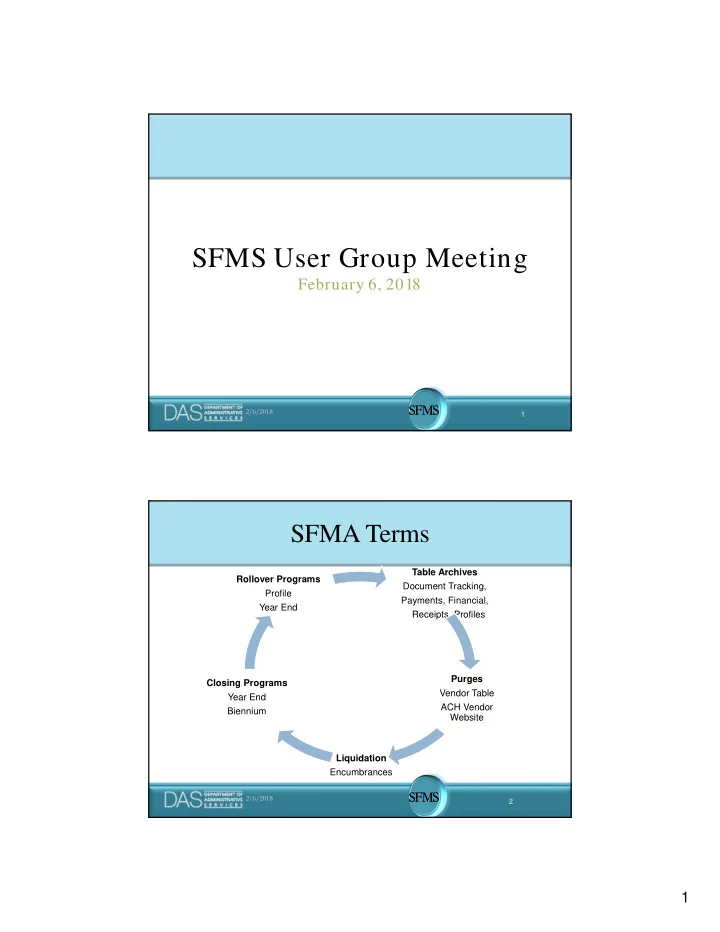
SFMA Terms

Table Archives Document Tracking, Payments, Financial, Receipts, Profiles Purges Vendor Table ACH Vendor Website Liquidation Encumbrances Closing Programs Year End Biennium Rollover Programs Profile Year End

slide-2
SLIDE 2

2

SFMS SFMS

2/6/2018 3

SFMS Calendar

July-Aug Validate Year End Rollover Year End Close Document Tracking Archive Sept-Dec Liquidate Encumbrances Biennium Close Jan-Mar Payment Control/Cancel Archive Receipt Table Archive April-May Profile Rollover Financial Table Archive Profile Table Archive June Vendor Table Purge ACH Vendor Website Purge Year End Rollover

SFMS SFMS

2/6/2018 4

Executive Order 17-09 Executive Order 17-09

slide-3
SLIDE 3

3

SFMS SFMS

2/6/2018 5

Executive Order No. 17-09

  • Objective

– Promote fiscal responsibility by recovering monies

  • wed to the state.

– Signed on May 5, 2017. – Requires state agencies to make efforts to recoup liquidated and delinquent debt from entities by means of reducing state agencies’ payments to such vendors.

SFMS SFMS

2/6/2018 6

Executive Order No. 17-09

  • R*STARS Changes

– Granting SSN/EIN view on the 52 screen to agencies’ payable staff. – Will grant view access to UC 17, 20, 22, 26, 28, 84, and 98.

slide-4
SLIDE 4

4

SFMS SFMS

2/6/2018 7

Executive Order No. 17-09

S052 UC: 17 STATE OF OREGON 11/27/17 01:46 PM LINK TO: SYSTEMWIDE VENDOR PROFILE ACPT VENDOR NO: 3987654321 NAME CONTROL: MOUS VENDOR NAME: MICKEY MOUSE SEARCH NAMES: MICKEY MOUSE MOUSE,MICKEY, ALT VENDOR/FID: 1099 IND: Y FEI/SSN IND: S REASON CODE: ADD VENDOR TYPE: 7 OWNRSHP CD: I TIN MATCH: 6 TIN: 007654321 ADDRESS: 1000 UPPER DISNEY LN CITY: DISNEY ST: OR ZIP: 98765 CNTRY: VENDOR CONTACT: CONTRACTOR /ADD ACH TAX OFFSET EXMPT: N TELEPHONE: 503 987 6543 EXT: FAX: HOLD RSN: PDT: DA EMAIL: PNI: N AGY: 107 CONTACT: DEBBIE KIRK PHONE: 503 378 3126 UPDATED BY: POLSTON, TERRY DIR DEP DATE: 10292015 W9 REQUEST DATE: BU/WH EFF DATE: STATUS CODE: A EFF START DATE: 08262014 EFF END DATE: LAST PROC DATE: 10222015 Z06 RECORD SUCCESSFULLY RECALLED F1-HELP F3-DEL F5-NXT F6-51 F9-INT F10-SAVE F11-SAVE/CLR ENTER-INQ CLEAR-EXT

SFMS SFMS

2/6/2018 8

Executive Order No. 17-09

  • R*STARS Change

– Automated inactivation of vendors on DOR debtor’s list.

slide-5
SLIDE 5

5

SFMS SFMS

2/6/2018 9

Executive Order No. 17-09

S052 UC: 02 STATE OF OREGON 11/29/17 12:47 PM LINK TO: SYSTEMWIDE VENDOR PROFILE ACPT VENDOR NO: 3987654321 NAME CONTROL: MOUS VENDOR NAME: MICKEY MOUSE SEARCH NAMES: MICKEY MOUSE MOUSE,MICKEY ALT VENDOR/FID: 1099 IND: Y FEI/SSN IND: S REASON CODE: ADD VENDOR TYPE: 7 OWNRSHP CD: I TIN MATCH: 6 TIN: 007654321 ADDRESS: 1000 UPPER DISNEY LN *PLEASE CONTACT DOR* CITY: DISNEY ST: OR ZIP: 98765 CNTRY: VENDOR CONTACT: CONTRACTOR /ADD ACH TAX OFFSET EXMPT: N TELEPHONE: 503 987 6543 EXT: FAX: HOLD RSN: PDT: DA EMAIL: PNI: N AGY: 107 CONTACT: DEBBIE KIRK PHONE: 503 378 3126 UPDATED BY: DAFJDOR DIR DEP DATE: 10292015 W9 REQUEST DATE: BU/WH EFF DATE: STATUS CODE: I EFF START DATE: 08262014 EFF END DATE: LAST PROC DATE: 11292017 Z06 RECORD SUCCESSFULLY RECALLED F1-HELP F3-DEL F5-NXT F6-51 F9-INT F10-SAVE F11-SAVE/CLR ENTER-INQ CLEAR-EXT

SFMS SFMS

2/6/2018 10

Executive Order No. 17-09

  • Process

– SFMA receives DOR debtor’s list nightly. – SFMA compares today’s and yesterday’s interface files to determine what changed. – Vendors on the DOR debtor’s list will be inactivated. – Agencies notify DOR of debtor/vendor match for garnishment evaluation. – If garnishable, then agencies create mail code 444 (special mail code used by DOR to collect payments).

slide-6
SLIDE 6

6

SFMS SFMS

2/6/2018 11

Executive Order No. 17-09

  • Process (continue)

– Agencies will release payment with no future due dates on the day the vendors are activated. – Payment is made to DOR. – Once the debt is collected by DOR, the debtor will drop off the DOR debtor’s list. SFMA will then automatically activate the vendor. – Agencies are now allowed to send payments to the vendors again.

SFMS SFMS

2/6/2018 12

Executive Order No. 17-09

  • Any dispute with the vendor will be handle by DOR.
  • No monitoring of the debt collection will be done by

SFMS.

  • Agencies are NOT to send the garnishment paperwork

to SFMS.

  • Training will be available approximately April 2018.
slide-7
SLIDE 7

7

SFMS SFMS

2/6/2018 13

Accounts Receivables Write Off Accounts Receivables Write Off

SFMS SFMS

2/6/2018 14

Collecting Write-Off Data

  • Background

– The Legislative Assembly has questioned the large amount owed to the State of Oregon as well as the value of accounts written off annually by agencies. – To assist agencies with ongoing analysis of amounts being written-off and the reasons why, SWARM and SFMS researched the possibility of using RSTARS to track the 10 types of write-offs and the associated amounts.

slide-8
SLIDE 8

8

SFMS SFMS

2/6/2018 15

Collecting Write-Off Data

  • Status Update

– It has been determined that the MPCD field on transactions is appropriate to use. – **Agencies that currently use the MPCD field when processing write-off transactions will be contacted by SWARM to identify an alternative field to capture agency specific data. – SWARM is considering a required implementation date of 7/1/18.

SFMS SFMS

2/6/2018 16

Collecting Write-Off Data

  • The MPCD field can be used on a voluntary basis prior

to the required date of implementation.

– T-codes 129, 130, 131, 445, 455, and 467. – Write-Off option

  • W01 – Debtor has no asset
  • W02 – Collection cost exceed or equal debt
  • W03 – Debtor is deceased & has no asset
  • W04 – Debtor is a corporation or LLC that has no income
  • W05 – Previously been discharged in bankruptcy
  • W06 – Debtor’s estate is pending bankruptcy; collection amount is insubstantial
  • W07 – Unable to collect in foreseeable future
  • W08 – Unable to locate debtor despite reasonable efforts to do so
  • W09 – Expired court judgement, administrative order, or distraint warrant
  • W10 – Other Attorney General approved write-off criteria
slide-9
SLIDE 9

9

SFMS SFMS

2/6/2018 17

Collecting Write-Off Data

  • Future direction will be provided at a later date.

– OAM 35.50.10 will change to reflect these new requirements. – MPCD field will be ‘R’equired on write-off t-codes in SFMA.

SFMS SFMS

2/6/2018 18

Transaction Codes:

Which One?

Transaction Codes:

Which One?

slide-10
SLIDE 10

10

SFMS SFMS

2/6/2018 19

Transaction Codes: Which One?

R*STARS is designed to… achieve the objective of maximum flexibility while maintaining control and efficiency.

SFMS SFMS

2/6/2018 20

Transaction Codes: Which One?

Additionally, R*STARS: – Provides flexibility at the agency level to satisfy agency requirements – Provides uniformity and consistency in statewide accounting and reporting – Minimizes the impact on user agencies

slide-11
SLIDE 11

11

SFMS SFMS

2/6/2018 21

Transaction Codes: Which One?

Today, we’ll look at … a. Overview of transaction codes b. General Ledger Profile: D31 screen c. Transaction Code Profiles: 28A and 28B screens d. Tools for selecting transaction codes e. Questions and answers

SFMS SFMS

2/6/2018 22

Transaction Codes: Overview

What is a Transaction Code? A 3-character code that determines the accounting impact of financial transactions in R*STARS. TC 199 TC 172 TC190 TC 407/408 TC 730/731 TC493 TC 200 TC 225 TC 135 TC 217 TC Z12 So many choices  So little time 

slide-12
SLIDE 12

12

SFMS SFMS

2/6/2018 23

Transaction Codes: Overview

Transaction Codes are designed as a single transaction concept. At the time the transaction is recorded:

– All general ledger accounts for a dual accounting system are posted using just one transaction code – The full range of classification data is affected – All system tables are impacted – No additional entries are needed to record:

  • Appropriation
  • Fund
  • Encumbrance balances

SFMS SFMS

2/6/2018 24

Transaction Codes: Overview

Various edit and validation criteria must be met before transactions are posted.

1. Improper Entry 2. Invalid Values 3. Insufficient Balances

slide-13
SLIDE 13

13

SFMS SFMS

2/6/2018 25

General Ledger accounts

What general ledger account will be used? OAM 60.10.00 What comptroller object can be used? OAM 60.30.00 OAM 60.20.00

(SARS website, Oregon Accounting Manual link)

SFMS SFMS

2/6/2018 26

General Ledger accounts:

slide-14
SLIDE 14

14

SFMS SFMS

2/6/2018 27

Transaction Code: Profile

28A screen 28B screen

These go “hand-in-hand”. Note: Only the 28A indicates if the transaction code is inactive.

SFMS SFMS

2/6/2018 28

Transaction Code: Profile

Segments on the 28A screen: 1. General Ledger Posting Segment – indicates the general ledger accounts to which the transaction will post. 2. Transaction Edit Indicators Segment – indicates the elements to be filled in on the transaction entry screen. 3. Special Indicators Segment – fields that provide added power and flexibility. 4. File Posting Indicators Segment – determines the financial table to which the system will post the transaction.

slide-15
SLIDE 15

15

SFMS SFMS

2/6/2018 29

Transaction Code: Profile

Let’s take a closer look at :

28A screen

SFMS SFMS

2/6/2018 30

Transaction Code: Profile

Whew! That is a lot of info! But there’s even more …

slide-16
SLIDE 16

16

SFMS SFMS

2/6/2018 31

Transaction Code: Profile

28B screen provides: Definition – the most common use of the transaction code, but not necessarily the only use. List of elements that can be used:

– General ledger accounts – Comptroller objects – Document types – Batch types SFMS SFMS

2/6/2018 32

Transaction Code: Profile

Let’s take a closer look at :

28B screen

slide-17
SLIDE 17

17

SFMS SFMS

2/6/2018 33

Transaction Code: Open

Let’s take a closer look at “open” t-codes:

Blank Debit and Credit pair SFMS SFMS

2/6/2018 34

Transaction Code: Open

Choose credit GL account from 28B screen

slide-18
SLIDE 18

18

SFMS SFMS

2/6/2018 35

Transaction Code: Open

Input GL # in GLA field SFMS SFMS

2/6/2018 36

Transaction Code: Spreadsheet

The SFMS spreadsheet:

T-codes.xlsx

(on SARS website-OAM-Quick link: Transaction codes )

slide-19
SLIDE 19

19

SFMS SFMS

2/6/2018 37

Transaction Code: Spreadsheet

The RSTARS report:

DAFQA010

  • On RSTARS 91 profile
  • Can be run any night since this is a profile report
  • Lists t-codes available for each general ledger account
  • Report does not list if in open GLs on 28B

SFMS SFMS

2/6/2018 38

Transaction Code: Tools

Toolbox

  • General Ledger accounts: OAM & D31 screen
  • Comptroller Object: OAM
  • 28A & 28B Screens
  • T-codes.xlsx on SARS website
  • DAFQA010 from RSTARS
slide-20
SLIDE 20

20

SFMS SFMS

2/6/2018 39

Question #1

What screen indicates if a General Ledger account is normally a Debit or a Credit?

  • 1. D31 screen
  • 2. 28A screen
  • 3. 90 HELP screen

SFMS SFMS

2/6/2018 40

Question #2

There are 2 positions used for the Interface Indicator field

  • n the 28A screen. They are used to tell us:
  • 1. If agencies are allowed to send interface files to RSTARS and how many

files

  • 2. If the transaction will interface to Treasury and if it will interface to a

receipted (agency) or suspense (treasury) account

  • 3. If this transaction code relates to another transaction code and, if so,

which transaction code

slide-21
SLIDE 21

21

SFMS SFMS

2/6/2018 41

Question #3

Document supported transaction codes have information in the File Posting Indicators section of the 28A screen. What indicates that the t-code is document supported?:

  • 1. All documents are supported
  • 2. There will be nothing in the A/S and BT columns
  • 3. There will be indicators in the DF table row under BT, Match, GLA and

Doc columns

SFMS SFMS

2/6/2018 42

References

Here are some references and resources available to you for additional details.

  • Data Entry Guide, Chapter 5

http://www.oregon.gov/das/Financial/AcctgSys/Documents/ Chapter_5_Desc_Profiles.pdf

  • Data Entry Guide, Chapter 6

http://www.oregon.gov/das/Financial/AcctgSys/Documents/ Chapter_6_Non_Descriptive_Profiles.pdf

slide-22
SLIDE 22

22

SFMS SFMS

2/6/2018 43

References

  • Desk Manual, Treasury Trea.1

http://www.oregon.gov/das/Financial/AcctgSys/Documents/t rea1.pdf

  • Desk Manual, Treasury Trea.2

http://www.oregon.gov/das/Financial/AcctgSys/Documents/t rea2.pdf

  • Desk Manual, Central Processing Cent.2

http://www.oregon.gov/das/Financial/AcctgSys/Documents/c ent2.pdf SFMS SFMS

2/6/2018 44

Transaction Codes: Which One?

Thank you for attending today!

For additional questions regarding transaction codes, please contact your SFMS analyst. Rose Mattix (503) 373-0770 Rosalyn.M.Mattix@oregon.gov Maria Berglund (503) 373-0263 Maria.Berglund@oregon.gov Dianne Lay (503) 373-0267 Dianne.Lay@oregon.gov
slide-23
SLIDE 23

23

SFMS SFMS

2/6/2018 45

Upcoming SFMA Archives

SFMS SFMS

2/6/2018 46

2018 Payment Control/ Cancel Archive – 3/1/18

  • No Agency responsibility
  • No anticipated system downtime
  • Archive criteria:

– Cancelled, Stop Pay and Paid warrants if the Cancel Date or Redemption Date is prior to 7/1/15 – All Expired warrants (expired prior to 11/1/17)

  • Warrants with a Payment Status of “I” (Issued) are not

archived

  • Archived records from the Payment Control table are

loaded to the Datamart

slide-24
SLIDE 24

24

SFMS SFMS

2/6/2018 47

2018 Financial Archive – 5/4/18

  • R*STARS System Functionality:

– When the 530 screen displays the message “EAI - IT FILE CLOSED”, agencies:

  • CAN view/update profile screens, use financial

inquiry and drilldown screens

  • CANNOT create, edit or release batches

SFMS SFMS

2/6/2018 48

2018 Financial Archive – 5/4/18 (Continued)

  • ADPICS System Functionality:

– When the R*STARS 530 screen displays the message “EAI - IT FILE CLOSED”, ADPICS agencies:

  • CAN create purchase orders, direct vouchers, etc.
  • CANNOT send transactions over to R*STARS.

When the R*STARS IT FILE is closed, you will receive the message “R*STARS System Not

  • Available. Document Not Posted.” Transactions

will remain in Unposted Status in ADPICS and can be sent to R*STARS once the IT file is open.

slide-25
SLIDE 25

25

SFMS SFMS

2/6/2018 49

2018 Financial Archive – 5/4/18 (Continued)

  • No Agency responsibility
  • System Availability:

– Friday, May 4 – SFMA is available as usual. Financial Archive jobs will begin after the normal nightly batch cycle. – Saturday, May 5 – R*STARS 530 screen will have a message that reads “EAI - IT FILE CLOSED”

SFMS SFMS

2/6/2018 50

2018 Financial Archive – 5/4/18 (Continued)

  • System Availability (Continued):

– Monday, May 7 – Expedite cycle will NOT occur – R*STARS 530 screen will have a message that reads “EAI - IT FILE CLOSED” for most of the day (possibly all day) while SFMS staff validate the archive. – SFMS plans to run a batch cycle Monday night (5/7). We will communicate the status of our verification on Monday and open up the IT file as soon as possible.

slide-26
SLIDE 26

26

SFMS SFMS

2/6/2018 51

2018 Financial Archive – 5/4/18 (Continued)

  • Archiving financial data through Fiscal Year 2014

except for protected Capital Construction (CC) records.

  • Affected Tables/R*STARS Screens:

Table Screen CC? Table Screen CC? Document Summary 11 Yes Contract 68 No Allotment (Agency Budget) 61 Yes Agency/Fund 69 No Appropriation 62 Yes Project 80 No Cash Control 63 No Summary GL Document 83 Yes Document Financial 64 Yes Inactive Accounting Event 84 Yes General Ledger 65 Yes Summary General Ledger 89 Yes Grant 66 No

SFMS SFMS

2/6/2018 52

2018 Financial Archive – 5/4/18 (Continued)

  • Archived records from the following tables are loaded

to the Datamart:

R*STARS tables Datamart table names (begin with SFMSARCH) Document Financial Arch Doc Financial General Ledger Arch Gl Detail Grant Arch Grant Financial Contract Arch Contract Financial Project Arch Project Financial Inactive Accounting Event Arch All Acct Event Summary General Ledger Arch Gl Summary

slide-27
SLIDE 27

27

SFMS SFMS

2/6/2018 53

2018 Profile Archive – 5/31/18

  • No anticipated system downtime
  • 28 R*STARS profile screens/tables grouped into three

categories: – Archive based on Appropriation Year < or = 2013 – Archive based on Fiscal Year < or = 2014 – Archive based on Effective End Date < or = 6/31/14

  • AY and FY Profile table records are subject to Capital

Construction protection

  • Profile Status (Active/Inactive) is not a factor

SFMS SFMS

2/6/2018 54

2018 Profile Archive – 5/31/18 (Continued)

  • Appropriation Year profile tables:

R*STARS screen – Title Datamart Table names (begin with SFMSPUSR) 20 – Appropriation Number Appn No 21 – Index/PCA Relationship PCA Index Rel 22 – Cost Allocation N/A 24 – Index Code Index No 26 – Program Cost Account PCA D03 – Organization Code Org Code D04 – Program Code Program Code D09 – Comptroller Source/Group Compt Srce Grp D10 – Comptroller Object Compt Obj D11 – Agency Object Agy Obj

slide-28
SLIDE 28

28

SFMS SFMS

2/6/2018 55

2018 Profile Archive – 5/31/18 (Continued)

  • Fiscal Year profile tables:

R*STARS screen – Title Datamart Table names (begin with SFMSPUSR) 25 – Agency Control N/A D23 – Fund Fund D23 D73 – Cash Fund Cash Fund

SFMS SFMS

2/6/2018 56

2018 Profile Archive – 5/31/18 (Continued)

  • Effective End Date profile tables:

R*STARS screen – Title Datamart Table names (begin with SFMSPUSR) 27 – Project Control Project Phase 29 – Grant Control Grant Phase 30 – Contract Contract 31 – Subgrantee Control Sub Grantee 34 – Agency Vendor N/A 550 – Recurring Transaction Recurring Tran D25 – Agency Object Group Agy Obj Grp D26 – Agency Code 1 Agency Code 1 D27 – Agency Code 2 Agency Code 2 D28 – Grantor Profile N/A

slide-29
SLIDE 29

29

SFMS SFMS

2/6/2018 57

2018 Profile Archive – 5/31/18 (Continued)

  • Effective End Date profile tables (Continued):

R*STARS screen – Title Datamart Table names (begin with SFMSPUSR) D32 – Agency General Ledger Account Agy GL D36 – Agency Code 3 Agency Code 3 D42 – Project Number Project No D47 – Grant Number Grant No D48 – Grant Object Grant Obj

SFMS SFMS

2/6/2018

2017 - 1099-MISC

slide-30
SLIDE 30

30

SFMS SFMS

2/6/2018 59

2017 – 1099-MISC

1099 Training Held 12/06/17 33 employees attended 24 agencies represented 1099 Training material available on SFMS Website Link: http://www.oregon.gov/das/Financial/AcctgSys/Docum

ents/1099_MISC.pdf SFMS SFMS

2/6/2018 60

2017 – 1099-MISC

IMPORTANT DATES 7,042 1099 Forms Printed/Mailed to Vendors 1-24-18 Electronic Submission to IRS & DOR occurred 1-29-18 (Due 1-31)

slide-31
SLIDE 31

31

SFMS SFMS

2/6/2018 61

2017 – 1099-MISC

Upcoming Processing Dates

  • 2017 Corrected 1099’s Processing Dates (if necessary)
  • 2-8-18
  • 2-22-18
  • 3-8-18
  • 3-29-18 (Final planned printing)

SFMS SFMS

2/6/2018 62

2017 – 1099-MISC

Questions?

slide-32
SLIDE 32

32

SFMS SFMS

2/6/2018 63

SFMS SFMS

2/6/2018 64

SFMS Contacts

Fabiola Flores • 503 373-0734 Ru Chen • 503 373-0750 Alan Park • 503 373-0262 Dianne Lay • 503 373-0267 Rose Mattix • 503 373-0770 Maria Berglund • 503 373-0251 Karlene Hancock • 503 373-0714 Judy Wilder • 503 373-0266