Services Do A for me. Sockets and Client/Server OK, heres your - - PDF document

services
SMART_READER_LITE
LIVE PREVIEW

Services Do A for me. Sockets and Client/Server OK, heres your - - PDF document

Services Do A for me. Sockets and Client/Server OK, heres your answer. Communication Now do B. OK, here. Client Server Jeff Chase request/response paradigm ==> client/server roles Duke University - Remote


slide-1
SLIDE 1

1 Sockets and Client/Server Communication

Jeff Chase Duke University

Services

request/response paradigm ==> client/server roles

  • Remote Procedure Call (RPC)
  • object invocation, e.g., Remote Method Invocation (RMI)
  • HTTP (the Web)
  • device protocols (e.g., SCSI)

“Do A for me.” “OK, here’s your answer.” “Now do B.” “OK, here.”

Client Server

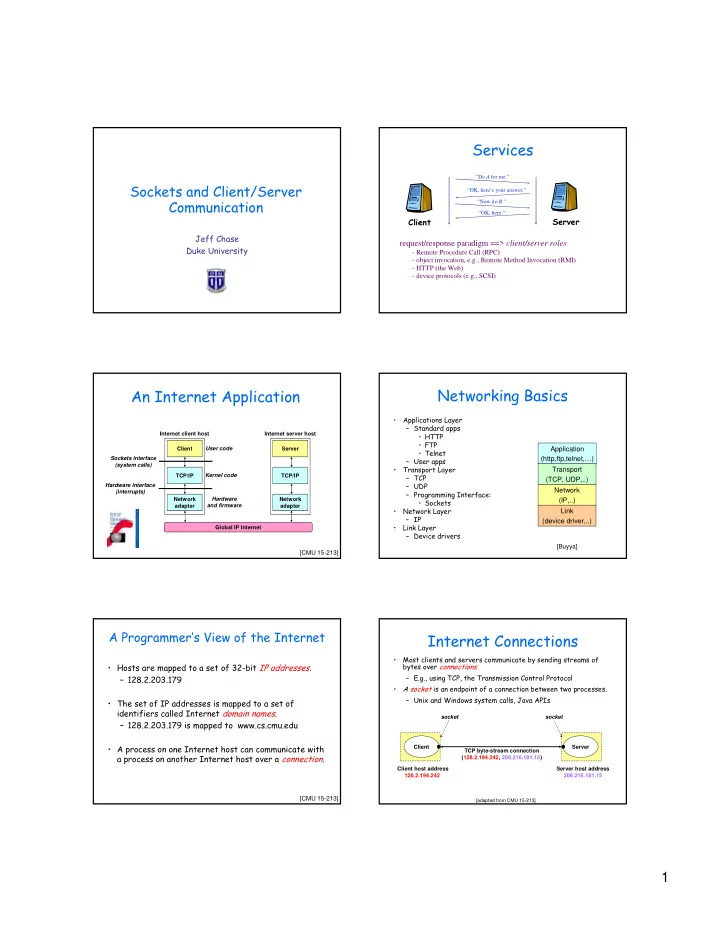
An Internet Application

TCP/IP Client Network adapter Global IP Internet TCP/IP Server Network adapter Internet client host Internet server host Sockets interface (system calls) Hardware interface (interrupts) User code Kernel code Hardware and firmware

[CMU 15-213]

Networking Basics

  • Applications Layer

– Standard apps

  • HTTP
  • FTP
  • Telnet

– User apps

  • Transport Layer

– TCP – UDP – Programming Interface:

  • Sockets
  • Network Layer

– IP

  • Link Layer

– Device drivers Application (http,ftp,telnet,…) Transport (TCP, UDP,..) Network (IP,..) Link (device driver,..)

[Buyya]

A Programmer’s View of the Internet

  • Hosts are mapped to a set of 32-bit IP addresses.

– 128.2.203.179

  • The set of IP addresses is mapped to a set of

identifiers called Internet domain names. – 128.2.203.179 is mapped to www.cs.cmu.edu

  • A process on one Internet host can communicate with

a process on another Internet host over a connection.

[CMU 15-213]

Internet Connections

TCP byte-stream connection (128.2.194.242, 208.216.181.15) Server Client Client host address 128.2.194.242 Server host address 208.216.181.15

  • Most clients and servers communicate by sending streams of

bytes over connections – E.g., using TCP, the Transmission Control Protocol

  • A socket is an endpoint of a connection between two processes.

– Unix and Windows system calls, Java APIs

[adapted from CMU 15-213]

socket socket

slide-2
SLIDE 2

2

Sockets: the rest of the story

Connection socket pair (128.2.194.242:51213, 208.216.181.15:80) Server (port 80) Client Client socket address 128.2.194.242:51213 Server socket address 208.216.181.15:80 Client host address 128.2.194.242 Server host address 208.216.181.15

  • A host might have many open connections, possibly held

by different processes.

  • A port is a unique communication endpoint on a host,

named by a 16-bit integer, and associated with a process.

Note: 51213 is an ephemeral port allocated by the kernel Note: 80 is a well-known port associated with Web servers

[CMU 15-213]

Using Ports to Identify Services

Web server (port 80) Client host Server host 128.2.194.242 Echo server (port 7) Service request for 128.2.194.242:80 (i.e., the Web server) Web server (port 80) Echo server (port 7) Service request for 128.2.194.242:7 (i.e., the echo server) Kernel Kernel Client Client

[CMU 15-213] (connect request) (connect request)

More on Ports

  • This port abstraction is an Internet Protocol concept.

– Source/dest port is named in every packet. – Kernel looks at port to demultiplex incoming traffic.

  • The term is commonly used to refer to a communication

endpoint in other contexts.

  • How do clients know what port number to connect to?

– We have to agree on well-known ports for common services: ICAAN again – Look at /etc/services – Ports 1023 and below are ‘reserved’

  • Clients need a return port, but it can be an ephemeral

port assigned dynamically by the kernel.

Berkeley Sockets

  • Networking protocols are implemented as part of the

OS – The networking API exported by most OS’s is the socket interface – Originally provided by BSD 4.1c ~1982.

  • The principal abstraction is a socket

– Point at which an application attaches to the network – Defines operations for creating connections, attaching to network, sending/receiving data, closing.

[Paul Barford]

Datagrams and Streams

Communication over the Internet uses a selected transport-layer protocol (layer 4) built above the common IP packet protocol.

  • Point-to-point communication with a socket/port at either end.
  • UDP = User Datagram Protocol (AF_INET/SOCK_DGRAM)

– Send/receive messages up to 8KB (plus) – Unreliable: messages may be lost or reordered – Connectionless: no notion or cost of ‘establishing a connection’

  • TCP = Transmission Control Protocol (AF_INET/SOCK_STREAM)

– Send/receive byte streams of arbitrary length (like a pipe) – All bytes delivered are correct and delivered in order – Masks transient packet loss – Connection setup/maintenance: other end is notified if one end closes or resets the connection, or if the connection breaks.

Unix Sockets I

  • Creating a socket

int socket(int domain, int type, int protocol)

  • domain = AF_INET, AF_UNIX
  • type = SOCK_STREAM, SOCK_DGRAM

What is this integer that is returned?

slide-3
SLIDE 3

3 Unix File Descriptors Illustrated

user space

File descriptors are a special case of kernel object handles.

pipe file

socket

process file descriptor table kernel system open file table tty Disclaimer: this drawing is

  • versimplified.

The binding of file descriptors to objects is specific to each process, like the virtual translations in the virtual address space.

Sending/Receiving

  • Use read/write system calls and variants to

transmit/receive byte-stream data. – “Just like files”! – Close works too

  • Alternative syscalls for sending/receiving messages
  • Variants of:

int send(int socket, char *msg, int mlen, int flags) int recv(int socket, char *buf, int blen, int flags)

Listening for a Connection

  • A server (program) runs on a specific computer and

has a socket that is bound to a specific port. The server waits and listens to the socket for a client to make a connection request.

server Client Connection request port

[Buyya]

Making a Connection

  • If everything goes well, the server accepts the

connection.

  • Upon acceptance, the server gets a new socket bound

to a different port.

– It needs a new socket (consequently a different port number) so that it can continue to listen to the original socket for connection requests while serving the connected client.

server Client Connection port port port

[Buyya]

Server-Side Sockets

  • Bind socket to IP address/port

int bind(int socket, struct sockaddr *addr, int addr_len)

  • Mark the socket as accepting connections

int listen(int socket, int backlog)

  • “Passive open” accepts connection

int accept(int socket, struct sockaddr *addr, int addr_len) (returns a new socket to talk to the client)

Client Socket

  • Active Open (on client)

int connect(int socket, struct sockaddr *addr, int addr_len)

slide-4
SLIDE 4

4

Connection-oriented example (TCP)

Server Socket() Bind() Client Socket() Listen() Accept() Recv() Send() Connect() Send() Recv() Block until connect Process request Connection Establishmt. Data (request) Data (reply) [Paul Barford]

Connectionless example (UDP)

Server Socket() Bind() Client Socket() Recvfrom() Sendto() Bind() Sendto() Recvfrom() Block until Data from client Process request Data (request) Data (reply) [Paul Barford]

Socket call

  • Means by which an application attached to the network
  • int socket(int family, int type, int protocol)
  • Family: address family (protocol family)

– AF_UNIX, AF_INET, AF_NS, AF_IMPLINK

  • Type: semantics of communication

– SOCK_STREAM, SOCK_DGRAM, SOCK_RAW – Not all combinations of family and type are valid

  • Protocol: Usually set to 0 but can be set to specific value.

– Family and type usually imply the protocol

  • Return value is a handle for new socket

[Paul Barford]

Bind call

  • Binds a newly created socket to the specified address
  • Int bind(int socket, struct sockaddr *address, int addr_len)
  • Socket: newly created socket handle
  • Address: data structure of address of local system

– IP address and port number (demux keys) – Same operation for both connection-oriented and connectionless servers

  • Can use well known port or unique port

[Paul Barford]

Listen call

  • Used by connection-oriented servers to indicate an

application is willing to receive connections

  • Int(int socket, int backlog)
  • Socket: handle of newly creates socket
  • Backlog: number of connection requests that can be

queued by the system while waiting for server to execute accept call.

[Paul Barford]

Accept call

  • After executing listen, the accept call carries out a

passive open (server prepared to accept connects).

  • Int accept(int socket, struct sockaddr *address, int addr_len)
  • It blocks until a remote client carries out a

connection request.

  • When it does return, it returns with a new socket

that corresponds with new connection and the address contains the clients address

[Paul Barford]

slide-5
SLIDE 5

5

Connect call

  • Client executes an active open of a connection
  • Int connect(int socket, struct sockaddr *address, int addr_len)
  • Call does not return until the three-way handshake

(TCP) is complete

  • Address field contains remote system’s address
  • Client OS usually selects random, unused port

[Paul Barford]

Send(to), Recv(from)

  • After connection has been made, application uses

send/recv to data

  • Int send(int socket, char *message, int msg_len, int flags)

– Send specified message using specified socket

  • Int recv(int scoket, char *buffer, int buf_len, int flags)

– Receive message from specified socket into specified buffer

[Paul Barford]

Implementing a Server (Java)

  • 1. Open the Server Socket:

ServerSocket server; DataOutputStream os; DataInputStream is; server = new ServerSocket( PORT );

  • 2. Wait for the Client Request:

Socket client = server.accept();

  • 3. Create I/O streams for communicating to the client

is = new DataInputStream( client.getInputStream() );

  • s = new DataOutputStream( client.getOutputStream() );
  • 4. Perform communication with client

Receive from client: String line = is.readLine(); Send to client: os.writeBytes("Hello\n");

  • 5. Close sockets: client.close();

[Buyya]

Implementing a Client (Java)

  • 1. Create a Socket Object:

client = new Socket( server, port_id );

  • 2. Create I/O streams for communicating with the

server.

is = new DataInputStream(client.getInputStream() );

  • s = new DataOutputStream( client.getOutputStream() );
  • 3. Perform I/O or communication with the server:

– Receive data from the server: String line = is.readLine(); – Send data to the server:

  • s.writeBytes("Hello\n");
  • 4. Close the socket when done:

client.close();

[Buyya]

A simple server (simplified code)

// SimpleServer.java: a simple server program import java.net.*; import java.io.*; public class SimpleServer { public static void main(String args[]) throws IOException { // Register service on port 1234 ServerSocket s = new ServerSocket(1234); Socket s1=s.accept(); // Wait and accept a connection // Get a communication stream associated with the socket OutputStream s1out = s1.getOutputStream(); DataOutputStream dos = new DataOutputStream (s1out); // Send a string! dos.writeUTF("Hi there"); // Close the connection, but not the server socket dos.close(); s1out.close(); s1.close(); } }

[Buyya]

A simple client (simplified code)

// SimpleClient.java: a simple client program import java.net.*; import java.io.*; public class SimpleClient { public static void main(String args[]) throws IOException { // Open your connection to a server, at port 1234 Socket s1 = new Socket("mundroo.cs.mu.oz.au",1234); // Get an input file handle from the socket and read the input InputStream s1In = s1.getInputStream(); DataInputStream dis = new DataInputStream(s1In); String st = new String (dis.readUTF()); System.out.println(st); // When done, just close the connection and exit dis.close(); s1In.close(); s1.close(); } }

[Buyya]

slide-6
SLIDE 6

6

ServerSocket & Exceptions

  • public ServerSocket(int port) throws IOException

– Creates a server socket on a specified port. – A port of 0 creates a socket on any free port. You can use getLocalPort() to identify the (assigned) port on which this socket is listening. – The maximum queue length for incoming connection indications (a request to connect) is set to 50. If a connection indication arrives when the queue is full, the connection is refused.

  • Throws:

– IOException - if an I/O error occurs when opening the socket. – SecurityException - if a security manager exists and its checkListen method doesn't allow the operation. [Buyya]

How does the Web work?

  • The canonical example in your Web browser

Click here

  • “here” is a Uniform Resource Locator (URL)

http://www-cse.ucsd.edu

  • It names the location of an object (document) on a

server.

[Geoff Voelker]

In Action…

Client Server

http://www-cse.ucsd.edu

– Client uses DNS to resolves name of server (www- cse.ucsd.edu) – Establishes an HTTP connection with the server over TCP/IP – Sends the server the name of the object (null) – Server returns the object

HTTP

[Voelker]

HTTP in a Nutshell

HTTP supports request/response message exchanges of arbitrary length. Small number of request types: basically GET and POST, with supplements.

  • bject name, + content for POST
  • ptional query string
  • ptional request headers

Responses are self-typed objects (documents) with attributes and tags.

  • ptional cookies
  • ptional response headers

GET /path/to/file/index.html HTTP/1.0 Content-type: MIME/html, Content-Length: 5000,...

Client Server

The Dynamic Web

HTTP began as a souped-up FTP that supports hypertext URLs. Service builders rapidly began using it for dynamically-generated content. Web servers morphed into Web Application Servers.

Common Gateway Interface (CGI) Java Servlets and JavaServer Pages (JSP) Microsoft Active Server Pages (ASP) “Web Services”

GET program-name?arg1=x&arg2=y Content-type: MIME/html, Content-Length: 5000,...

execute program

Client Server

Web Servers

Web server HTTP request HTTP response (content)

  • Clients and servers communicate

using the HyperText Transfer Protocol (HTTP) – Client and server establish TCP connection – Client requests content – Server responds with requested content – Client and server close connection (usually)

  • E.g., HTTP/1.1

– IETF RFC 2616, June, 1999.

Web client (browser) [CMU 15-213]

slide-7
SLIDE 7

7

Web Content

  • Web servers return content to clients

– content: a sequence of bytes with an associated MIME (Multipurpose Internet Mail Extensions) type

  • Example MIME types

– text/html HTML document – text/plain Unformatted text – application/postscript Postcript document – image/gif

Binary image encoded in GIF format

– image/jpeg

Binary image in JPEG format

[CMU 15-213]

Static and Dynamic Content

  • The content returned in HTTP responses can be

either static or dynamic. – Static content: content stored in files and retrieved in response to an HTTP request

  • Examples: HTML files, images, audio clips.

– Dynamic content: content produced on-the-fly in response to an HTTP request

  • Example: content produced by a program

executed by the server on behalf of the client.

  • Bottom line: All Web content is associated with a file

that is managed by the server.

[CMU 15-213]

URLs

  • Each file managed by a server has a unique name called a URL

(Universal Resource Locator)

  • URLs for static content:

– http://www.cs.cmu.edu:80/index.html – http://www.cs.cmu.edu/index.html – http://www.cs.cmu.edu

  • Identifies a file called index.html, managed by a Web

server at www.cs.cmu.edu that is listening on port 80.

  • URLs for dynamic content:

– http://www.cs.cmu.edu:8000/cgi-bin/adder?15000&213

  • Identifies an executable file called adder, managed by a

Web server at www.cs.cmu.edu that is listening on port 8000, that should be called with two argument strings: 15000 and 213.

[CMU 15-213]

How Clients and Servers Use URLs

  • Example URL: http://www.aol.com:80/index.html
  • Clients use prefix (http://www.aol.com:80) to infer:

– What kind of server to contact (Web server) – Where the server is (www.aol.com) – What port it is listening on (80)

  • Servers use suffix (/index.html) to:

– Determine if request is for static or dynamic content.

  • No hard and fast rules for this.
  • Convention: executables reside in cgi-bin directory

– Find file on file system.

  • Initial “/” in suffix denotes home directory for requested

content.

  • Minimal suffix is “/”, which all servers expand to some

default home page (e.g., index.html).

[CMU 15-213]

Anatomy of an HTTP Transaction

unix> telnet www.aol.com 80 Client: open connection to server Trying 205.188.146.23... Telnet prints 3 lines to the terminal Connected to aol.com. Escape character is '^]'. GET / HTTP/1.1 Client: request line host: www.aol.com Client: required HTTP/1.1 HOST header Client: empty line terminates headers. HTTP/1.0 200 OK Server: response line MIME-Version: 1.0 Server: followed by five response headers Date: Mon, 08 Jan 2001 04:59:42 GMT Server: NaviServer/2.0 AOLserver/2.3.3 Content-Type: text/html Server: expect HTML in the response body Content-Length: 42092 Server: expect 42,092 bytes in the resp body Server: empty line (“\r\n”) terminates hdrs <html> Server: first HTML line in response body ... Server: 766 lines of HTML not shown. </html> Server: last HTML line in response body Connection closed by foreign host. Server: closes connection unix> Client: closes connection and terminates

[CMU 15-213]

HTTP Requests

  • HTTP request is a request line, followed by zero or

more request headers

  • Request line: <method> <uri> <version>

– <version> is HTTP version of request (HTTP/1.0 or

HTTP/1.1) – <uri> is typically URL for proxies, URL suffix for servers.

  • A URL is a type of URI (Uniform Resource Identifier)
  • See http://www.ietf.org/rfc/rfc2396.txt

– <method> is either GET, POST, OPTIONS, HEAD, PUT, DELETE, or TRACE.

[CMU 15-213]
slide-8
SLIDE 8

8

HTTP Responses

  • HTTP response is a response line followed by zero or more response

headers.

  • Response line:
  • <version> <status code> <status msg>

– <version> is HTTP version of the response. – <status code> is numeric status. – <status msg> is corresponding English text.

  • 200 OK

Request was handled without error

  • 403

Forbidden Server lacks permission to access file

  • 404

Not found Server couldn’t find the file.

  • Response headers: <header name>: <header data>

– Provide additional information about response – Content-Type: MIME type of content in response body. – Content-Length: Length of content in response body.

[CMU 15-213]

HTTP Server

  • HTTP Server

– Creates a socket (socket) – Binds to an address – Listens to setup accept backlog – Can call accept to block waiting for connections

– (Can call select to check for data on multiple socks)

  • Handle request

– GET /index.html HTTP/1.0\n <optional body, multiple lines>\n \n

Inside your server

packet queues listen queue accept queue Server application (Apache, Tomcat/Java, etc)

Measures

  • ffered load

response time throughput utilization

Web Server Processing Steps

Accept Client Connection Read HTTP Request Header Find File Send HTTP Response Header Read File Send Data