
SLIDE 1
SEFRAM 7880 series
TV Meter
SEFRAM 7880 series
TV Meter
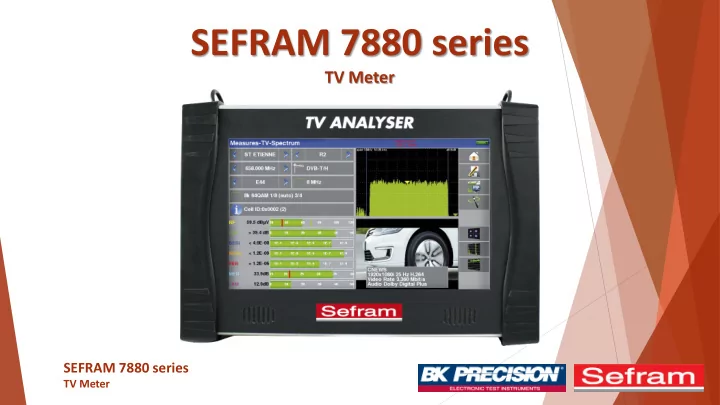
SEFRAM 7880 series TV Meter SEFRAM 7880 series TV Meter Overview - - PowerPoint PPT Presentation
SEFRAM 7880 series TV Meter SEFRAM 7880 series TV Meter Overview SEFRAM 7880 series TV Meter Overview Panoramic LCD touch screen : 10 inches Display High Definition TV programs MPEG4-H.264 and H.265 (HEVC) Display analog TV
SEFRAM 7880 series
TV Meter
TV Meter
SEFRAM 7880 series
TV Meter
SEFRAM 7880 series
TV Meter
Wifi, DVBT2-MI via IP and OTT mode (available in September by software upgrade)
SEFRAM 7880 series
TV Meter
Fasteners for the straps 10 '' high resolution capacitive touch screen
SEFRAM 7880 series
TV Meter
RF input with F / F or BNC / F adapter Optical Input Power supply indicator RF input 5GHz HDMI output Ethernet Power Supply USB ON / OFF JACK AV input or headphone Charge indicator WIFI input GPS input DVB-CI CAM IPTV input ASI OUT ASI IN
SEFRAM 7880 series
TV Meter
SEFRAM 7880 series
TV Meter
SEFRAM 7880 series
TV Meter
Direct access to function from the touch screen is like a game: dedicated icons, special "home" function to go back to main menu, virtual keyboard to enter your specific data, possibility to export / import file on USB memory stick,… Getting started with the new SEFRAM 7885 is fast and easy.
SEFRAM 7880 series
TV Meter
One menu per function
Using the upper panel, access the different menu and view the available measurements
RF Measurement Optical Measurement RF 5GHz Measurement ASI Input Video Input / Output GPS function IPTV Measurement WiFi Measurement
SEFRAM 7880 series
TV Meter
One menu per function : RF Measurement
Direct access to available functions for RF measurement
Setup menu: setting the language, date, time, ... List and library access Autoset Mode: Automatically search for available satellite, terrestrial and cable programs Access to the checksat or antenna pointing mode Measures-TV-Spectrum page : allows to visualize at once, the measure, the spectrum, the video. Monitoring : Record all the measurements made on the current signal over a definite time Measurement map : Automatic measurement of level and error rate of programs in the selected measurement list LNB-DiSEqC : Setting remote power supply, setting up switches, ... RF Measurement
SEFRAM 7880 series
TV Meter
One menu per function : Optical Measurement – Same measurement that RF measurement and optical power measurement
GPS Measurement Setup menu: setting the language, date, time, ... List and library access Autoset Mode: Automatically search for available satellite, terrestrial and cable programs Access to the checksat or antenna pointing mode Measures-TV-Spectrum page : allows to visualize at once, the measure, the spectrum, the video. Monitoring : Record all the measurements made on the current signal over a definite time Measurement map : Automatic measurement of level and error rate of programs in the selected measurement list Choice of wavelength used for
Triple wavelength optical power measurement
SEFRAM 7880 series
TV Meter
One menu per function : ASI Input
Setup menu: setting the language, date, time, ... TV : View the image of your ASI signal ASI Measurement
SEFRAM 7880 series
TV Meter
One menu per function : Video Input / Output
Setup menu: setting the language, date, time, ... TV : View the image of your A/V Input A/V Input
SEFRAM 7880 series
TV Meter
One menu per function : GPS Function
Setup menu: setting the language, date, time, ... GPS Cartography : superimpose a map, the level / BER measurements from the selected list GPS Measurement GPS View : graphically view available GPS satellites GPS Log : record in time the number of GPS satellites used GPS antenna power supply Geographical repository for GPS mode
SEFRAM 7880 series
TV Meter
One menu per function : Wifi Measurement
Setup menu: setting the language, date, time, ... Measure the reception level of the Wi-Fi network, or list all the networks that the device receives WiFi Measurement Measurement map : Automatic measurement of level of the WiFi signal Graphical display of received WiFi signals
SEFRAM 7880 series
TV Meter
SEFRAM 7880 series
TV Meter
All information on one page - Press the zone of your choice to enter the function
Signal parameters Full screen measurements Spectrum analyzer Full Screen TV
SEFRAM 7880 series
TV Meter
All information on one page - Easy access to complementary measures
Autolock : with this function the device finds in a few seconds the standard, the modulation and other signal parameters Constellation : The device displays the constellation of the current signal Echoes : Displays echo measurement MER / Carrier : The device displays the MER per carrier and the overall MER of the current signal
SEFRAM 7880 series
TV Meter
Spectrum – Put some cursors and zoom on a part of the spectrum
Zoom between cursors Cursors on the spectrum
SEFRAM 7880 series
TV Meter
Spectrum – Different display modes
Normal scan Keeps ridges on every sweep Averaging at each scan Hold back the last scan Auditory indication of the total power seen dual display on the "Span" set and on 10MHz in terrestrial, 50MHz in satellite Simulation of an LTE filter (4G) Full or wired plot Activation of cursors
SEFRAM 7880 series
TV Meter
Start/Stop sweeping Zoom on the curve (x1, x2, x4, x8) Change the unit (km, miles, µs) Change the display (graph + table, graph)
Signal multiple ways displayed
SEFRAM 7880 series
TV Meter
Record all the measurements made on the current signal over a definite time
Saved measures Recording time Start/Stop monitoring Current signal Return to Measures-TV- Spectrum page
SEFRAM 7880 series
TV Meter
Speed : to change the number of carriers used for display
: one on one, ie all the carriers are used : one in two : one in four : one in eight : one in sixteen : max speed measured on 624 carriers only
SEFRAM 7880 series
TV Meter
Automatic measurement of level and error rate of programs in the selected measurement list
Measure : It is possible not to measure all the lines: you can "filter" the lines to be measured by DVB-T / T2 program, DVB-S / S2, etc ... Mode : it is possible to clock the complete sweeping of the lines: from one-shot to 24 hours USB Stick : It is possible to memorize these measurements
is present. Graphic : It is possible to display the Measurement Plan graphically
SEFRAM 7880 series
TV Meter
Graphically display the measurement plan
Measure : It is possible not to measure all the lines: you can "filter" the lines to be measured by DVB-T / T2 program, DVB-S / S2, etc ... Mode : it is possible to clock the complete sweeping of the lines: from one-shot to 24 hours USB Stick : It is possible to memorize these measurements
is present. Return to the numerical measurement map
SEFRAM 7880 series
TV Meter
You can choose to measure a single wavelength, or 2, or all 3 simultaneously
Choice of measured wavelengths Display unit: dB, mW or dBm Reference points for each wavelength Optical power for each wavelength Optical Power Meters : Purple: 1310nm / Yellow: 1490nm / Blue: 1550nm Graphical recording of optical power measurements. Recording time: 10mn, 60mn, 8h or 24h
SEFRAM 7880 series
TV Meter
DAB / DAB + digital radio decoding and service display
SEFRAM 7880 series
TV Meter
View and LOG Functions
SEFRAM 7880 series
TV Meter
Cartography Function
This function allows the level / BER measurements of the received RF signals to be superimposed on a map. The function create a * .GPS file in the internal memory of the device with for each registered point :
SEFRAM 7880 series
TV Meter
Real-time Transport Stream (TS) analysis according to TR101290
The device analyzes in real time, the Transport Stream (TS) according to the TR101290 standard defining a list of alarms. Each anomaly detected is indicated by a red cross opposite its definition. These alarms are stored on the display to detect a transient error for a long period of analysis. The status of all the alarms can be saved simultaneously on a USB key: a TSLOGxx.txt file is created with indication of the date and time of each alarm. The device analyzes the Transport Stream (TS), and measures for each Service its bit rate and occupation in the Multiplex. In the list of Services are displayed, for each Service:
the current bit rate
the measured minimum
the maximum measured
the percentage occupied in the total multiplex
SEFRAM 7880 series
TV Meter
Easily remote control your device with a Web Browser
Ethernet connection and IP Address View the display of your device in a Web Browser
SEFRAM 7880 series
TV Meter
SEFRAM 7880 series
TV Meter
Powerfull tool
The Autoset mode allows to make automatic search of the frequencies available. After finishing it provides an list of all frequencies found.
SEFRAM 7880 series
TV Meter
Easy to adjust your Antenna
Antenna Pointing
Press this button to display the names of the services on the channels
SEFRAM 7880 series
TV Meter
Check Sat
Easy to adjust your satellite
Press this button to point two satellites with a double head Press this button to access to the NIT function Use this function to enter your GPS coordinates and get the
SEFRAM 7880 series
TV Meter
Digital quality display in one graphical mode
DVB-S2 Constellation DVB-T Constellation
SEFRAM 7880 series
TV Meter
Setting remote power supply, setting up switches, ...
Apply remote supply in terrestrial mode Apply remote supply in satellite mode OL frequencies: OL1 frequency and OL2 of the LNB OL selection: Band switching on the LNB (22 kHz, Tone-Burst or DiSEqC) Polar selection: polarization switching
Switch: switch, type and position (No, ToneBurst, 22 kHz, DiSEqC, Pos A, B, C or D) Uncommitted: "Un-committed" switch, type and position (No, DiSEqC, Pos 1 to 16) Positioner: presence of a positioner (Yes / No) DCSS: Digital Channel Stacking System (2 modes SATCR and SCD2 single cable distribution)
SEFRAM 7880 series
TV Meter
Save and recall your information
Easy to recall of data on field. The Sefram 7880 series uses 20 measurement lists of each 50 lines and 1000 setups Use the Sefram Software TR7837 to easily manage all your TV Meter lists and Libraries
SEFRAM 7880 series
TV Meter
To view encrypted services
SEFRAM 7880 series
TV Meter
Sefram 7880 series
Supplied with: main adaptor (90-245V with European plug), user's manual on CD ROM, F/F and F/BNC adaptor, carrying protective pouch, belt clip, transportation pouch Warranty: 2 years
SEFRAM 7880 series
TV Meter
32, Rue E. Martel – BP55 F42009 – Saint-Etienne Cedex 2 France Phone: 0033 4 77 59 01 01 Fax: 0033 4 77 57 23 23 sales@sefram.fr