Scope October 28, 2008 1 private boolean rectGrabbed = false; - - PowerPoint PPT Presentation

scope
SMART_READER_LITE
LIVE PREVIEW

Scope October 28, 2008 1 private boolean rectGrabbed = false; - - PowerPoint PPT Presentation

Scope October 28, 2008 1 private boolean rectGrabbed = false; private Location lastPoint; / / Last mouse location Dragging public void onMousePress (Location point) { if (rect.contains (point)) { Algorithm rectGrabbed = true; lastPoint


slide-1
SLIDE 1

Scope

October 28, 2008

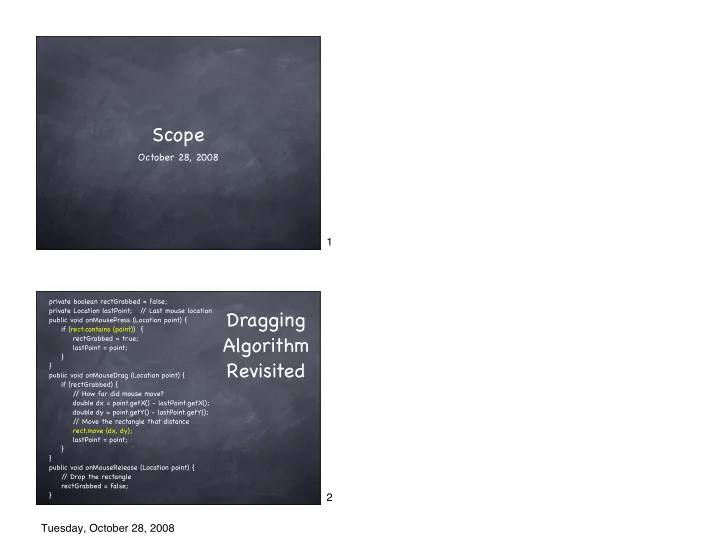
private boolean rectGrabbed = false; private Location lastPoint; / / Last mouse location public void onMousePress (Location point) { if (rect.contains (point)) { rectGrabbed = true; lastPoint = point; } } public void onMouseDrag (Location point) { if (rectGrabbed) { / / How far did mouse move? double dx = point.getX() - lastPoint.getX(); double dy = point.getY() - lastPoint.getY(); / / Move the rectangle that distance rect.move (dx, dy); lastPoint = point; } } public void onMouseRelease (Location point) { / / Drop the rectangle rectGrabbed = false; }

Dragging Algorithm Revisited

1 2 Tuesday, October 28, 2008

slide-2
SLIDE 2

Dragging a train

private boolean trainGrabbed = false; private Location lastPoint; / / Last mouse location public void onMousePress (Location point) { if (train.contains (point)) { trainGrabbed = true; lastPoint = point; } } public void onMouseDrag (Location point) { if (trainGrabbed) { / / How far did mouse move? double dx = point.getX() - lastPoint.getX(); double dy = point.getY() - lastPoint.getY(); / / Move the object that distance train.move (dx, dy); lastPoint = point; } } public void onMouseRelease (Location point) { / / Drop the object trainGrabbed = false; }

Defining a Class

What do we want objects created from that class to do? Example: A train is a collection of shapes consisting of a car, wheels and a smokestack. A train can move on the track. The train can produce a puff of smoke.

3 4 Tuesday, October 28, 2008

slide-3
SLIDE 3

Defining a Class

What do we want objects created from that class to do? Example: A train is a collection of shapes consisting of a car, wheels and a smokestack. A train can move on the track. The train can produce a puff of smoke.

Data

Defining a Class

What do we want objects created from that class to do? Example: A train is a collection of shapes consisting of a car, wheels and a smokestack. A train can move on the track. The train can produce a puff of smoke.

Methods 5 6 Tuesday, October 28, 2008

slide-4
SLIDE 4

Methods Data

public class Train { private FilledRect car; private FilledOval rearWheel; private FilledOval frontWheel; private FramedRect smokeStack; public void move (...) { ... } public boolean contains (Location point) { ... } public FilledOval produceSmoke (...) { ... } }

The Train Class

(almost)

Constructing a Train

Need a way to say “give me a new train” We’ve written code that creates things: new FramedOval (10, 10, 50, 50, canvas); You created a constructor for your penguin in the last lab: public Penguin (DrawingCanvas penguinCanvas) { ... }

7 8 Tuesday, October 28, 2008

slide-5
SLIDE 5

Constructor

public class Train { private FilledRect car; private FilledOval rearWheel; private FilledOval frontWheel; private FramedRect smokeStack; public Train (...) { } public void move (...) { ... } public boolean contains (Location point) { ... } public FilledOval produceSmoke (...) { ... } }

The Train Class Constructing a Train

Initialize the instance variables Get it on the display

public class Train { private FilledRect car; private FilledOval rearWheel; private FilledOval frontWheel; private FramedRect smokeStack; public Train (...) { car = new FilledRect (...); rearWheel = new FilledOval (...); frontWheel = new FilledOval (...); smokeStack = new FramedRect (...); } ... }

9 10 Tuesday, October 28, 2008

slide-6
SLIDE 6

Train Size

Let train determine its own size Define constants within Train class

public class Train { private static final int CAR_WIDTH = ...; private static final int CAR_HEIGHT = ...; private static final int WHEEL_DIAMETER = ...; private static final int SMOKESTACK_HEIGHT = ...; private static final int SMOKESTACK_WIDTH = ...; ... public Train (...) { car = new FilledRect (..., CAR_WIDTH, CAR_HEIGHT, ...); rearWheel = new FilledOval (..., WHEEL_DIAMETER, WHEEL_DIAMETER, ...); frontWheel = new FilledOval (..., WHEEL_DIAMETER, WHEEL_DIAMETER, ...); smokeStack = new FilledOval (... SMOKESTACK_WIDTH, SMOKESTACK_HEIGHT, ...); } ...

Train Location

Suppose we want to let the method that calls “new Train” decide where to place the train Add parameters to the constructor

public Train(double left, double top, DrawingCanvas trainCanvas) { car = new FilledRect (left, top, CAR_WIDTH, CAR_HEIGHT, trainCanvas);

rearWheel = new FilledOval (left + ..., top + ..., WHEEL_DIAMETER, WHEEL_DIAMETER, trainCanvas); frontWheel = new FilledOval (left + ..., top + ..., WHEEL_DIAMETER, WHEEL_DIAMETER, trainCanvas); smokeStack = new FilledOval (left + ..., top - ..., SMOKESTACK_WIDTH, SMOKESTACK_HEIGHT, trainCanvas);

}

11 12 Tuesday, October 28, 2008
slide-7
SLIDE 7

Moving a train

How do we move it? How do we know where to move it to?

public void move (...) { ... }

Moving a train

How do we move it? Move its pieces Technique is called delegation

public void move (...) { car.move (...); rearWheel.move (...); frontWheel.move (...); smokeStack.move (...); } 13 14 Tuesday, October 28, 2008

slide-8
SLIDE 8

Moving a train

How do we know where to move it to? Model after things like FramedOval Let the caller tell the train how far to move Add parameters to the move method All the parts move the same amount.

public void move (double dx, double dy) { car.move (dx, dy); rearWheel.move (dx, dy); frontWheel.move (dx, dy); smokeStack.move (dx, dy); }

public class Train { ... public Train (int left, int top, DrawingCanvas trainCanvas) { } public void move (int dx, int dy) { ... } public boolean contains (Location point) { ... } public void produceSmoke () { ... } }

The Train Class

15 16 Tuesday, October 28, 2008

slide-9
SLIDE 9

TrainController

public class TrainController extends WindowController { private Train train; public void begin() { train = new Train (10, 150, canvas); } }

Ignoring the User!

What if we want to limit what the user can do? For example, don’t allow the user to drag the train off the track How do we change the dragging code to do that? How do we change the move method to only move horizontally?

17 18 Tuesday, October 28, 2008

slide-10
SLIDE 10

Staying on track!

public void onMouseDrag (Location point) { if (trainGrabbed) { double dx = point.getX() - lastPoint.getX(); double dy = point.getY() - lastPoint.getY(); train.move (dx, dy); lastPoint = point; } } public void onMouseDrag (Location point) { if (trainGrabbed) { double dx = point.getX() - lastPoint.getX(); train.move (dx); lastPoint = point; } }

Normal drag moves in 2 dimensions Staying on track ignores vertical motion

Staying on track!

public void move (double dx, double dy) { car.move (dx, dy); rearWheel.move (dx, dy); frontWheel.move (dx, dy); smokeStack.move (dx, dy); } public void move (double dx) { car.move (dx, 0); rearWheel.move (dx, 0); frontWheel.move (dx, 0); smokeStack.move (dx, 0); }

Normal drag moves in 2 dimensions Staying on track moves 0 pixels vertically 19 20 Tuesday, October 28, 2008

slide-11
SLIDE 11

Scope

Scope determines the part of a program that knows about a declaration. Depends on Where the declaration is: Instance variable Parameter Local variable Use of words “public” and “private”

Instance Variables

Declared inside a class, but outside all methods Should always be private Scope: the entire class Should be given a value either where they are declared or in the constructor Key differentiator: Remember their value between method calls

public class Train { private FilledRect car; public Train (...) { car = new FilledRect (...); ... } public void move (int dx, int dy) { car.move (dx, dy); ... } }

21 22 Tuesday, October 28, 2008

slide-12
SLIDE 12

Parameters

Parameter Declared in the signature of a method or constructor Say neither public nor private Scope: the entire method or constructor Key differentiator: They are given a value based on an argument passed in when the method is called

public Train (int left, int trackHeight, DrawingCanvas canvas) { car = new FilledRect (left, trackHeight - ..., ..., ..., canvas); ... } Somewhere else: new Train (10, 50, canvas); new Train (100, 30, canvas);

Local variables

Local variable Declared inside a method or constructor Say neither public nor private Scope: (part of) that method or constructor They are given a value with an assignment statement inside the method or constructor Go out of existence when the block in which they are declared ends Key differentiator: Good for temporary computations

public void onMouseDrag (Location point) { Line line = new Line (start, point, canvas); line.setColor (Color.RED); }

23 24 Tuesday, October 28, 2008

slide-13
SLIDE 13

scope of dy

Blocks

public void onMouseDrag (Location point) { if (hiderGrabbed) { double dx = point.getX() - lastPoint.getX(); double dy = point.getY() - lastPoint.getY(); hider.move (dx, dy); lastPoint = point; } }

A local variable’ s scope is from the point at which it is declared to the end of the enclosing block. scope of dx

Blocks

public void onMouseDrag (Location point) { if (hiderGrabbed) { double dx = point.getX() - lastPoint.getX(); double dy = point.getY() - lastPoint.getY(); hider.move (dx, dy); lastPoint = point; } }

A local variable’ s scope is from the point at which it is declared to the end of the enclosing block. 25 26 Tuesday, October 28, 2008

slide-14
SLIDE 14

Reusing Names within a Class

public class SomeController extends WindowController { public void onMousePress (Location point) { double x = point.getX(); ... } public void onMouseRelease (Location point) { double y = point.getY(); ... } }

Scopes do not overlap. No problem.

Reusing Names within a Class

public class SomeController extends WindowController { private Location point; public void onMousePress (Location point) { double x = point.getX(); ... } public void begin () { point = new Location (30, 50); ... } }

Scopes overlap. Inner declaration hides outer one. 27 28 Tuesday, October 28, 2008

slide-15
SLIDE 15

Reusing Names within a Class

public class SomeController extends WindowController { private Location point; public void onMousePress (Location point) { this.point = point; double x = point.getX(); ... } }

“this. ” always gives access to the instance variable

Reusing Names in 2 Classes

public class SomeController extends WindowController { public void begin () { SmileyFace face = new SmileyFace (canvas); ... } } public class SmileyFace { public SmileyFace (DrawingCanvas canvas) { FramedOval face = new FramedOval(..., canvas); ... } }

2 distinct variables that have distinct values 29 30 Tuesday, October 28, 2008

slide-16
SLIDE 16

Reusing Names in 2 Classes

public class SomeController extends WindowController { public void begin () { FilledRect grass = new FilledRect (..., canvas); Train train = new Train (canvas); ... } } public class Train { public Train (DrawingCanvas canvas) { FilledRect car = new FilledRect(..., canvas); ... } }

2 distinct variables that will have the same value at runtime

Summary

Classes give us a way to treat a collection of

  • bjects as a single object

When we define a class, we are defining an abstraction - a way of stepping back from implementation details to define a new thing A train is an abstraction of multiple shapes. We can use it thinking of it as its own type of thing, with its own interesting behavior, like move Abstraction is essential to build complex programs (or other things!)

31 32 Tuesday, October 28, 2008