Review from Last Time Motivations to do simulations Modeling - - PDF document

review from last time
SMART_READER_LITE
LIVE PREVIEW

Review from Last Time Motivations to do simulations Modeling - - PDF document

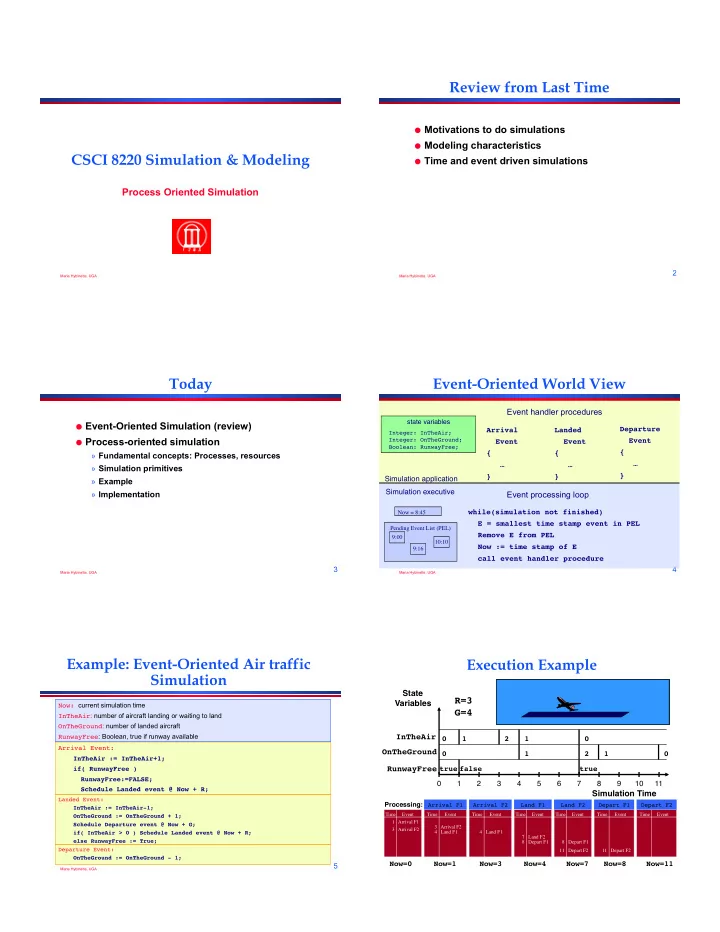
Review from Last Time Motivations to do simulations Modeling characteristics CSCI 8220 Simulation & Modeling Time and event driven simulations Process Oriented Simulation 2 Maria Hybinette, UGA Maria Hybinette, UGA


slide-1
SLIDE 1

Maria Hybinette, UGA

CSCI 8220 Simulation & Modeling

Process Oriented Simulation

Maria Hybinette, UGA

2

Review from Last Time

Motivations to do simulations Modeling characteristics Time and event driven simulations

Maria Hybinette, UGA

3

Today

Event-Oriented Simulation (review) Process-oriented simulation

» Fundamental concepts: Processes, resources » Simulation primitives » Example » Implementation

Maria Hybinette, UGA

4

state variables

Integer: InTheAir; Integer: OnTheGround; Boolean: RunwayFree;

Event handler procedures

Simulation application Arrival Event { … } Landed Event { … } Departure Event { … }

Pending Event List (PEL) 9:00 9:16 10:10 Now = 8:45

Simulation executive

Event processing loop

while(simulation not finished) E = smallest time stamp event in PEL Remove E from PEL Now := time stamp of E call event handler procedure

Event-Oriented World View

Maria Hybinette, UGA

5

Example: Event-Oriented Air traffic Simulation

Arrival Event: InTheAir := InTheAir+1; if( RunwayFree ) RunwayFree:=FALSE; Schedule Landed event @ Now + R; Now: current simulation time InTheAir: number of aircraft landing or waiting to land OnTheGround: number of landed aircraft RunwayFree: Boolean, true if runway available

Landed Event: InTheAir := InTheAir-1; OnTheGround := OnTheGround + 1; Schedule Departure event @ Now + G; if( InTheAir > 0 ) Schedule Landed event @ Now + R; else RunwayFree := True; Departure Event: OnTheGround := OnTheGround - 1;

Execution Example

OnTheGround Simulation Time State Variables RunwayFree InTheAir

1 2 3 4 5 6 7 8 9 10 11 true

R=3 G=4

Time Event 1 Arrival F1 3 Arrival F2

Now=0

Processing:

false 1

Time Event 4 Land F1 3 Arrival F2

Arrival F1

  • Now=1

2

Time Event 4 Land F1

Arrival F2

  • Now=3

1 1

Land F1

  • Now=4

Time Event 8 Depart F1 7 Land F2

2 true

Time Event 8 Depart F1 11 Depart F2

Land F2

  • Now=7

1

Time Event 11 Depart F2

Depart F1

  • Now=8

Time Event

Depart F2

  • Now=11
slide-2
SLIDE 2

Maria Hybinette, UGA

7

state variables

Integer: InTheAir; Integer: OnTheGround; Boolean: RunwayFree;

Event handler procedures

Simulation application Arrival Event { … } Landed Event { … } Departure Event { … }

Event-Oriented World View

Event-oriented simulation programs may be difficult to

understand and modify:

» Program organized around state transitions » Behavior of an aircraft distributed across multiple event handlers » Flow of control among event handlers not obvious

» Suppose you want to model: Different aircrafts, airlines, pilots – imagine events for each segment (volume) of airspace

Maria Hybinette, UGA

8

Process Oriented

A simulation process models a specific entity

with a well defined behavior.

» It describes the action performed of the process through out its lifetime.

– Models a specific entity with well defined behavior and it is encapsulated within the process. – Example: an aircraft Event oriented view: lifetime of an event is a

SINGLE instant in time.

Process oriented view: lifetime is a time

period of the ‘process’ or ‘thread’

Maria Hybinette, UGA

9

Event versus Process Oriented Views

state variables

Integer: InTheAir; Integer: OnTheGround; Boolean: RunwayFree;

Process Oriented View

Entities modeled by processes. Aircraft1 { Arrive Land Depart } Aircraft2 { Arrive Land Depart } AircraftN { Arrive Land Depart }

state variables

Integer: InTheAir; Integer: OnTheGround; Boolean: RunwayFree;

Focus of model is on EVENTS and how they affect the state of the simulation. Arrival Event { … } Landed Event { … } Departure Event { … }

Event Oriented View

Maria Hybinette, UGA

10

Process Oriented Execution Model

Focus simulation program around behavior of entities

» Aircraft: arrives, waits for runway, lands, departs

Process-oriented simulation

» Process: Thread of execution describing entity behavior over time » Resources: Shared resource used by entities (e.g., the runway)

Execution: alternate between

» simulation computations at a single instant of simulation time, and » advances in simulation time (no computation)

Computation Time advance Computation Time advance

Wall clock time

Simulation time advances (no computation) Computation at a single Instant of simulation time

Maria Hybinette, UGA

11

Simulation Primitives

AdvanceTime(T) : advance T units of simulation time

» Also called “hold” » Example: AdvanceTime(R) to model using runway R units

  • f simulation time

WaitUntil(p) : simulation time advances until predicate

p becomes true

» Predicate based on simulation variables that can be modified by other simulation processes » Example: WaitUntil(RunwayFree) to wait until runway becomes available for landing

Other combinations

» WaitUntil(p,T) : Wait up to T units of simulation time for predicate p to become true » Not used in the air traffic example

Primitives needed to advance simulation time

Maria Hybinette, UGA

12

Process Model Example: Aircraft

/* simulate aircraft arrival, circling, and landing */ Integer: InTheAir; Integer: OnTheGround; Boolean: RunwayFree; 1 InTheAir := InTheAir + 1; 2 WaitUntil( RunwayFree ); /* circle */ 3 RunwayFree := FALSE; /* land */ 4 AdvanceTime( R ); 5 RunwayFree := TRUE; /* simulate aircraft on the ground */ 6 InTheAir := InTheAir - 1; 7 OnTheGround := OnTheGround + 1; 8 AdvanceTime( G ); /* simulate aircraft departure */ 9 OnTheGround := OnTheGround - 1;

A new aircraft process is created with each Arrival event

slide-3
SLIDE 3

Execution Example

OnTheGround

Simulation Time

State Variables RunwayFree InTheAir

1 2 3 4 5 6 7 8 9 10 11

true

R=3 G=4

false 1 2 1 1 2 true 1

Flight 1

1 InTheAir := InTheAir+1; 2 WaitUntil( RunwayFree ); 3 RunwayFree := FALSE; 4 AdvanceTime( R ); 5 RunwayFree := TRUE; 6 InTheAir := InTheAir-1; 7 OnTheGround := OnTheGround +1; 8 AdvanceTime( G); 9 OnTheGround:=OnTheGround-1;

Flight 2

1 InTheAir := InTheAir+1; 2 WaitUntil( RunwayFree ); 3 RunwayFree := FALSE; 4 AdvanceTime( R ); 5 RunwayFree := TRUE; 6 InTheAir := InTheAir-1; 7 OnTheGround:=OnTheGround+1; 8 AdvanceTime( G ); 9 OnTheGround:=OnTheGround-1;

Maria Hybinette, UGA

14

Implementation

Lifetime of a simulation process consists of a

sequence of event computations.

Event computation: computation occurring at an

instant in simulation time

» Execution of code section ending with calling a primitive to advance simulation time

Computation threads

» Typically implemented with co-routine (threading) mechanism

Simulation primitives to advance time

» Schedule events » Event handlers resume execution of processes

Process-oriented simulations are built over event oriented simulation mechanisms (event list, event processing loop)

Maria Hybinette, UGA

15

Aircraft Arrival Aircraft Landing Aircraft On The Ground Aircraft Departs

Aircraft Process

/* simulate aircraft arrival, circling, and landing */ Integer: InTheAir; Integer: OnTheGround; Boolean: RunwayFree; 1 InTheAir := InTheAir + 1; 2 WaitUntil( RunwayFree ); /* circle */ 3 RunwayFree := FALSE; /* land */ 4 AdvanceTime( R ); 5 RunwayFree := TRUE; /* simulate aircraft on the ground */ 6 InTheAir := InTheAir - 1; 7 OnTheGround := OnTheGround + 1; 8 AdvanceTime( G ); /* simulate aircraft departure */ 9 OnTheGround := OnTheGround - 1;

Identify computation associated with each simulation event

Maria Hybinette, UGA

16

Implementation: AdvanceTime( T )

Execute AdvanceTime(T):

» Schedule Resume event at time Now+T » Suspend execution of thread » Return execution to event scheduler program

Process Resume event:

» Return control to thread

Simulation process

RunwayFree := FALSE; AdvanceTime( R ); RunwayFree := TRUE; ... AdvanceTime( T ) { Schedule a Resume event at Now+T; Xfer to Schedule } Scheduler { while( sim not done ) Remove event from PEL Call event handler } Resume Event Handler { Xfer to sim process }

later

Causes simulation time in the process to advance by T units

Maria Hybinette, UGA

17

Implementation: WaitUntil( p )

Execute WaitUntil( p ):

» Suspend execution of thread, record waiting for p to become true » Return execution to event scheduler program

Main scheduler loop

» For each suspended process, check if execution can resume » Prioritization rule if more than one can resume

Simulation process

InTheAir:=InTheAir+1; WaitUntil(RunwayFree);

  • RunwayFree:=FALSE;

... WaitUntil(p) { Add to suspended list Xfer to Scheduler } Scheduler { while( sim not done ) Remove event from PEL

  • Call event handler

while( a process’s predicate is true)

  • Xfer sim process

}

later

Suspend until predicate p evaluates to true

Maria Hybinette, UGA

18

Additional Notes

Theoretically, both views are equivalent:

» Process-oriented simulations can be transformed to event-

  • riented simulations and vice versa

Practically, runtime performance differs:

» Event-oriented views typically execute faster than process-

  • riented views
slide-4
SLIDE 4

Maria Hybinette, UGA

19

Summary

Process-oriented simulation typically simplifies

model development and modification

Requires threading (e.g., co-routine) mechanism Additional complexity and computation

  • verhead to suspend and resume simulation

processes