Processes, Execution, and State What is a Process? 3A. What is a - - PDF document

processes execution and state what is a process
SMART_READER_LITE
LIVE PREVIEW

Processes, Execution, and State What is a Process? 3A. What is a - - PDF document

4/8/2017 Processes, Execution, and State What is a Process? 3A. What is a Process? an executing instance of a program 3B. Process Address Space how is this different from a program? 3Y. Libraries a virtual private computer 3C.


slide-1
SLIDE 1

4/8/2017 1

Processes, Execution, and State

3A. What is a Process? 3B. Process Address Space 3Y. Libraries 3C. Process Operations 3D. Implementing Processes 3E. Asynchronous Exceptions 3U. User-mode Exceptions 3X. Object modules and Load modules 3Z. Linkage conventions

1 Processes, Execution and State

What is a Process?

  • an executing instance of a program

– how is this different from a program?

  • a virtual private computer

– what does a virtual computer look like? – how is a process different from a virtual machine?

  • a process is an object

– characterized by its properties (state) – characterized by its operations

Processes, Execution and State 2

What is “state”?

  • the primary dictionary definition of “state” is

– “a mode or condition of being” – an object may have a wide range of possible states

  • all persistent objects have “state”

– distinguishing it from other objects – characterizing object's current condition

  • contents of state depends on object

– complex operations often mean complex state – we can save/restore the aggregate/total state – we can talk of a subset (e.g. scheduling state)

Processes, Execution and State 3

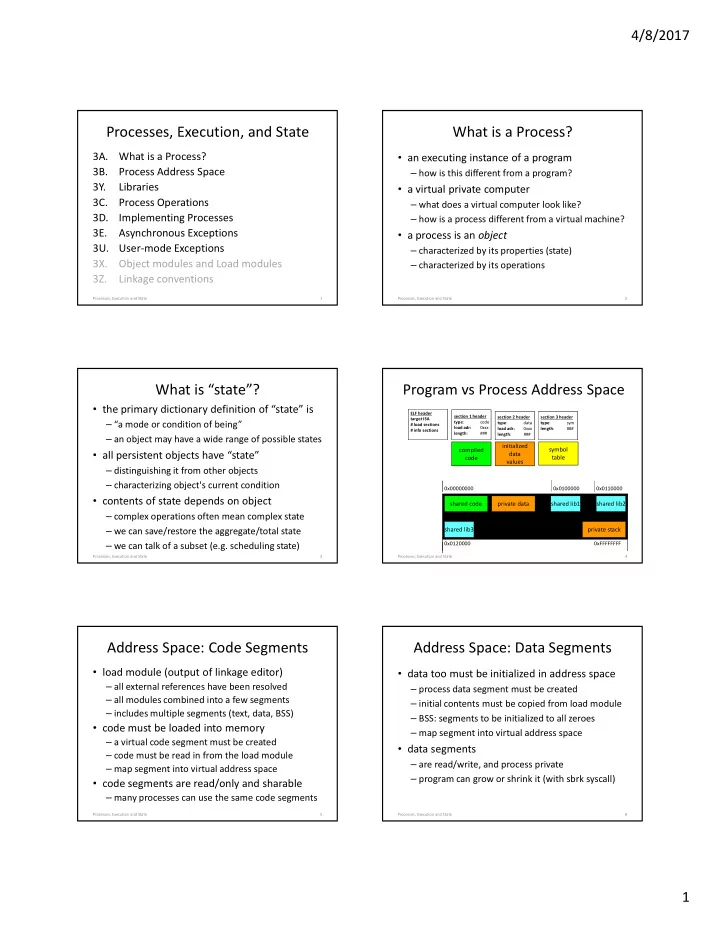
Program vs Process Address Space

Processes, Execution and State 4 section 1 header type: code load adr: 0xxx length: ### section 3 header type: sym length: ###

compiled code initialized data values symbol table

ELF header target ISA # load sections # info sections section 2 header type: data load adr: 0xxx length: ###

0x00000000 0xFFFFFFFF

shared code private data private stack shared lib1 shared lib2 shared lib3

0x0100000 0x0110000 0x0120000

Address Space: Code Segments

  • load module (output of linkage editor)

– all external references have been resolved – all modules combined into a few segments – includes multiple segments (text, data, BSS)

  • code must be loaded into memory

– a virtual code segment must be created – code must be read in from the load module – map segment into virtual address space

  • code segments are read/only and sharable

– many processes can use the same code segments

Processes, Execution and State 5

Address Space: Data Segments

  • data too must be initialized in address space

– process data segment must be created – initial contents must be copied from load module – BSS: segments to be initialized to all zeroes – map segment into virtual address space

  • data segments

– are read/write, and process private – program can grow or shrink it (with sbrk syscall)

Processes, Execution and State 6

slide-2
SLIDE 2

4/8/2017 2

Address Space: Stack Segment

  • size of stack depends on program activities

– grows larger as calls nest more deeply – amount of local storage allocated by each procedure – after calls return, their stack frames can be recycled

  • OS manages the process's stack segment

– stack segment created at same time as data segment – some allocate fixed sized stack at program load time – some dynamically extend stack as program needs it

  • Stack segments are read/write and process private

Processes, Execution and State 7

Characteristics of Libraries

  • Many advantages

– Reusable code makes programming easier – Asingle well written/maintained copy – Encapsulates complexity … better building blocks

  • Multiple bind-time options

– Static … include in load module at link time – Shared … map into address space at exec time – Dynamic … choose and load at run-time

  • It is only code … it has no special privileges

8 Processes, Execution and State

Sharable executables

  • code segments are usually read-only

– one copy could be shared by multiple processes – allow more process to run in less memory

  • code has been relocated to specific addresses

– all procs must use shared code at the same address

  • only the code segments are sharable

– each process requires its own copy of writable data – data must be loaded into each process at start time

9 Processes, Execution and State

address space – shared executable

0x00000000 0xFFFFFFFF

shared code private data private stack

10 Processes, Execution and State

Shared Libraries

  • library modules are usually added to load module

– each load module has its own copy of each library

  • this dramatically increases the size of each process

– program must be re-linked to incorporate new library

  • existing load modules don't benefit from bug fixes
  • make each library a sharable code segment

– one in memory copy, shared by all processes – keep the library separate from the load modules – operating system loads library along with program

11 Processes, Execution and State

Advantages of Shared Libraries

  • reduced memory consumption

– one copy can be shared by multiple processes/programs

  • faster program start-ups

– if it is already in memory, it need not be loaded again

  • simplified updates

– library modules are not included program load modules – library can be updated (e.g. new version w/ bug fixes) – programs automatically get new version when restarted

12 Processes, Execution and State

slide-3
SLIDE 3

4/8/2017 3

address space – shared libraries

0x00000000 0xFFFFFFFF

shared code private data private stack shared lib1 shared lib2 shared lib3

0x0100000 0x0110000 0x0120000

13 Processes, Execution and State

Implementing Shared Libraries

  • multiple code segments in a single address space

– one for the main program, one for each shared library – each sharable, and mapped in at a well-known address

  • deferred binding of references to shared libs

– applications are linkage edited against a stub library

  • stub module has addresses for each entry point, but no code
  • linkage editor resolves all refs to standard map-in locations

– loader must find a copy of each referenced library

  • and map it in at the address where it is expected to be

14 Processes, Execution and State

Stub modules vs real shared libraries

stub module: libfoo.a symbol table: 0: libfoo.so, shared library 1: foosub1, global, absolute, 0x1020000 2: foosub2, global, absolute, 0x1020008 3: foosub3, global, absolute, 0x1020010 4: foosub4, global, absolute, 0x1020018 … shared library: libfoo.so … (to be mapped in at 0x1020000) 0x1020000 jmp foosub1 0x1020008 jmp foosub2 0x1020010 jmp foosub3 0x1020018 jmp foosub4 …. foosub1: … foosub2: … Program is linkage edited against the stub module, and so believes each of the contained routines to be at a fixed address. The real shared object is mapped into the process’ address space at that fixed address. It begins with a jump table, that effectively seems to give each entry point a fixed address.

15 Processes, Execution and State

Indirect binding to shared libraries

code segment (read only) … call foo … shared library (read only, at well known location) foo: … ... jump foo redirection table

D1

16 Processes, Execution and State

Limitations of Shared Libraries

  • not all modules will work in a shared library

– they cannot define/include static data storage

  • they are read into program memory

– whether they are actually needed or not

  • called routines must be known at compile-time

– only the fetching of the code is delayed 'til run-time – symbols known at compile time, bound at link time

  • Dynamically Loadable Libraries are more general

– they eliminate all of these limitations ... at a price

17 Processes, Execution and State

Loading and Binding w/DLLs

code segment (read only) Procedure Linkage Table (writeable) … call foo … run time loader new code segment foo: … ... jump foo load foo.dll

18 Processes, Execution and State

slide-4
SLIDE 4

4/8/2017 4

(run-time binding to DLLs)

  • load module includes a Procedure Linkage Table

– addresses for routines in DLL resolve to entries in PLT – each PLT entry contains a system call to run-time loader (asking it to load the corresponding routine)

  • first time a routine is called, we call run-time

loader

– which finds, loads, and initializes the desired routine – changes the PLT entry to be a jump to loaded routine – then jumps to the newly loaded routine

  • subsequent calls through that PLT entry go

directly

19 Processes, Execution and State

Shared Libraries vs. DLLs

  • both allow code sharing and run-time binding
  • shared libraries

– do not require a special linkage editor – shared objects obtained at program load time

  • Dynamically Loadable Libraries

– require smarter linkage editor, run-time loader – modules are not loaded until they are needed

  • automatically when needed, or manually by program

– complex, per-routine, initialization can be performed

  • e.g. allocation of private data area for persistent local

variables

E1

20 Processes, Execution and State

Dynamic Loading

  • DLLs are not merely “better” shared libraries

– libraries are loaded to satisfy static external references – DLLs are designed for dynamic binding

  • Typical DLL usage scenario

– identify a needed module (e.g. device driver) – call RTL to load the module, get back a descriptor – use descriptor to call initialization entry-point – initialization function registers all other entry points – module is used as needed – later we can unregister, free resources, and unload

21 Processes, Execution and State

Process Operations: fork

  • parent and child are identical:

– data and stack segments are copied – all the same files are open

  • code sample:

int rc = fork(); if (rc < 0) { fprintf(stderr, “Fork failed\n”); } else if (rc == 0) { fprintf(stderr, “Child\n”); } else fprintf(stderr, “Fork succeeded, child pid = %d\n”, rc);

Processes, Execution and State 22

Variations on Process Creation

  • tabula rasa – a blank slate

– a new process with minimal resources – a few resources may be passed from parent – most resources opened, from scratch, by child

  • run – fork + exec

– create new process to run a specified command

  • a cloning fork is a more expensive operation

– much data and resources to be copied – convenient for setting up pipelines – allows inheritance of exclusive use devices

Processes, Execution and State 23

Windows Process Creation

  • The CreateProcess() system call
  • A very flexible way to create a new process
  • Numerous parameters to shape the child

– name of program to run – security attributes (new or inherited) – open file handles to pass/inherit – environment variables – initial working directory

24 Processes, Execution and State

slide-5
SLIDE 5

4/8/2017 5

Process Forking

  • The way Unix/Linux creates processes

– child is a clone of the parent – the classical Computer Science fork operation

  • Occasionally a clone is what you wanted

– likely for some kinds of parallel programming

  • Program in child process can adjust resources

– change input/output file descriptors – change working directory – change environment variables – choose which program to run

25 Processes, Execution and State

What Happens After a Fork?

  • There are now two processes

– with different process ID numbers – but otherwise nearly identical

  • How do I profitably use that?

– two processes w/same code & program counter – figure out which is which – parent process goes one way – child process goes another

  • perhaps adjust process resources
  • perhaps load a new program into the process
  • this code takes the place of (CreateProcess) parameters

26 Processes, Execution and State

Process Operations: exec

  • load new program, pass parameters

– address space is completely recreated – open files remain open, disabled signals disabled – available in many polymorphisms

  • code sample:

char *myargs[3]; myargs[0] = “wc”; myargs[1] = “myfile”; myargs[2] = NULL; int rc = execvp(myargs[0], myargs);

Processes, Execution and State 27

How Processes Terminate

  • Perhaps voluntarily

– by calling the exit(2) system call

  • Perhaps involuntarily

– as a result of an unhandled signal/exception – a few signals (e.g. SIGKILL) cannot be caught

  • Perhaps at the hand of another

– a parent sends a termination signal (e.g. TERM) – a system management process (e.g. INT, HUP)

Processes, Execution and State 28

Process Operations: wait

  • await termination of a child process

– collect exit status

  • code sample:

int rc = waitpid(pid, &status, 0); if (rc == 0) { fprintf(stderr, “process %d exited rc=%d\n”, pid, status); }

Processes, Execution and State 29

The State of a Process

  • Registers

– Program Counter, Processor Status Word – Stack Pointer, general registers

  • Address space

– size and location of text, data, stack segments – size and location of supervisor mode stack

  • System Resources and Parameters

– open files, current working directory, ... – owning user ID, parent PID, scheduling priority, ...

30 Processes, Execution and State

slide-6
SLIDE 6

4/8/2017 6

Representing a Process

  • all (not just OS) objects have descriptors

– the identity of the object – the current state of the object – references to other associated objects

  • Process state is in multiple places

– parameters and object references in a descriptor – app execution state is on the stack, in registers – each Linux process has a supervisor-mode stack

  • to retain the state of in-progress system calls
  • to save the state of an interrupt preempted process

Processes, Execution and State 31

Resident and non-Resident State

Processes, Execution and State 32

Resident Process Table

PID: 1 STS: in mem … PID: 2 STS:

  • n disk

… PID: 3 STS: swapout …

Non-resident Process State in memory

  • n disk

(resident process descriptor)

  • state that could be needed at any time
  • information needed to schedule process

– run-state, priority, statistics – data needed to signal or awaken process

  • identification information

– process ID, user ID, group ID, parent ID

  • communication and synchronization resources

– semaphores, pending signals, mail-boxes

  • pointer to non-resident state

Processes, Execution and State 33

(non-resident process state)

  • information needed only when process runs

– can swap out to free memory for other processes

  • execution state

– supervisor mode stack – including: saved register values, PC, PS

  • pointers to resources used when running

– current working directory, open file descriptors

  • pointers to text, data and stack segments

– used to reconstruct the address space

Processes, Execution and State 34

Creating a new process

  • allocate/initialize resident process description
  • allocate/initialize non-resident description
  • duplicate parent resource references (e.g. fds)
  • create a virtual address space

– allocate memory for code, data and stack – load/copy program code and data – copy/initialize a stack segment – set up initial registers (PC, PS, SP)

  • return from supervisor mode into new process

Processes, Execution and State 35

Forking and the Data Segments

  • Forked child shares parent’s code segment

– a single read only segment, referenced by both

  • Stack and Data segments are private

– each process has its own read/write copy – child’s is initialized as a copy of parent’s – copies diverge w/subsequent updates

  • Common optimization: Copy-on-Write

– start with a single shared read/only segment – make a copy only if parent (or child) changes it

36 Processes, Execution and State

slide-7
SLIDE 7

4/8/2017 7

Forking a New Process

Physical Memory Process Descriptors code data stack PID=1000 code data stack PID=1001 code data stack data’ stack’

37 Processes, Execution and State

Loading (exec) a Program

  • We have a load module

– The output of linkage editor – All external references have been resolved – All modules combined into a few segments – Includes multiple segments (code, data, etc.)

  • A computer cannot “execute” a load module

– Computers execute instructions in memory – An entirely new address space must be created – Memory must be allocated for each segment – Code must be copied from load module to memory

38 Processes, Execution and State

Loading a new program (exec)

section 1 header type: code load adr: 0xxx length: ### section 3 header type: sym length: ###

compiled code initialized data values symbol table

ELF header target ISA # load sections # info sections section 2 header type: data load adr: 0xxx length: ###

Load Module

shared code private data private stack

shared lib

Process Virtual Address Space

text data stack

39 Processes, Execution and State

How to Terminate a Process?

  • Reclaim any resources it may be holding

– memory – locks – access to hardware devices

  • Inform any other process that needs to know

– those waiting for interprocess communications – parent (and maybe child) processes

  • Remove process descriptor from process table

40 Processes, Execution and State

Asynchronous Events

  • some things are worth waiting for

– when I read(), I want to wait for the data

  • sometimes waiting doesn’t make sense

– I want to do something else while waiting – I have multiple operations outstanding – some events demand very prompt attention

  • we need event completion call-backs

– this is a common programming paradigm – computers support interrupts (similar to traps) – commonly associated with I/O devices and timers

Processes, Execution and State 41

Asynchronous Exceptions

  • some errors are routine

– end of file, arithmetic overflow, conversion error – we should check for these after each operation

  • some errors occur unpredictably

– segmentation fault (e.g. dereferencing NULL) – user abort (^C), hang-up, power-failure

  • these must raise asynchronous exceptions

– some languages support try/catch operations – computers support traps – operating systems also use these for system calls

Processes, Execution and State 42

slide-8
SLIDE 8

4/8/2017 8

Hardware: Traps and Interrupts

  • Used to get immediate attention from S/W

– Traps: exceptions recognized by CPU – Interrupts: events generated by external devices

  • The basic processes are very similar

– program execution is preempted immediately – each trap/interrupt has a numeric code (0-n) – that is used to index into a table of PC/PS vectors – new PS is loaded from the selected vector – previous PS/PC are pushed on to the (new) stack – new PC is loaded from the selected vector

Processes, Execution and State 43

Review (User vs. Supervisor mode)

  • the OS executes in supervisor mode

– able to perform I/O operations – able to execute privileged instructions

  • e.g. enable, disable and return from interrupts

– able update memory management registers

  • to create and modify process address spaces

– access data structures within the OS

  • application programs execute in user mode

– they can only execute normal instructions – they are restricted to the process's address space

44 Processes, Execution and State

Direct Execution

  • Most operations have no security implications

– arithmetic, logic, local flow control & data movement

  • Most user-mode programs execute directly

– CPU fetches, pipelines, and executes each instruction – this is very fast, and involves zero overhead

  • A few operations do have security implications

– h/w refuses to perform these in user-mode – these must be performed by the operating system – program must request service from the kernel

45 Processes, Execution and State

Limited Direct Execution

  • CPU directly executes all application code

– Punctuated by occasional traps (for system calls) – With occasional timer interrupts (for time sharing)

  • Maximizing direct execution is always the goal

– For Linux user mode processes – For OS emulation (e.g., Windows on Linux) – For virtual machines

  • Enter the OS as seldom as possible

– Get back to the application as quickly as possible

46 Processes, Execution and State

Using Traps for System Calls

  • reserve one illegal instruction for system calls

– most computers specifically define such instructions

  • define system call linkage conventions

– call: r0 = system call number, r1 points to arguments – return: r0 = return code, cc indicates success/failure

  • prepare arguments for the desired system call
  • execute the designated system call instruction
  • OS recognizes & performs requested operation
  • returns to instruction after the system call

Processes, Execution and State 47

System Call Trap Gates

Processes, Execution and State 48

1st level trap handler 2nd level handler (system service implmementation) return to user mode Application Program user mode supervisor mode

PS/PC

TRAP vector table

PS/PC PS/PC PS/PC instr ; instr ; instr ; trap ; instr ; instr ; system call dispatch table

slide-9
SLIDE 9

4/8/2017 9

Stacking and unstacking a System Call

Processes, Execution and State 49

stack frames from application computation User-mode Stack Supervisor-mode Stack direction

  • f growth

user mode PC & PS saved user mode registers parameters to system call handler return PC system call handler stack frame resumed computation

(Trap Handling)

  • hardware trap handling

– trap cause as index into trap vector table for PC/PS – load new processor status word, switch to supv mode – push PC/PS of program that cuased trap onto stack – load PC (w/addr of 1st level handler)

  • software trap handling

– 1st level handler pushes all other registers – 1st level handler gathers info, selects 2nd level handler – 2nd level handler actually deals with the problem

  • handle the event, kill the process, return ...

Processes, Execution and State 50

(Returning to User-Mode)

  • return is opposite of interrupt/trap entry

– 2nd level handler returns to 1st level handler – 1st level handler restores all registers from stack – use privileged return instruction to restore PC/PS – resume user-mode execution at next instruction

  • saved registers can be changed before return

– change stacked user r0 to reflect return code – change stacked user PS to reflect success/failure

Processes, Execution and State 51

User-Mode Signal Handling

  • OS defines numerous types of signals

– exceptions, operator actions, communication

  • processes can control their handling

– ignore this signal (pretend it never happened) – designate a handler for this signal – default action (typically kill or coredump process)

  • analogous to hardware traps/interrupts

– but implemented by the operating system – delivered to user mode processes

Processes, Execution and State 52

Signals and Signal Handling

  • when an asynchronous exception occurs

– the system invokes a specified exception handler

  • invocation looks like a procedure call

– save state of interrupted computation – exception handler can do what ever is necessary – handler can return, resume interrupted computation

  • more complex than a procedure call and return

– must also save/restore condition codes & volatile regs – may abort rather than return

Processes, Execution and State 53

Signals: sample code

Processes, Execution and State 54

int fault_expected, fault_happened; void handler( int sig) { if (!fault_expected) exit(-1); /* if not expected, die */ else fault_happened = 1; /* if expected, note it happened */ } signal(SIGHUP, SIGIGNORE); /* ignore hang-up signals */ signal(SIGSEGV, &handler); /* handle segmentation faults */ ... fault_happened = 0; fault_expected = 1; ... /* code that might cause a segmentation fault */ fault_expected = 0;

slide-10
SLIDE 10

4/8/2017 10

Stacking a signal delivery

Processes, Execution and State 55

p1: parameters p1: saved registers p1: local variables p1: computation p0: return address PC/PS (at time of exception) handler: saved registers handler: local variables stack (at time of exception) stack frame (pushed by signal) handler: parameters addr of signal unstacker signal handler sees a completely standard appearing stack frame.

Assignments

  • Project

– get started on P1A

  • many will have problems with terminal modes
  • many will have problems with non-blocking I/O
  • many will have problems with fork/exec
  • Reading

– A/D 7 (Scheduling) – A/D 8 (Adaptive Scheduling) – Real-Time Scheduling

Processes, Execution and State 56

Supplementary Slides

the compilation process

source.c header.h compiler asm.s assembler

  • bject.o
  • bject.o

library.a linkage editor load module load map

  • ptimizer

asm.s

B1

58 Processes, Execution and State

(Compilation/Assembly)

  • compiler

– reads source code and header files – parses and understands "meaning" of source code – optimizer decides how to produce best possible code – code generation typically produces assembler code

  • assembler

– translates assembler directives into machine language – produces relocatable object modules

  • code, data, symbol tables, relocation information

59 Processes, Execution and State

Typical Object Module Format

each code/data section is a block of information that should be kept together, as a unit, in the final program

section 1 header type: code length: ### flags: … section 2 header type: data length: ### flags: … section 3 header type: sym length: ### flags: … section 4 header type: reloc length: ### flags: …

compiled code initialized data values symbol table relocation description entries

60 Processes, Execution and State

slide-11
SLIDE 11

4/8/2017 11

(Relocatable Object Modules)

  • code segments

– relocatable machine language instructions

  • data segments

– non-executable initialized data, also relocatable

  • symbol table

– list of symbols defined and referenced by this module

  • relocation information

– pointers to all relocatable code and data items

61 Processes, Execution and State

  • bject modules, symbols, & relocation

extern foo … call foo … assembler code main.s … call instruction 0x00000000 …

  • bject module

main.o library member foo.o code … 53: foo unresolved … symbol table 0x108 0x10c … reloc 0x10c sym=53 … relocation table … code for foo … code … 15: foo, 0x40, global … symbol table 0x40

62 Processes, Execution and State

Libraries

  • programmers need not write all code for

programs

– standard utility functions can be found in libraries

  • a library is a collection of object modules

– a single file that contains many files (like a zip or jar) – these modules can be used directly, w/o recompilation

  • most systems come with many standard libraries

– system services, encryption, statistics, etc. – additional libraries may come with add-on products

  • programmers can build their own libraries

– functions commonly needed by parts of a product

63 Processes, Execution and State

Linkage Editing

  • obtain additional modules from libraries

– search libraries to satisfy unresolved external references

  • combine all specified object modules

– resolve cross-module references – copy all required modules into a single address space – relocate all references to point to the chosen locations

  • result should be complete load module

– no unresolved external addresses – all data items assigned to specific virtual addresses – all code references relocated to assigned addresses

64 Processes, Execution and State

Linkage editing: resolution & relocation

Load module

code segment

(main.o loaded at 0x4000): 0x4108 0x410c call instruction 0x00000000

... ...

0x6040 code for foo

... ...

(foo.o loaded at 0x6000) 0x00006040

Resolution

search all specified libraries to find modules that can satisfy all unresolved external references.

Relocation

update all pointers to externally resolved symbols to correctly refer to the locations where the corresponding modules were actually loaded.

65 Processes, Execution and State

Load Modules (ELF)

section 1 header type: code load adr: 0xxx length: ### alignment: … flags: … section 3 header type: sym length: ### flags: …

compiled code initialized data values symbol table

ELF header version info target ISA # load sections # info sections flags section 2 header type: data load adr: 0xxx length: ### alignment: … flags: … 66 Processes, Execution and State

slide-12
SLIDE 12

4/8/2017 12

program loading – executable code

  • load module (output of linkage editor)

– all external references have been resolved – all modules combined into a few segments – includes multiple segments (text, data, BSS)

  • each to be loaded, contiguously, at a specified address
  • a computer cannot "execute" a load module

– computers execute instructions in memory – memory must be allocated for each segment – code must be copied from load module to memory

  • in ancient times this involved an additional relocation step

C1 C1

67 Processes, Execution and State

program loading – data segments

  • code segments are read-only & fixed size
  • programs include data as well as code
  • data too must be initialized in address space

– memory must be allocated for each data segment – initial contents must be copied from load module – BSS: segments to be initialized to all zeroes

  • data segments read/write & variable size

– execution can change contents of data segments – program can extend data segment to get more memory

68 Processes, Execution and State

Processes – stack frames

  • modern programming languages are stack-based

– greatly simplified procedure storage management

  • each procedure call allocates a new stack frame

– storage for procedure local (vs global) variables – storage for invocation parameters – save and restore registers

  • popped off stack when call returns
  • most modern computers also have stack support

– stack too must be preserved as part of process state

69 Processes, Execution and State

Simple procedure linkage conventions

calling routine

push p1; push first parameter push p2; push second parameter call foo ; save pc, call routine add =8,sp ; pop parameters …

called routine

foo: push r2-r6 ; save registers sub =12,sp ; space for locals ... mov rslt,r0 ; return value add =12,sp ; pop locals pop r2-r6 ; restore regs return ; restore pc

F1

70 Processes, Execution and State

Sample stack frames

p1: parameters p1: saved registers p1: local variables p1: computation p0: return address p2: parameters p2: saved registers p2: local variables p2: computation p1: return address stack frame n (owned by caller) stack frame n- 1 stack frame n+1

  • wned by

callee

71 Processes, Execution and State

Process Stacks

  • size of stack depends on activity of program

– grows larger as calls nest more deeply – amount of local storage allocated by each procedure – after calls return, their stack frames can be recycled

  • OS manages the process's stack segment

– stack segment created at same time as data segment – some allocate fixed sized stack at program load time – some dynamically extend stack as program needs it

72 Processes, Execution and State

slide-13
SLIDE 13

4/8/2017 13

UNIX stack space management

Data segment starts at page boundary after code segment Stack segment starts at high end of address space Unix extends stack automatically as program needs more. Data segment grows up; Stack segment grows down Both grow towards the hole in the middle. They are not allowed to meet.

0x00000000 0xFFFFFFFF

code segment data segment stack segment

73 Processes, Execution and State

Traps vs. Interrupts

  • Traps originate within the CPU

– illegal instruction, invalid address, loss of power, … – each represents a critical one-time event

  • Interrupts come from devices on I/O bus

– I/O completion, device added/removed, … – they can be (temporarily) blocked/disabled – they may represent a continuing condition – may block acceptance of other similar interrupts – may not clear until they are acknowledged

Processes, Execution and State 74