Printing multiple slides Microsoft PowerPoint 2007 You may wish to - - PDF document

printing multiple slides
SMART_READER_LITE
LIVE PREVIEW

Printing multiple slides Microsoft PowerPoint 2007 You may wish to - - PDF document

Printing multiple slides Microsoft PowerPoint 2007 You may wish to save your computer budget by printing multiple Microsoft PowerPoint slides on per page. For example, 6 slides on one sheet could save $0.35. Here is an example of 6 slides per


slide-1
SLIDE 1

Page 1 of 3 Produced by Massey University Library Information Commons

Printing multiple slides

Microsoft PowerPoint 2007

You may wish to save your computer budget by printing multiple Microsoft PowerPoint slides on per page. For example, 6 slides on one sheet could save $0.35.

 Here is an example of 6 slides per page with a 21 slide file.

  • 1. Go to Office Button > Print > Print
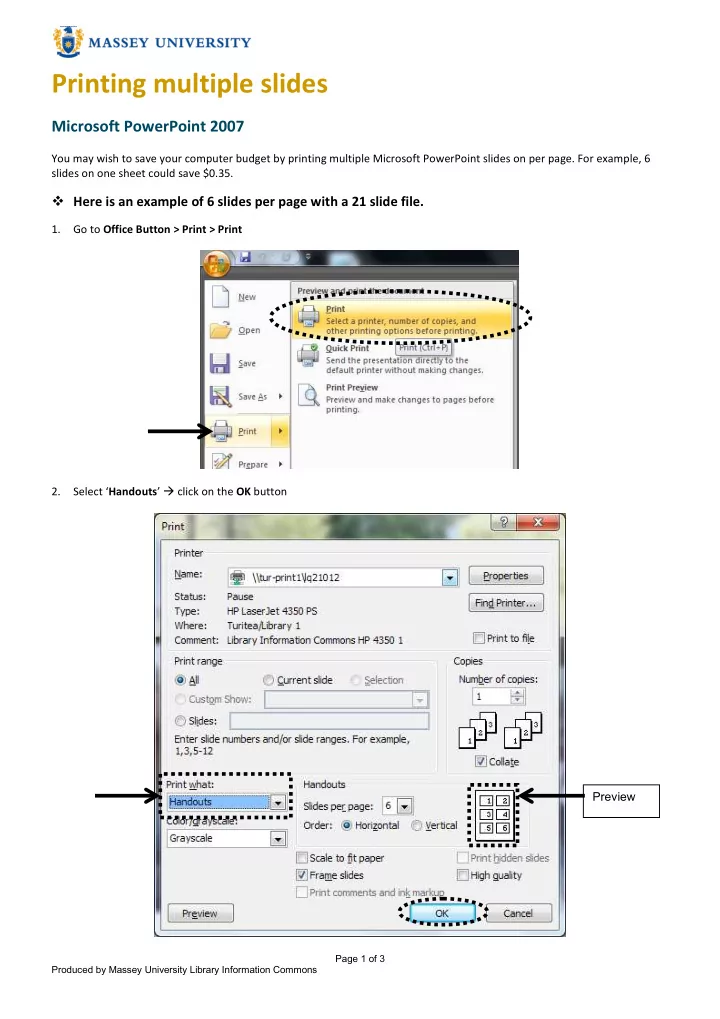
  • 2. Select ‘Handouts’  click on the OK button

Preview

slide-2
SLIDE 2

Page 2 of 3 Produced by Massey University Library Information Commons

  • 3. The Pharos Notify window shows the printing charge at $0.28 (4 A4 pages) because this file contains 21 sides. 4 pages.

Each page will have 6 slides and will have 3 slides.

 An example of 4 slides per page

If you wish to have 4 slides per sheet, the landscape layout is better than portrait. For the same cost, you will have bigger slides.

  • 1. Go to Design > Page Setup
slide-3
SLIDE 3

Page 3 of 3 Produced by Massey University Library Information Commons

  • 2. Choose ‘Landscape’ on both ‘Slides’ and ‘Notes, handouts & outline’ options → click on the ‘OK’ button.
  • 3. Select ‘Handouts’ → choose 4 for ‘Slides per page’ → click on the ‘OK’ button
  • 4. If you pay attention to the Pharos Notify window shoes the printing charge, at $0.42 (4 A4 pages) because this file

contains 21 sides. 6 pages will come out. One page has 4 slides. Preview