Prerequisites - You have installed Tableau Desktop on your computer. - - PDF document

prerequisites
SMART_READER_LITE
LIVE PREVIEW

Prerequisites - You have installed Tableau Desktop on your computer. - - PDF document

DATA SCIENCE SUMMER SCHOOL @ UNI VIENNA TUTORIAL: TABLEAU Prerequisites - You have installed Tableau Desktop on your computer. Available here: http://www.tableau.com/academic/students - You have downloaded the data (athlete_events.csv)


slide-1
SLIDE 1

DATA SCIENCE SUMMER SCHOOL @ UNI VIENNA TUTORIAL: TABLEAU 1

Prerequisites

  • You have installed Tableau Desktop on your computer.

Available here: http://www.tableau.com/academic/students

  • You have downloaded the data (athlete_events.csv)

available here: https://www.kaggle.com/heesoo37/120-years-of-olympic-history- athletes-and-results or here https://www.dropbox.com/s/6h5n8pcfwvc6wdl/athlete_events.csv?dl=0

Motivation

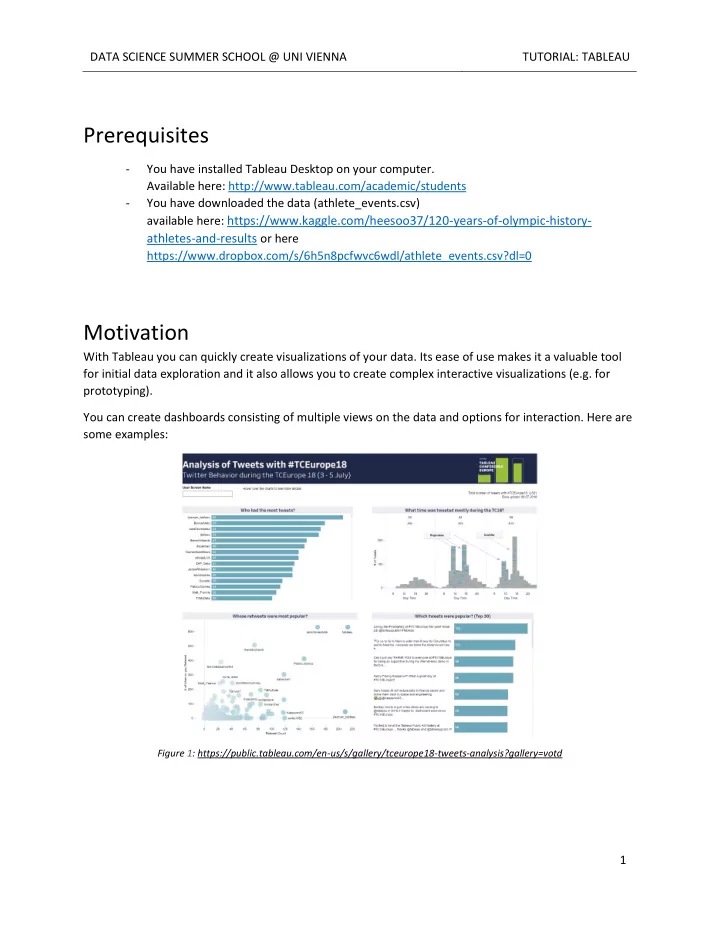
With Tableau you can quickly create visualizations of your data. Its ease of use makes it a valuable tool for initial data exploration and it also allows you to create complex interactive visualizations (e.g. for prototyping). You can create dashboards consisting of multiple views on the data and options for interaction. Here are some examples:

Figure 1: https://public.tableau.com/en-us/s/gallery/tceurope18-tweets-analysis?gallery=votd

slide-2
SLIDE 2

DATA SCIENCE SUMMER SCHOOL @ UNI VIENNA TUTORIAL: TABLEAU 2

Figure 2: https://public.tableau.com/en-us/s/gallery/world-cup-match-dashboard?gallery=votd Figure 3: http://public.tableau.com/profile/datalicious.pty.ltd#!/vizhome/MalteSpitzCallData/MalteSpitzcalldatadashboard

slide-3
SLIDE 3

DATA SCIENCE SUMMER SCHOOL @ UNI VIENNA TUTORIAL: TABLEAU 3

Loading Data

The first step to the visualization is to load the data. On the left side of the screen in the section To a File choose Text File. This way you can

  • pen the .csv file.

After you have selected the data file, you will see an initial table representation of your data. For the data entries to appear, you might have to click Update Now. To make sure our data is correct we need to check what encoding is used to load the data.

slide-4
SLIDE 4

DATA SCIENCE SUMMER SCHOOL @ UNI VIENNA TUTORIAL: TABLEAU 4 Click the little triangle next to your data file in the large white area and select Text file properties. Then select Comma as separator, “ as text qualifier and English (United States) as locale. These settings depend on the dataset you have! Check the datatype of each column. Sometimes a NA in column results in a text column even though column describes something like the weight. Change the columns to the appropriate data types. Spending some time here saves time afterwards. You may also go back to this screen any time to fix something. After you have set the correct format, the table is

  • useable. Click Sheet 1 at the bottom of the window

to proceed to your worksheet.

slide-5
SLIDE 5

DATA SCIENCE SUMMER SCHOOL @ UNI VIENNA TUTORIAL: TABLEAU 5

Basics

Dimensions & Measures

In the leftmost panel you will see the columns of your table as either dimensions or measures. Dimensions are usually categorical datatypes. They can be used to separate your data by discrete tags. Measures are the quantitative data that you will encode in your marks. You can change the type by dragging a measure to dimension or the

  • ther way. This is useful if the auto detection of Tableau isn’t working

properly.

slide-6
SLIDE 6

DATA SCIENCE SUMMER SCHOOL @ UNI VIENNA TUTORIAL: TABLEAU 6

Building Charts

You can drag and drop both measures and dimensions to the central panel to create plots. Let’s suppose we are interested in the number of athletes per year . Simply drag the dimension Year to the columns and the measure Number of Records to rows. You will see that the records are automatically summed up and we see a bar chart of the athletes per year. Looking at the chart, the number

  • f participants seems to fluctuate

in the last years. Any idea why?

slide-7
SLIDE 7

DATA SCIENCE SUMMER SCHOOL @ UNI VIENNA TUTORIAL: TABLEAU 7

Encoding

We take now a closer look by using additional visual channels. The Marks window shows all available channels in Tableau. Let us drag and drop the Season field onto Color. We can see now that in the beginning only summer games where held. After that both types happened during the same year and now the they are during different years. Double clicking the legend allows us to change the colors.

slide-8
SLIDE 8

DATA SCIENCE SUMMER SCHOOL @ UNI VIENNA TUTORIAL: TABLEAU 8 You may select a predefined color from a palette or you double click the color on the left side and select a custom color. Dragging now Season onto the Filter area allows us to remove the summer season from this view. On the right upper side the Show Me window provides possible visualization given the current used fields. Let us remove the Season filter and select the box-and-whisker plot. Which leads to the plot on the right side and a different perspective on the dataset.

slide-9
SLIDE 9

DATA SCIENCE SUMMER SCHOOL @ UNI VIENNA TUTORIAL: TABLEAU 9 Next we create a new plot by selecting the New Worksheet button at the bottom of the window. Now let’s try to visualize how many women had gold medals during all those years. One way is to filter multiple times until we have what we want. Another option are calculated fields. Create one by right click into the dimension or metrics and select Create Calculated Field… Let’s name it FemaleGold and use the formula from the picture below. The square brackets allow you to target certain fields, like the Medal field. The triangle at the right of this pop-up shows a list of all possible operations. Using this as row and Sport as column shows us the gold medals women won in different sports. Let us now sort the x-axis by the number of gold

  • medals. Click the

small sort symbol directly on the y- axis In addition, drag the created calculated field onto Label in Marks to show the

  • numbers. Finally, we

can drag Season

  • nto color.

What are the top three sports for female athletes?

slide-10
SLIDE 10

DATA SCIENCE SUMMER SCHOOL @ UNI VIENNA TUTORIAL: TABLEAU 10

Dashboard

Create a dashboard by selecting the create Dashboard button at the bottom. Drag and drop the two sheets into the empty space so it looks like this:

slide-11
SLIDE 11

DATA SCIENCE SUMMER SCHOOL @ UNI VIENNA TUTORIAL: TABLEAU 11 Let us now connect those two sheets though brushing and linking. Open Dashboard at the top and select Actions. Select Add Action and create a Filter. We use both sheets as source as well as target. You might say one sheet is used as a filter for all other sheets as an example. We also use Select as method and show all values after deselection.

slide-12
SLIDE 12

DATA SCIENCE SUMMER SCHOOL @ UNI VIENNA TUTORIAL: TABLEAU 12 This allows us to analyze the data further. Shown below I selected the winter games from 2014 in the upper chart and the lower chart shows only the female gold medals from this specific game.

  • Which year had most Basketball gold medals for female athletes?
  • How many gold medals in athletics had the women in the games 1972?
slide-13
SLIDE 13

DATA SCIENCE SUMMER SCHOOL @ UNI VIENNA TUTORIAL: TABLEAU 13 Let us have a look at the percentages of medals for different

  • countries. Create a new sheet and use Team as row,

FemaleGold as column and label. Right click Team and click at Sort… There, select Descending and Sort by Field as shown on the right side. This shows us the total amount of female medals for each team or country. Let us now compare the relative amount of medals between

  • countries. Right click AGG(FemaleGold) and select Add Table
  • Calculation. Change the calculation type to Percent of Total use

Specific Dimensions with Team as dimension. Do the same for the AGG(FemaleGold) for the label to see percent instead of the count. Finally drag Season onto color and add the sheet to the dashboard.

slide-14
SLIDE 14

DATA SCIENCE SUMMER SCHOOL @ UNI VIENNA TUTORIAL: TABLEAU 14 This allows us now to look at the performance of certain countries. Here we see that Austria had only female gold medals in the winter seasons (shown by the color) and most of the medals are won in Alpine

  • Skiing. Play around and look for your own country and compare it to your neighbors.

Create new sheets and try to answer questions like:

  • Which age and weight combination results in the most medals in judo?
  • Is age and medal somehow correlated (for specific sports or generally)?
  • We saw the female gold medals, can you extend it to analyze gold, silver and bronze medals?
  • Show it for male and female athletes