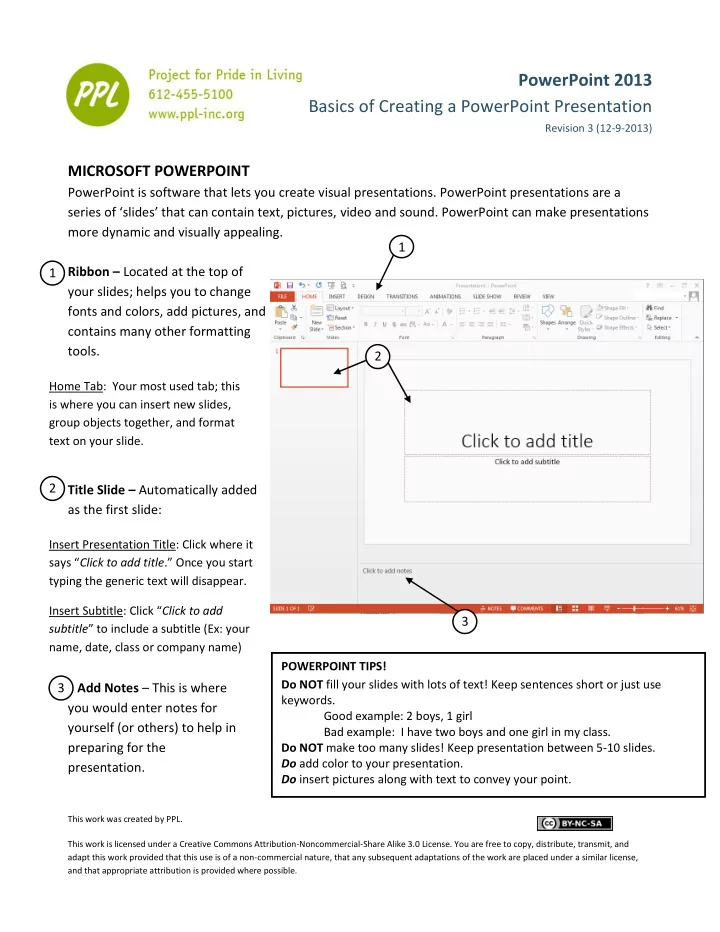
SLIDE 1
This work was created by PPL. This work is licensed under a Creative Commons Attribution-Noncommercial-Share Alike 3.0 License. You are free to copy, distribute, transmit, and adapt this work provided that this use is of a non-commercial nature, that any subsequent adaptations of the work are placed under a similar license, and that appropriate attribution is provided where possible.
Using the Ribbon to Insert a New Slide
To insert a new slide, click where it says “New Slide.” Once selected, a slide layout menu will appear. Slide Order: In this left side bar, you can see the order of your presentation. Insert Options: The 6 little images in the middle of your large text box are options for inserting a table, chart, graphics, pictures from a file, the Internet, or a video. To just add text you can simply move your cursor to where it says “Click to add text” and begin typing.
Note: The slide is automatically set up with ‘bullets’. Every time you hit ENTER
- n the keyboard a new line with a bullet will appear. If you don’t want your