Power Recall (or learn) that Power is a measure of: - - PowerPoint PPT Presentation

power
SMART_READER_LITE
LIVE PREVIEW

Power Recall (or learn) that Power is a measure of: - - PowerPoint PPT Presentation

17.1 17.2 Power Recall (or learn) that Power is a measure of: _____________________________________ EE 109 Unit 17 - Pulse Width In an electronic circuit, P = ______________ Power = Current & Voltage (each may be


slide-1
SLIDE 1

17.1

EE 109 Unit 17 - Pulse Width Modulation

17.2

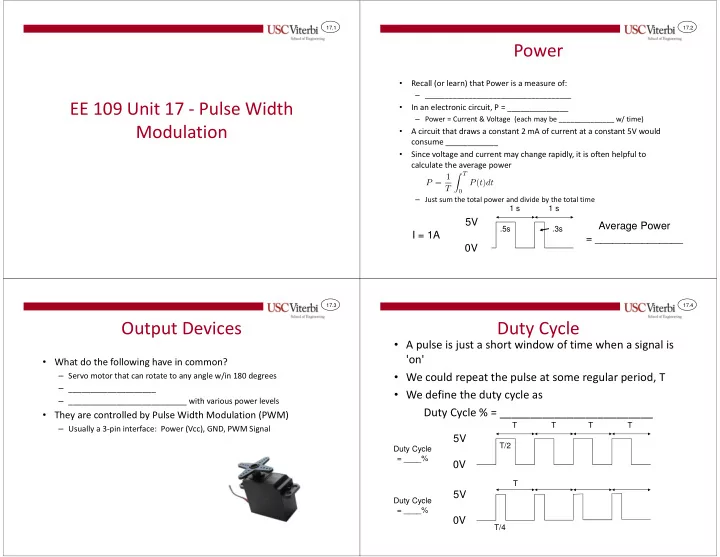
Power

  • Recall (or learn) that Power is a measure of:

– _____________________________________

  • In an electronic circuit, P = ______________

– Power = Current & Voltage (each may be ______________ w/ time)

  • A circuit that draws a constant 2 mA of current at a constant 5V would

consume ____________

  • Since voltage and current may change rapidly, it is often helpful to

calculate the average power

– Just sum the total power and divide by the total time

5V 0V

1 s .5s 1 s .3s

I = 1A Average Power = _______________

17.3

Output Devices

  • What do the following have in common?

– Servo motor that can rotate to any angle w/in 180 degrees – ____________________ – ___________________________ with various power levels

  • They are controlled by Pulse Width Modulation (PWM)

– Usually a 3-pin interface: Power (Vcc), GND, PWM Signal

17.4

Duty Cycle

  • A pulse is just a short window of time when a signal is

'on'

  • We could repeat the pulse at some regular period, T
  • We define the duty cycle as

Duty Cycle % = _________________________

5V 0V

T T/2

5V 0V

T T/4 T T T Duty Cycle = ____% Duty Cycle = ____%

slide-2
SLIDE 2

17.5

Power & Duty Cycle

  • When we light up an LED we
  • ften just turn a PORTxx output

'on' and leave it 'on'

– This supplies the ____________ power possible to the LED

  • We could _________ the output

at some duty cycle (say 50%) at a fast rate

– Fast so that the human eye can't ___________________ – Average power would be ½ the

  • riginal always 'on' power

– Result would be a _____________ __________________

  • 5V

0V 5V 0V T T/2 T

PORTxx 'on' constantly PORTxx 'on' 50% of time

17.6

In-Class Activity

  • Write a program with a loop that turns on the LED

(PORT B5) for x milliseconds and then turns it off for 100-x milliseconds

– Initially set x = 100 – Now set x = 50 – Now set x = 20 – Now set x = 10 – Now set x = 2

  • Notice result may be non-linear
  • A similar tactic is used in your _______________

when you want to cook something at __________

  • etc. power.

17.7

PWM

  • Modulation refers to _____________ a value based on some

___________ (i.e. changing one signal based on another)

  • Pulse width modulation refers to modifying the width of a

pulse based on another signal

  • It can be used to _______________ one signal into another

– Example below of sine wave represented as pulses w/ different widths

  • Or it can just be used

to alter average power as in the last activity

17.8

Simple Digital-To-Analog

  • Connecting a PWM output to a resistor-capacitor circuit

as shown causes the voltage at Vc to "integrate" the digital PWM signal (charge the capacitor)

– Analogy: Imagine you have a leaky bucket (i.e. capacitor) and you want to produce a variable level (i.e. _______________) of water by only turning the hose (___________ output) on or off VPWM 5V 0V Vc 5V 0V

slide-3
SLIDE 3

17.9

Servo Motors

  • Many embedded systems use servo

motors to move or rotate mechanical devices

  • Most servo motors use some form of

pulse width modulation to control the direction and speed of their rotation

  • 2 Kinds

– ____________ servo motors: can only rotate through a certain _____ (usually 180 degrees) – _______________: can keep spinning round and round while pulses are provided

17.10

Standard Servo Motor

  • Pulse width determines ________________ of servo motor
  • Must continue to give pulses for the duration of time it takes

to ________________________________________

  • No pulses = _____________

Pulse width = 750us Full left Centered Full right 20 ms 20 ms Pulse width = 1500us 20 ms 20 ms Pulse width = 2250us 20 ms 20 ms Do an Internet search for Standard Servo Motors & try to find the appropriate pulse width for each position

17.11

Continuous Servo Motors

  • Pulse width determines ________________ of

rotation

  • Controlled via PWM (Pulse Width Modulation)

– Short pulse = Rotate one direction – Medium pulse = Stop – Long pulse = Rotate other direction

20 ms 20 ms 20 ms Pulse Width = _______ us = Full Speed Clockwise Pulse Width = ________ us = Stopped Pulse Width = ________ us = Full Speed Counter- Clockwise

17.12

Implementing PWM

  • Can use delays or timers to make your own pulse

signals

  • Most microcontrollers have hardware to

automatically generate PWM signals based on the contents of some control registers

  • Many microcontrollers use the Timers to also serve

as PWM signals

– Recall the timer module gave us a counter that would increment until it hit some 'modulus' (MAX) count which would cause it to restart and also generate an interrupt

slide-4
SLIDE 4

17.13

Using Timers for PWM

  • For PWM we can use that counter to just count 0 to some

MAX count making the:

– PWM output = '1' while the count < threshold (OCRxx) and – PWM output = '0' when the count >= modulus (OCRxx)

time OCRxA MAX (255) time OCRxB MAX (255) PWM Output 1 PWM Output 2

17.14

PWM Control Registers

  • In this slide packet we will use the 8-bit Timer/Counter0 rather

than the 16-bit Timer/Counter1

  • Refer to Timer Slides w/ following additions
  • Set WGM0[2:0] bits for Fast PWM mode as opposed to CTC
  • Timer/Counter0 can produce two PWM outputs on Arduino pins

D5 and D6, each with its own threshold value, so you need to pick which one you want to use

– Bits COM0A[1:0] and threshold register OCRA control operation of output D6 (PORTD6) – Bits COM0B[1:0] and threshold register OCRB control operation of output D5 (PORTD5)

See datasheet, textbook or other documentation for further explanation

17.15

PWM Control Registers

WGM01, WGM00 WGM02=0 WGM02=1 (Ignore ) 00 Normal (Counter) Unused 01 Phase Correct PWM Phase Correct PWM (Top=OCRA) 10 CTC (Timer) Unused 11 Fast PWM (Top=255) Fast PWM (Top=OCRA) COM0?1, COM0?0 Output Compare pin (assume WGM02=0) 00 Don't use Pin 01 Don't use Pin 10 Set Pin on CTR=0x00, Clear pin on match=OCR? 11 Clear Pin on CTR=0x00, Set pin on match=OCR? CS0 [2:0] Prescaler 010 Clk / 8 011 Clk / 64 100 Clk / 256 101 Clk / 1024

TCCR0A Reg. Timer/Counter0 Control Register

COM0 A1 COM0 A0 COM0 B1 COM0 B0

  • WGM

00 WGM 01

TCCR0B Reg. Timer/Counter0 Control Register

FOC 0A FOC 0B

  • WGM

02 CS02 CS00 CS01

  • Set WGM bits for PWM mode [usually

Fast PWM mode] as opposed to CTC

  • Pick COM0?[1:0] for desired waveform
  • Still need to pick a prescaler to slow

down the clock

  • Set OCRA or OCRB to the desired

threshold which will effectively control the duty cycle of the PWM output

17.16

Exercise

  • Try to use PWM to make your LED glow at

various brightness levels similar to what you did earlier with normal digital I/O

slide-5
SLIDE 5

17.17

A BRIEF SUMMARY

Review of some key concepts from the first half of the semester and revisit what CECS prepares you to do in the future….

17.18

A Few Big Ideas 1

  • _________________________ bits in a register tells the

hardware what do and when (this is SW interacting with HW)

  • ___________ matters

– Your software is executing ___________ compared to how fast a human can do something – You can use that to your advantage: blinking an LED at a fast rate can give the illusion it's always on but just more dim – Or it can work to your disadvantage: One button press may look like __________ because a loop may see one press on multiple iterations. – We must write our software with this in mind

17.19

A Few Big Ideas 2

  • Clocking or enables are necessary to say ________

– Digital signals are always 1's and 0's so just looking at the bits doesn't tell us how many we have – We usually need ____________ (pulses) to tell the hardware when we want it to grab the data

Just looking at this set of digital values, are we sending 0101 once, twice, three times, how many? Once because we use the clock/enable to indicate that. But without the clock we'd have no clue how many times we are trying to write 0101 17.20

A Few Big Ideas 3

  • External events happen __________________ with your

software (don't know "when" something has happened)

– Your software program is the brains for how to process information but it doesn't magically know "when" something has happened? – We have to keep checking it (polling) or – Hardware designers built "interrupt" mechanisms to help

  • Many tasks can be done in ___________________; SW

may be easier to code/use but HW provides parallelism

– A 0.1 second timer can be done in SW using delays but then software can't do much else – Or in HW using timers allowing SW to do other tasks

slide-6
SLIDE 6

17.21

Remember Day 1

http://www.cmu.edu/news/image-archive/Boss.jpg http://prisonerofclass-5933.zippykid.netdna-cdn.com/wp-content/uploads/2013/05/iphone.jpg http://firstcallappliance.com/wp-content/uploads/image/microwave.jpg http://www.amazon.com/Fisher-Price-T-M-X-Tickle-Me-Elmo/dp/B000ETRE0Q http://oeatech.net/wp-content/uploads/2011/03/RADARSAT2-satellite.jpg

  • Computer engineering prepares

you for a broad set of fields

– You could work in the SW industry – You could work in the HW industry – You will be most qualified for jobs that combine that knowledge

  • We've been focused on the

software/hardware interaction embodied in embedded systems

17.22

You Can Do That…

C / C++ / Java Logic Gates Transistors

HW SW

Voltage / Currents Assembly / Machine Code Applications Libraries OS Processor / Memory / I/O Functional Units (Registers, Adders, Muxes)

Devices & Integrated Circuits (Semiconductors & Fabrication) Architecture (Processor & Embedded HW) Systems & Networking (Embedded Systems, Networks) Applications (AI, Robotics, Graphics, Mobile) Cloud & Distributed Computing (CyberPhysical, Databases, Data Mining,etc.)

Scripting & Interfaces Networked Applications

What we've been focusing on thus far

17.23

Dive Into a SmartPhone

  • Here's a picture of what's inside the

iPhoneTM 6

  • Both sides of the circuit board are

populated with chips

http://www.techinsights.com/teardown.com/apple-iphone-6/

https://d3nevzfk7ii3be.cloudfront.net/igi/6MaZk5cEE2tm1uCj.huge

Battery 2-sided Circuit Board 17.24

What's Inside Your SmartPhone

  • What's inside an iPhone 6?
  • Microcontrollers/microprocessors

– Apple A8 APL1011 SoC + Elpida 1 GB LPDDR3 RAM – SoC = __________________…Not just a processor but a processor with custom hardware to do specialized tasks…on- board graphics processor in this case – NXP LPC18B1UK ARM Cortex-M3 Microcontrollers – Similar on-board I/O modules as the _____________. Take a look… – http://www.nxp.com/products/microcontrollers/cortex_m3/

  • Modem + Amplifiers + Transceivers for wireless

communication

– Qualcomm MDM9625M LTE Modem + many others

http://www.techinsights.com/teardown.com/apple-iphone-6/

slide-7
SLIDE 7

17.25

What's Inside?

  • A gyroscope, accelerometer, and touchscreen

– InvenSense MP67B 6-axis gyroscope and accelerometer combo – Broadcom BCM5976 Touchscreen Controller – Both use some form of _____________________ to sense motion or touch

  • Memory Storage

– SK Hynix H2JTDG8UD1BMS 128 Gb (16 GB) NAND Flash

  • Other specialized HW I/O modules

– Murata 339S0228 Wi-Fi Module – Qualcomm PM8019 power management IC – Cirrus Logic 338S1201 audio codec

http://www.techinsights.com/teardown.com/apple-iphone-6/ 17.26

Computer Engineering & HW

  • Computer engineering prepares you to

work in jobs that design these kinds of systems by:

– Learning how to design digital circuits using logic gates [AND, OR, NOT] (EE 154 and EE 254 Digital System Design) – Learning how to optimize processors to execute software as efficiently as possible (EE 457 Computer Architecture) – Learn how to assemble many HW pieces (processor cores, RAM, specialized HW) to form systems-on-chip (EE 454L – SoC Design) – Learn some of the physics and science of fabricating these designs on silicon (EE 277L and EE 477L VLSI Design)

http://www.anandtech.com/show/8562/chipworks-a8

Die Photo of the Apple A8 SoC Processor