
SLIDE 1
Performance Analysis Superpowers with Linux eBPF
Brendan Gregg
Senior Performance Architect Jun 2017
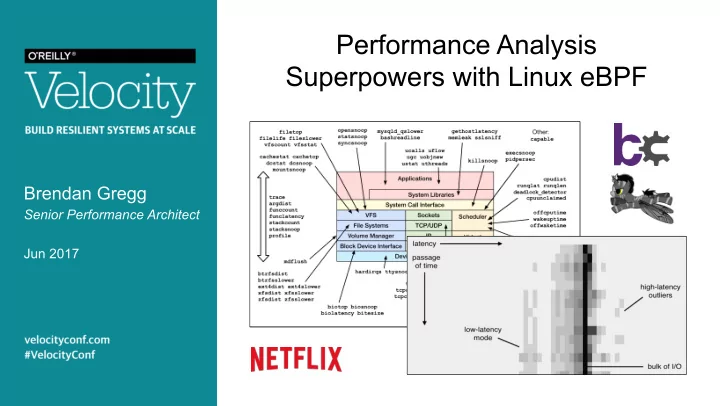
Performance Analysis Superpowers with Linux eBPF Brendan Gregg - - PowerPoint PPT Presentation
Performance Analysis Superpowers with Linux eBPF Brendan Gregg Senior Performance Architect Jun 2017 Efficiently trace TCP sessions with PID, bytes, and dura:on using tcplife # /usr/share/bcc/tools/tcplife PID COMM LADDR LPORT
Brendan Gregg
Senior Performance Architect Jun 2017
Efficiently trace TCP sessions with PID, bytes, and dura:on using tcplife
# /usr/share/bcc/tools/tcplife PID COMM LADDR LPORT RADDR RPORT TX_KB RX_KB MS 2509 java 100.82.34.63 8078 100.82.130.159 12410 0 0 5.44 2509 java 100.82.34.63 8078 100.82.78.215 55564 0 0 135.32 2509 java 100.82.34.63 60778 100.82.207.252 7001 0 13 15126.87 2509 java 100.82.34.63 38884 100.82.208.178 7001 0 0 15568.25 2509 java 127.0.0.1 4243 127.0.0.1 42166 0 0 0.61 2509 java 127.0.0.1 42166 127.0.0.1 4243 0 0 0.67 12030 upload-mes 127.0.0.1 34020 127.0.0.1 8078 11 0 3.38 2509 java 127.0.0.1 8078 127.0.0.1 34020 0 11 3.41 12030 upload-mes 127.0.0.1 21196 127.0.0.1 7101 0 0 12.61 3964 mesos-slav 127.0.0.1 7101 127.0.0.1 21196 0 0 12.64 12021 upload-sys 127.0.0.1 34022 127.0.0.1 8078 372 0 15.28 2509 java 127.0.0.1 8078 127.0.0.1 34022 0 372 15.31 2235 dockerd 100.82.34.63 13730 100.82.136.233 7002 0 4 18.50 2235 dockerd 100.82.34.63 34314 100.82.64.53 7002 0 8 56.73 12068 titus-reap 127.0.0.1 46476 127.0.0.1 19609 0 0 1.25 [...]
bcc/BPF tools
Introducing enhanced BPF for tracing: kernel-level soWware
Berkeley Packet Filter # tcpdump host 127.0.0.1 and port 22 -d (000) ldh [12] (001) jeq #0x800 jt 2 jf 18 (002) ld [26] (003) jeq #0x7f000001 jt 6 jf 4 (004) ld [30] (005) jeq #0x7f000001 jt 6 jf 18 (006) ldb [23] (007) jeq #0x84 jt 10 jf 8 (008) jeq #0x6 jt 10 jf 9 (009) jeq #0x11 jt 10 jf 18 (010) ldh [20] (011) jset #0x1fff jt 18 jf 12 (012) ldxb 4*([14]&0xf) (013) ldh [x + 14] [...]
User-defined bytecode executed by an in-kernel sandboxed virtual machine Steven McCanne and Van Jacobson, 1993
2 x 32-bit registers & scratch memory
Op?mizes packet filter performance
aka eBPF or just "BPF"
Alexei Starovoitov, 2014+
10 x 64-bit registers maps (hashes) ac:ons
BPF bytecode Observability Program Kernel tracepoints kprobes uprobes BPF maps per-event data sta?s?cs verifier
sta?c tracing dynamic tracing async copy perf_events sampling, PMCs BPF program event config aMach load
Enhanced BPF is also now used for SDNs, DDOS mi?ga?on, intrusion detec?on, container security, …
send receive tcpdump Kernel buffer file system
Analyzer
disks
Old way: packet capture New way: dynamic tracing
Tracer
tcp_retransmit_skb()
E.g., tracing TCP retransmits
Linux 4.3 Linux 4.7 Linux 4.9 Linux 4.9 Linux 4.1 BPF stacks Linux 4.6 BPF output Linux 4.4 (version BPF support arrived)
also: LTTng, ktap, sysdig, ...
Introducing BPF Complier Collec?on: user-level soWware
– hMps://github.com/iovisor/bcc – Lead developer: Brenden Blanco
– Python – Lua – C++ – C helper libraries – golang (gobpf) BPF Python Events Kernel lua bcc front-ends bcc tool bcc tool
… …
user kernel
Tracing layers:
bcc examples/tracing/bitehist.py en:re program
hMps://github.com/iovisor/ply/blob/master/README.md en:re program
Scope & Capability Ease of use
sysdig perf Wrace C/BPF ktap stap Stage of Development
(my opinion)
dtrace4L.
(brutal) (less brutal)
(alpha) (mature) bcc/BPF ply/BPF Raw BPF LTTng
(hist triggers) recent changes (many)
Performance analysis
hMp://techblog.neRlix.com/2015/11/linux-performance-analysis-in-60s.html
– Also available as an Ubuntu snap – Ubuntu 16.04 is good, 16.10 beMer: more tools work
– In /usr/share/bcc/tools, and …/tools/old for older kernels
# echo "deb [trusted=yes] https://repo.iovisor.org/apt/xenial xenial-nightly main" |\ sudo tee /etc/apt/sources.list.d/iovisor.list # sudo apt-get update # sudo apt-get install bcc-tools
1. execsnoop 2.
3. ext4slower (…) 4. biolatency 5. biosnoop 6. cachestat 7. tcpconnect 8. tcpaccept 9. tcpretrans
Discover short-lived process issues using execsnoop
# execsnoop -t TIME(s) PCOMM PID PPID RET ARGS 0.031 dirname 23832 23808 0 /usr/bin/dirname /apps/tomcat/bin/catalina.sh 0.888 run 23833 2344 0 ./run 0.889 run 23833 2344 -2 /command/bash 0.889 run 23833 2344 -2 /usr/local/bin/bash 0.889 run 23833 2344 -2 /usr/local/sbin/bash 0.889 bash 23833 2344 0 /bin/bash 0.894 svstat 23835 23834 0 /command/svstat /service/nflx-httpd 0.894 perl 23836 23834 0 /usr/bin/perl -e $l=<>;$l=~/(\d+) sec/;print $1||0; 0.899 ps 23838 23837 0 /bin/ps --ppid 1 -o pid,cmd,args 0.900 grep 23839 23837 0 /bin/grep org.apache.catalina 0.900 sed 23840 23837 0 /bin/sed s/^ *//; 0.900 cut 23841 23837 0 /usr/bin/cut -d -f 1 0.901 xargs 23842 23837 0 /usr/bin/xargs 0.912 xargs 23843 23842 -2 /command/echo 0.912 xargs 23843 23842 -2 /usr/local/bin/echo 0.912 xargs 23843 23842 -2 /usr/local/sbin/echo 0.912 echo 23843 23842 0 /bin/echo [...]
Efficient: only traces exec()
Discover short-lived process issues using execsnoop
# execsnoop -t TIME(s) PCOMM PID PPID RET ARGS 0.031 dirname 23832 23808 0 /usr/bin/dirname /apps/tomcat/bin/catalina.sh 0.888 run 23833 2344 0 ./run 0.889 run 23833 2344 -2 /command/bash 0.889 run 23833 2344 -2 /usr/local/bin/bash 0.889 run 23833 2344 -2 /usr/local/sbin/bash 0.889 bash 23833 2344 0 /bin/bash 0.894 svstat 23835 23834 0 /command/svstat /service/nflx-httpd 0.894 perl 23836 23834 0 /usr/bin/perl -e $l=<>;$l=~/(\d+) sec/;print $1||0; 0.899 ps 23838 23837 0 /bin/ps --ppid 1 -o pid,cmd,args 0.900 grep 23839 23837 0 /bin/grep org.apache.catalina 0.900 sed 23840 23837 0 /bin/sed s/^ *//; 0.900 cut 23841 23837 0 /usr/bin/cut -d -f 1 0.901 xargs 23842 23837 0 /usr/bin/xargs 0.912 xargs 23843 23842 -2 /command/echo 0.912 xargs 23843 23842 -2 /usr/local/bin/echo 0.912 xargs 23843 23842 -2 /usr/local/sbin/echo 0.912 echo 23843 23842 0 /bin/echo [...]
Efficient: only traces exec()
Exonerate or confirm storage latency issues and outliers with ext4slower
# /usr/share/bcc/tools/ext4slower 1 Tracing ext4 operations slower than 1 ms TIME COMM PID T BYTES OFF_KB LAT(ms) FILENAME 17:31:42 postdrop 15523 S 0 0 2.32 5630D406E4 17:31:42 cleanup 15524 S 0 0 1.89 57BB7406EC 17:32:09 titus-log-ship 19735 S 0 0 1.94 slurper_checkpoint.db 17:35:37 dhclient 1061 S 0 0 3.32 dhclient.eth0.leases 17:35:39 systemd-journa 504 S 0 0 26.62 system.journal 17:35:39 systemd-journa 504 S 0 0 1.56 system.journal 17:35:39 systemd-journa 504 S 0 0 1.73 system.journal 17:35:45 postdrop 16187 S 0 0 2.41 C0369406E4 17:35:45 cleanup 16188 S 0 0 6.52 C1B90406EC […]
Tracing at the file system is a more reliable and complete indicator than measuring disk I/O latency Also: btrfsslower, xfsslower, zfsslower
Exonerate or confirm storage latency issues and outliers with ext4slower
# /usr/share/bcc/tools/ext4slower 1 Tracing ext4 operations slower than 1 ms TIME COMM PID T BYTES OFF_KB LAT(ms) FILENAME 17:31:42 postdrop 15523 S 0 0 2.32 5630D406E4 17:31:42 cleanup 15524 S 0 0 1.89 57BB7406EC 17:32:09 titus-log-ship 19735 S 0 0 1.94 slurper_checkpoint.db 17:35:37 dhclient 1061 S 0 0 3.32 dhclient.eth0.leases 17:35:39 systemd-journa 504 S 0 0 26.62 system.journal 17:35:39 systemd-journa 504 S 0 0 1.56 system.journal 17:35:39 systemd-journa 504 S 0 0 1.73 system.journal 17:35:45 postdrop 16187 S 0 0 2.41 C0369406E4 17:35:45 cleanup 16188 S 0 0 6.52 C1B90406EC […]
Tracing at the file system is a more reliable and complete indicator than measuring disk I/O latency Also: btrfsslower, xfsslower, zfsslower
Iden:fy mul:modal disk I/O latency and outliers with biolatency
# biolatency -mT 10 Tracing block device I/O... Hit Ctrl-C to end. 19:19:04 msecs : count distribution 0 -> 1 : 238 |********* | 2 -> 3 : 424 |***************** | 4 -> 7 : 834 |********************************* | 8 -> 15 : 506 |******************** | 16 -> 31 : 986 |****************************************| 32 -> 63 : 97 |*** | 64 -> 127 : 7 | | 128 -> 255 : 27 |* | 19:19:14 msecs : count distribution 0 -> 1 : 427 |******************* | 2 -> 3 : 424 |****************** | […]
Average latency (iostat/sar) may not be represen??ve with mul?ple modes or outliers The "count" column is summarized in-kernel
Iden:fy mul:modal disk I/O latency and outliers with biolatency
# biolatency -mT 10 Tracing block device I/O... Hit Ctrl-C to end. 19:19:04 msecs : count distribution 0 -> 1 : 238 |********* | 2 -> 3 : 424 |***************** | 4 -> 7 : 834 |********************************* | 8 -> 15 : 506 |******************** | 16 -> 31 : 986 |****************************************| 32 -> 63 : 97 |*** | 64 -> 127 : 7 | | 128 -> 255 : 27 |* | 19:19:14 msecs : count distribution 0 -> 1 : 427 |******************* | 2 -> 3 : 424 |****************** | […]
Average latency (iostat/sar) may not be represen??ve with mul?ple modes or outliers The "count" column is summarized in-kernel
Efficiently trace TCP sessions with PID, bytes, and dura:on using tcplife
# /usr/share/bcc/tools/tcplife PID COMM LADDR LPORT RADDR RPORT TX_KB RX_KB MS 2509 java 100.82.34.63 8078 100.82.130.159 12410 0 0 5.44 2509 java 100.82.34.63 8078 100.82.78.215 55564 0 0 135.32 2509 java 100.82.34.63 60778 100.82.207.252 7001 0 13 15126.87 2509 java 100.82.34.63 38884 100.82.208.178 7001 0 0 15568.25 2509 java 127.0.0.1 4243 127.0.0.1 42166 0 0 0.61 2509 java 127.0.0.1 42166 127.0.0.1 4243 0 0 0.67 12030 upload-mes 127.0.0.1 34020 127.0.0.1 8078 11 0 3.38 2509 java 127.0.0.1 8078 127.0.0.1 34020 0 11 3.41 12030 upload-mes 127.0.0.1 21196 127.0.0.1 7101 0 0 12.61 3964 mesos-slav 127.0.0.1 7101 127.0.0.1 21196 0 0 12.64 12021 upload-sys 127.0.0.1 34022 127.0.0.1 8078 372 0 15.28 2509 java 127.0.0.1 8078 127.0.0.1 34022 0 372 15.31 2235 dockerd 100.82.34.63 13730 100.82.136.233 7002 0 4 18.50 2235 dockerd 100.82.34.63 34314 100.82.64.53 7002 0 8 56.73 [...]
Dynamic tracing of TCP set state only; does not trace send/receive Also see: tcpconnect, tcpaccept, tcpretrans
Efficiently trace TCP sessions with PID, bytes, and dura:on using tcplife
# /usr/share/bcc/tools/tcplife PID COMM LADDR LPORT RADDR RPORT TX_KB RX_KB MS 2509 java 100.82.34.63 8078 100.82.130.159 12410 0 0 5.44 2509 java 100.82.34.63 8078 100.82.78.215 55564 0 0 135.32 2509 java 100.82.34.63 60778 100.82.207.252 7001 0 13 15126.87 2509 java 100.82.34.63 38884 100.82.208.178 7001 0 0 15568.25 2509 java 127.0.0.1 4243 127.0.0.1 42166 0 0 0.61 2509 java 127.0.0.1 42166 127.0.0.1 4243 0 0 0.67 12030 upload-mes 127.0.0.1 34020 127.0.0.1 8078 11 0 3.38 2509 java 127.0.0.1 8078 127.0.0.1 34020 0 11 3.41 12030 upload-mes 127.0.0.1 21196 127.0.0.1 7101 0 0 12.61 3964 mesos-slav 127.0.0.1 7101 127.0.0.1 21196 0 0 12.64 12021 upload-sys 127.0.0.1 34022 127.0.0.1 8078 372 0 15.28 2509 java 127.0.0.1 8078 127.0.0.1 34022 0 372 15.31 2235 dockerd 100.82.34.63 13730 100.82.136.233 7002 0 4 18.50 2235 dockerd 100.82.34.63 34314 100.82.64.53 7002 0 8 56.73 [...]
Dynamic tracing of TCP set state only; does not trace send/receive Also see: tcpconnect, tcpaccept, tcpretrans
Iden:fy DNS latency issues system wide with gethostlatency
# /usr/share/bcc/tools/gethostlatency TIME PID COMM LATms HOST 18:56:36 5055 mesos-slave 0.01 100.82.166.217 18:56:40 5590 java 3.53 ec2-…-79.compute-1.amazonaws.com 18:56:51 5055 mesos-slave 0.01 100.82.166.217 18:56:53 30166 ncat 0.21 localhost 18:56:56 6661 java 2.19 atlas-alert-….prod.netflix.net 18:56:59 5589 java 1.50 ec2-…-207.compute-1.amazonaws.com 18:57:03 5370 java 0.04 localhost 18:57:03 30259 sudo 0.07 titusagent-mainvpc-m…3465 18:57:06 5055 mesos-slave 0.01 100.82.166.217 18:57:10 5590 java 3.10 ec2-…-79.compute-1.amazonaws.com 18:57:21 5055 mesos-slave 0.01 100.82.166.217 18:57:29 5589 java 52.36 ec2-…-207.compute-1.amazonaws.com 18:57:36 5055 mesos-slave 0.01 100.82.166.217 18:57:40 5590 java 1.83 ec2-…-79.compute-1.amazonaws.com 18:57:51 5055 mesos-slave 0.01 100.82.166.217 […]
Instruments using user-level dynamic tracing of getaddrinfo(), gethostbyname(), etc.
Iden:fy DNS latency issues system wide with gethostlatency
# /usr/share/bcc/tools/gethostlatency TIME PID COMM LATms HOST 18:56:36 5055 mesos-slave 0.01 100.82.166.217 18:56:40 5590 java 3.53 ec2-…-79.compute-1.amazonaws.com 18:56:51 5055 mesos-slave 0.01 100.82.166.217 18:56:53 30166 ncat 0.21 localhost 18:56:56 6661 java 2.19 atlas-alert-….prod.netflix.net 18:56:59 5589 java 1.50 ec2-…-207.compute-1.amazonaws.com 18:57:03 5370 java 0.04 localhost 18:57:03 30259 sudo 0.07 titusagent-mainvpc-m…3465 18:57:06 5055 mesos-slave 0.01 100.82.166.217 18:57:10 5590 java 3.10 ec2-…-79.compute-1.amazonaws.com 18:57:21 5055 mesos-slave 0.01 100.82.166.217 18:57:29 5589 java 52.36 ec2-…-207.compute-1.amazonaws.com 18:57:36 5055 mesos-slave 0.01 100.82.166.217 18:57:40 5590 java 1.83 ec2-…-79.compute-1.amazonaws.com 18:57:51 5055 mesos-slave 0.01 100.82.166.217 […]
Instruments using user-level dynamic tracing of getaddrinfo(), gethostbyname(), etc.
Examine CPU scheduler run queue latency as a histogram with runqlat
# /usr/share/bcc/tools/runqlat 10 Tracing run queue latency... Hit Ctrl-C to end. usecs : count distribution 0 -> 1 : 2810 |* | 2 -> 3 : 5248 |** | 4 -> 7 : 12369 |****** | 8 -> 15 : 71312 |****************************************| 16 -> 31 : 55705 |******************************* | 32 -> 63 : 11775 |****** | 64 -> 127 : 6230 |*** | 128 -> 255 : 2758 |* | 256 -> 511 : 549 | | 512 -> 1023 : 46 | | 1024 -> 2047 : 11 | | 2048 -> 4095 : 4 | | 4096 -> 8191 : 5 | | […]
As efficient as possible: scheduler calls can become frequent
Examine CPU scheduler run queue latency as a histogram with runqlat
# /usr/share/bcc/tools/runqlat 10 Tracing run queue latency... Hit Ctrl-C to end. usecs : count distribution 0 -> 1 : 2810 |* | 2 -> 3 : 5248 |** | 4 -> 7 : 12369 |****** | 8 -> 15 : 71312 |****************************************| 16 -> 31 : 55705 |******************************* | 32 -> 63 : 11775 |****** | 64 -> 127 : 6230 |*** | 128 -> 255 : 2758 |* | 256 -> 511 : 549 | | 512 -> 1023 : 46 | | 1024 -> 2047 : 11 | | 2048 -> 4095 : 4 | | 4096 -> 8191 : 5 | | […]
As efficient as possible: scheduler calls can become frequent
hMp://www.brendangregg.com/methodology.html
1. Workload Characteriza?on 2. Latency Analysis 3. USE Method
then find the A's
– funccount, trace, argdist, stackcount e.g., storage I/O subsystem:
Construct programma:c one-liners with trace
# trace 'sys_read (arg3 > 20000) "read %d bytes", arg3' TIME PID COMM FUNC - 05:18:23 4490 dd sys_read read 1048576 bytes 05:18:23 4490 dd sys_read read 1048576 bytes 05:18:23 4490 dd sys_read read 1048576 bytes ^C
argdist by Sasha Goldshtein
# trace -h [...] trace –K blk_account_io_start Trace this kernel function, and print info with a kernel stack trace trace 'do_sys_open "%s", arg2' Trace the open syscall and print the filename being opened trace 'sys_read (arg3 > 20000) "read %d bytes", arg3' Trace the read syscall and print a message for reads >20000 bytes trace r::do_sys_return Trace the return from the open syscall trace 'c:open (arg2 == 42) "%s %d", arg1, arg2' Trace the open() call from libc only if the flags (arg2) argument is 42 [...]
e.g. reads over 20000 bytes:
Create in-kernel summaries with argdist
# argdist -H 'p::tcp_cleanup_rbuf(struct sock *sk, int copied):int:copied' [15:34:45] copied : count distribution 0 -> 1 : 15088 |********************************** | 2 -> 3 : 0 | | 4 -> 7 : 0 | | 8 -> 15 : 0 | | 16 -> 31 : 0 | | 32 -> 63 : 0 | | 64 -> 127 : 4786 |*********** | 128 -> 255 : 1 | | 256 -> 511 : 1 | | 512 -> 1023 : 4 | | 1024 -> 2047 : 11 | | 2048 -> 4095 : 5 | | 4096 -> 8191 : 27 | | 8192 -> 16383 : 105 | | 16384 -> 32767 : 0 | |
argdist by Sasha Goldshtein
e.g. histogram of tcp_cleanup_rbuf() copied:
Coming to a GUI near you
BPF metrics and analysis can be automated in GUIs
Flame Graphs Heat Maps Tracing Reports …
Eg, NeRlix Vector (self-service UI):
Should be open sourced; you may also build/buy your own
Latency heatmaps show histograms over :me
CPU and Off-CPU Flame Graphs can be BPF op:mized and used in produc:on
hMp://www.brendangregg.com/flamegraphs.html
CPU Off-CPU
On-CPU with Off-CPU analysis can help solve any performance issue
Generic thread state transi?on diagram
Advanced off-CPU analysis: BPF can merge the blocking stack with the waker stack in-kernel
Waker task Waker stack Blocked stack Blocked task Stack Direc?on Wokeup
bcc/BPF
– Performance monitoring/analysis products
– Created by Tobias Waldekranz – hMps://github.com/iovisor/ply hMps://wkz.github.io/ply/
– Simple one-liners – Short scripts
– kprobes and tracepoints only, uprobes/perf_events not yet – Successful so far as a proof of concept – Not produc?on tested yet (bcc is)
File opens can be traced using a short ply one-liner
# ply -c 'kprobe:do_sys_open { printf("opened: %s\n", mem(arg(1), "128s")); }' 1 probe active
[...]
ply programs are concise, such as measuring read latency
# ply -A -c 'kprobe:SyS_read { @start[tid()] = nsecs(); } kretprobe:SyS_read /@start[tid()]/ { @ns.quantize(nsecs() - @start[tid()]); @start[tid()] = nil; }' 2 probes active ^Cde-activating probes [...] @ns: [ 512, 1k) 3 |######## | [ 1k, 2k) 7 |################### | [ 2k, 4k) 12 |################################| [ 4k, 8k) 3 |######## | [ 8k, 16k) 2 |##### | [ 16k, 32k) 0 | | [ 32k, 64k) 0 | | [ 64k, 128k) 3 |######## | [128k, 256k) 1 |### | [256k, 512k) 1 |### | [512k, 1M) 2 |##### | [...]
BPF Tracing in Linux
Please contribute:
iovisor/bcc
iovisor/ply
iovisor bcc:
bcc tutorial:
ply: hMps://github.com/iovisor/ply BPF:
Flame Graphs:
NeRlix Tech Blog on Vector:
Linux Performance: hMp://www.brendangregg.com/linuxperf.html
Brendan Gregg
Senior Performance Architect Jun 2017
– Ques?ons? – iovisor bcc: hMps://github.com/iovisor/bcc – hMp://www.brendangregg.com – hMp://slideshare.net/brendangregg – bgregg@neRlix.com – @brendangregg
Thanks to Alexei Starovoitov (Facebook), Brenden Blanco (PLUMgrid/ VMware), Sasha Goldshtein (Sela), Daniel Borkmann (Cisco), Wang Nan (Huawei), and other BPF and bcc contributors!