Analysis and Optimizations Analysis and Optimizations Program - - PowerPoint PPT Presentation

analysis and optimizations analysis and optimizations
SMART_READER_LITE
LIVE PREVIEW

Analysis and Optimizations Analysis and Optimizations Program - - PowerPoint PPT Presentation

Analysis and Optimizations Analysis and Optimizations Program Analysis Program Analysis Discovers properties of a program Optimizations Using Program Analysis Use analysis results to transform program Use analysis results


slide-1
SLIDE 1

Using Program Analysis for Optimization Analysis and Optimizations Analysis and Optimizations

  • Program Analysis
  • Program Analysis

– Discovers properties of a program

  • Optimizations

– Use analysis results to transform program Use analysis results to transform program – Goal: improve some aspect of program

b f d i i b f l

  • number of executed instructions, number of cycles
  • cache hit rate

( d d )

  • memory space (code or data)
  • power consumption

– Has to be safe: Keep the semantics of the program

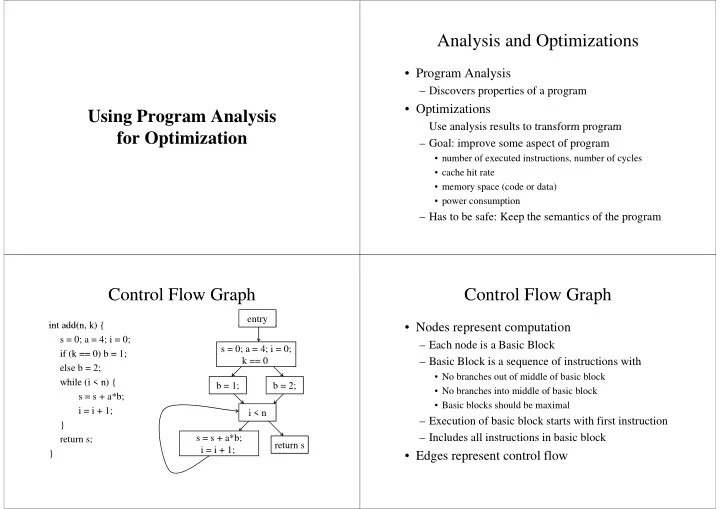
Control Flow Graph Control Flow Graph

int add(n k) { entry int add(n, k) { s = 0; a = 4; i = 0; if (k == 0) b = 1; s = 0; a = 4; i = 0; if (k == 0) b = 1; else b = 2; while (i < n) { k == 0 while (i < n) { s = s + a*b; i i + 1; b = 1; b = 2; i i = i + 1; } t i < n s = s + a*b; return s; } s = s + a*b; i = i + 1; return s

Control Flow Graph Control Flow Graph

  • Nodes represent computation
  • Nodes represent computation

– Each node is a Basic Block – Basic Block is a sequence of instructions with

  • No branches out of middle of basic block
  • No branches into middle of basic block
  • Basic blocks should be maximal

– Execution of basic block starts with first instruction Includes all instructions in basic block – Includes all instructions in basic block

  • Edges represent control flow
slide-2
SLIDE 2

Two Kinds of Variables Two Kinds of Variables

  • Temporaries introduced by the compiler
  • Temporaries introduced by the compiler

– Transfer values only within basic block – Introduced as part of instruction flattening – Introduced by optimizations/transformations Introduced by optimizations/transformations

  • Program variables

l d i i i l – Declared in original program – May transfer values between basic blocks

Basic Block Optimizations Basic Block Optimizations

  • Common Sub-

Expression Elimination

  • Copy Propagation

– a = x+y; b = a; c = b+z; – a = (x+y)+z; b = x+y; – t = x+y; a = t+z; b = t; y – a = x+y; b = a; c = a+z; y; ; ;

  • Constant Propagation

– x = 5; b = x+y;

  • Dead Code Elimination

– a = x+y; b = a; c = a+z; x 5; b x+y; – x = 5; b = 5+y;

  • Algebraic Simplification

a x+y; b a; c a+z; – a = x+y; c = a+z

  • Strength Reduction
  • Algebraic Simplification

– a = x * 1;

  • Strength Reduction

– t = i * 4; t i << 2 – a = x; – t = i << 2;

Value Numbering Value Numbering

  • Normalize basic block so that all statements are

f h f

  • f the form

– var = var op var (where op is a binary operator) p ( p y p ) – var = op var (where op is a unary operator) var = var – var = var

  • Simulate execution of basic block

– Assign a virtual value to each variable – Assign a virtual value to each expression Assign a virtual value to each expression – Assign a temporary variable to hold value of each computed expression computed expression

Value Numbering for CSE Value Numbering for CSE

  • As we simulate execution of program
  • As we simulate execution of program
  • Generate a new version of program

– Each new value assigned to temporary

  • a = x+y; becomes a = x+y; t = a;

a x y; becomes a x y; t a;

– Temporary preserves value for use later in program even if the original variable is rewritten even if the original variable is rewritten

  • a = x+y; a = a+z; b = x+y becomes
  • a = x+y; t = a; a = a+z; b = t;
  • a = x+y; t = a; a = a+z; b = t;
slide-3
SLIDE 3

CSE Example CSE Example

  • Original
  • After CSE
  • Original

a = x+y b +

  • After CSE

a = x+y b + b = a+z b = b+y + b = a+z t = b b b+ c = a+z b = b+y c = t

  • Issues

– Temporaries store values for use later – CSE with different names CSE with different names

  • a = x; b = x+y; c = a+y;

Excessive Temp Generation and Use – Excessive Temp Generation and Use Original Basic New Basic Block

a = x+y a = x+y t1 = a

g Block Block

b = a+z b = b+y c = a+z t1 a b = a+z t2 = b b b c a+z b = b+y t3 = b

Var to Val

c = t2 x → v1 y → v2

Var to Val Exp to Val Exp to Tmp

c t2 y → v2 a → v3 z → v4 v1+v2 → v3 v3+v4 → v5

Exp to Val

v1+v2 → t1 v3+v4 → t2

Exp to Tmp

b → v5 b → v6 c → v5 v3+v4 → v5 v3+v4 → t2 v5+v2 → v6 v5+v2 → t3

Problems Problems

  • Algorithm has a temporary for each new value
  • Algorithm has a temporary for each new value

– a = x+y; t1 = a

  • Introduces

– lots of temporaries lots of temporaries – lots of copy statements to temporaries

  • In many cases, temporaries and copy statements

are unnecessary

  • So we eliminate them with copy propagation

and dead code elimination and dead code elimination

Copy Propagation Copy Propagation

  • Once again simulate execution of program
  • Once again, simulate execution of program
  • If possible, use the original variable instead of a

temporary

– a = x+y; b = x+y; a x+y; b x+y; – After CSE becomes a = x+y; t = a; b = t; Af CP b b – After CP becomes a = x+y; b = a;

  • Key idea: determine when original variables are

y g NOT overwritten between computation of stored value and use of stored value value and use of stored value

slide-4
SLIDE 4

Copy Propagation Maps Copy Propagation Maps

  • Maintain two maps
  • Maintain two maps

– tmp to var: tells which variable to use instead of a given temporary variable – var to set (inverse of tmp to var): tells which temps are mapped to a given variable by tmp to var

Copy Propagation Example Copy Propagation Example

O i i l After CSE and After CSE Original After CSE and Copy Propagation

+

After CSE

a = x+y a = x+y b = a+z a = x+y t1 = a b + a = x+y t1 = a b = a+z c = x+y a = b b = a+z t2 = b b a+z t2 = b c = t1 c = a a = b c t1 a = b

Copy Propagation Example Copy Propagation Example

Basic Block Basic Block After Basic Block After CSE Basic Block After CSE and Copy Prop

a = x+y t1 = a a = x+y t1 = a

tmp to var var to set

t1 → a a →{t1}

Copy Propagation Example Copy Propagation Example

Basic Block Basic Block After Basic Block After CSE Basic Block After CSE and Copy Prop

a = x+y t1 = a b = a+z a = x+y t1 = a b = a+z b = a+z t2 = b b a+z t2 = b

tmp to var var to set

t1 → a t2 → b a →{t1} b →{t2}

slide-5
SLIDE 5

Copy Propagation Example Copy Propagation Example

Basic Block Basic Block After Basic Block After CSE Basic Block After CSE and Copy Prop

a = x+y t1 = a b = a+z a = x+y t1 = a b = a+z b = a+z t2 = b c = t1 b a+z t2 = b

tmp to var var to set

t1 → a t2 → b a →{t1} b →{t2}

Copy Propagation Example Copy Propagation Example

Basic Block Basic Block After Basic Block After CSE Basic Block After CSE and Copy Prop

a = x+y t1 = a b = a+z a = x+y t1 = a b = a+z b = a+z t2 = b c = t1 b a+z t2 = b c = a

tmp to var var to set

t1 → a t2 → b a →{t1} b →{t2}

Copy Propagation Example Copy Propagation Example

Basic Block Basic Block After Basic Block After CSE Basic Block After CSE and Copy Prop

a = x+y t1 = a b = a+z a = x+y t1 = a b = a+z b = a+z t2 = b c = t1 b a+z t2 = b c = a a = b a = b

tmp to var var to set

t1 → a t2 → b a →{t1} b →{t2}

Copy Propagation Example Copy Propagation Example

Basic Block Basic Block After Basic Block After CSE Basic Block After CSE and Copy Prop

a = x+y t1 = a b = a+z a = x+y t1 = a b = a+z b = a+z t2 = b c = t1 b a+z t2 = b c = a a = b a = b

tmp to var var to set

t1 → t1 t2 → b a →{} b →{t2}

slide-6
SLIDE 6

Dead Code Elimination Dead Code Elimination

  • Copy propagation keeps all temps around
  • Copy propagation keeps all temps around
  • There may be temps that are never read
  • Dead Code Elimination (DCE) removes them

Basic Block After CSE + Copy Prop Basic Block After CSE + Copy Prop + DCE

a = x+y t1 = a a = x+y b = a+z b = a+z t2 = b c = a a = b c = a a = b

Dead Code Elimination Dead Code Elimination

  • Basic Idea
  • Basic Idea

– Process code in reverse execution order – Maintain a set of variables that are needed later in computation – On encountering an assignment to a temporary that is not needed, we remove the assignment is not needed, we remove the assignment Basic Block After

a = x+y

CSE and Copy Prop

a = x+y t1 = a b = a+z t2 = b c = a b a = b

Needed Set Assume that initially Needed Set {a, c} Assume that initially Basic Block After

a = x+y

CSE and Copy Prop

a = x+y t1 = a b = a+z t2 = b c = a b a = b

Needed Set Needed Set {a, b, c}

slide-7
SLIDE 7

Basic Block After

a = x+y

CSE and Copy Prop

a = x+y t1 = a b = a+z t2 = b c = a b a = b

Needed Set Needed Set {a, b, c} Basic Block After

a = x+y

CSE and Copy Prop

a = x+y t1 = a b = a+z c = a b a = b

Needed Set Needed Set {a, b, c} Basic Block After

a = x+y

CSE and Copy Prop

a = x+y t1 = a b = a+z c = a b a = b

Needed Set Needed Set {a, b, c, z} Basic Block After

a = x+y

CSE and Copy Prop

a = x+y t1 = a b = a+z c = a b a = b

Needed Set Needed Set {a, b, c, z}

slide-8
SLIDE 8

Basic Block After

a = x+y

CSE and Copy Prop

a = x+y b = a+z c = a b a = b

Needed Set Needed Set {a, b, c, z} Basic Block after CSE Copy Propagation

a = x+y

py p g and Dead Code Elimination

a = x+y b = a+z c = a b a = b

Needed Set Needed Set {a, b, c, z} Basic Block after

a = x+y

CSE + Copy Propagation + Dead Code Elimination

a = x+y b = a+z c = a b a = b

Needed Set Needed Set {a, b, c, z}

Interesting Properties Interesting Properties

  • Analysis and Optimization Algorithms
  • Analysis and Optimization Algorithms

Simulate Execution of Program

– CSE and Copy Propagation go forward – Dead Code Elimination goes backwards g

  • Optimizations are stacked

G f b i f i – Group of basic transformations – Work together to get good result – Often, one transformation creates inefficient code that is cleaned up by subsequent transformations p y q

slide-9
SLIDE 9

Other Basic Block Transformations Other Basic Block Transformations

  • Constant Propagation
  • Constant Propagation
  • Strength Reduction

– a << 2 = a * 4; – a + a + a = 3 * a; a + a + a 3 a;

  • Algebraic Simplification

– a = a * 1; – b = b + 0;

  • Unified transformation framework

Dataflow Analysis Dataflow Analysis

  • Used to determine properties of programs that
  • Used to determine properties of programs that

involve multiple basic blocks

  • Typically used to enable transformations

– common sub-expression elimination common sub expression elimination – constant and copy propagation d d d li i i – dead code elimination

  • Analysis and transformation often come in pairs

y p

Reaching Definitions Reaching Definitions

  • Concept of definition and use
  • Concept of definition and use

– z = x+y – is a definition of z – is a use of x and y is a use of x and y

  • A definition reaches a use if

l i b d fi i i – value written by definition – may be read by use

Reaching Definitions Reaching Definitions

s = 0; s = 0; a = 4; i = 0; k == 0 b = 1; b = 2; i < n s = s + a*b; i = i + 1; return s

slide-10
SLIDE 10

Reaching Definitions and Constant Propagation

  • Is a use of a variable a constant?
  • Is a use of a variable a constant?

– Check all reaching definitions – If all assign variable to same constant – Then use is in fact a constant Then use is in fact a constant

  • Can replace variable with constant

Is a constant in s = s+a*b? Is a constant in s s+a b? Yes!

s = 0; a = 4; i = 0;

Yes!

On all reaching

i 0; k == 0

definitions a = 4

b = 1; b = 2; i < n s = s + a*b; i = i + 1; return s

Constant Propagation Transform Constant Propagation Transform Yes!

s = 0; a = 4; i = 0;

Yes!

On all reaching

i 0; k == 0

definitions a = 4

b = 1; b = 2; i < n s = s + 4*b; i = i + 1; return s

Is b constant in s = s+a*b? Is b constant in s s+a b? No!

s = 0; a = 4; i = 0;

No!

One reaching

i 0; k == 0

definition with b = 1

b = 1; b = 2;

One reaching definition with

i < n

definition with b = 2

s = s + a*b; i = i + 1; return s

slide-11
SLIDE 11

Computing Reaching Definitions Computing Reaching Definitions

  • Compute with sets of definitions
  • Compute with sets of definitions

– represent sets using bit vectors – each definition has a position in bit vector

  • At each basic block compute

At each basic block, compute

– definitions that reach start of block d fi i i h h d f bl k – definitions that reach end of block

  • Do computation by simulating execution of

p y g program until the fixed point is reached

0000000 1: s = 0; 2: a = 4; 3: i = 0; k == 0 1110000 1110000 4: b = 1; 5: b = 2; 1110000 1110000 i < n 1111100 1111100 1111111 1111111 6: s = s + a*b; 7: i = i + 1; return s 1111100 1111100 1111111 1111111 7: i = i + 1;

Formalizing Analysis Formalizing Analysis

  • Each basic block has
  • Each basic block has

– IN - set of definitions that reach beginning of block – OUT - set of definitions that reach end of block – GEN - set of definitions generated in block GEN set of definitions generated in block – KILL - set of definitions killed in the block

GEN[ + *b i i + 1 ] 0000011

  • GEN[s = s + a*b; i = i + 1;] = 0000011
  • KILL[s = s + a*b; i = i + 1;] = 1010000

[ ; ;]

  • Compiler scans each basic block to derive GEN

and KILL sets and KILL sets

GEN[0] = 1110000 KILL[0] 0000011 1: s = 0; 2: a = 4; KILL[0] = 0000011 3: i = 0; k == 0 4: b = 1; 5: b = 2; GEN[1] = 0001000 KILL[1] = 0000100 GEN[2] = 0000100 KILL[2] = 0001000 i < n GEN[3] = 0000000 KILL[3] = 0000000 6: s = s + a*b; 7: i = i + 1; return s KILL[3] 0000000 7: i = i + 1; GEN[5] = 0000000 KILL[5] = 0000000 GEN[4] = 0000011 KILL[4] 1010000 KILL[5] = 0000000 KILL[4] = 1010000

slide-12
SLIDE 12

Dataflow Equations Dataflow Equations

  • IN[b] = OUT[b1] ∪

∪ OUT[bn]

  • IN[b] = OUT[b1] ∪ ... ∪ OUT[bn]

– where b1, ..., bn are predecessors of b in CFG

  • OUT[b] = (IN[b] - KILL[b]) ∪ GEN[b]
  • IN[entry] = 0000000
  • IN[entry] = 0000000
  • Result: system of equations

Solving Equations Solving Equations

  • Use fixed point algorithm
  • Initialize with solution of OUT[b] = 0000000
  • Repeatedly apply equations
  • Repeatedly apply equations

– IN[b] = OUT[b1] ∪ ... ∪ OUT[bn] – OUT[b] = (IN[b] - KILL[b]) ∪ GEN[b]

  • Until reaching fixed point

Until reaching fixed point

– I.e., until equation application has no further effect

  • Use a worklist to track which equation

applications may have a further effect pp y

Reaching Definitions Algorithm Reaching Definitions Algorithm

for all nodes n in N OUT[n] = ∅; // OUT[n] = GEN[n]; Worklist = N; // N = all nodes in graph while (Worklist != ∅) choose a node n in Worklist; Worklist = Worklist - { n }; IN[n] = ∅; for all nodes p in predecessors(n) IN[n] = IN[n] ∪ OUT[p]; OUT[n] = (IN[n] - KILL[n]) ∪ GEN[n]; if (OUT[n] changed) for all nodes s in successors(n) Worklist = Worklist ∪ { s };

Questions Questions

  • Does the algorithm halt?
  • Does the algorithm halt?

– yes, because transfer function is monotonic – if increase IN, increase OUT – in limit, all bits are 1 in limit, all bits are 1

  • If bit is 1, is there always an execution in which

di d fi iti h b i bl k? corresponding definition reaches basic block?

  • If bit is 0, does the corresponding definition

, p g ever reach basic block?

  • Concept of conservative analysis
  • Concept of conservative analysis
slide-13
SLIDE 13

Available Expressions Available Expressions

  • An expression x+y is available at a point p if
  • An expression x+y is available at a point p if

– every path from the initial node to p evaluates x+y before reaching p, – and there are no assignments to x or y after the evaluation but before p.

  • Available Expression information can be used

Available Expression information can be used to do global (across basic blocks) CSE. f i i il bl h i

  • If an expression is available at use, there is no

need to re-evaluate it.

Computing Available Expressions Computing Available Expressions

  • Represent sets of expressions using bit vectors
  • Represent sets of expressions using bit vectors
  • Each expression corresponds to a bit
  • Run dataflow algorithm similar to reaching

definitions definitions

  • Big difference:

– A definition reaches a basic block if it comes from ANY predecessor in CFG p – An expression is available at a basic block only if it is available from ALL predecessors in CFG is available from ALL predecessors in CFG

0000

Available Expressions Example

a = x+y; x == 0 Expressions 1001 x = z; b + 1: x+y 2: i < n 3: i+c 1001 1001 b = x+y; i + 3: i+c 4: x == 0 1000 1000 i = x+y; 1000 i < n 1100 1100 c = x+y; i = i+c; d = x+y a = x+y;

Global CSE Transform

y; t = a; x == 0 Expressions 0000 1001 x = z; b = x+y; 1: x+y 2: i < n 3: i+c 1001 y; t = b; i t 3: i+c 4: x == 0 1000 i = t; 1000 must use same temp for CSE in all blocks i < n 1100 1100 for CSE in all blocks c = t; i = i+c; d = t;

slide-14
SLIDE 14

Formalizing Analysis Formalizing Analysis

  • Each basic block has

– IN - set of expressions available at start of block OUT set of expressions available at end of block – OUT - set of expressions available at end of block – GEN - set of expressions computed in block – KILL - set of expressions killed in the block

  • GEN[x = z; b = x+y] = 1000

GEN[x z; b x y] 1000

  • KILL[x = z; b = x+y] = 1001
  • Compiler scans each basic block to derive GEN

and KILL sets

Dataflow Equations Dataflow Equations

  • IN[b] = OUT[b1] ∩

∩ OUT[bn]

  • IN[b] = OUT[b1] ∩ ... ∩ OUT[bn]

– where b1, ..., bn are predecessors of b in CFG

  • OUT[b] = (IN[b] - KILL[b]) ∪ GEN[b]
  • IN[entry] = 0000
  • IN[entry] = 0000
  • Result: system of equations

Solving Equations Solving Equations

  • Use fixed point algorithm
  • IN[entry] = 0000
  • Initialize OUT[b]

1111

  • Initialize OUT[b] = 1111
  • Repeatedly apply equations

– IN[b] = OUT[b1] ∩ ... ∩ OUT[bn] – OUT[b] = (IN[b] - KILL[b]) ∪ GEN[b] – OUT[b] = (IN[b] - KILL[b]) ∪ GEN[b]

  • Use a worklist algorithm to track which

equation applications may have further effect

Available Expressions Algorithm Available Expressions Algorithm

for all nodes n in N OUT[n] = E; // OUT[n] = E - KILL[n]; IN[Entry] = ∅; OUT[Entry] = GEN[Entry]; Worklist = N - { Entry }; // N = all nodes in graph while (Worklist != ∅) choose a node n in Worklist; Worklist = Worklist - { n }; IN[n] = E; // E is set of all expressions for all nodes p in predecessors(n) IN[n] = IN[n] ∩ OUT[p]; OUT[n] = (IN[n] - KILL[n]) ∪ GEN[n]; if (OUT[n] changed) ( [ ] g ) for all nodes s in successors(n) Worklist = Worklist ∪ { s };

slide-15
SLIDE 15

Questions Questions

  • Does algorithm always halt?
  • Does algorithm always halt?
  • If expression is available in some execution, is

it always marked as available in analysis?

  • If expression is not available in some execution
  • If expression is not available in some execution,

can it be marked as available in analysis?

  • In what sense is the algorithm conservative?

Duality In Two Algorithms Duality In Two Algorithms

  • Reaching definitions
  • Reaching definitions

– Confluence operation is set union – OUT[b] initialized to empty set

  • Available expressions

Available expressions

– Confluence operation is set intersection b i i i li d f il bl i – OUT[b] initialized to set of available expressions

  • General framework for dataflow algorithms

g

  • Build parameterized dataflow analyzer once,

use for all dataflow analysis problems use for all dataflow analysis problems

Liveness Analysis Liveness Analysis

  • A variable v is live at point p if
  • A variable v is live at point p if

– v is used along some path starting at p, and – no definition of v along the path before the use.

  • When is a variable v dead at point p?

When is a variable v dead at point p?

– No use of v on any path from p to exit node, or f ll h f d fi b f i – If all paths from p, redefine v before using v.

What Use is Liveness Information? What Use is Liveness Information?

  • Register allocation

– If a variable is dead, we can reassign its register

  • Dead code elimination
  • Dead code elimination

– Eliminate assignments to variables not read later – But must not eliminate last assignment to variable (such as instance variable) visible outside CFG – Can eliminate other dead assignments – Handle by making all externally visible variables Handle by making all externally visible variables live on exit from CFG

slide-16
SLIDE 16

Conceptual Idea of Analysis Conceptual Idea of Analysis

  • Simulate execution
  • Simulate execution
  • But start from exit and go backwards in CFG
  • Compute liveness information from end to

beginning of basic blocks beginning of basic blocks

Liveness Example Liveness Example

  • Assume a b c visible

0101110 a = x+y; t = a;

  • Assume a,b,c visible
  • utside function and

c = a+x; x == 0

thus are live on exit

  • Assume x,y,z,t are

b = t+z;

Assume x,y,z,t are not visible on exit R t li

1100111 1000111 b t+z; c = y+1; 1100100

  • Represent liveness

using a bit vector

c = y+1; 1110000

– order is abcxyzt

Using Liveness Information for Dead Code Elimination

  • Assume a b c visible

0101110

  • Assume a,b,c visible
  • utside function and

a = x+y; t = a;

thus are live on exit

  • Assume x,y,z,t are

c = a+x; x == 0

Assume x,y,z,t are not visible on exit R t li

b = t+z; 1100111 1000111

  • Represent liveness

using a bit vector

b t+z; c = y+1; 1100100

– order is abcxyzt

c = y+1; 1110000

Formalizing Analysis Formalizing Analysis

  • Each basic block has

– IN - set of variables live at start of block OUT set of variables live at end of block – OUT - set of variables live at end of block – USE - set of variables with upwards exposed uses in bl k block – DEF - set of variables defined in block

  • USE[x = z; x = x+1;] = { z } (x not in USE)
  • DEF[x = z; x = x+1;y = 1;] = {x y}
  • DEF[x = z; x = x+1;y = 1;] = {x, y}
  • Compiler scans each basic block to derive USE

and DEF sets

slide-17
SLIDE 17

Algorithm g

OUT[Exit] = ∅; IN[Exit] = USE[n]; [ ] [ ]; for all nodes n in N - { Exit } IN[n] = ∅; Worklist = N - { Exit }; Wo st N { t }; while (Worklist != ∅) choose a node n in Worklist; choose a node n in Worklist; Worklist = Worklist - { n }; OUT[n] = ∅; OUT[n] ∅; for all nodes s in successors(n) OUT[n] = OUT[n] ∪ IN[s]; IN[n] = USE[n] ∪ (OUT[n] - DEF[n]); IN[n] USE[n] ∪ (OUT[n] - DEF[n]); if (IN[n] changed) for all nodes p in predecessors(n) Worklist = Worklist ∪{ p }; for all nodes p in predecessors(n) Worklist = Worklist ∪{ p };

Similar to Other Dataflow Algorithms

  • Backwards analysis not forwards
  • Backwards analysis, not forwards
  • Still have transfer functions
  • Still have confluence operators

C li f k t k f b th

  • Can generalize framework to work for both

forwards and backwards analyses

Analysis Information Inside Basic Blocks

  • One detail:
  • One detail:

– Given dataflow information at IN and OUT of node – Also need to compute information at each statement

  • f basic block

– Simple propagation algorithm usually works fine – Can be viewed as restricted case of dataflow – Can be viewed as restricted case of dataflow analysis

Summary Summary

  • Basic blocks and basic block optimizations
  • Basic blocks and basic block optimizations

– Copy and constant propagation – Common sub-expression elimination Common sub expression elimination – Dead code elimination

  • Dataflow Analysis

Dataflow Analysis

– Control flow graph – IN[b], OUT[b], transfer functions, join points IN[b], OUT[b], transfer functions, join points

  • Paired of analyses and transformations

– Reaching definitions/constant propagation Reaching definitions/constant propagation – Available expressions/common sub-expression elimination – Liveness analysis/Dead code elimination y