Peeking Inside Peeking Inside Persistent storage modeled as a - - PowerPoint PPT Presentation

peeking inside peeking inside
SMART_READER_LITE
LIVE PREVIEW

Peeking Inside Peeking Inside Persistent storage modeled as a - - PowerPoint PPT Presentation

Peeking Inside Peeking Inside Persistent storage modeled as a sequence of N blocks Persistent storage modeled as a sequence of N blocks from 0 to N-1 from 0 to N-1 4KB in this example 4KB in this example some blocks store data some blocks store


slide-1
SLIDE 1

Peeking Inside

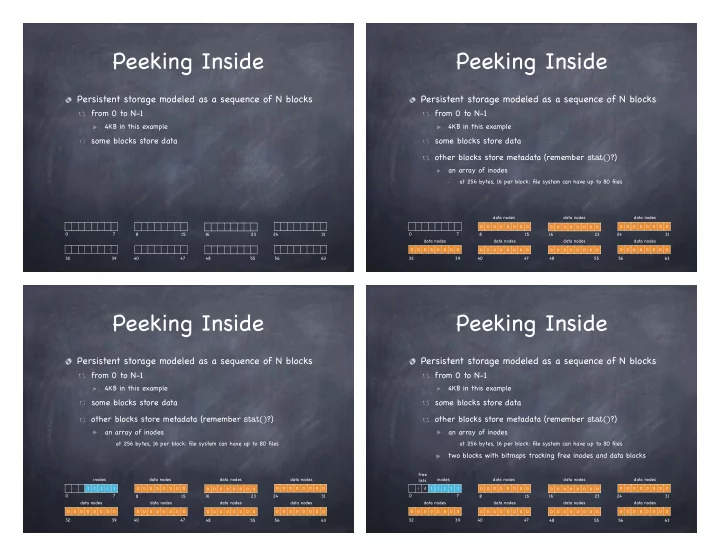
Persistent storage modeled as a sequence of N blocks

from 0 to N-1

4KB in this example

0 7 8 15 16 23 24 31 32 39 40 47 48 55 56 63

some blocks store data

Peeking Inside

Persistent storage modeled as a sequence of N blocks

from 0 to N-1

4KB in this example

D D D D D D D D D D D D D D D D D D D D D D D D

0 7 8 15 16 23 24 31 32 39 40 47 48 55 56 63

D D D D D D D D D D D D D D D D D D D D D D D D D D D D D D D D

some blocks store data

  • ther blocks store metadata (remember stat()?)

an array of inodes

at 256 bytes, 16 per block: file system can have up to 80 files

data nodes data nodes data nodes data nodes data nodes data nodes data nodes

Peeking Inside

Persistent storage modeled as a sequence of N blocks

from 0 to N-1

4KB in this example

some blocks store data

I I I I I D D D D D D D D D D D D D D D D D D D D D D D D

0 7 8 15 16 23 24 31 40 47 48 55 56 63

D D D D D D D D D D D D D D D D D D D D D D D D D D D D D D D D

data nodes data nodes data nodes data nodes data nodes data nodes data nodes inodes 32 39

  • ther blocks store metadata (remember stat()?)

an array of inodes

at 256 bytes, 16 per block: file system can have up to 80 files

Peeking Inside

Persistent storage modeled as a sequence of N blocks

from 0 to N-1

4KB in this example

some blocks store data

i d I I I I I D D D D D D D D D D D D D D D D D D D D D D D D

0 7 8 15 16 23 24 31 40 47 48 55 56 63

D D D D D D D D D D D D D D D D D D D D D D D D D D D D D D D D

data nodes data nodes data nodes data nodes data nodes data nodes data nodes inodes 32 39 free lists

  • ther blocks store metadata (remember stat()?)

an array of inodes

at 256 bytes, 16 per block: file system can have up to 80 files

two blocks with bitmaps tracking free inodes and data blocks

slide-2
SLIDE 2

Peeking Inside

Persistent storage modeled as a sequence of N blocks

from 0 to N-1

4KB in this example

some blocks store data

S i d I I I I I D D D D D D D D D D D D D D D D D D D D D D D D

0 7 8 15 16 23 24 31 40 47 48 55 56 63

D D D D D D D D D D D D D D D D D D D D D D D D D D D D D D D D

data nodes data nodes data nodes data nodes data nodes data nodes data nodes inodes 32 39 free lists

  • ther blocks store metadata (remember stat()?)

an array of inodes

at 256 bytes, 16 per block: file system can have up to 80 files

two blocks with bitmaps tracking free inodes and data blocks superblock

The uperblock

One logical superblock per file system

at a well-known location. contains metadata about the file system, including

how many inodes how many data blocks where the inode table begins magic number identifying file system type

read first when mounting a file system

The inode

Low-level file name Locating an inode on disk

inode 32 is on sector 40 can you see why?

Super i-bmap d-bmap

1 2 3 16 17 18 19 32 33 34 35 48 49 50 51 64 65 66 67 4 5 6 7 20 21 22 23 36 37 38 39 52 53 54 55 68 69 70 71 8 9 10 11 24 25 26 27 40 41 42 43 56 57 58 59 72 73 74 75 12 13 14 15 28 29 30 31 44 45 46 47 60 61 62 63 76 77 78 79

iblock 0 iblock 1 iblock 2 iblock 3 iblock 4 0KB 4KB 8KB 12KB 16KB 20KB 24KB 28KB 32KB

sector : (inumber×sizeof (inode t)) + inodeStartAddr

sectorSize

<latexit sha1_base64="lZbA8PIsbTA6+UwZ/rInRg+Qew=">ACOnicdVDLTtAFB2ntKTpK5QlmxFRJVCjyC4IkREBuWVDQkUhxF4/E1jBh7rJlrpGD5a/gNuz4A9QtG4TYAOIDmCTtgj7u6uicM/fOUEqhUHX/emUXs28fjNbflt59/7Dx0/Vuc8HRmWaQ4crqXQvYAakSKCDAiX0Ug0sDiR0g+Odsd49AW2ESn7gKIVBzA4TEQnO0FLDat8AR6XpBvUjzXi+JIsDkBTH0UMhvoxwyOBuRGnoKLCyioEf4jLy36dfqV+fULsI9O4HYa6yKf79q29GFZrXsOdDP0/qG09tKzq0prb1i9EPFsxgS5JIZ0/fcFAe53S24hKLiZwZSxo/ZIeST6AX9YqmQRjZBpBKkE/aFj8XGjOLAOsdJzJ/amPyX1s8wag5ykaQZQsKnh6JMUlR03CMNhbZJ5cgCxrWwP6T8iNkK0bZdsdHdxsraqrfi0r/B7+gH3xreaqP53au1N8l0ymSBLJIl4pF10ia7ZI90CcX5Ibckwfn3Ll2bp27qbXk/HozT16M8/QM+Wyx4w=</latexit>

The ext2 inode (simplified)

Size Name What is this inode field for? 2 mode can this file be read/written/ executed? 2 uid who owns this file? 4 size how many bytes are in this file? 4 time what time was this file last accessed? 4 ctime what time was this file created? 4 mtime what time was this file last modified? 4 dtime what time was this inode deleted? 4 gid which group does this file belong to? 2 links_count how many hard links are there to this file? 2 blocks how many blocks have been allocated to this file? 4 flags how should ext2 use this inode? 4

  • sd1

an OS-dependent field 60 block a set of disk pointers (15 total) 4 generation file version (used by NFS) 4 file_acl a new permissions model beyond mode bits 4 dir_acl called access control lists

slide-3
SLIDE 3

File structure

Each file is a fixed, asymmetric tree, with fixed size data blocks (e.g. 4KB) as its leaves The root of the tree is the file’ s inode

contains a set of pointers

typically 15 first 12 point to data block last three point to intermediate blocks, themselves containing pointers

13: indirect pointer 14: double indirect pointer 15: triple indirect pointer

Multilevel index

Inode Array Inode

File metadata Data blocks

}

12 x 4KB = 48KB

indirect block

contains pointers to data blocks 4 Bytes entries

}

1K x 4KB = 4MB

double indirect block

contains pointers to indirect blocks

}

1K x 1k x 4KB = 4GB

triple indirect block

contains pointers to double indirect blocks

}

1K x 1k x 1k x 4KB = 4TB at known location on disk file number = inode number = index in the array

Multilevel index: key ideas

Tree structure

efficient in finding blocks

High degree

efficient in sequential reads

  • nce an indirect block is read,

can read 100s of data block

Fixed structure

simple to implement

Asymmetric

supports efficiently files big and small

File metadata Inode array Data blocks

Why Unbalanced Trees?

(and other fun facts)

Most files are small Average file size is growing Most bytes are stored in large files File systems contains lots of files File systems are roughly half full Directories are typically small

Roughly 2K is the most common size Almost 200K is the average A few big files use most of the space Almost 100K on average Even as disks grow, file system remain about 50% full Many have few entries; most have 20 or fewer

slide-4
SLIDE 4

Directory

A file that contains a collection of mapping from file name to file number To look up a file, find the directory that contains the mapping to the file number To find that directory, find the parent directory that contains the mapping to that directory’ s file number... Good news: root directory has well-known number (2)

Documents Music griso.jpg 394 416 864 /Users/lorenzo .. . 256 1061

Find file /Users/lorenzo/griso.jpg

Looking up a file

file 2 “/”

bin 438 usr Users 256 782 chiara 1197 maria lorenzo 1061 294

file 256 “/Users” file 1061 “/Users/lorenzo”

Documents griso.jpg 394 416 864 Music

file 864 “/Users/lorenzo/griso.jpg”

Directory Layout

Directory stored as a file

Linear search to find filename (small directories)

256 416 394 864

. ..

Music

File 1061 /Users/lorenzo

Documents griso.jpg

1061

Free Space

Free Space

End of File

Larger directories use B trees

searched by hash of file name

Reading a File

First, must open the file

  • pen(“/CS4410/roster”, O_RDONLY)

Follow the directory tree, until we get to the inode for “roster” Read that inode

do a permission check return a file descriptor fd

Then, for each read()

read inode read appropriate data block (depending on offset) update last access time in inode update file offset in in-memory open file table for fd

slide-5
SLIDE 5

Read first 3 data blocks from /CS4410/roster

data bitmap inode bitmap root inode CS4410 inode roster inode root data CS4410 data roster data[0] roster data[1] roster data[2]

  • pen(CS4410)

read() read() read() read() read() read() read() read() write() read() read() read() write() read() read() read() write()

Writing a File

Must open the file, like before But now may have to allocate a new data block

each logical write can generate up to five I/O ops

reading the free data block bitmap writing the free data block bitmap reading the file’ s inode writing the file’ s inode to include pointer to the new block writing the new data block

Creating a file is even worse!

read and write free inode bitmap write inode (read) and write directory data write directory inode

and if directory block is full, must allocate another block

Read first 3 data blocks from /CS4410/roster

data bitmap inode bitmap root inode CS4410 inode roster inode root data CS4410 data roster data[0] roster data[1] roster data[2]

create (/CS4410/roster)

read() read() read() read() read() write() write() read() write() write()

write()

read() read() write() write() write()

write()

read() read() write() write() write()

write()

read() read() write() write() write()

Caching

Reading a long path can cause a lot of I/O ops! Cache aggressively!

early: fixed sized cache for popular blocks

static partitioning can be wasteful

current: dynamic partitioning via unified page cache

virtual memory pages and file system blocks in a single cache