Novel imaging - Applications in iVEC Capture technologies - - - PowerPoint PPT Presentation

novel imaging applications in
SMART_READER_LITE
LIVE PREVIEW

Novel imaging - Applications in iVEC Capture technologies - - - PowerPoint PPT Presentation

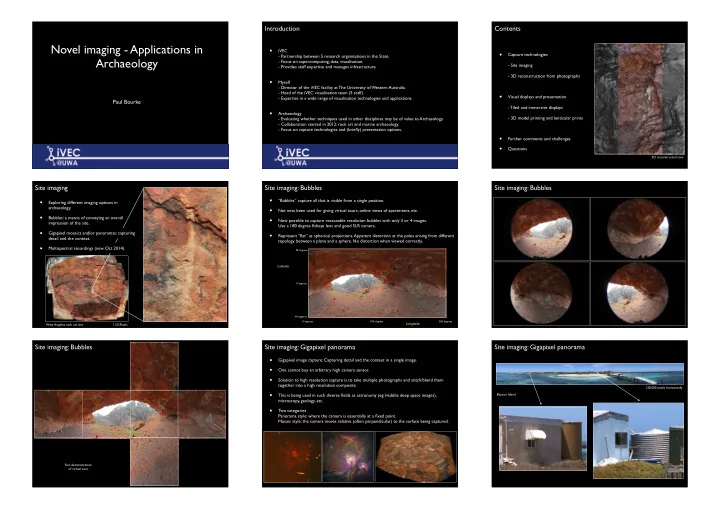
Introduction Contents Novel imaging - Applications in iVEC Capture technologies - Partnership between 5 research organisations in the State. Archaeology - Focus on supercomputing, data, visualisation. - Site imaging - Provides


slide-1
SLIDE 1

Novel imaging - Applications in Archaeology

Paul Bourke

Introduction

  • iVEC
  • Partnership between 5 research organisations in the State.
  • Focus on supercomputing, data, visualisation.
  • Provides staff expertise and manages infrastructure.
  • Myself
  • Director of the iVEC facility at The University of Western Australia.
  • Head of the iVEC visualisation team (5 staff).
  • Expertise in a wide range of visualisation technologies and applications.
  • Archaeology
  • Evaluating whether techniques used in other disciplines may be of value to Archaeology.
  • Collaboration started in 2012: rock art and marine archaeology.
  • Focus on capture technologies and (briefly) presentation options.

Contents

  • Capture technologies
  • Site imaging
  • 3D reconstruction from photographs
  • Visual displays and presentation
  • Tiled and immersive displays
  • 3D model printing and lenticular prints
  • Further comments and challenges
  • Questions

3D reconstructed cave

Site imaging

  • Exploring different imaging options in

archaeology.

  • Bubbles: a means of conveying an overall

impression of the site.

  • Gigapixel mosaics and/or panoramas: capturing

detail and the context.

  • Multispectral recordings (new Oct 2014).

1.5GPixels West Angeles rock art site

Site imaging: Bubbles

  • “Bubbles” capture all that is visible from a single position.
  • Not new, been used for giving virtual tours, online views of apartments, etc.
  • Now possible to capture reasonable resolution bubbles with only 3 or 4 images.

Use a 180 degree fisheye lens and good SLR camera.

  • Represent “flat” as spherical projections. Apparent distortion at the poles arising from different

topology between a plane and a sphere. No distortion when viewed correctly.

90 degrees

  • 90 degrees

0 degrees

Latitude

0 degrees 180 degrees 360 degrees

Longitude

Site imaging: Bubbles Site imaging: Bubbles

Run demonstration

  • f virtual tour

Site imaging: Gigapixel panorama

  • Gigapixel image capture: Capturing detail and the context in a single image.
  • One cannot buy an arbitrary high camera sensor.
  • Solution to high resolution capture is to take multiple photographs and stitch/blend them

together into a high resolution composite.

  • This is being used in such diverse fields as astronomy (eg: Hubble deep space images),

microscopy, geology, etc.

  • Two categories

Panorama style: where the camera is essentially at a fixed point. Mosaic style: the camera moves relative (often perpendicular) to the surface being captured.

Site imaging: Gigapixel panorama

Beacon Island 120,000 pixels horizontally

slide-2
SLIDE 2

Site imaging: Gigapixel panorama

  • Typically use a motorised rig.
  • The final resolution is largely dependent on the field of view of the lens. The narrower the lens

the more photographs and the higher the final resolution.

  • Use approximately 1/3 image overlap.

Site imaging: Gigapixel panorama

45,000 x 22,500 pixels

Site imaging: Gigapixel mosaic

  • For panorama style the camera is arranged to rotate about it’s so called “nodal” point.
  • Stitching can be perfect.
  • Mosaics refer to a camera that moves, typically across a largely 2D object.
  • For fundamental reasons the stitching/blending cannot be perfect across all depths.

Thus better for surfaces with minimal depth variation.

Camera 1 Camera 2 Camera 1 image Camera 2 image

Site imaging: Gigapixel mosaic

Department of Mines and Petroleum 13 photographs

Site imaging: Gigapixel mosaic

900,000 pixels West Angeles 8 x 8 grid of photographs Movie

Site imaging: Multispectral

  • Multispectral imaging: recording at multiple independent wavelength bands.
  • Basic idea is that standard photographs compress the electromagnetic intensity from three

regions of the spectrum into just three RGB numbers.

  • Not recording huge amounts of data ... the intensity at each wavelength.

wavelength intensity

B G R 350nm 400nm 450nm 500nm 550nm 600nm 650nm

Site imaging: Multispectral

  • First test of this at another project at West Angeles rock shelter.
  • Used 8 narrow bandpass filters.
  • spaced every 50nm over the visible spectrum.
  • 20nm wide, FWHH (Full Width Half Height).

350nm 400nm 450nm 500nm 550nm 600nm 650nm ~20nm

Site imaging: Multispectral

400nm 450nm 500nm 550nm 600nm 650nm

  • A normal RGB image would be formed by simply a weighted averages of these images.
  • Enhanced images of the vertical rock art lines might be achieved by:

(500nm * 550nm) - 650nm.

Site imaging: Multispectral

slide-3
SLIDE 3

Site imaging: Multispectral 3D reconstruction from photographs

  • The “magic” part!
  • Photogrammetry is the term given to any 3D measurement derived from 2 or more

photographs.

  • Simplest case might be deriving distance measures from a stereoscopic image pair.
  • More recently advances in computer science, computer/machine vision in particular, and

computation geometry have allowed full 3D textured models to be derived.

  • The interesting aspect here is that each of these components are active areas of research in

computer science and computer graphics. Improvements in the overall capability are occurring regularly.

3D reconstruction from photographs

  • Find matching feature points between any pair of images. Similar to first stage of processing of

panoramic or mosaic images.

  • Using these feature points and some knowledge of the camera optics, derive the 3D positions
  • f the feature points and cameras. (Bundler algorithm)
  • Using this new information derive a denser point cloud.
  • Create a mesh based upon the dense point cloud, possibly decimate to a desired resolution.
  • Re-project the images from the cameras onto this mesh to form texture images(s).

Photography Derive sparce point cloud from feature points Derive camera positions. Derive dense point cloud Compute mesh

  • ver point cloud

Reproject camera images to texture mesh

350 x 22MPixel photographs

slide-4
SLIDE 4

Movie

3D reconstruction from photographs

  • Texture quality vs geometric quality.
  • Former is easier to achieve with 3D reconstruction from photographs.
  • Geometric quality depends on the application.

2,000,000 triangles 200,000 triangles

3D reconstruction from photographs

  • Texture/visual quality vs geometric quality.
  • Comparison with laser scanning.

Geometric resolution Texture resolution Gaming / VR Low High Analysis High May not care Education Medium High Archive High High Online Low/Average Low/Average 3D reconstruction Laser scanning Geometric accuracy Improving High Effort Low High Time Fast Often long Visual quality Potentially high Average Occlusion issues Less problematic More problematic

3D reconstruction from photographs

Wanmanna 2012 Wanmanna 2014 Movie Movie

3D reconstruction from photographs

Wanmanna 2014

Visual displays and presentation

  • Visualisation is a very broad term used to mean various things depending on the discipline.
  • My definition: Visualisation is the use of advanced computing to provide insight into research data.
  • Since our brain receives most information through our sense of vision, the “advanced

computing” often translates to the use of computer graphics and visual displays.

  • Makes sense to maximise our visual sense.

3 obvious capabilities not engaged by normal computer displays.

  • Stereopsis: the sense of depth resulting from separate stimuli to each eye.
  • Peripheral vision: almost 180 degree horizontally and 120 degrees vertically.
  • Fidelity: the real world isn’t represented by pixels.
  • Other senses do play a part in some areas of visualisation.
  • The sense of hearing, referred to as sonification.
  • The sense of touch, there are various force feedback devices, user interfaces, etc.
  • Not just about providing insight to researchers.

Visualisation outcomes also used to provide insight to peers and the general public.

Visual displays and presentation

  • Tiled displays: a space and cost effective means of getting a large numbers of pixels to engage
  • ur visual fidelity.
  • Save the zooming in and out that is commonplace with lower resolution devices.

Seeing the detail and the context.

slide-5
SLIDE 5

Visual displays and presentation

  • iDome display engages our peripheral vision. Ideal for being inside something.
  • Gives a sense of “being there”, often referred to as “presence”.

Visual displays and presentation

  • 3D printing: tactile visualisation.
  • Exploring objects the same way as we do in real life, with our hands and eyes.

Visual displays and presentation

  • Lenticular prints: glasses free 3D prints.
  • Provide “look around” parallax effect as well as depth perception.
  • Intended as a way of presenting depth perception without 3D TVs and other hardware.

Further comments and challenges

  • Interesting to compare traditional laser scanning, other 3D scanning options with 3D
  • reconstruction. Each has relative merits and no single solution, but 3D reconstruction is

improving.

  • Despite 20 years of the internet it is still problematic to (reliably) present 3D models online.

No progressive mesh and texture options available.

  • Don’t have databases with smart support for 3D geometry. Should be able to interrogate a

database of 3D structures for computable quantities other than those predefined or precomputed in the meta data.

  • File formats for gigapixel images are problematic
  • Many are proprietary
  • The standards based solutions are poorly supported.

Most standard formats are limited to 30K pixels on any axis. Most are flat and do not support hierarchical storage and presentation.

Questions?

Movie