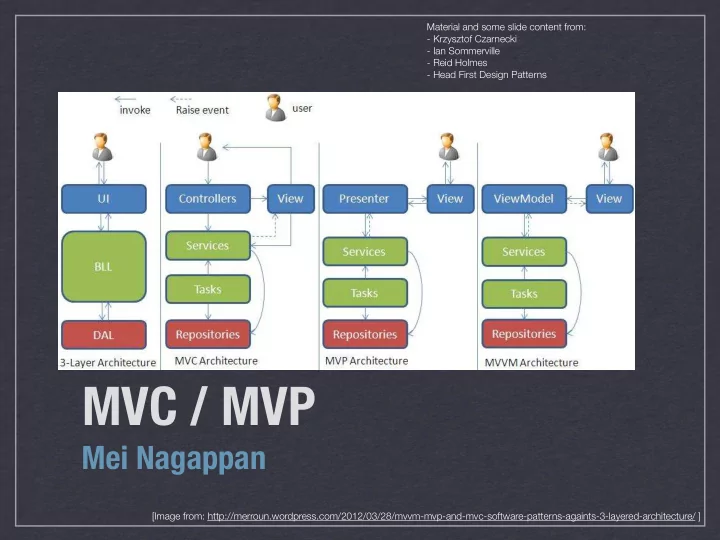
MVC / MVP Mei Nagappan [Image from: - - PowerPoint PPT Presentation

mvc mvp
SMART_READER_LITE
LIVE PREVIEW

MVC / MVP Mei Nagappan [Image from: - - PowerPoint PPT Presentation

Material and some slide content from: - Krzysztof Czarnecki - Ian Sommerville - Reid Holmes - Head First Design Patterns MVC / MVP Mei Nagappan [Image from:


slide-1
SLIDE 1

Material and some slide content from:

  • Krzysztof Czarnecki
  • Ian Sommerville
  • Reid Holmes
  • Head First Design Patterns

MVC / MVP

Mei Nagappan

[Image from: http://merroun.wordpress.com/2012/03/28/mvvm-mvp-and-mvc-software-patterns-againts-3-layered-architecture/ ]

slide-2
SLIDE 2

MEI NAGAPPAN- SE2: SOFTWARE DESIGN & ARCHITECTURE

Background

  • MVC started w/ Smalltalk-80
  • Java UI frameworks & EJBs reignited interest
  • Also prevalent in GWT and .NET development
slide-3
SLIDE 3

MEI NAGAPPAN- SE2: SOFTWARE DESIGN & ARCHITECTURE

MVC Motivation

  • UI changes more frequently than business logic
  • e.g., layout changes (esp. in web applications)
  • The same data is often displayed in different ways
  • e.g., table view vs chart view
  • The same business logic can drive both
  • Designers and developers are different people
  • Testing UI code is difficult and expensive
  • Main Goal: Decouple models and views
  • Increase maintainability/testability of system
  • Permit new views to be developed
slide-4
SLIDE 4

MEI NAGAPPAN- SE2: SOFTWARE DESIGN & ARCHITECTURE

Model

  • Contains application data
  • This is often persisted to a backing store
  • Does not know how to present itself
  • Is domain independent
  • Are often Subjects in the Observer pattern
slide-5
SLIDE 5

MEI NAGAPPAN- SE2: SOFTWARE DESIGN & ARCHITECTURE

View

  • Presents the model to the user
  • Allows the user to manipulate the data
  • Does not store data
  • Is configurable to display different data
slide-6
SLIDE 6

MEI NAGAPPAN- SE2: SOFTWARE DESIGN & ARCHITECTURE

Controller

  • Glues Model and View together
  • Updates the view when the Model changes
  • Updates the model when the user manipulates the

view

  • Houses the application logic
  • Loose coupling between Model and others
  • View tightly cohesive with its Controller
slide-7
SLIDE 7

MEI NAGAPPAN- SE2: SOFTWARE DESIGN & ARCHITECTURE

Abstract topology

Controller View Model

<<updates state>> <<changes>> <<retrieves state>> <<notifies of state changes>>

1 2 3 4

slide-8
SLIDE 8

MEI NAGAPPAN- SE2: SOFTWARE DESIGN & ARCHITECTURE

Concrete topology

ViewController MobileView Model BrowserView TabletView MockView

slide-9
SLIDE 9

MEI NAGAPPAN- SE2: SOFTWARE DESIGN & ARCHITECTURE

Interaction mechanism

  • User interacts with the UI (View)
  • UI (View) notifies controller of changes
  • Controller handles notifications, processing them

into actions that can be performed on the model

  • Controller modifies the model as required
  • If the model changes, it fires modification events
  • The view responds to the modification events
slide-10
SLIDE 10

MEI NAGAPPAN- SE2: SOFTWARE DESIGN & ARCHITECTURE

Benefits and tradeoffs

  • Pro:
  • Decouple view from model
  • Support multiple views [collaborative views]
  • Maintainability [add new views]
  • Split teams [relieve critical path]
  • Testability [reduce UI testing]
  • Con:
  • Complexity [indirection, events]
  • Efficiency [frequent updates, large models]
slide-11
SLIDE 11

MEI NAGAPPAN- SE2: SOFTWARE DESIGN & ARCHITECTURE

Compound Pattern

  • MVC (and other similar patterns) rely upon several

more basic design patterns

  • In MVC:
  • View/Controller leverage the strategy pattern
  • View is often a composite pattern
  • View/Model interact through the observer pattern
  • Other meta-patterns rely upon similar lower-level

design patterns

slide-12
SLIDE 12

MEI NAGAPPAN- SE2: SOFTWARE DESIGN & ARCHITECTURE

MVP Motivation

  • Take MVC a tiny bit further:
  • Enhance testability
  • Further separate Designers from Developers
  • Leveraged by both GWT and .NET
slide-13
SLIDE 13

MEI NAGAPPAN- SE2: SOFTWARE DESIGN & ARCHITECTURE

Model

  • Contains application data
  • This is often persisted to a backing store
  • Does not know how to present itself
  • Is domain independent
  • Often fires events to an Event Bus
slide-14
SLIDE 14

MEI NAGAPPAN- SE2: SOFTWARE DESIGN & ARCHITECTURE

View

  • Thin UI front-end for controller
  • Does not store data
  • Can be interchanged easily
  • Does not ever see or manipulate Model objects
  • Only interacts with primitives
  • e.g., (setUser(String) instead of setUser(User))
slide-15
SLIDE 15

MEI NAGAPPAN- SE2: SOFTWARE DESIGN & ARCHITECTURE

Controller

  • Glues Model and View together
  • Updates the view when the Model changes
  • Updates the model when the user manipulates the

view

  • Houses the application logic
slide-16
SLIDE 16

MEI NAGAPPAN- SE2: SOFTWARE DESIGN & ARCHITECTURE

MVP Topology

Presenter View Model

<<updates, retrieves state>> <<notifies>> <<refresh>> <<notifies of state changes>> Event Bus

1 2 3 4

slide-17
SLIDE 17

MEI NAGAPPAN- SE2: SOFTWARE DESIGN & ARCHITECTURE

Concrete MVP Topology

ViewController MobileView Model BrowserView MockView App Controller OutlineController OutlineView MockOutline

<<notifies of state changes>> Event Bus

slide-18
SLIDE 18

MEI NAGAPPAN- SE2: SOFTWARE DESIGN & ARCHITECTURE

Benefits and tradeoffs

  • Same as MVC with improved:
  • Decoupling of views from the model
  • Split teams [relieve critical path]
  • Testability [reduce UI testing]
  • A little less complex than MVC [fewer events]
slide-19
SLIDE 19

MEI NAGAPPAN- SE2: SOFTWARE DESIGN & ARCHITECTURE

Architecture/Design Review Meeting

  • Don’t think of this as an oral exam
  • Start with 5 minute presentation (board only)
  • Followed by 20 minute discussion
  • Evaluating the product, not the producer
  • Be prepared!
  • Goal:
  • Ensure system meets proposal
  • Check consistency of design with architecture
  • Talk about arch/design decisions/justification
  • Discuss support for future system evolution