Meet the OS Software that manages a computer s resources - - PowerPoint PPT Presentation

meet the os
SMART_READER_LITE
LIVE PREVIEW

Meet the OS Software that manages a computer s resources - - PowerPoint PPT Presentation

Meet the OS Software that manages a computer s resources Introduction Makes it easier to write the applications you want to write CS 4410 Makes you want to use the applications you wrote by running them efficiently OS wears many hats


slide-1
SLIDE 1

Introduction

CS 4410

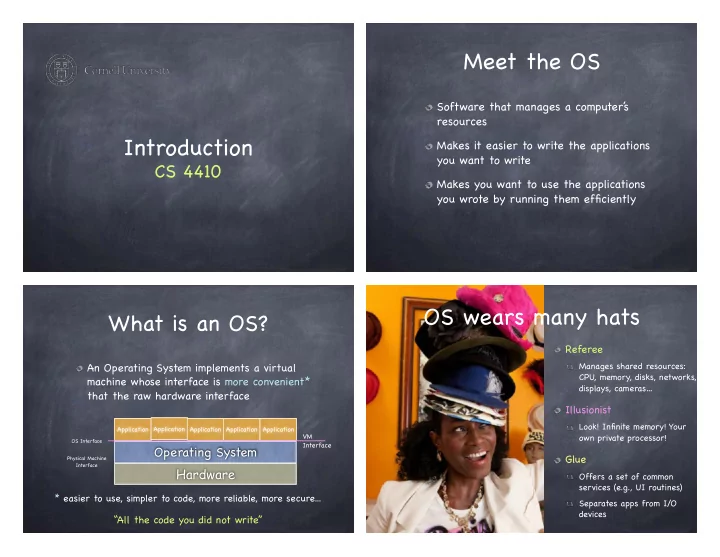
Meet the OS

Software that manages a computer’ s resources Makes it easier to write the applications you want to write Makes you want to use the applications you wrote by running them efficiently

What is an OS?

An Operating System implements a virtual machine whose interface is more convenient* that the raw hardware interface

Operating System

Application Application Application Application Application

Hardware

OS Interface Physical Machine Interface

* easier to use, simpler to code, more reliable, more secure...

“All the code you did not write”

VM Interface

Referee

Manages shared resources: CPU, memory, disks, networks, displays, cameras…

Illusionist

Look! Infinite memory! Your

  • wn private processor!

Glue

Offers a set of common services (e.g., UI routines) Separates apps from I/O devices

OS wears many hats

slide-2
SLIDE 2

OS as Referee

Resource allocation

Multiple concurrent tasks, how does OS decide who gets how much?

Isolation

A faulty app should not disrupt other apps or OS

Communication/Coordination

Apps need to coordinate and share state

OS as Illusionist

Virtualization

Processor, memory, screen space, disk, network

Appearance of resources not physically present

Operating System

Application Application Application Application Application

Hardware

VM Interface

OS as Illusionist

Virtualization

Processor, memory, screen space, disk, network The entire computer Fooling the illusionist itself! Eases debugging, portability, isolation

Appearance of resources not physically present

Operating System

Application Application Application Application Application

Hardware

VM Interface

VMM

Application Application Application Application Application

Hardware

Guest OS 1 Guest OS 2

VM Interface VM Interface

Appearance of resources not physically present Atomic operations

HW guarantees atomicity at the word level… What happens during concurrent updates to complex data structures? What is a computer crashes while writing a file block? At the hardware level, packets are lost Reliable communication channels

OS as Illusionist

slide-3
SLIDE 3

OS as Glue

Offers standard services to simplify app design and facilitate sharing

Send/Receive byte streams Read/Write files Pass messages Share memory UI

Decouples HW and app development

A Short History of Operating Systems

History of Operating Systems

Phase 1: Hardware is expensive, humans are cheap

User at console: single-user systems Batching systems Multi-programming systems

Hand programmed machines (1945-1955)

Single user systems OS = loader + libraries of common subroutines Problem: low utilization of expensive components

  • bservation interval = % utilization

time device busy

slide-4
SLIDE 4

Batch Processing (1955-1965)

Operating system = loader + sequencer + output processor

Tape Tape Input

Compute

Output Card Reader Printer Tape Tape Operating System “System Software” User Program User Data

Multiprogramming (1965-1980)

Keep several jobs in memory and multiplex CPU between jobs

Operating System “System Software” User Program 1 User Program 2 User Program 2 User Program n ...

program P begin : Read(var) :
 end P system call Read() begin StartIO(input device) WaitIO(interrupt) EndIO(input device) :
 end Read

Multiprogramming (1965-1980)

Keep several jobs in memory and multiplex CPU between jobs

Operating System “System Software” User Program 1 User Program 2 User Program 2 User Program n ... Program 1 I/O Device

k: read() k+1: endio() interrupt main{ } }

OS

read{ startIO() waitIO()

Multiprogramming (1965-1980)

Keep several jobs in memory and multiplex CPU between jobs

Operating System “System Software” User Program 1 User Program 2 User Program 2 User Program n ... Program 1 I/O Device

k: read() k+1: interrupt main{ }

OS

read{ startIO() endio{ } schedule() main{ } schedule()

Program 2

slide-5
SLIDE 5

Phase 1: Hardware is expensive, humans are cheap

User at console: single-user systems Batching systems Multi-programming systems

Phase 2: Hardware is cheap, humans are expensive

Time sharing: Users use cheap terminals and share servers

History of Operating Systems

Timesharing (1970-)

A timer interrupt is used to multiplex CPU between jobs

Operating System “System Software” User Program 1 User Program 2 User Program 2 User Program n ... Program 1 Program 2

k: k+1: main{

OS

schedule(){ } main{ timer interrupt timer interrupt schedule(){ schedule(){ } timer interrupt

Phase 1: Hardware is expensive, humans are cheap

User at console: single-user systems Batching systems Multi-programming systems

Phase 2: Hardware is cheap, humans are expensive

Time sharing: Users use cheap terminals and share servers

Phase 3: Hardware is very cheap, humans are very expensive

Personal computing: One system per user Distributed computing: many systems per user Ubiquitous computing: LOTS of systems per users

History of Operating Systems

Operating Systems for PCs

Personal computing systems Single user Utilization no longer a concern Emphasis on user interface and API Many services & features not present Evolution Initially: OS as a simple service provider (simple libraries) Now: Multi-application systems with support for coordination

slide-6
SLIDE 6

!21

Why study Operating Systems?

To learn how to manage complexity through appropriate abstractions infinite CPU, infinite memory, files, locks, etc. To learn about design performance vs. robustness, functionality vs. simplicity, HW vs. SW, etc. To learn how computers work Because OSs are everywhere!

Why study Operating Systems?

To learn how to manage complexity through appropriate abstractions infinite CPU, infinite memory, files, locks, etc. To learn about design performance vs. robustness, functionality vs. simplicity, HW vs. SW, etc. To learn how computers work Because OSs are everywhere!

Where’ s the OS? Las Vegas

slide-7
SLIDE 7

Where’ s the OS? New York

What will the course be like?

What kind of course?

Top-down…

Start from first principles Re-derive the design of components of a complex system

… & Bottom-up

Dissect existing systems, to learn what tradeoffs they make what patterns they use

slide-8
SLIDE 8

Painting

Order Design Tension Balance Harmony Reliability Availability Portability Efficiency Security

System

building

* *Sondheim: Sunday in the Park with George

System building is hard!

slide-9
SLIDE 9

Therac-25

Safety critical system with software interlocks

prevent machine from changing state because

  • f state of another

element

Beam controlled entirely through a custom OS

[1982]

Computer-controlled radiation therapy machine

Therac-25

Old system used a hardware interlock

Lever either in the “electron-beam” or “x-ray” position

New system was computer controlled.

A synchronization failure triggered when competent nurses used back arrow to change the data on the screen “too quickly” Engineers reused software from older models

it was buggy, but hardware interlocks masked the bugs

The system noted a problem and halted X-beam, displaying “MALFUNCTION” followed by obscure error code 54

technician resumed treatment

Therac-25 Outcome

Patients received over 100x the recommended dose

  • f radiation

Three patients died of radiation overdose Many cancer patients received inadequate treatment People died because a programmer could not write correct code for a concurrent system 37 Year Later…. Now what?

System building is hard

We do not have the necessary technologies and know-how to build robust computer systems The world is increasingly dependent on computer systems Connected, networked, interlinked There is huge demand for people who deeply understand and can build robust systems (most people don’ t and can’ t)

slide-10
SLIDE 10

What’ s this course about?

Ostensibly, operating systems

Architecting complex software Identifying needs and priorities Separating concerns Implementing artifacts with desired properties

In reality, software design principles

OSes happen to illustrate organizational principles and design patterns

This is a Capstone Course. Get Ready!

What makes a good OS?

The right set of abstractions

A good abstraction:

is portable and hides implementation details has an intuitive and easy-to-use interface can be installed many times is efficient and reasonably easy to implement

OS: a collection of abstractions

Processes (abstract CPU and RAM) Files (abstract disks) Network endpoints (abstract NIC) Windows (abstract screens) …

Think of them as objects with state and methods

Issues in OS Design

Structure: how is the OS organized? Concurrency: how are parallel activities created and controlled? Sharing: how are resources shared? Naming: how are resources named by users? Protection: how are distrusting parties protected from each other? Security: how to authenticate, authorize, and ensure privacy? Performance: how to make it fast?

slide-11
SLIDE 11

More Issues in OS Design

Reliability: how do we deal with failures?? Portability: how to write once, run anywhere? Extensibility: how do we add new features? Communication: how do we exchange information? Scale: what happens as demands increase? Persistence: how do we make information outlast the processes that created it? Accounting: who pays the bill and how do we control resource usage?