SLIDE 1
Line Equation
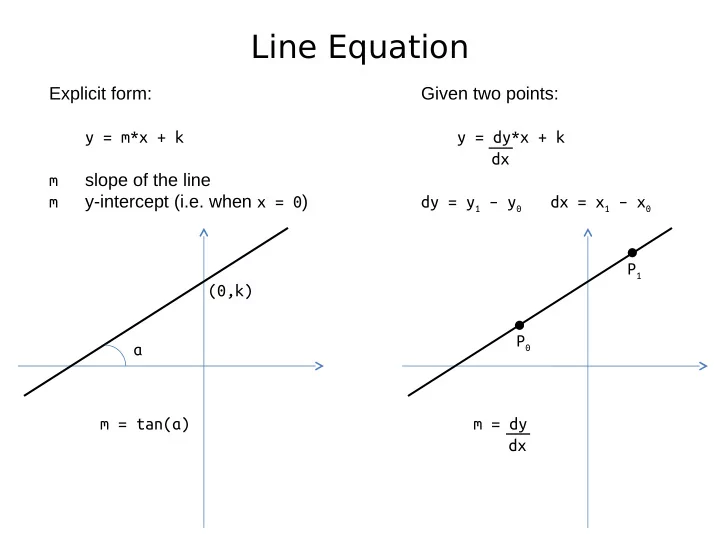
Explicit form: y = m*x + k m slope of the line m y-intercept (i.e. when x = 0) α (0,k) m = tan(α) P0 P1 Given two points: y = dy*x + k dx dy = y1 – y0 dx = x1 – x0 m = dy dx
SLIDE 2
Lines and Slopes
m = 0 (α = 0) m = +1 (α = 45) m = -1 (α = -45) m = (0..1) (α = 0..45) m = (1..∞) (α = 45..90) m = (-∞..-1) (α = -90..45) m = (-1..0) (α = -45..0) m = ∞ (α = 90)
SLIDE 3 Line Drawing (Naïve)
Given two points P0(x0,y0) and P1(x1,y1):
- 1. find the line equation y = m*x + k
- 2. for each x in [x0, x1]:
calculate y and plot (x, y) Assumptions: x0 <= x1 m = [-1..1] def drawLine(x0, y0, x1, y1): compute m and k for each x in [x0 , x1]: y = m*y + k plot(x, round(y))
SLIDE 4 Line Drawing (Incremental)
Given a line equation y = m*x + k knowing the coordinates
- f P(x,y) makes it easy to calculate y’ for the neighbor point P’(x+1,y’)
y’ = m*x’ + k = m*(x + 1) + k = m*x + m + k = m*x + k + m = y + m So to get the next y, just add the slope to the current y value def drawLine(x0, y0, x1, y1): compute the slope m start at y = y0 for each x in [x0 , x1]: plot(x, round(y)) y = y + m
SLIDE 5
Line Equation
Implicit form: a*x + b*y + c = 0 the line is all points (x,y) that satisfy the equation If we let: F(x, y) = a*x + b*y + c then F(x, y) = 0 (x,y) on the line F(x, y) < 0 (x,y) “below” the line F(x, y) > 0 (x,y) “above” the line
SLIDE 6
Line Equation
Implicit form: a*x + b*y + c = 0 the line is all points (x,y) that satisfy the equation If we let: F(x, y) = a*x + b*y + c then F(x, y) = 0 (x,y) on the line F(x, y) < 0 (x,y) “below” the line F(x, y) > 0 (x,y) “above” the line F(P) = a*x + b*y + c = 0 F(P”) = ? F(P’) = ? P” P P'
SLIDE 7
Line Equation
Implicit form: a*x + b*y + c = 0 the line is all points (x,y) that satisfy the equation If we let: F(x, y) = a*x + b*y + c then F(x, y) = 0 (x,y) on the line F(x, y) < 0 (x,y) “below” the line F(x, y) > 0 (x,y) “above” the line F(P) = a*x + b*y + c = 0 F(P”) = F(x, y+1) = a*x + b*(y+1) + c = = a*x + b*y + b + c = = a*x + b*y + c + b = = F(P) + b = b F(P’) = F(x, y-1) = -b P” P P'
SLIDE 8
Line Drawing (Midpoint)
Pick the pixel closest to the line P’ P” d” d’ Expensive, since it requires distance computation
SLIDE 9
Line Drawing (Midpoint)
Instead of calculating the true distances d’ and d” (time consuming) check on which side of the line the midpoint M lies, i.e. check whether F(M) > 0 or F(M) < 0 P’ P” d” d’ Pick P’ if M above the line, i.e. F(M) > 0 Pick P” if M is below the line, i.e. F(M) < 0 M
SLIDE 10
Line Drawing (Midpoint)
Midpoint lets us decide (1) which vertex to pick (2) which midpoint to consider next should we highlight vertex below M and move left to examine ME OR should we highlight vertex above midpoint and move diagonally to examine MNE M ? ? ME MNE
SLIDE 11
Line Drawing (Midpoint)
Midpoint lets us decide (1) which vertex to pick (2) which midpoint to consider next M ? ? M ME ? ?
SLIDE 12
Line Drawing (Midpoint)
Midpoint lets us decide (1) which vertex to pick (2) which midpoint to consider next M ? ? M MNE ? ?
SLIDE 13
Line Drawing (Midpoint)
Midpoint lets us decide (1) which vertex to pick (2) which midpoint to consider next M ? ? M ME ? ? M ? ? M MNE ? ?
SLIDE 14
Line Drawing (Midpoint)
Given two points P0(x0,y0) and P1(x1,y1) pick the closest pixels to the line. Assumptions: x0 < x1 m = [0..1] Start with the implicit equation a*x + b*y + c = 0 where a = dy, b = -dx, c = k*dx Use the idea from the incremental algorithm: if we know the value at F(M) can we calculate efficiently F(ME) or F(MNE) M ME MNE
SLIDE 15
Line Drawing (Midpoint)
Calculating the value F(ME) M ME Coordinates: M(x, y) ME(x+1,y) F(ME) = a*(x+1) + b*y + c = a*x + a + b*y + c = a*x + b*y + c + a = F(M) + a Calculating the value F(MNE) Coordinates: M(x, y) MNE(x+1,y+1) F(MNE) = a*(x+1) + b*(y+1) + c = a*x + a + b*y + b + c = a*x + b*y + c + a + b = F(M) + a + b M MNE
SLIDE 16
Line Drawing (Midpoint)
Calculating the value F(M0) Coordinates: P0(x0,y0) M0(x0+1,y0+½) F(M0) = a*(x0+1) + b*(y0+½) + c = a*x0 + a + b*y0 + b/2 + c = a*x0 + b*y0 + c + a + b/2 = F(P0) + a + b/2 = 0 + a + b/2 = a + b/2 M0 P0
SLIDE 17
Line Drawing (Midpoint)
In summary, F(Mi+1) = F(Mi) + a if Mi “above” the line, i.e. go E F(Mi+1) = F(Mi) + (a+b) if Mi “below” the line, i.e. go NE F(M0) = a + b/2 for the first midpoint M0 To avoid the division in the term b/2 we could go back and use: F(x, y) = 2a*x + 2b*y + 2c same line as F(x, y) = a*x + b*y + c Finally, F(Mi+1) = F(Mi) + 2a if Mi “above” the line, i.e. go E F(Mi+1) = F(Mi) + 2(a+b) if Mi “below” the line, i.e. go NE F(M0) = 2a + b for the first midpoint M0
SLIDE 18
Line Drawing (Issues)
Endpoint order: The assumption was that x1 < x2 i.e. drawing from “left” to “right” If x1 > x2 i.e. drawing from “right” to “left” could simply swap P1 and P2 However, swapping will not work if the lines have styles, since it will lead to discontinuities in the pattern.
SLIDE 19
Line Drawing (Issues)
Endpoint order: The assumption was that x1 < x2 i.e. drawing from “left” to “right” If x1 > x2 i.e. drawing from “right” to “left” could simply swap P1 and P2 Challenges: if lines have styles, swapping P1 and P2 will lead to discontinuities in the pattern
SLIDE 20
Line Drawing (Issues)
Starting at the edge of a clip rectangle: xmin xmax P2 P1
SLIDE 21
Line Drawing (Issues)
Starting at the edge of a clip rectangle: instead of drawLine(P1,P2) compute P'1 = (xmin, m*xmin+ k) and drawLine(P'1,P2) however, the two lines will have different slopes and will be drawn differently xmin xmax P2 P1 P'1
SLIDE 22
Line Drawing (Issues)
Starting at the edge of a clip rectangle: to fix, plot P'1 = (xmin, m*xmin+ k) but also set M0 to closest midpoint to start algo M xmin xmax P2 P1 P'1 M0
SLIDE 23
Line Drawing (Issues)
Starting at the edge of a clip rectangle: P1 P2 ymin ymax
SLIDE 24
Line Drawing (Issues)
Starting at the edge of a clip rectangle: instead of drawLine(P1,P2) compute P'1 = ((ymin-k)/m,xmin) and drawLine(P'1,P2) however, the two lines will have different slopes and will be drawn differently P1 P2 P'1 ymin ymax
SLIDE 25
Line Drawing (Issues)
Starting at the edge of a clip rectangle: may miss a pixel – adjust the clip window Ymin - ½ ymin ymax
SLIDE 26
Line Drawing (Issues)
Starting at the edge of a clip rectangle: M ymin Ymin- ½
SLIDE 27
Line Drawing (Issues)
Varying intensity with respect to slope: same number of pixels to represent different lengths