Jira for Slack Overview De fi ning and improving how Atlassians - - PowerPoint PPT Presentation

jira for slack
SMART_READER_LITE
LIVE PREVIEW

Jira for Slack Overview De fi ning and improving how Atlassians - - PowerPoint PPT Presentation

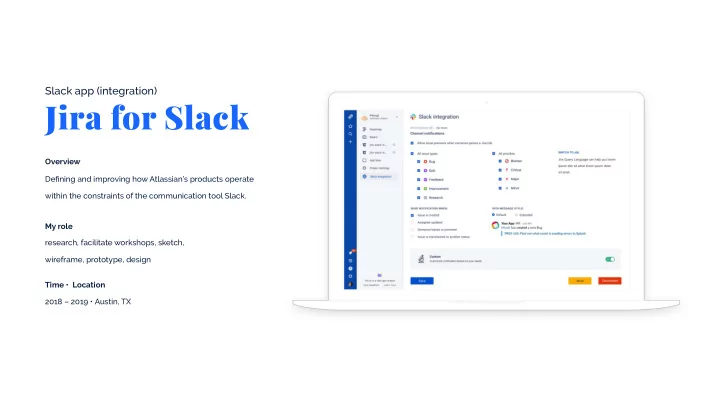
Slack app (integration) Jira for Slack Overview De fi ning and improving how Atlassians products operate within the constraints of the communication tool Slack. My role research, facilitate workshops, sketch, wireframe, prototype, design


slide-1
SLIDE 1

Jira for Slack

Slack app (integration)

My role Overview research, facilitate workshops, sketch, wireframe, prototype, design Time • Location 2018 – 2019 • Austin, TX Defining and improving how Atlassian’s products operate within the constraints of the communication tool Slack.

slide-2
SLIDE 2

Atlassian Corporation is an enterprise software company best known for it’s product Jira, which is a project tracking tool used by millions around the world. Slack, needless to say, is one

  • f the most popular chat apps nowadays.

! About

The steaks were high as issues with installation, setup and managing the app were affecting the huge intersection between Jira and Slack customers, including the companies Airbnb, Target, NASA, Netflix, Nintendo and the current version of the app was in production.

" The problem # The Process

A well-versed team, consisting of two Product managers, ten Developers, a Content writer and myself, leading the design efforts on the integration.

$% The team Evolve Design Understand
slide-3
SLIDE 3

We don't have it set up with any channels. By default, it is way too noisy. We don't have it set up with any channels. By default, it is way too noisy.

Understand the product, clarify initial assumptions, uncover user pain-points and insights.

Understand

Over the first several months I focused on analyzing the current state of the app, reviewing competitors and building empathy for the users. Both qualitative and quantitative research helped me in my pursuit of the truth. Reading through the direct customer feedback, doing user interviews and interpreting statistical data were an eye opener.

! Research

slide-4
SLIDE 4

User journey mapping

The handfull of user insights were a great basis, but we needed to dig deeper. We got together in a room for a 3-day workshop. First we summarized the gathered knowledge about the users into personas, after which we traversed through the user’s journey, and identified pain-points at each stage like:

  • Customers not knowing their Jira instance URL
  • Established connection redirects to a wrong channel
  • App configuration is misleading and others

! Interpret

slide-5
SLIDE 5

The statistics we set up showed that there a less than 40% completion rate on installation.

  • I. Installation

A big chunk of the customers un-installed the app, because of the overwhelming notifications.

  • II. Signal to noise ratio

More than 20% of the app feedback was about introducing the create issue feature.

  • III. Feature parity

We condensed the pain-points into 3 main categories

! Problem framing

slide-6
SLIDE 6

I started the process by establishing fundamental pieces of advice to follow throughout the process of the app design.

! Product Principles

Design

" Forgive user mistakes

It’s in our human nature to make

  • mistakes. Allow the option to undo

actions whenever possible.

# Simple & predictable

In our fast-paced lifestyle, there is no time to think actions through. Our communication should be predictable, handholding & directing.

Visualize the solutions in a way that they can be validated as well as refined early and often.

slide-7
SLIDE 7

Reconsidering the user journey we came up with a concept about logging the user first, which gave us the possibility to transform the Jira-Slack connector into simple inline form.

! 25%

Growth in-app installs for the first 3 months after shipping.

3-click install

  • I. Install

Working closely with the team allowed me to paper-sketch most of the solutions and validate them on the spot, which eliminated the need for digital wireframes.

" Prototype & Design

slide-8
SLIDE 8

We tracked and analyzed which are the most common notifications people use and set them as a default configuration.

40%

Decrease of negative feedback about the noise.

Smart defaults & Custom configuration

  • II. Signal to noise ratio

!

slide-9
SLIDE 9

Based on our initial research and triaged feedback we introduced a few of the most needed features like Create, watch, transition, comment on a Jira issue and enhanced unfurls.

! 70%

Success rate on the adoption of the “Create Issue” feature.

Introduced Jira features

  • III. Feature parity
slide-10
SLIDE 10

More screens

slide-11
SLIDE 11

Tracking the right user flows and metrics helped us identify how we can evolve the product, so it stands the test of time. Data bath meetings was our bi-weekly way of analyzing drop-

  • ffs together, triaging user feedback and brainstorm on

potential improvements.

! Behavioral analytics events

Most solutions were validated through usertesting.com by preparing scenarios in advanced. Dogfooding and blitz testing were other techniques we used throughtout the process to make sure we’re shipping a quality product.

" User Testing

Design never ends, but we need to continue our pursue of perfection by improving the product constantly.

Evolve

slide-12
SLIDE 12

It was challenging to understand what caused user issues and reproduce features from one system into another, but with a lot of trials and errors, we did it

  • successfully. The most important lesson I learned is that

setting metrics for a project is a crucial part of the process and a great way to measure progress. Increase in Monthly Active Users for less than 6 months.

✌ Conclusion

"Miro is a fantastic designer who exudes all of the right

  • traits. He was a beloved member of our team at

Atlassian as both a designer and a friend. I would jump for the opportunity to work with Miro again and highly recommend anyone else looking for a seasoned designer to do the same”

" Testimonial

# 24%