interface a Java contract From designing to coding 1 st step: - - PDF document

interface a java contract from designing to coding
SMART_READER_LITE
LIVE PREVIEW

interface a Java contract From designing to coding 1 st step: - - PDF document

interface a Java contract From designing to coding 1 st step: sensibly split work among team So write the interfaces members Formalizes much of the contract Choose splits along thin interfaces Precisely defines


slide-1
SLIDE 1

1

From designing to coding

1st step: sensibly split work among team

members

– Choose splits along “thin” interfaces

Probably not equal parts; split biggest parts again later

– Formalize the interfaces – think of them as contracts – Write least-coupled parts first … most-coupled last

i.e., classes that don’t depend on any other classes

Oh yeah, one more thing to think about:

Reserve ample time for testing!

interface – a Java contract

So write the interfaces Formalizes much of the contract

– Precisely defines available services (methods) – But pre- and post-conditions are not insured

These are communicated by documentation only

Implement class and client class independently

– Can even compile clients (but cannot fully test)

Note: maybe change an interface to a class later

– e.g., client developed using interface A – okay to replace with class A later

Pre- and post-conditions

The most important points to document Pre-conditions – what the client is responsible for

– The “requires” clauses of the contract

Especially include any restrictions on calling arguments Also any associations that should already exist

Post-conditions – what will be accomplished by

the operation if the pre-conditions are met

– The “effects” and/or “modifies” contract clauses

Including all side effects (objects created/destroyed,

associations formed/broken, attribute values modified)

Also should state any exceptions that might be thrown

javadoc comments

“Cheap” external documentation

– Handy way to share just a class’s interface with team

Should always use to document all public declarations –

classes, instance variables, methods

– Easy way to communicate pre- & post-conditions

Even ready to post on the web (or intranet)

– Easily kept up-to-date – just recompile with javadoc after completing each class

Learn to use javadocs – then make them a habit

– See any Java text (often in an appendix though) – And/or see Sun’s javadoc how-to pages

Converting designs into code

Largely a direct translation of key artifacts

– Class specs – variables and method definitions – Class and package diagrams – associations

Translate to instance variables and/or method arguments

– Interaction and state-chart diagrams – method calls and sequences

Still involves creativity, and probably change

– Good ideas often arise during coding – okay, go for it

But also plan to revise design artifacts to match later

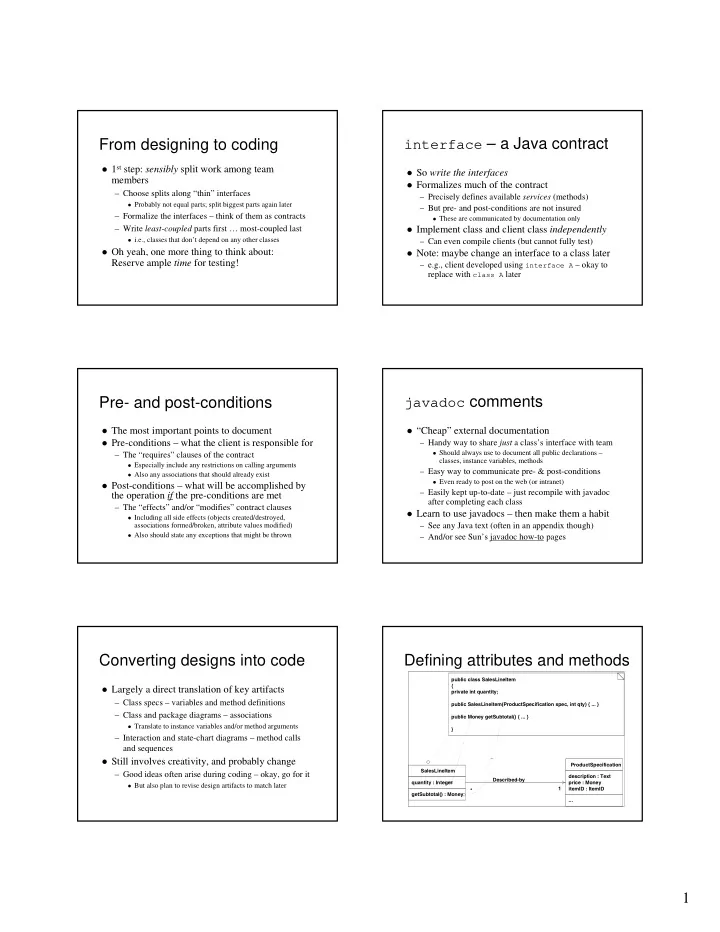
Defining attributes and methods

public class SalesLineItem { private int quantity; public SalesLineItem(ProductSpecification spec, int qty) { ... } public Money getSubtotal() { ... } } SalesLineItem quantity : Integer getSubtotal() : Money ProductSpecification description : Text price : Money itemID : ItemID ... Described-by 1 *

slide-2
SLIDE 2

2

Translating associations

SalesLineItem quantity : Integer getSubtotal() : Money ProductSpecification description : Text price : Money itemID : ItemID ... Described-by public class SalesLineItem { private int quantity; private ProductSpecification productSpec; public SalesLineItem(ProductSpecification spec, int qty) {... } public Money getSubtotal() { ... } } * 1 Simple attribute Reference attribute

Implementing interactions – e.g.,

enterItem(id, qty)

2: makeLineItem(spec, qty) enterItem(id, qty) 1: spec := getSpecification(id) :Register :Sale :Product Catalog { ProductSpecification spec = catalog.getSpecification(id); sale.makeLineItem(spec, qty); }

Least- to most-coupled order

SalesLineItem quantity : Integer getSubtotal() ProductCatalog ... getSpecification(...) ProductSpecification description : Text price : Money itemID : ItemID ... Store address : Address name : Text addSale(...) Payment amount : Money ... Contains 1..

*

Contains 1..

*

Register ... endSale() enterItem(...) makeNewSale() makePayment(...) Sale date : Date isComplete : Boolean time : Time becomeComplete() makeLineItem(...) makePayment(...) getTotal() Captures Houses Uses Looks-in Paid-by Describes 1 1 1 1 1 1 1 1 1 1 1 1 1

*

Logs-completed 4

*

1

1 2 3 4 5 6 7

Use your resources

i.e., “don’t reinvent the wheel” if possible

– JDC Tech Tips, Java user groups, &c – see web – See books like Effective Java (by Joshua Bloch) for lots of useful advice

On a real project: consider 3rd party

solutions, existing code, other quick fixes

– Of course, we hope you do yourself in CS 50

And don’t wrestle with revision control

problems – use a revision control system

Revision control problem Lock-Modify-Unlock Solution

slide-3
SLIDE 3

3

Copy-Modify-Merge Solution: 1

Continued next slide

Copy-Modify-Merge Solution: 2

e.g., Subversion – an open source and widely used revision control

Testing – goal is to find faults

Faults (a.k.a. bugs) cause systems to fail

– e.g., a system crashes – the most obvious type of fault – e.g., a security system that allows unauthorized entry – e.g., a shot-down plane that continues on its flight path

Can verify the presence of bugs, not their absence Testing and debugging are separate processes

– Testing identifies faults – Debugging corrects/removes faults

But it can also introduce new ones, so retesting is required

When are faults introduced?

During requirements analysis

– Incorrect, missing, or unclear requirements

During domain analysis and system design

– Incorrect or unclear translation of problem – Incorrect or unclear design specification

During system implementation

– Misinterpretation of system design – Incorrect syntax or semantics

Even during testing

– New faults introduced when old ones corrected

Note how naïve to consider this the

  • nly source of bugs

Testing steps

Unit testing – insure each part is correct

– Each method of each class of each package should be tested independently

Integration testing – insure parts work together System testing

– Functional tests – a.k.a. use case testing – Performance tests – test system attribute requirements – Acceptance tests – client hands-on testing – Installation tests – final platform testing (on-site)

Unit and integration testing

Test parts of the system before the whole

– Units – test basic parts (methods, classes, packages) – Integration – test basic connections between parts

Requires special purpose test programs

– i.e., “driver” programs and “stubs” – Or can use a framework

e.g., JUnit – by Erich Gamma and Kent Beck

Java note – any class can have a main method

– Can use just for testing all parts of that class

slide-4
SLIDE 4

4

System testing phases

Use case testing

– Test pre- and post-conditions of system functions – Best if independent of the user interface

i.e., also requires special purpose testing code

Performance, acceptance, installation tests

– All involve the complete working system, GUI and all

If any changes to code – rerun all tests

Tragic truth: testing takes time

But it can save time and money in the long run

– Get in the habit: “code a little, test a little, …”

Inadequate testing costs lots of real world $$$

and maybe lives

Fact: costs of testing/debugging increase as

development progresses

– Cheapest during requirements analysis (especially if an impossible requirement is uncovered) – Cheaper during unit than integration testing, …

Remaining “lecture” plan and

student responsibility summary

3/12 – No lecture; final project due 3/10 – Evals; Demonstrations 3/5 – 3 Presentations 3/3 – 3 Presentations 3/8 – No lecture; work on project 10 2/24 – 3 Presentations 2/17 – Exam 2/26 – 3 Presentations 3/1 – 3 Presentations 2/19 – No lecture; 1st implementation due

Wednesday

9 2/22 – 3 Presentations 8 2/15 – Holiday 7

Friday Monday

Week