Input Front side bus A Front side bus B controller Bus #0 HI - - PowerPoint PPT Presentation

input
SMART_READER_LITE
LIVE PREVIEW

Input Front side bus A Front side bus B controller Bus #0 HI - - PowerPoint PPT Presentation

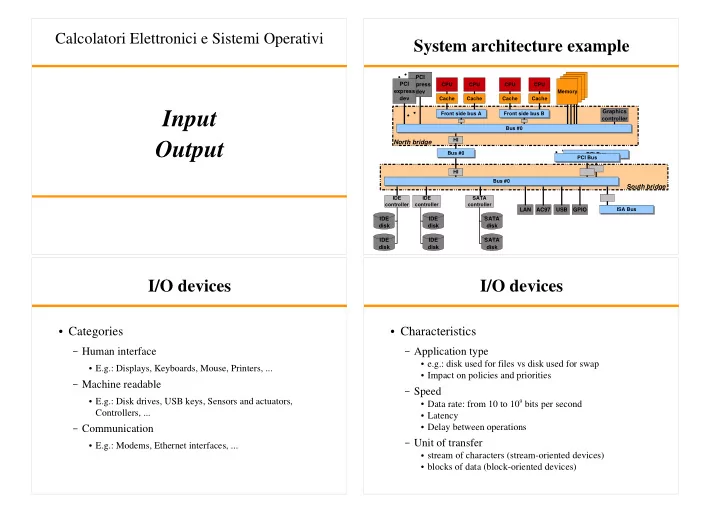
Calcolatori Elettronici e Sistemi Operativi System architecture example PCI PCI express CPU CPU CPU CPU express dev Memory dev Cache Cache Cache Cache Graphics Input Front side bus A Front side bus B controller Bus #0 HI


slide-1
SLIDE 1

Input Output

Calcolatori Elettronici e Sistemi Operativi

PCI Bus PCI express dev

System architecture example

CPU Cache Front side bus A CPU Cache CPU Cache Front side bus B CPU Cache PCI express dev Bus #0 Bus #0 PCI Bus LAN AC97 USB GPIO HI HI IDE disk IDE disk IDE disk IDE disk SATA disk SATA disk IDE controller IDE controller SATA controller

North bridge South bridge

ISA Bus Bus #0 Memory Graphics controller

I/O devices

Categories

– Human interface

E.g.: Displays, Keyboards, Mouse, Printers, ...

– Machine readable

E.g.: Disk drives, USB keys, Sensors and actuators,

Controllers, ...

– Communication

E.g.: Modems, Ethernet interfaces, ...

I/O devices

Characteristics

– Application type

e.g.: disk used for files vs disk used for swap Impact on policies and priorities

– Speed

Data rate: from 10 to 109 bits per second Latency Delay between operations

– Unit of transfer

stream of characters (stream-oriented devices) blocks of data (block-oriented devices)

slide-2
SLIDE 2

I/O devices

Characteristics

– Access method

Sequential / Random

– Transfer schedule

Synchronous / Asynchronous

– I/O direction

Read only / Write only / Read/write

– Sharing

Dedicate / Shareable

– Complexity of control

I/O devices

Characteristics

– Data representation

Data encoding scheme Redundancy

– Error conditions

Error types

– e.g.: connection errors, wrong data, unreliable writing, ...

Reporting

– interrupts, error codes, ...

Response

– retry, correct, fail, ...

Consequences

I/O devices

Access

– Polling (programmed I/O) – Interrupt-driven I/O – DMA

Address spaces

– CPU address space

Addresses used internally by CPU (virtual/logic addresses)

– Bus address space

Addresses for I/O (physical addresses)

I/O structure

I/O device Device controller I/O device Device controller I/O device Device controller Device driver

I/O subsystem

Device driver Device driver

User level code

Operating system

  • Device controller (HW):

Interprets commands from the HW/SW interface

Sends proper sequences of electrical signals to the device

Interprets signals coming from the device

Modifies the value of its registers Send IRQs

slide-3
SLIDE 3

OS objectives

Efficiency Abstraction (generality)

– User code must see I/O class functions

logical I/O functions (read/write/seek) communication functions (socket handling) filesystem functions (directory management, file permissions)

– Kernel code maps user calls to HW specific features

Device drivers

Sharing

OS objectives

Error handling Low-level tuning

– Ethernet packet size – Synchronous/Asynchronous transfers

(e.g.: write-through or write-deferred with respect to

controller buffers)

– Blocking/Non-blocking transfers – ...

Efficiency

I/O is a major factor in system performance

– Reduce the number of context switch – Reduce frequency of interrupts

Use polling if busy-waiting can be minimized Increase concurrency with DMA

– Increase the efficiency of large transfers with DMA – Reduce the number of buffer copies – Move processing primitives in hardware if possible

OS I/O components

I/O subsystem

– Filesystems – Networking – Block devices

SCSI, IDE, ...

– Character devices

Device driver (HW dependent)

slide-4
SLIDE 4

I/O subsystem features

Uniform interface

– open, close, read, write, seek, ioctl, ...

Naming Protection

– access through syscalls

Policy

– buffer sizes – block sizes – high level error handling – scheduling – data managing (e.g.: packet reordering) – spooling

SW caching

– OS I/O buffers and caches

I/O subsystem components

Networking Block devices Char devices Caching/buffering VFS Network Protocols Filesystems Generic HW management

(iomem, ioports)

IRQ core

I/O Scheduling

Requests are classified by device Apply scheduling algorithms

– Algorithms depend on devices characteristics – Reordering – Clustering Device 1 REQ 1 REQ 3 REQ 7 Device 2 REQ 4 REQ 5 REQ 6 Device 3 REQ 2 REQ 8

I/O Buffering

Manage speed mismatch Fragment or riassembly data Multi-copy issue

– From device to memory (kernel) – From memory to memory (user) – Save with memory mapping

Kernel space buffer User space buffer Device Data transfer Copy to user

slide-5
SLIDE 5

Buffering strategies

User process

Device

Single buffering

User process

Device

Double buffering

User process

Device

Circular buffering

Caching

Cache: memory that holds a copy of data Main memory can be used to increase I/O speed

– Example:

Files cached in main memory

– Physical I/O are deferred and clustered

Multiple writes can be merged in a single buffer copy Reads are resolved in memory

Spooling

I/O on non-shareable devices

– e.g., printers – Job are independent no interference – A list of jobs for each device that needs spooling

e.g., spooling directory

– System task (spooler) to read jobs and send to device

Policy:

– FIFO – other

Device driver

HW access

– I/O through ports – Memory mapped I/O

IRQ handling Low level error handling HW caching

– Controller buffers

slide-6
SLIDE 6

I/O request flow

I/O req Already satisfiable? Send req to device driver Process req (send commands to device controller) Interact with device Receive IRQ Update buffers Start deferred work Send IRQ Manage data Indicate I/O changes to I/O subsystem Tranfer data to process I/O completed yes no Device controller commands IRQ IRQ handler User process

HW (device controller) Device driver I/O subsystem (device independent) User-level code