SLIDE 1
Illumination Model
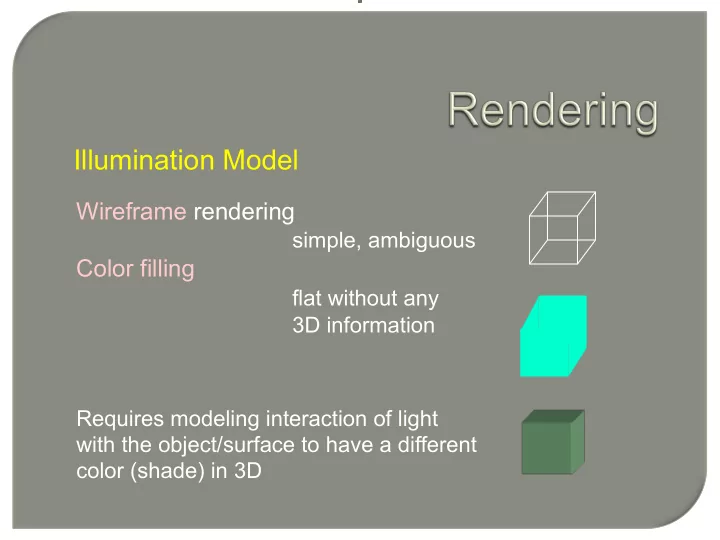
Wireframe rendering simple, ambiguous Color filling flat without any
3D information Requires modeling interaction of light with the object/surface to have a different color (shade) in 3D
SLIDE 2
Illumination Model
The reflected light is scattered depending upon the surface properties and incident light Ambient light comes from all directions, is scattered in all directions Diffuse light comes from one direction and is scattered in all directions Specular light comes from one direction and is scattered in preferred direction
SLIDE 3 Illumination Model
Phong Illumination Model
∑
=
=
= + + = + + =
m i n i i s i i d a a n l s l d a a n l s l d a a total
V R I k N L I k I k V R I k N L I k I k α I k θ I k I k reflection specular reflection diffeuse reflection ambient I
1
) ( ) ( ) ( ) ( cos cos
SLIDE 4 Illumination Model
Phong Illumination Model
Local computation for obtaining color (intensity) at a point
Basic inputs are light(s), material properties
SLIDE 5 Polygon Shading
Shading
Process of applying illumination model to surface points Polygon (approximates the 3D shape/surface)
Approaches
- Flat Shading
- Gouraud Shading
- Phong Shading
SLIDE 6
Polygon Shading
Flat Shading One intensity for the whole polygon constant shading
P np
For each face/polygon ► Select a point P on the face ► Find normal to the face np ► Find intensity I at P ► Fill the polygon with I Not smooth
SLIDE 7
Polygon Shading
Flat Shading
Example
SLIDE 8 Polygon Shading
Flat Shading
- Computationally fast
- Not smooth
- Mach Band effect
SLIDE 9 Gouraud Shading Smooth shading
- Compute intensity at vertices of a polygon
ð Needs vertex normal
- Fill the interior with shade (intensity) using interpolation
Polygon Shading
SLIDE 10
Gouraud Shading Vertex Normal
N1 N2 N3 N4 Nv
Normal at the vertex is average of normals of the faces incident at the vertex
Polygon Shading ∑
=
=
P i i i v
n n N
1
SLIDE 11
Gouraud Shading Vertex Normal
Polygon Shading
SLIDE 12
Gouraud Shading Interpolation
Ia Ib I2 I3 I4 Is Scan line
Polygon Shading
I1 (x1, y1) (x2, y2) (x3, y3) (x4, y4)
Scan conversion!
SLIDE 13 Gouraud Shading Interpolation
Ia Ib I2 I3 I4 Is Scan line
Polygon Shading
I1 (x1, y1) (x2, y2) (x3, y3) (x4, y4) )] ( ) ( [ 1 )] ( ) ( [ 1 )] ( ) ( [ 1
1 4 4 1 4 1 1 2 2 1 2 1 a s b s b a a b s s s b s s a
x x I x x I x x I y y I y y I y y I y y I y y I y y I − + − − = − + − − = − + − − = (xa, ys) (xb, ys) (xs, ys)
SLIDE 14
Gouraud Shading Example
Polygon Shading
SLIDE 15
Gouraud Shading
Handling Specular Reflections- Highlights
Polygon Shading
Not Right
SLIDE 16
Phong Shading
Interpolate normals and then compute intensity
Polygon Shading
Not to confuse with Phong Illumination Model
SLIDE 17
Phong Shading
Polygon Shading
Na Nb N2 N3 N4 Ns Scan line N1 (x1, y1) (x2, y2) (x3, y3) (x4, y4) Ns Is
Illumination using Ns
SLIDE 18
- More accurate specular component
- Reduced Mach band effect
- Better shape approximation
N1 N2 Original surface
Polygon Shading
Phong Shading
Computationally more intensive
SLIDE 19
Polygon Shading
Phong Shading Example
SLIDE 20
Polygon Shading
Phong Shading Example
SLIDE 21
Problems
Polygon Shading
Interpolated shading Polygon Silhouette
SLIDE 22
Problems
Interpolation Inaccuracy (screen space vs world space)
Linear Interpolation Perspective Interpolation
Polygon Shading
Interpolated shading
SLIDE 23
Animation
Polygon Shading
Problems
Interpolated shading P
V1 V2 V3 V4 V1 V2 V3 V4
P Rotate
SLIDE 24
Vertex Normal
Polygon Shading
Problems
Interpolated shading Face Normals Vertex Normals
SLIDE 25
Graphics Pipeline Order
Polygon Shading
Illumination computation is done early after modeling transformation Shading is done towards the end with rasterization (scan conversion)
SLIDE 26
Polygon Shading
Transparency
Simple Model Non refractive
d transmitte reflected
I k kI I ) 1 ( − + =
k is the opacity factor (coefficient)