SLIDE 1
1 Systems Design & Programming CMPE 310
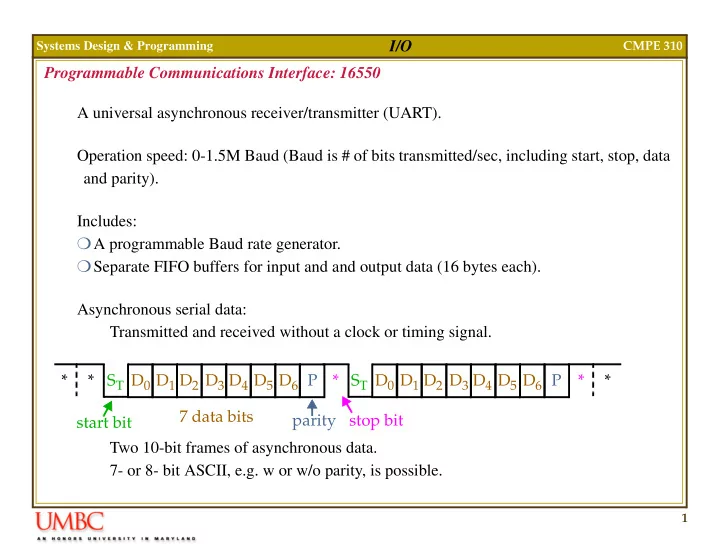
I/O Programmable Communications Interface: 16550 A universal asynchronous receiver/transmitter (UART). Operation speed: 0-1.5M Baud (Baud is # of bits transmitted/sec, including start, stop, data and parity). Includes: A programmable Baud rate generator. Separate FIFO buffers for input and and output data (16 bytes each). Asynchronous serial data: Transmitted and received without a clock or timing signal. Two 10-bit frames of asynchronous data. 7- or 8- bit ASCII, e.g. w or w/o parity, is possible. D0 ST * * D1 D2 D3 D4 D5 D6 P * D0 ST D1 D2 D3 D4 D5 D6 P * * start bit 7 data bits parity stop bit
SLIDE 2
2 Systems Design & Programming CMPE 310
I/O Programmable Communications Interface: 16550 The 16550 can control a modem through DSR, DTR, CTS, RTS, RI and DCD. In this context, the modem is called the data set while the 16550 is called the data terminal.
16550
A0 BAUDOUT SIN SOUT D0 D1 D7 D6 D5 D4 ADS D3 D2 WR MR A1 A2 CS0 CS1 CS2 RD RD WR XIN XOUT TXRDY RXRDY DDIS INTR RCLK RTS CTS DTR DSR DCD RI OUT1 OUT2 Two separate sections are responsible for data communications: Receiver Transmitter Can function in: simplex: transmit only half-duplex: transmit and receive but full-duplex: transmit and receive simultaneously not simultaneously
SLIDE 3 3 Systems Design & Programming CMPE 310
I/O Pinout of the 16550 A0, A1 and A2: Select an internal register for programming and data transfer. ADS: Address strobe used to latch address and chip select. Not needed on Intel systems -
BAUDOUT: Clock signal from Baud rate generator in transmitter. CS0, CS1, CS2: Chip selects CTS: Clear to send -- indicates that the modem or data set is ready to exchange
- information. (Used in half-duplex to turn the line around).
A2 A1 A0 Register Receiver buffer (read) and transmitter holding (write) 1 Interrupt enable 1 Interrupt identification (read) and FIFO control (write) 1 1 Line control 1 Modem control 1 1 Line status 1 1 Modem status 1 1 1 Scratch
SLIDE 4 4 Systems Design & Programming CMPE 310
I/O Pinout of the 16550 D7-D0: The data bus pins are connected to the microprocessor data bus. DCD: The data carrier detect -- used by the modem to signal the 16550 that a carrier is present. DDIS: Disable driver output -- set to 0 to indicate that the microprocessor is reading data from the UART. Used to change direction of data flow through a buffer. DSR: Data set ready is an input to 16550 -- indicates that the modem (data set) is ready to
DTR: Data terminal ready is an output -- indicates that the data terminal (16550) is ready to function. INTR: Interrupt request is an output to the micro -- used to request an interrupt. Receiver error Data received Transmit buffer empty MR: Master reset -- connect to system RESET OUT1, OUT2: User defined output pins for modem or other device. RCLK: Receiver clock -- clock input to the receiver section of the UART. Always 16X the desired receiver Baud rate.
SLIDE 5
5 Systems Design & Programming CMPE 310
I/O Pinout of the 16550 RD, RD: Read inputs (either can be used) -- cause data to be read from the register given by the address inputs. RI: Ring indicator input -- set to 0 by modem to indicate telephone is ringing. RTS: Request-to-send -- signal to modem, indicating UART wishes to send data. SIN, SOUT: Serial data pins, in and out. RXRDY: Receiver ready -- used to transfer received data via DMA techniques. TXRDY: Transmitter ready -- used to transfer transmitter data via DMA. WR, WR: Write (either can be used) -- connects to micro write signal to transfer commands and data to 16550. XIN, XOUT: Main clock connections -- a crystal oscillator can be used.
SLIDE 6
6 Systems Design & Programming CMPE 310
I/O Programming the 16550 Two phases: Initialization, operation. Initialization: After RESET, the line control register and baud rate generator need to be pro- grammed. Line control register sets the # of data bits, # of stop bits and the parity. Addressed at location 011. Stop bits: S = 1, 1.5 stop bits used for 5 data bits, 2 used for 6, 7 or 8. DL SB ST P PE S L1 L0 Data length: 00 = 5 bits, ... 11 = 8 bits. Stop bits: 0 = 1, 1 = 1.5/2 Parity enable Parity type, 0 odd. Stick bit, 0 = stick parity off Send break, 0 = off Enable divisor latch
SLIDE 7
7 Systems Design & Programming CMPE 310
I/O Programming the 16550 Initialization (cont.) ST, P and PE used to send even or odd parity, to send no parity or to send a 1 or a 0 in the parity bit position for all data. No parity, both 0 -- used for internet connections. SB = 1 causes a break to be transmitted on SOUT. A break is at least two frame of 0 data. DL = 1 enables programming of the baud rate divisor.
ST P PE Function No parity 1 Odd parity 1 No parity 1 1 Even parity 1 Undefined 1 1 Send/receive 1 1 1 Undefined 1 1 1 Send/receive 0
SLIDE 8
8 Systems Design & Programming CMPE 310
I/O Programming the 16550 Initialization (cont.) Baud rate generator is programmed with a divisor that sets baud rate of transmitter. Baud rate generator is programmed at 000 and 001. Port 000 used to hold least significant byte, 001 most significant. Value used depends on external clock/crystal frequency. For 18.432MHz crystal, 10,473 gives 110 band rate, 30 gives 38,400 baud. Note, number programmed generates a clock 16X the desired Baud rate. Last, the FIFO control register must be programmed at 010. RT1 DMA FIFO Enable Reset transmitter FIFO DMA mode control Receiver trigger level RT0 XMIT RST REVC RST EN Reset receiver FIFO 1/4/8/14 byte in FIFO
SLIDE 9
9 Systems Design & Programming CMPE 310
I/O Programming the 16550 Operation: Status line register gives information about error conditions and state of the transmitter and receiver. This register needs to be tested in software routines designed to use the 16550 to trans- mit/receive data. Suppose a program wants to send data out SOUT. It needs to pool the TH bit to determine if transmitter is ready to receive data. To receive information, the DR bit is tested. ER TE TH BI FE PE OE DR Data ready, 0: no data Overrun Error if 1 Parity error if 1 Break indicator: 1 = received Transmitter holding register Transmitter empty if 1 Error in FIFO if 1 Framing error if 1
SLIDE 10
10 Systems Design & Programming CMPE 310
I/O Programming the 16550 Operation: It is also a good idea to check for errors. Parity error: Received data has wrong error -- transmission bit flip due to noise. Framing error: Start and stop bits not in their proper places. This usually results if the receiver is receiving data at the incorrect baud rate. Overrun error: Data has overrun the internal receiver FIFO buffer. Software is failing to read the data from the FIFO. Break indicator bit: Software should check for this as well, i.e. two consecutive frames of 0s. The other registers (for interrupt control and modem control) will be discussed in next chapter.
SLIDE 11
11 Systems Design & Programming CMPE 310
I/O Example of 16550
16550
A0 BAUDOUT SIN SOUT D0 D1 D7 D6 D5 D4 ADS D3 D2 WR MR A1 A2 CS0 CS1 CS2 RD RD WR XIN XOUT TXRDY RXRDY DDIS INTR RCLK RTS CTS DTR DSR DCD RI OUT1 OUT2 I1 I2 I3 I4 I5 I6 I7 I8 I9 I10 16L8 O1 O2 O3 O4 O5 O6 O7 O8 A3 A4 A5 A6 A7 A8 A9 A0 A1 A2 A10 A11 A12 A14 A15 A13 Data Bus Decoded at F0H to F7H 18.432 MHz RESET IORD IOWR Serial data
SLIDE 12
12 Systems Design & Programming CMPE 310
I/O Serial Port Most PC interfaces for serial data exchange comply with the RS-232C standard. This standard defines the mechanical, electrical and logical interface for asynchronous data transfer between the data terminal equipment (DTE: Computer) and the data car- rier equipment (DCE: modem, other computer etc.) The 16550 or similar UART devices are used to perform the complex handshaking defined by the standard The RS-232C standard defines 25 lines between DTE and DCE, but most are reserved for synchronous data transfer For serial, asynchronous data exchange only 11 RS-232C signals are required IBM defined a 9-pin connection for its serial port, which is the standard serial port found on most PCs today.
SLIDE 13
13 Systems Design & Programming CMPE 310
I/O Serial Port The RS-232C signals are similar to the UART signals discussed before RTS (Request to send) CTS (Clear to send) DCD (Data carrier detect) DSR (Data set ready) DTR (Data terminal ready) RI (Ring indicator) TD (Transmitted data) RD (Received data) Can operate in simplex, half-duplex and full-duplex modes Mostly used for connections to modems Also used for serial printers Null-modem connection can be used to transfer data between two DTEs. Identified as the COM port in PCs.
SLIDE 14
14 Systems Design & Programming CMPE 310
I/O Parallel Port In a PC usually known as the LPT (line printer) port The connection between the port and the printer is created by a 'Centronics' cable. Named after the company that created the first printer interface standard The centronics cable uses 36 wires, 18 of which are ground As only 18 are required to communicate with the printer, IBM defined a 25 pin connector Data is transferred using a 8-bit data register, other pins are used for handshaking and detecting errors The status register is updated by the printer using dedicated signals on the connector and read by the PC to determine the printer status The control register can be read or written by the PC and controls the operation of the printer
SLIDE 15
15 Systems Design & Programming CMPE 310
I/O Parallel Port The parallel port signals are given below: STR: A logic low transfers data to the printer D0-D7: Data bits 0 through 7 ALF: Logic low signals an auto line feed after every line INI: Logic low initializes the printer ACK: Acknowledge signal from the printer when data is transferred DSL: Logic low selects the printer BSY: When active, indicates the printer is busy and cannot accept more data PAP: High level shows that paper is about to run out OFON: High level shows that the printer is on-line ERR: Signals printer errors An improved parallel port standard was defined by the IEEE: IEEE-1248 This is the port found in most modern PCs Uses the same old centronics interface, has both 25 and 36 pin interfaces defined, but signal names are assigned according to the mode of operation.
SLIDE 16
16 Systems Design & Programming CMPE 310
I/O Parallel Port Five modes or operation are defined: Compatible Mode: defined for backward compatibility with the old unidirectional model, also known as SPP (standard parallel port) Byte Mode: bidirectional centronics mode, 8 bits wide Nibble Mode: defines the minimum characteristics for a parallel port, data is transferred in nibbles (4-bits) Extended Parallel Port (EPP): bidirectional data transfer, and also addresses, for a max- imum of 256 units. Enhanced Capability Mode (ECP): same as EPP, but uses data compression, FIFO with DMA and interrupt capability and command cycles, 128 maximum units
SLIDE 17 17 Systems Design & Programming CMPE 310
I/O Digital-to-Analog (DAC) Converters Used to convert between analog and digital data. For example, the DAC 0830 (National Semi Corp.) is an 8-bit DAC that transforms an 8-bit binary number to an analog voltage. 8-bit yields 256 different analog voltages. 10-bit, 12-bit and 16-bit are also available. Conversion time is 1µs.
DAC0830
AGND D0 D1 D7 D6 D5 D4 D3 D2 CS WR1 XFER ILE VREF WR2 RFB IOUT2 IOUT1 DGND Drive an external
SLIDE 18 18 Systems Design & Programming CMPE 310
I/O Digital-to-Analog (DAC) Converters 8-bit digital value drives D0 through D7. The outputs are IOUT1 and IOUT2. The output step voltage is defined by -VREF (reference voltage), divided by 255, e.g. if VREF = -5.0V, then the output step voltage is +0.0196. The output step voltage is called the resolution of the converter. Latch 1 Internal structure of DAC0830 Latch 2 R-2R VREF IOUT1 IOUT2 RFB 8 8 ILE G G Latches are transparent when G = 1 CS WR1 XFER WR2 Two latches implement 1 element buf disabled with ILE = 1 and CS = 0
Converter AGND
SLIDE 19 19 Systems Design & Programming CMPE 310
I/O Analog-to-Digital (ADC) Converters The ADC0804 is an 8-bit analog-to-digital converter that requires up to 100us to convert an analog input voltage into a digital output. To start conversion, WR is pulsed with CS at GND. The INTR pin signals the end of the conversion process.
ADC0804
AGND DB0 DB1 DB7 DB6 DB5 DB4 DB3 DB2 INTR VREF VI+ VI- CS RD WR CLK CLKR WR CS INTR RD Start conversion Read data Test and wait
- r connect to interrupt input
SLIDE 20 20 Systems Design & Programming CMPE 310
I/O Analog-to-Digital (ADC) Converters VI- and VI+ are connected to an internal operational amplifier. The ADC0804 requires a clock, generated either with: An external clock applied to the CLK pin. Using an RC circuit. +
VI- To sense a 0 to +5V input. To sense an input +
VI- +5V
analog input analog input To internal ADC ADC0804 Fclk 1 1.1RC
Permissible clk frequencies are 100KHz to 1.46MHz. Desirable to run at max. CLK CLKR R C 1K 0.001uF
SLIDE 21 21 Systems Design & Programming CMPE 310
I/O Analog-to-Digital (ADC) Converters
ADC0804
AGND DB0 DB1 DB7 DB6 DB5 DB4 DB3 DB2 INTR VREF VI+ VI- CSRD WR CLK CLKR
DAC0830
AGND D0 D1 D7 D6 D5 D4 D3 D2 XFER ILE VREF RFB IOUT2 IOUT1 DGND CS WR1 WR2
+12 Speaker 10K Amp Microphone 1K 0.001uF