h ( t ) y ( t ) x [ n ] h [ n ] y [ n ] Review of sampling property - - PowerPoint PPT Presentation

h t
SMART_READER_LITE
LIVE PREVIEW

h ( t ) y ( t ) x [ n ] h [ n ] y [ n ] Review of sampling property - - PowerPoint PPT Presentation

Convolution Sum Overview Impulse Response Review of time invariance x ( t ) h ( t ) y ( t ) x [ n ] h [ n ] y [ n ] Review of sampling property Discrete-time convolution sum Recall that if x ( t ) = ( t ) or x [ n ] = [ n ] ,


slide-1
SLIDE 1

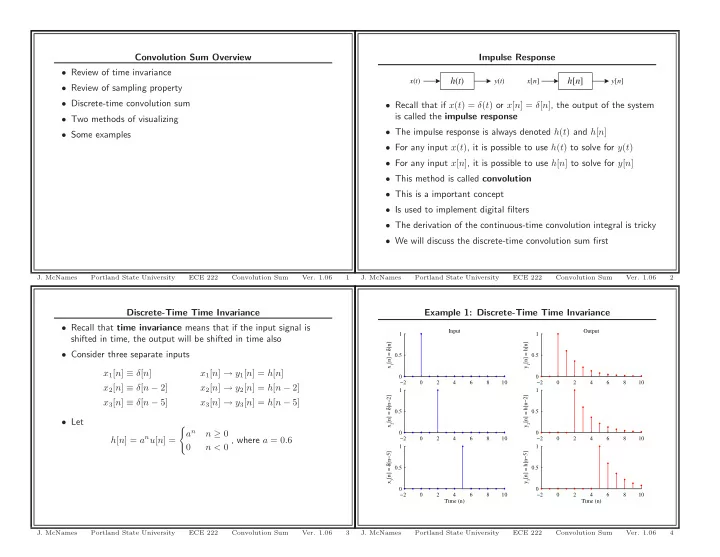
Discrete-Time Time Invariance

  • Recall that time invariance means that if the input signal is

shifted in time, the output will be shifted in time also

  • Consider three separate inputs

x1[n] ≡ δ[n] x1[n] → y1[n] = h[n] x2[n] ≡ δ[n − 2] x2[n] → y2[n] = h[n − 2] x3[n] ≡ δ[n − 5] x3[n] → y3[n] = h[n − 5]

  • Let

h[n] = anu[n] =

  • an

n ≥ 0 n < 0 , where a = 0.6

  • J. McNames

Portland State University ECE 222 Convolution Sum

  • Ver. 1.06

3

Convolution Sum Overview

  • Review of time invariance
  • Review of sampling property
  • Discrete-time convolution sum
  • Two methods of visualizing
  • Some examples
  • J. McNames

Portland State University ECE 222 Convolution Sum

  • Ver. 1.06

1

Example 1: Discrete-Time Time Invariance

−2 2 4 6 8 10 0.5 1 Input x1[n] = δ[n] −2 2 4 6 8 10 0.5 1 Output y1[n] = h[n] −2 2 4 6 8 10 0.5 1 x2[n] = δ[n−2] −2 2 4 6 8 10 0.5 1 y2[n] = h[n−2] −2 2 4 6 8 10 0.5 1 Time (n) x3[n] = δ[n−5] −2 2 4 6 8 10 0.5 1 Time (n) y3[n] = h[n−5]

  • J. McNames

Portland State University ECE 222 Convolution Sum

  • Ver. 1.06

4

Impulse Response h(t)

x(t) y(t)

h[n]

x[n] y[n]

  • Recall that if x(t) = δ(t) or x[n] = δ[n], the output of the system

is called the impulse response

  • The impulse response is always denoted h(t) and h[n]
  • For any input x(t), it is possible to use h(t) to solve for y(t)
  • For any input x[n], it is possible to use h[n] to solve for y[n]
  • This method is called convolution
  • This is a important concept
  • Is used to implement digital filters
  • The derivation of the continuous-time convolution integral is tricky
  • We will discuss the discrete-time convolution sum first
  • J. McNames

Portland State University ECE 222 Convolution Sum

  • Ver. 1.06

2

slide-2
SLIDE 2

Discrete-Time Unit-Impulse Sampling Property Recall from our earlier discussion of signal fundamentals that any signal x[n] can be written as x[n] =

  • k=−∞

x[k]δ[n − k] =

  • k=−∞

akxk[n] Side note: since δ[n] is an even signal, δ[n] = δ[−n], we can also write this as x[n] =

  • k=−∞

x[k]δ[k − n] Though, this is not the conventional form.

  • J. McNames

Portland State University ECE 222 Convolution Sum

  • Ver. 1.06

7

Example 1: MATLAB Code

a = 0.6; n = -2:10; subplot(3,2,1); x1 = (n==0); % Unit impulse centered at n=0 h = stem(n,x1,’b’); set(h(1),’Marker’,’.’); title(’Input’); ylabel(’x_1[n] = \delta[n]’); box off; xlim([min(n) max(n)]); subplot(3,2,2); y1 = (a.^n).*(n>=0); % Unit impulse response h[n] h = stem(n,y1,’r’); set(h(1),’Marker’,’.’); title(’Output’); ylabel(’y_1[n] = h[n]’); box off; xlim([min(n) max(n)]); subplot(3,2,3); x2 = (n==2); % Unit impulse centered at n=2 h = stem(n,x2,’b’); set(h(1),’Marker’,’.’); ylabel(’x_2[n] = \delta[n-2]’); box off; xlim([min(n) max(n)]); subplot(3,2,4); y2 = (a.^(n-2)).*(n>=2); % Unit impulse response h[n] h = stem(n,y2,’r’); set(h(1),’Marker’,’.’); ylabel(’y_2[n] = h[n-2]’); box off; xlim([min(n) max(n)]);

  • J. McNames

Portland State University ECE 222 Convolution Sum

  • Ver. 1.06

5

Example 2: Unit-Impulse Sampling Property

  • Any bounded discrete-time signal can be written as a sum of

discrete-time impulses

  • For example, consider the following signal

x[n] = ⎧ ⎪ ⎪ ⎪ ⎨ ⎪ ⎪ ⎪ ⎩ 1 n = 0 −1 n = 2 2 n = 5

  • therwise
  • In terms of unit-impulses, this signal can also be expressed as

x[n] = 1 · δ[n] − 1 · δ[n − 2] + 2 · δ[n − 5]

  • J. McNames

Portland State University ECE 222 Convolution Sum

  • Ver. 1.06

8

Example 1: MATLAB Code Continued

subplot(3,2,5); x3 = (n==5); % Unit impulse centered at 5 h = stem(n,x3,’b’); set(h(1),’Marker’,’.’); xlabel(’Time (n)’); ylabel(’x_3[n] = \delta[n-5]’); box off; xlim([min(n) max(n)]); subplot(3,2,6); y3 = (a.^(n-5)).*(n>=5); % Unit impulse response h[n] h = stem(n,y3,’r’); set(h(1),’Marker’,’.’); xlabel(’Time (n)’); ylabel(’y_3[n] = h[n-5]’); box off; xlim([min(n) max(n)]);

  • J. McNames

Portland State University ECE 222 Convolution Sum

  • Ver. 1.06

6

slide-3
SLIDE 3

Discrete-Time Convolution Sum Derived x[n] = x1[n] + x2[n] + x3[n] = 1 · δ[n] − 1 · δ[n − 2] + 2 · δ[n − 5] by linearity, we know the output will be equal to the sum of the

  • utputs due to the application of x1[n], x2[n], and x3[n] alone.

x[n] → y[n] = y1[n] + y2[n] + y3[n] Since x1[n] ≡ δ[n] x1[n] → y1[n] = h[n] x2[n] ≡ −δ[n − 2] x2[n] → y2[n] = −h[n − 2] x3[n] ≡ 2 · δ[n − 5] x3[n] → y3[n] = 2 · h[n − 5] Therefore, y[n] = h[n] − h[n − 2] + 2 · h[n − 5]

  • J. McNames

Portland State University ECE 222 Convolution Sum

  • Ver. 1.06

11

Example 3: Discrete-Time Unit Sampling Example

−2 2 4 6 8 10 −1 1 2 x1[n] Example of Unit Sampling −2 2 4 6 8 10 −1 1 2 x2[n] −2 2 4 6 8 10 −1 1 2 x3[n] −2 2 4 6 8 10 −1 1 2 x[n] Time (n)

  • J. McNames

Portland State University ECE 222 Convolution Sum

  • Ver. 1.06

9

Discrete-Time Convolution Sum

  • Any discrete-time input signal x[n] can be expressed as a sum of

scaled unit impulses x[n] =

  • k=−∞

x[k]δ[n − k]

  • By linearity and time invariance, the output of the system is the

scaled sum of outputs due to each unit impulse x[n] → y[n] = h[n] ∗ x[n] =

  • k=−∞

x[k]h[n − k]

  • This is called the discrete-time convolution sum
  • This applies to all LTI discrete-time systems!
  • If we know h[n], then we can calculate y[n] for any input x[n]
  • Thus, h[n] completely characterizes LTI discrete-time systems
  • J. McNames

Portland State University ECE 222 Convolution Sum

  • Ver. 1.06

12

Example 3: MATLAB Code

n = -2:10; x1 = 1*(n==0); % Unit impulse centered at n=0 x2 = -1*(n==2); % Unit impulse centered at n=2 x3 = 2*(n==5); % Unit impulse centered at 0 x = x1 + x2 + x3; % The original signal X = [x1;x2;x3;x]; for cnt = 1:4, subplot(4,1,cnt); plot([min(n) max(n)],[0 0],’k:’); hold on; h = stem(n,X(cnt,:),’b’); set(h(1),’Marker’,’.’); hold off; box off; axis([min(n) max(n) min(x) max(x)]); if cnt==1, ylabel(’x_1[n]’); title(’Example of Unit Sampling’); elseif cnt==2, ylabel(’x_2[n]’); elseif cnt==3, ylabel(’x_3[n]’); elseif cnt==4, ylabel(’x[n]’); xlabel(’Time (n)’); end; end;

  • J. McNames

Portland State University ECE 222 Convolution Sum

  • Ver. 1.06

10

slide-4
SLIDE 4

Example 4: MATLAB Code Continued

subplot(4,2,2*cnt); plot([min(n) max(n)],[0 0],’k:’); hold on; h = stem(n,Y(cnt,:),’r’); set(h(1),’Marker’,’.’); hold off; box off; axis([min(n) max(n) -1 2]); if cnt==1, ylabel(’y_1[n]’); title(’Output’); elseif cnt==2, ylabel(’y_2[n]’); elseif cnt==3, ylabel(’y_3[n]’); elseif cnt==4, ylabel(’y[n]’); xlabel(’Time (n)’); end; end;

  • J. McNames

Portland State University ECE 222 Convolution Sum

  • Ver. 1.06

15

Example 4: Discrete-Time Convolution Sum

−2 2 4 6 8 10 −1 1 2 x1[n] Input −2 2 4 6 8 10 −1 1 2 y1[n] Output −2 2 4 6 8 10 −1 1 2 x2[n] −2 2 4 6 8 10 −1 1 2 y2[n] −2 2 4 6 8 10 −1 1 2 x3[n] −2 2 4 6 8 10 −1 1 2 y3[n] −2 2 4 6 8 10 −1 1 2 x[n] Time (n) −2 2 4 6 8 10 −1 1 2 y[n] Time (n)

  • J. McNames

Portland State University ECE 222 Convolution Sum

  • Ver. 1.06

13

Discrete-Time Convolution Derivation Summary x[n] x[n] δ[n] δ[n − k] x[k]δ[n − k] +∞

k=-∞ x[k]δ[n − k] Definition of δ[n] Time Invariance Linearity Linearity Definition of h[n]

y[n] h[n] h[n] h[n] h[n] h[n] h[n] h[n] h[n − k] x[k]h[n − k] Σ+∞

k=-∞x[k]h[n − k]

Σ+∞

k=-∞x[k]h[n − k]

  • J. McNames

Portland State University ECE 222 Convolution Sum

  • Ver. 1.06

16

Example 4: MATLAB Code

a = 0.6; n = -2:10; x1 = 1*(n==0); % Unit impulse centered at n=0 x2 = -1*(n==2); % Unit impulse centered at n=2 x3 = 2*(n==5); % Unit impulse centered at 0 x = x1 + x2 + x3; % The original signal y1 = 1*a.^(n-0).*(n>=0); y2 = -1*a.^(n-2).*(n>=2); y3 = 2*a.^(n-5).*(n>=5); y = y1 + y2 + y3; % The original signal X = [x1;x2;x3;x]; Y = [y1;y2;y3;y]; for cnt = 1:4, subplot(4,2,2*cnt-1); plot([min(n) max(n)],[0 0],’k:’); hold on; h = stem(n,X(cnt,:),’b’); set(h(1),’Marker’,’.’); hold off; box off; axis([min(n) max(n) -1 2]); if cnt==1, ylabel(’x_1[n]’); title(’Input’); elseif cnt==2, ylabel(’x_2[n]’); elseif cnt==3, ylabel(’x_3[n]’); elseif cnt==4, ylabel(’x[n]’); xlabel(’Time (n)’); end;

  • J. McNames

Portland State University ECE 222 Convolution Sum

  • Ver. 1.06

14

slide-5
SLIDE 5

Example 5: MATLAB Code

n = 7; k = -5:10; subplot(4,1,1); x = (k==0) - (k==2) + 2*(k==5); % Input Signal plot([min(k) max(k)],[0 0],’k:’); hold on; sh = stem(k,x,’b’); set(sh(1),’Marker’,’.’); hold off; ylabel(’x[k]’); box off; xlim([min(k) max(k)]); subplot(4,1,2); h = ((0.6).^(k)).*((k)>=0); % Unit impulse response h[k] sh = stem(k,h,’g’); set(sh(1),’Marker’,’.’); ylabel(’h[k]’); box off; xlim([min(k) max(k)]); subplot(4,1,3); h = (a.^(-k)).*((-k)>=0); % Unit impulse response h[-k] sh = stem(k,h,’g’); set(sh(1),’Marker’,’.’); ylabel(’h[-k]’); box off; xlim([min(k) max(k)]); subplot(4,1,4); h = (a.^(n-k)).*((n-k)>=0); % Unit impulse response h[-k] sh = stem(k,h,’g’); set(sh(1),’Marker’,’.’); ylabel(’h[7-k]’); xlabel(’Time (k)’); box off; xlim([min(k) max(k)]);

  • J. McNames

Portland State University ECE 222 Convolution Sum

  • Ver. 1.06

19

Discrete-Time Convolution Sum Mechanics h[n]

x[n] y[n]

y[n] =

  • k=−∞

x[k]h[n−k]

  • There is a second technique for visualizing the convolution sum
  • Consider the portion of x[n] at n = 0
  • If the impulse response decays (common), the influence of x[0] on

y[n] decreases as n increases

  • Specifically, the portion of the sum due to x[0] is h[n]
  • More generally, the portion of the sum due to x[n0] is h[n − n0]
  • This can be visualized by plotting x[k] and h[n − k] versus k
  • The product and sum over all k of these two signals gives the
  • utput y[n] for each value of n
  • J. McNames

Portland State University ECE 222 Convolution Sum

  • Ver. 1.06

17

Example 6: Convolution Sum n = −5

−5 5 10 −1 1 2 x[k] Time (k) −5 5 10 −1 1 2 h[−5−k] Time (k) −5 5 10 −1 1 2 y[n] Time (n)

  • J. McNames

Portland State University ECE 222 Convolution Sum

  • Ver. 1.06

20

Example 5: Convolution Sum Visualization

−5 5 10 −2 2 x[k] −5 5 10 0.5 1 h[k] −5 5 10 0.5 1 h[−k] −5 5 10 0.5 1 h[7−k] Time (k)

  • J. McNames

Portland State University ECE 222 Convolution Sum

  • Ver. 1.06

18

slide-6
SLIDE 6

Example 6: Convolution Sum n = −2

−5 5 10 −1 1 2 x[k] Time (k) −5 5 10 −1 1 2 h[−2−k] Time (k) −5 5 10 −1 1 2 y[n] Time (n)

  • J. McNames

Portland State University ECE 222 Convolution Sum

  • Ver. 1.06

23

Example 6: Convolution Sum n = −4

−5 5 10 −1 1 2 x[k] Time (k) −5 5 10 −1 1 2 h[−4−k] Time (k) −5 5 10 −1 1 2 y[n] Time (n)

  • J. McNames

Portland State University ECE 222 Convolution Sum

  • Ver. 1.06

21

Example 6: Convolution Sum n = −1

−5 5 10 −1 1 2 x[k] Time (k) −5 5 10 −1 1 2 h[−1−k] Time (k) −5 5 10 −1 1 2 y[n] Time (n)

  • J. McNames

Portland State University ECE 222 Convolution Sum

  • Ver. 1.06

24

Example 6: Convolution Sum n = −3

−5 5 10 −1 1 2 x[k] Time (k) −5 5 10 −1 1 2 h[−3−k] Time (k) −5 5 10 −1 1 2 y[n] Time (n)

  • J. McNames

Portland State University ECE 222 Convolution Sum

  • Ver. 1.06

22

slide-7
SLIDE 7

Example 6: Convolution Sum n = 2

−5 5 10 −1 1 2 x[k] Time (k) −5 5 10 −1 1 2 h[2−k] Time (k) −5 5 10 −1 1 2 y[n] Time (n)

  • J. McNames

Portland State University ECE 222 Convolution Sum

  • Ver. 1.06

27

Example 6: Convolution Sum n = 0

−5 5 10 −1 1 2 x[k] Time (k) −5 5 10 −1 1 2 h[0−k] Time (k) −5 5 10 −1 1 2 y[n] Time (n)

  • J. McNames

Portland State University ECE 222 Convolution Sum

  • Ver. 1.06

25

Example 6: Convolution Sum n = 3

−5 5 10 −1 1 2 x[k] Time (k) −5 5 10 −1 1 2 h[3−k] Time (k) −5 5 10 −1 1 2 y[n] Time (n)

  • J. McNames

Portland State University ECE 222 Convolution Sum

  • Ver. 1.06

28

Example 6: Convolution Sum n = 1

−5 5 10 −1 1 2 x[k] Time (k) −5 5 10 −1 1 2 h[1−k] Time (k) −5 5 10 −1 1 2 y[n] Time (n)

  • J. McNames

Portland State University ECE 222 Convolution Sum

  • Ver. 1.06

26

slide-8
SLIDE 8

Example 6: Convolution Sum n = 6

−5 5 10 −1 1 2 x[k] Time (k) −5 5 10 −1 1 2 h[6−k] Time (k) −5 5 10 −1 1 2 y[n] Time (n)

  • J. McNames

Portland State University ECE 222 Convolution Sum

  • Ver. 1.06

31

Example 6: Convolution Sum n = 4

−5 5 10 −1 1 2 x[k] Time (k) −5 5 10 −1 1 2 h[4−k] Time (k) −5 5 10 −1 1 2 y[n] Time (n)

  • J. McNames

Portland State University ECE 222 Convolution Sum

  • Ver. 1.06

29

Example 6: Convolution Sum n = 7

−5 5 10 −1 1 2 x[k] Time (k) −5 5 10 −1 1 2 h[7−k] Time (k) −5 5 10 −1 1 2 y[n] Time (n)

  • J. McNames

Portland State University ECE 222 Convolution Sum

  • Ver. 1.06

32

Example 6: Convolution Sum n = 5

−5 5 10 −1 1 2 x[k] Time (k) −5 5 10 −1 1 2 h[5−k] Time (k) −5 5 10 −1 1 2 y[n] Time (n)

  • J. McNames

Portland State University ECE 222 Convolution Sum

  • Ver. 1.06

30

slide-9
SLIDE 9

Example 6: Convolution Sum n = 10

−5 5 10 −1 1 2 x[k] Time (k) −5 5 10 −1 1 2 h[10−k] Time (k) −5 5 10 −1 1 2 y[n] Time (n)

  • J. McNames

Portland State University ECE 222 Convolution Sum

  • Ver. 1.06

35

Example 6: Convolution Sum n = 8

−5 5 10 −1 1 2 x[k] Time (k) −5 5 10 −1 1 2 h[8−k] Time (k) −5 5 10 −1 1 2 y[n] Time (n)

  • J. McNames

Portland State University ECE 222 Convolution Sum

  • Ver. 1.06

33

Example 6: MATLAB Code

a = 0.6; n = 7; k = -5:10; n = -5:10; y = []; subplot(3,1,1); x = (k==0) - (k==2) + 2*(k==5); % Input Signal plot([min(k) max(k)],[0 0],’k:’); hold on; sh = stem(k,x,’b’); set(sh(1),’Marker’,’.’); hold off; ylabel(’x[k]’); xlabel(’Time (k)’); box off; xlim([min(k) max(k)]); for cnt = 1:length(n), subplot(3,1,2); h = (a.^(n(cnt)-k)).*((n(cnt)-k)>=0); % Unit impulse response h[-k] sh = stem(k,h,’g’); set(sh(1),’Marker’,’.’); st = sprintf(’h[%d-k]’,n(cnt)); ylabel(st); xlabel(’Time (k)’); box off; xlim([min(k) max(k)]);

  • J. McNames

Portland State University ECE 222 Convolution Sum

  • Ver. 1.06

36

Example 6: Convolution Sum n = 9

−5 5 10 −1 1 2 x[k] Time (k) −5 5 10 −1 1 2 h[9−k] Time (k) −5 5 10 −1 1 2 y[n] Time (n)

  • J. McNames

Portland State University ECE 222 Convolution Sum

  • Ver. 1.06

34

slide-10
SLIDE 10

Example 7: Convolution Sum h[n]

x[n] y[n]

x[n] = 3δ[n + 2] − 5δ[n + 1] + 2δ[n] − 1δ[n − 3] h[n] = u[n] − u[n − 5] Solve for the system output at the following times: n = −3, −2, 2, 10.

  • J. McNames

Portland State University ECE 222 Convolution Sum

  • Ver. 1.06

39

Example 6: MATLAB Code Continued

subplot(3,1,3); m = -5:n(cnt); s = sum(h.*x); % Convolution sum y = [y,s]; plot([min(n) max(n)],[0 0],’k:’); hold on; sh = stem(m,y,’r’); set(sh(1),’Marker’,’.’); hold off; ylabel(’y[n]’); xlabel(’Time (n)’); box off; axis([min(n) max(n) -1 2]); pause; end;

  • J. McNames

Portland State University ECE 222 Convolution Sum

  • Ver. 1.06

37

Example 7: Workspace n = −3

−5 5 10 −5 −4 −3 −2 −1 1 2 3 x[k] Time (k)

  • J. McNames

Portland State University ECE 222 Convolution Sum

  • Ver. 1.06

40

Discrete-Time Convolution Sum Mechanics h[n]

x[n] y[n]

y[n] =

  • k=−∞

x[k]h[n−k]

  • You should be able to calculate this sum manually for a specified n
  • You must be given x[n] and h[n]
  • We will use a similar technique for continuous-time convolution
  • J. McNames

Portland State University ECE 222 Convolution Sum

  • Ver. 1.06

38

slide-11
SLIDE 11

Example 7: Workspace n = 10

−5 5 10 −5 −4 −3 −2 −1 1 2 3 x[k] Time (k)

  • J. McNames

Portland State University ECE 222 Convolution Sum

  • Ver. 1.06

43

Example 7: Workspace n = −2

−5 5 10 −5 −4 −3 −2 −1 1 2 3 x[k] Time (k)

  • J. McNames

Portland State University ECE 222 Convolution Sum

  • Ver. 1.06

41

Example 7: Solution

−5 5 10 −4 −2 2 y[n] Time (n)

  • J. McNames

Portland State University ECE 222 Convolution Sum

  • Ver. 1.06

44

Example 7: Workspace n = 2

−5 5 10 −5 −4 −3 −2 −1 1 2 3 x[k] Time (k)

  • J. McNames

Portland State University ECE 222 Convolution Sum

  • Ver. 1.06

42

slide-12
SLIDE 12

Example 8: Workspace n = −3

−5 5 10 −5 −4 −3 −2 −1 1 2 3 x[k] Time (k)

  • J. McNames

Portland State University ECE 222 Convolution Sum

  • Ver. 1.06

47

Example 7: MATLAB Code

k = -5:10; n = -5:10; x = 3*(k==-2) - 5*(k==-1) + 2*(k==0) -1*(k==3); % Input Signal x[k] y = zeros(size(n)); for cnt = 1:length(n), h = ((n(cnt)-k)>=0) - ((n(cnt)-k)>=5); % Unit Impulse: h[n-k] y(cnt) = sum(x.*h); % Convolution Sum end; subplot(2,1,1); sh = stem(n,y,’r’); set(sh(1),’Marker’,’.’); ylabel(’y[n]’); xlabel(’Time (n)’); box off; set(gca,’YGrid’,’On’); axis([min(n) max(n) min(x) max(x)]);

  • J. McNames

Portland State University ECE 222 Convolution Sum

  • Ver. 1.06

45

Example 8: Workspace n = −2

−5 5 10 −5 −4 −3 −2 −1 1 2 3 x[k] Time (k)

  • J. McNames

Portland State University ECE 222 Convolution Sum

  • Ver. 1.06

48

Example 8: Convolution Sum h[n]

x[n] y[n]

x[n] = 3δ[n + 2] − 5δ[n + 1] + 2δ[n] − 1δ[n − 3] h[n] = (0.5)nu[n] Solve for the system output at the following times: n = −3, −2, 2, 10.

  • J. McNames

Portland State University ECE 222 Convolution Sum

  • Ver. 1.06

46

slide-13
SLIDE 13

Example 8: Solution

−5 5 10 −4 −2 2 y[n] Time (n)

  • J. McNames

Portland State University ECE 222 Convolution Sum

  • Ver. 1.06

51

Example 8: Workspace n = 2

−5 5 10 −5 −4 −3 −2 −1 1 2 3 x[k] Time (k)

  • J. McNames

Portland State University ECE 222 Convolution Sum

  • Ver. 1.06

49

Example 8: MATLAB Code

k = -5:10; n = -5:10; x = 3*(k==-2) - 5*(k==-1) + 2*(k==0) -1*(k==3); % Input Signal x[k] y = zeros(size(n)); for cnt = 1:length(n), h = (0.5).^(n(cnt)-k).*((n(cnt)-k)>=0); % Unit Impulse: h[n-k] y(cnt) = sum(x.*h); % Convolution Sum end; subplot(2,1,1); sh = stem(n,y,’r’); set(sh(1),’Marker’,’.’); ylabel(’y[n]’); xlabel(’Time (n)’); box off; set(gca,’YGrid’,’On’); axis([min(n) max(n) min(x) max(x)]);

  • J. McNames

Portland State University ECE 222 Convolution Sum

  • Ver. 1.06

52

Example 8: Workspace n = 10

−5 5 10 −5 −4 −3 −2 −1 1 2 3 x[k] Time (k)

  • J. McNames

Portland State University ECE 222 Convolution Sum

  • Ver. 1.06

50

slide-14
SLIDE 14

Summary h[n]

x[n] y[n]

y[n] = x[n]∗h[n] =

  • k=−∞

x[k]h[n−k]

  • The convolution sum describes how the output y[n] is related to

the input signal x[n] and the unit impulse h[n]

  • Only two assumptions were made about the system

– Linear – Time Invariant

  • Key points:

– The impulse response h[n] completely defines the behavior of discrete-time LTI systems – If h[n] is known, then the output of a discrete-time LTI system can be calculated for any input x[n] using the convolution sum

  • J. McNames

Portland State University ECE 222 Convolution Sum

  • Ver. 1.06

53