SLIDE 1
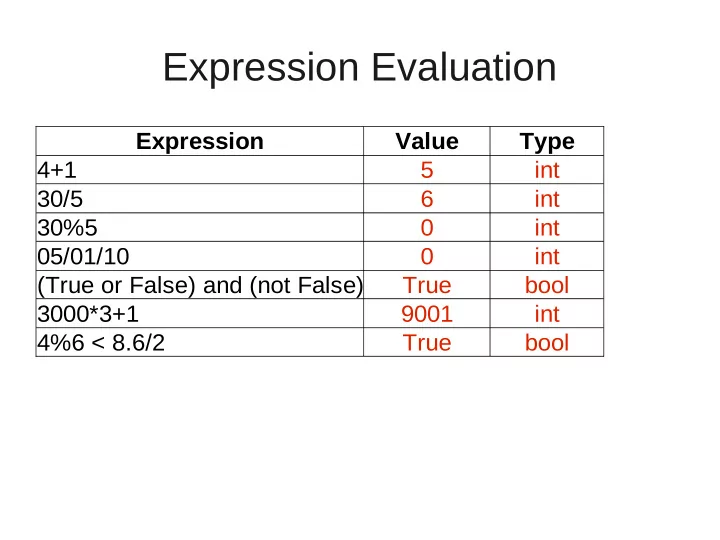
Expression Evaluation
Expression Value Type 4+1 5 int 30/5 6 int 30%5 int 05/01/10 int (True or False) and (not False) True 3000*3+1 9001 int 4%6 < 8.6/2 True bool bool
SLIDE 2 Output of Program
def myFunc(x): print x x = int(x) print x+4 y = str(x) print y+”5” myFunc(6.5)
Output is as follows: 6.5 10 65 Note that the datatypes
would be float, int, and str, respectively.
SLIDE 3
Legal or Illegal Variable Names?
1x x1 x_1 X1 x 1 x11 x+1 $x _x
Legal names are: x1 x_1 X1 x11 _x (although one this would be considered bad form except in special circumstances)
SLIDE 4 Error?
counter = 0 while counter <= 10: forward(1,counter) Generates an infinite
value of x somewhere in body of loop. For example: x=x-1
SLIDE 5
Function Writing
Write a function called multTable which takes 1 input parameters, a number to make into row a multiplication table. Your function should print out the first 9 entries for that number in a multiplication table beginning at 1*the parameter. And example is below: >>>multTable(2) >>>2, 4, 6, 8, 10, 12, 14, 16, 18
SLIDE 6
Function Writing
def multTable(x): for i in range(1,10,1): print x*i Note that this will print each part of your output on a separate line. That's fine.
SLIDE 7 Program Writing
Write a program to calculate a user's weight on the moon and on the sun. You should ask the user for their weight. (For this exercise, you may assume your user always enters valid numbers and makes no errors.) You should then calculate and display their “moon weight” and “sun weight”. To find their weight on the moon, you need to divide by 6 and to calculate their sun weight, you need to multiply by 27.1. Your answer should be as precise as
- possible. An example output is below:
What is your earth weight? 1 Your moon weight is 0.166666666667 and your sun weight is 27.1
SLIDE 8
Program Writing
weight = input(“What is your weight on earth? ”) mw = weight/6.0 sw = weight*27.1 print “Your moon weight is”, mw, “and your sun weight is”, sw