
SLIDE 1
EMPLOYER SUBMISSION OF WORK OFFER REFUSALS
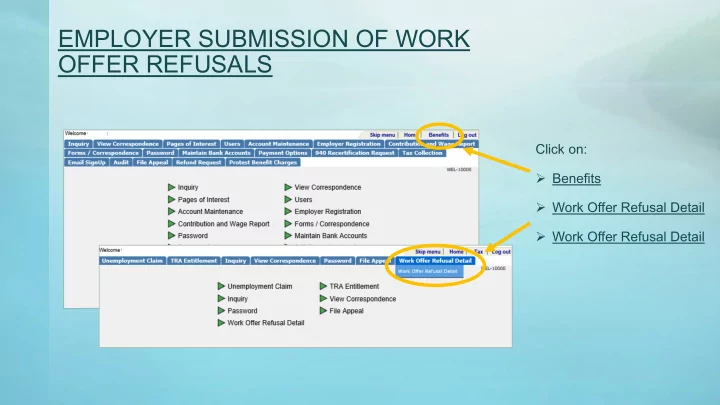
Click on:
- Benefits
- Work Offer Refusal Detail
- Work Offer Refusal Detail
EMPLOYER SUBMISSION OF WORK OFFER REFUSALS Click on: Benefits - - PowerPoint PPT Presentation
EMPLOYER SUBMISSION OF WORK OFFER REFUSALS Click on: Benefits Work Offer Refusal Detail Work Offer Refusal Detail There are two methods of providing Work Offer Refusal information: Method #1: Method #2: Complete the Work Offer
Complete the Work Offer Refusal Detail screen. Click on Submit when finished. If you have more than 10 Work Offer Refusals, you can:
Offer Refusal Detail screen again at any time; or
Method #2 to upload a completed template.
Click on Click Here for a template spreadsheet on which the information can be provided. Click on Browse to upload the spreadsheet to UInteract. Click on Submit when finished.