Economics Class - XI Presentation of Data - Notes The presentation - - PDF document

economics class xi presentation of data notes the
SMART_READER_LITE
LIVE PREVIEW

Economics Class - XI Presentation of Data - Notes The presentation - - PDF document

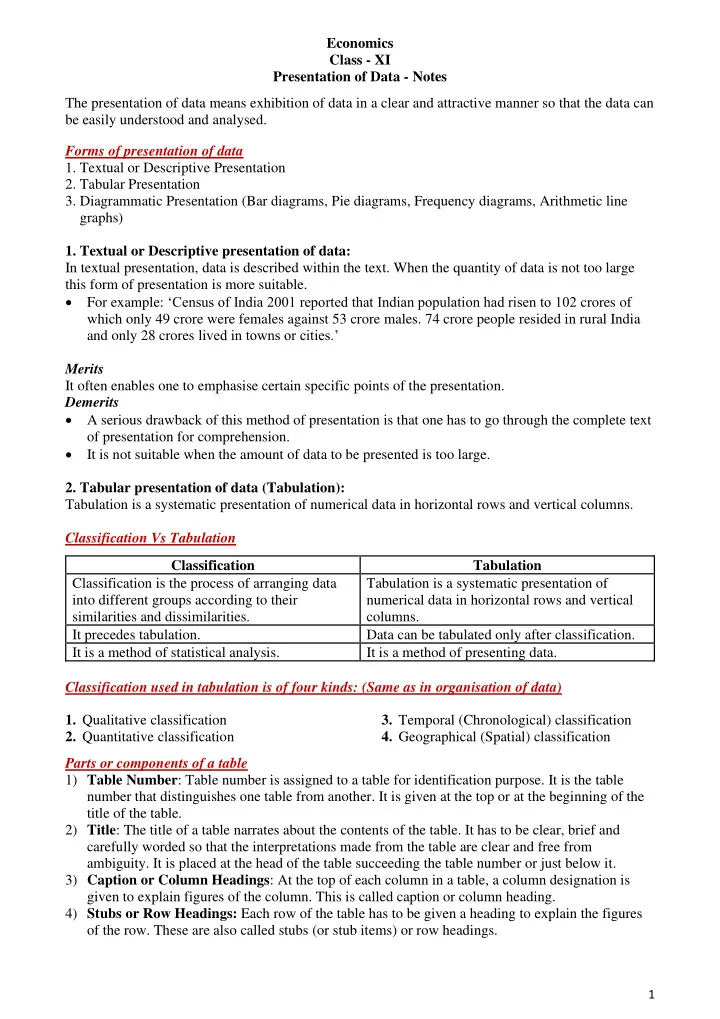
Economics Class - XI Presentation of Data - Notes The presentation of data means exhibition of data in a clear and attractive manner so that the data can be easily understood and analysed. Forms of presentation of data 1. Textual or


slide-1
SLIDE 1

1

Economics Class - XI Presentation of Data - Notes The presentation of data means exhibition of data in a clear and attractive manner so that the data can be easily understood and analysed. Forms of presentation of data

  • 1. Textual or Descriptive Presentation
  • 2. Tabular Presentation
  • 3. Diagrammatic Presentation (Bar diagrams, Pie diagrams, Frequency diagrams, Arithmetic line

graphs)

  • 1. Textual or Descriptive presentation of data:

In textual presentation, data is described within the text. When the quantity of data is not too large this form of presentation is more suitable.

  • For example: ‘Census of India 2001 reported that Indian population had risen to 102 crores of

which only 49 crore were females against 53 crore males. 74 crore people resided in rural India and only 28 crores lived in towns or cities.’ Merits It often enables one to emphasise certain specific points of the presentation. Demerits

  • A serious drawback of this method of presentation is that one has to go through the complete text
  • f presentation for comprehension.
  • It is not suitable when the amount of data to be presented is too large.
  • 2. Tabular presentation of data (Tabulation):

Tabulation is a systematic presentation of numerical data in horizontal rows and vertical columns. Classification Vs Tabulation Classification Tabulation Classification is the process of arranging data into different groups according to their similarities and dissimilarities. Tabulation is a systematic presentation of numerical data in horizontal rows and vertical columns. It precedes tabulation. Data can be tabulated only after classification. It is a method of statistical analysis. It is a method of presenting data. Classification used in tabulation is of four kinds: (Same as in organisation of data)

  • 1. Qualitative classification
  • 2. Quantitative classification
  • 3. Temporal (Chronological) classification
  • 4. Geographical (Spatial) classification

Parts or components of a table 1) Table Number: Table number is assigned to a table for identification purpose. It is the table number that distinguishes one table from another. It is given at the top or at the beginning of the title of the table. 2) Title: The title of a table narrates about the contents of the table. It has to be clear, brief and carefully worded so that the interpretations made from the table are clear and free from

  • ambiguity. It is placed at the head of the table succeeding the table number or just below it.

3) Caption or Column Headings: At the top of each column in a table, a column designation is given to explain figures of the column. This is called caption or column heading. 4) Stubs or Row Headings: Each row of the table has to be given a heading to explain the figures

  • f the row. These are also called stubs (or stub items) or row headings.
slide-2
SLIDE 2

2

5) Body of the Table: It is the main part of the table and it contains the actual numerical data. Location of any one figure/data in the table is fixed and determined by the row and column of the table. 6) Unit of Measurement: The unit of measurement of the figures in the table (actual data) should always be stated along with the title. If different units are there for rows or columns of the table, these units must be stated along with stubs or captions. 7) Source: It is a brief statement or phrase indicating the source of data presented in the table. If more than one source is there, all the sources are to be written in the ‘source’. Source is generally written at the bottom of the table. 8) Note (or Footnote): Note is the last part of the table. It explains the specific feature of the data content of the table which is not self-explanatory and has not been explained earlier. For example: Tabulate the given data. Advantages of tabular presentation of data:

  • The most important advantage of tabulation is that it organises data for further statistical

treatment and decision making.

  • It makes comparison of data easier.
  • It is economical and easy to understand.

Table No.1

slide-3
SLIDE 3

3

  • 3. Diagrammatic presentation of data:

Diagrammatic presentation is a technique of presenting numerical data using diagrams such as bar diagrams, pie diagrams or frequency diagrams etc. It is the most attractive and appealing way to represent statistical data.

  • Bar Diagram

A bar diagram is one dimensional. It is only the height (or length) and not the width of the bar that matters. ➢ In case of bar diagrams, the magnitude of the characteristic is shown by the height or length of the bar. ➢ Bar diagram comprises of a group of equi-spaced and equi-width rectangular bars for each category of data. ➢ Bar diagram can be drawn both for discrete and continuous variables. Types of bar diagrams

  • i. Simple Bar Diagram

It is a bar diagram which represents only one characteristic and is the simplest form of bar diagram. For example: The bar diagram given below shows the number of students in class XI in different streams in the year 2018. No of students in class XI in 2018 Year Humanities Commerce Science 2018 550 350 200 Diagrammatic presentation of data Bar Diagrams Simple Bar Diagram Multiple Bar Diagram Component

  • r

Sub-divided Bar Diagram Percentage Bar Diagram Pie Chart Frequency Diagrams Histogram Frequency Polygon/ Curve Ogive Arithmetic Line Graph

slide-4
SLIDE 4

4

  • ii. Multiple Bar Diagram

It is a diagram depicting two or more characteristics in the form of adjacently placed bars of height proportional to the magnitude of the characteristics. For example, a chart comparing the number of students in Humanities, Commerce and Sciences may be represented with 3 bars for each stream, drawn side by side (adjacent to each other) for each year. Year Humanities Commerce Science 2018 550 350 200 2019 650 450 300 2020 400 500 400

  • iii. Component Bar Diagram (or Sub-Divided Bar Diagram)

A component bar diagram shows the bar and its sub-divisions into two or more components. Component bar diagrams is also called sub-divided bar diagrams. To construct a component bar diagram, first of all, a bar is constructed on the x-axis with its height

100 200 300 400 500 600 Humanities Commerce Science Number of Students Streams

Number of students in class XI in 2018

Scale: y-axis: 1cm = 100 students 100 200 300 400 500 600 700

2018 2019 2020 Number of students

YEARS

Multiple Bar Diagram

Humanities Commerce Science

Scale: y-axis: 1cm = 100 students

slide-5
SLIDE 5

5

equivalent to the total value of the bar and the respective components are then marked. It can also be constructed by drawing each component one by one, each on top of the previous one in the given

  • rder.

For example: Draw a sub-divided bar diagram for the given data. Year Humanities Commerce Science Total 2018 550 350 200 1100 2019 650 450 300 1400 2020 400 500 400 1300

  • iv. Percentage Bar Diagram

When the components are represented as percentages of the whole, it is known as a percentage bar

  • diagram. The main feature of this component diagram is that all bars are of the same height since it

represents 100%. For example: Represent the following data using a percentage bar diagram. Year Humanities Commerce Science Total 2018 550 350 100 1000 2019 700 800 500 2000 2020 800 900 300 2000 The first step, hence, is to calculate the component percentages and then plot the bar diagram with percentages on y-axis. Year Humanities (%) Commerce (%) Science (%) Total (%) 2018 55 35 10 100 2019 35 40 25 100 2020 40 45 15 100

550 650 400 350 450 500 200 300 400 200 400 600 800 1000 1200 1400 1600 2018 2019 2020

Number of Students Years

Sub-divided Bar Diagram

Humanities Commerce Science

Scale: y-axis: 1cm = 200 students

slide-6
SLIDE 6

6

  • Pie Diagram or Pie Chart

A pie diagram is also a component diagram, but it is a circle whose area is proportionally divided among the components it represents. Steps in the construction of a pie diagram Step 1: The value of each component is first expressed as a percentage of the total value of all the components: Step 2: Conversion of percentages of components into angular components of the circle: A circle in a pie chart, irrespective of its value of radius, is thought of having 100 equal parts of 3.6° (360°/100) each. To find out the angle, which the component shall subtend at the centre of the circle, each percentage figure of every component is multiplied by 3.6°. For example: Construct a pie chart for the following data. Items Cost Percentage Degrees Wages 16000 40 % 144◦ Interest 8000 20 % 72◦ Rent 12000 30 % 108◦ Miscellaneous 4000 10 % 36◦ Total Cost 40000 100 % 360◦

55 35 40 35 40 45 10 25 15 0% 10% 20% 30% 40% 50% 60% 70% 80% 90% 100% 2018 2019 2020

% of Students

Years Percentage Bar Diagram

Humanities Commerce Science Scale: y-axis: 1cm = 10%

Note: To find out the angle or degree of the component without using percentages : Degree of the component = Value of the component X 360◦ Total value of all the components

slide-7
SLIDE 7

7

  • Frequency diagrams

Data in the form of grouped frequency distributions are generally represented using graphs by frequency diagrams like histogram, frequency polygon, frequency curve and ogive. Histogram It is a graph of a frequency distribution consisting of rectangles in which the class intervals are plotted along the x-axis and their respective frequencies on the y-axis.

  • A histogram is a two-dimensional diagram.
  • A histogram is never drawn for a discrete variable. It is drawn for continuous variables only.

Case I: If the class intervals are of equal width

Since, for continuous variables, the lower-limit of a class interval fuses with the upper-limit of the previous interval, the rectangles are all adjacent and there is no space between two consecutive rectangles. For example: Draw a histogram for marks obtained in statistics by 30 students of class XI.

Pie Diagram Wages Interest Rent Miscellaneous

Scale: x-axis: 1cm = 10 marks y-axis: 1cm = 2 students

slide-8
SLIDE 8

8

Obtaining Mode Graphically

  • Graphically, mode is obtained by drawing a histogram. The rectangle with the greatest height

will give the modal class.

  • We join the top right point of the rectangle of the modal class with the top right point of the

rectangle of the preceding class, and the top left point of the rectangle of the modal class with the top left point of the rectangle of the succeeding class.

  • From the point of intersection of these lines, we draw a perpendicular on the x-axis intersecting

the x-axis at a point, which gives the value of the mode. For example: Calculate the mode graphically for the given data. Since the classes have gaps, they first need to be converted to exclusive series for continuity.

slide-9
SLIDE 9

9 Case II: If the class intervals are of unequal/varying width

When classes vary in their width, the frequencies are to be adjusted to yield comparable

  • measurements. The answer in such a situation is to divide the actual frequency by the adjustment

factor to get the adjusted frequency. The histogram is then drawn using the adjusted frequency. Adjustment factor (A) = Width of the class Width of smallest class For example: Draw a histogram for the following data. Marks

  • No. of Students (F)

Adjusted Frequency = F/A

Scale: x-axis: 1cm = `5 y-axis: 1cm = 2 earners

slide-10
SLIDE 10

10

Difference between Bar Diagram and Histogram Bar Diagram Histogram A bar diagram is one dimensional. It is only the height (or length) of the bar and not the width of the bar that matters. A histogram is two-dimensional, i.e., the width of the class and class frequency both are taken into consideration. The width in a histogram is as important as its height. Bar diagram has equi-spaced and equi-width bars. In Histogram, no space is left between two

  • rectangles. In case of unequal classes, width of

the rectangles may differ. Bar diagram can be drawn both for discrete and continuous variables. Histogram is drawn only for a continuous variable. Frequency Polygon A frequency polygon is a plane closed figure bounded by straight lines used for depicting frequency data. Case I: Frequency polygon derived from histogram itself The simplest method of drawing a frequency polygon is to join the midpoints of the topside of the consecutive rectangles of the histogram using straight lines. The figure so obtained is closed by joining the two endpoints to the base line at the mid-values of the two extreme classes (on both sides) with zero frequency. For example: Draw a histogram and frequency polygon for the given data.

Scale: x-axis: 1cm = 10 marks y-axis: 1cm = 1 student

slide-11
SLIDE 11

11

Case 2: Frequency Polygon without drawing a histogram Class-marks or class midpoints can be used along the x-axis. Frequencies are plotted against the mid- points of class intervals. For example: Draw a frequency polygon for the given data.

Scale: x-axis: 1cm = `100 y-axis: 1cm = 2 workers

slide-12
SLIDE 12

12

Frequency Curve It is obtained by drawing a smooth free-hand curve passing through the points of the frequency polygon as closely as possible. Ogive (or Cumulative Frequency Curve) A cumulative frequency curve or ogive is obtained by plotting the cumulative frequencies along the y-axis and the class limits along the x-axis in a cumulative frequency distribution. As there are two types of cumulative frequencies — ‘less than’ type and ‘more than’ type, accordingly there are two

  • gives for any grouped frequency distribution data.
  • For ‘less than’ ogive, cumulative frequencies are plotted against the upper limits of the class

intervals.

  • For ‘more than’ ogive, cumulative frequencies are plotted against the lower limits of the class

interval. NOTE: ‘Less than’ ogive is never decreasing and ‘More than’ ogive is never increasing. Obtaining Median Graphically Median can be obtained graphically using ogives. Case1: Obtaining median from less-than and more-than ogives From the point of intersection of the two ogives, draw a line perpendicular to the x-axis. The point where the perpendicular line meets the x-axis, is the median.

slide-13
SLIDE 13

13

Case2: Obtaining median from either ‘less than’ or ‘more than’ ogive

  • Locate N/2 on the y-axis (where N = Sum total of all frequencies) and from this point draw a line

parallel to the x-axis to intersect the ogive.

  • From this point, draw a perpendicular line on the x-axis. The point where the perpendicular line

meets the x-axis, is the median. Arithmetic Line Graph An arithmetic line graph is also called time series graph. In this graph, time (hour, day/date, week, month, year, etc.) is plotted along x-axis and the value of the variable (time series data) along y-axis. A line graph by joining these plotted points, thus, obtained is called arithmetic line graph (time series graph). It helps in understanding the long-term trend, periodicity, cyclicity etc., in a long-term time series data.

Scale: x-axis: 1cm = 10 marks y-axis: 1cm = 5 students

N/2 = 32 N/2 = 32

slide-14
SLIDE 14

14

For example: False Baseline A false base line is used when figures in a series on the y-axis start with very high values or the difference between the zero and the smallest value on the y-axis is very large. It is used to break the continuity of y-axis with the origin. For example: Advantages of Diagrammatic Data Presentation

  • Attractive and impressive – Diagrams and graphs are always attractive and impressive and

many newspapers and magazines use them frequently to explain certain facts or phenomena.

  • Simplified presentation – Large volumes of complex data can be presented in a simplified

manner using diagrams which makes it easier for a common man to understand the data.

  • Facilitates comparisons – Diagrammatic presentation helps in comparison of data and analysing

the relationships between variables. Limitations of Diagrammatic Presentation

  • Diagrams and graphs do not depict perfectly accurate data. They are usually based on
  • approximations. So, these are suitable for general guidance and not for taking particular

decisions.

  • Diagrams can provide misleading results if not correctly drawn.

Scale: y-axis: 1cm = ` 10 lakhs False Baseline

slide-15
SLIDE 15

15

Recap ➢ Data (even voluminous data) speak meaningfully through presentation. ➢ For small data (quantity) textual presentation serves the purpose better. ➢ Tabulated data can be presented through diagrams which enable quicker comprehension of the facts presented otherwise. ➢ For large quantity of data tabular presentation helps in accommodating any volume of data for

  • ne or more variables.

Click on the following links for further explanations of the topics discussed above:

https://www.youtube.com/watch?v=Xr0BgvtXWwA( Tabulation of Data and Parts of a Table) https://www.youtube.com/watch?v=g0qmf4z766w (Presentation of data)

Summary

Presentation of data Textual Presentation Tabular Presentation Diagrammatic Presentation Frequency Diagrams Pie Chart Bar Diagrams Simple Bar Diagram Component

  • r

Subdivided Bar Diagram Multiple Bar Diagram Percentage Bar Diagram Histogram Frequency Polygon / Frequency Curve Ogive Arithmetic Line Graph