Dynamic Storage Allocation C s data structures, including arrays, - - PDF document

dynamic storage allocation
SMART_READER_LITE
LIVE PREVIEW

Dynamic Storage Allocation C s data structures, including arrays, - - PDF document

3/27/14 Dynamic Storage Allocation C s data structures, including arrays, are normally fixed in size, i.e., static. Memory Management o Static data structures must have their sizes decided at time of compilation Fortunately, C


slide-1
SLIDE 1

3/27/14 ¡ 1 ¡

Memory Management

Based on slides from K. N. King and Dianna Xu Bryn Mawr College CS246 Programming Paradigm

Dynamic Storage Allocation

  • C’s data structures, including arrays, are normally

fixed in size, i.e., static.

  • Static data structures must have their sizes decided

at time of compilation

  • Fortunately, C supports dynamic storage allocation:

the ability to allocate storage during program execution.

  • used most often for strings, arrays, and structures.
  • can be linked together to form lists, trees, and other

data structures.

  • done by calling a memory allocation function.

The Heap

  • The pool of memory from which dynamic memory

is allocated is separate, and is known as the heap.

  • There are library routines to allocate and free

memory from the heap.

  • Heap memory is only accessible through pointers.
  • Mixing statically and dynamically allocated

memory is not allowed.

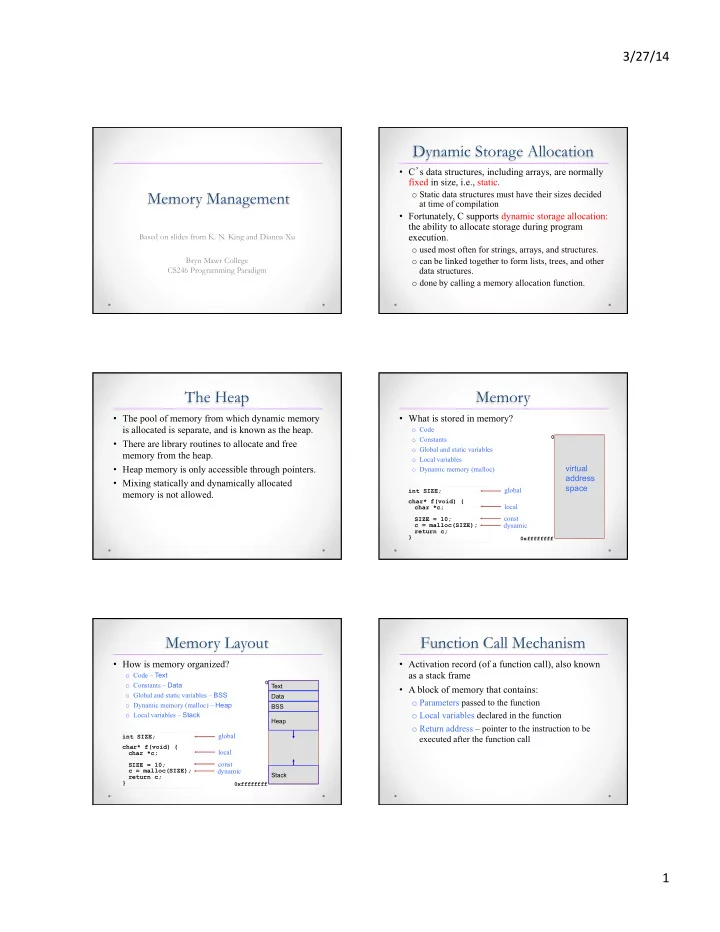
Memory

  • What is stored in memory?
  • Code
  • Constants
  • Global and static variables
  • Local variables
  • Dynamic memory (malloc)

int SIZE; char* f(void) { char *c; SIZE = 10; c = malloc(SIZE); return c; }

global local const dynamic

0xffffffff

virtual address space

Memory Layout

  • How is memory organized?
  • Code – Text
  • Constants – Data
  • Global and static variables – BSS
  • Dynamic memory (malloc) – Heap
  • Local variables – Stack

int SIZE; char* f(void) { char *c; SIZE = 10; c = malloc(SIZE); return c; }

global local const dynamic

0xffffffff

Text Data BSS Heap Stack

Function Call Mechanism

  • Activation record (of a function call), also known

as a stack frame

  • A block of memory that contains:
  • Parameters passed to the function
  • Local variables declared in the function
  • Return address – pointer to the instruction to be

executed after the function call

slide-2
SLIDE 2

3/27/14 ¡ 2 ¡

Call Stack

  • A call stack is a region of memory that manages

activation records

  • The call stack is initialized with the activation

record of main

  • Activation record of a function is
  • Pushed onto the stack at the function call
  • Popped off the stack on return from the call
  • The reason why local variables are only present

during the function call

A Typical Stack Frame

  • int foo(int arg1, int arg2);
  • Two local vars
  • Stack grows upwards
  • ESP and EBP:

registers used to point to the top

  • f the stack

and the base

Callee saved registers (as needed) temporary storage Caller’s EBP Stack local var1 local var2 Return address arg1 arg2

EBP-8 EBP-4 EBP+8 EBP+12

Caller saved registers (as needed)

ESP-->

Memory Allocation Functions

  • The <stdlib.h> header declares three memory

allocation functions:

malloc—Allocates a block of memory but doesn’t initialize it.

  • void *malloc (size_t size);
  • Allocates a block of size bytes from the heap
  • Returns a pointer to the block allocated
  • size_t is an unsigned integer type used for very large

integers.

  • type void * is a “generic” pointer.

calloc—Allocates a block of memory and clears it. realloc—Resizes a previously allocated block of memory.

  • void free (void *ptr);

Null Pointers

  • If a memory allocation function can’t locate a memory

block of the requested size, it returns a null pointer. p = malloc(10000);

if (p == NULL) { //same as: if (!p) /* allocation failed; take appropriate action */ }

  • A null pointer is a special value that can be

distinguished from all valid pointers.

  • After we’ve stored the function’s return value in a

pointer variable, we must test to see if it’s a null pointer.

Dynamic Memory Layout

0xffffffff 0 Text

Data BSS Heap Stack char *p1 = malloc(3); char *p2 = malloc(4); char *p3 = malloc(1); free(p2); char *p4 = malloc(6); free(p3); char *p5 = malloc(2); free(p1); free(p4); free(p5);

Dynamic Memory Layout

0xffffffff 0 Text

Data BSS Heap Stack char *p1 = malloc(3); char *p2 = malloc(4); char *p3 = malloc(1); free(p2); char *p4 = malloc(6); free(p3); char *p5 = malloc(2); free(p1); free(p4); free(p5); p1

slide-3
SLIDE 3

3/27/14 ¡ 3 ¡

Dynamic Memory Layout

char *p1 = malloc(3); char *p2 = malloc(4); char *p3 = malloc(1); free(p2); char *p4 = malloc(6); free(p3); char *p5 = malloc(2); free(p1); free(p4); free(p5);

0xffffffff 0 Text

Data BSS Heap Stack p1 p2

Dynamic Memory Layout

char *p1 = malloc(3); char *p2 = malloc(4); char *p3 = malloc(1); free(p2); char *p4 = malloc(6); free(p3); char *p5 = malloc(2); free(p1); free(p4); free(p5);

0xffffffff 0 Text

Data BSS Heap Stack p1 p2 p3

Dynamic Memory Layout

char *p1 = malloc(3); char *p2 = malloc(4); char *p3 = malloc(1); free(p2); char *p4 = malloc(6); free(p3); char *p5 = malloc(2); free(p1); free(p4); free(p5);

0xffffffff 0 Text

Data BSS Heap Stack p1 p3 p2

Dynamic Memory Layout

char *p1 = malloc(3); char *p2 = malloc(4); char *p3 = malloc(1); free(p2); char *p4 = malloc(6); free(p3); char *p5 = malloc(2); free(p1); free(p4); free(p5);

0xffffffff 0 Text

Data BSS Heap Stack p1 p2 p3 p4

Dynamic Memory Layout

char *p1 = malloc(3); char *p2 = malloc(4); char *p3 = malloc(1); free(p2); char *p4 = malloc(6); free(p3); char *p5 = malloc(2); free(p1); free(p4); free(p5);

0xffffffff 0 Text

Data BSS Heap Stack p1 p2 p3 p4

Dynamic Memory Layout

char *p1 = malloc(3); char *p2 = malloc(4); char *p3 = malloc(1); free(p2); char *p4 = malloc(6); free(p3); char *p5 = malloc(2); free(p1); free(p4); free(p5);

0xffffffff 0 Text

Data BSS Heap Stack p1 p2,p5 p3 p4

slide-4
SLIDE 4

3/27/14 ¡ 4 ¡

Dynamic Memory Layout

char *p1 = malloc(3); char *p2 = malloc(4); char *p3 = malloc(1); free(p2); char *p4 = malloc(6); free(p3); char *p5 = malloc(2); free(p1); free(p4); free(p5);

0xffffffff 0 Text

Data BSS Heap Stack p1 p2,p5 p3 p4

Dynamic Memory Layout

char *p1 = malloc(3); char *p2 = malloc(4); char *p3 = malloc(1); free(p2); char *p4 = malloc(6); free(p3); char *p5 = malloc(2); free(p1); free(p4); free(p5);

0xffffffff 0 Text

Data BSS Heap Stack p1 p2,p5 p3 p4

Dynamic Memory Layout

char *p1 = malloc(3); char *p2 = malloc(4); char *p3 = malloc(1); free(p2); char *p4 = malloc(6); free(p3); char *p5 = malloc(2); free(p1); free(p4); free(p5);

0xffffffff 0 Text

Data BSS Heap Stack p1 p2,p5 p3 p4

Example: String Allocation

  • Allocate memory for a string of n characters:

char * p; p = malloc(n + 1);//adding 1 for ‘\0’

By default void* will be casted to char*.

char *concat(const char *s1, const char *s2){ char *result; result = malloc(strlen(s1) + strlen(s2) + 1); if (result == NULL) { printf("Error: malloc failed in concat\n"); exit(EXIT_FAILURE); } strcpy(result, s1); strcat(result, s2); return result; }

Example: int Array Allocation

  • Suppose a program needs an array of n integers,

where n is computed during program execution.

int *a; a = (int *) malloc(sizeof(int)*n); for (i = 0; i < n; i++) a[i] = 0; …… free(a);

The calloc Function

  • The calloc function is an alternative to malloc.

void *calloc(size_t nmemb, size_t size);

  • Allocates space for an array with nmemb elements,

each of which is size bytes long.

  • Returns a null pointer if the requested space isn’t

available.

  • Initializes allocated memory by setting all bits to 0.
  • a = calloc(n, sizeof(int));

//array of n integers.

  • struct point { int x, y; } *p;

p = calloc(1, sizeof(struct point));

slide-5
SLIDE 5

3/27/14 ¡ 5 ¡

The realloc Function

  • The realloc function can resize a dynamically

allocated array.

void *realloc(void *ptr, size_t size);

  • ptr must point to a memory block obtained by a

previous call of malloc, calloc, or realloc to the new size specified by size.

  • Returns a NULL if expansion attempt fails.
  • If called with NULL as 1st argument ptr,

behaves like malloc.

  • If called with 0 as 2nd argument, behaves like

free.

Deallocating Storage

  • Example:

p = malloc(…); q = malloc(…); p = q;

  • After q is assigned to p,

both variables now point to the second memory block: Garbage

  • A program that leaves garbage behind has a memory leak.
  • Calling the free function to release unneeded memory.

The “Dangling Pointer” Problem

  • Using free leads to a new problem: dangling pointers.
  • free(p) deallocates the memory block that p points to,

but doesn’t change p itself.

  • If we forget that p no longer points to a valid memory

block, chaos may ensue:

char *p = malloc(4); … free(p); … strcpy(p, "abc"); /*** WRONG ***/

  • Always assign your pointers to malloced memory or by &
  • f a variable.
  • Stack variables (i.e. locals in functions) are deallocated as

soon as a function returns. Therefore, avoid assigning pointers to addresses of such variables.

Working with Memory Blocks

  • Generic pointers can not be dereferenced.
  • string.h functions to work with typeless memory

blocks pointed to by void *.

  • void *memcpy(void *des,void *src,size_t l);
  • void *memmove(void *des,const void *src,size_t l);
  • int memcmp(const void *p,cost void *q,size_t l);
  • void *memchr(const void *p, int val, size_t l);
  • These are generic versions of the corresponding string

functions (strcpy, strcmp and strchr).

  • memmove is used instead of memcpy if the two blocks
  • verlap.

File I/O on Memory Blocks:Binary Files

  • Binary files do not have a line-oriented structure.
  • They consist of blocks of objects, and the format of these
  • bjects are application as well as machine dependent.
  • When opening a binary file, always append a 'b' to the

second argument, i.e.

  • fopen("test.exe", "wb");
  • fopen("test.exe", "rb");

Current File Position

  • long ftell(FILE *fp);
  • Returns the current file position, or –1L.
  • fseek is used to set the file position:

fseek(fp, -sizeof(double), SEEK_CUR);

  • ftell’s return value is often used by fseek:

long file_pos; … file_pos = ftell(fp); /* saves current position */ … fseek(fp, file_pos, SEEK_SET); /* returns to old position */

slide-6
SLIDE 6

3/27/14 ¡ 6 ¡

File Positioning

  • fgetpos(fp, &file_pos) stores the file

position associated with fp in the file_pos variable.

  • fsetpos(fp, &file_pos) sets the file position

for fp to be the value stored in file_pos. fpos_t file_pos; … fgetpos(fp, &file_pos); /* saves current position */ … fsetpos(fp, &file_pos); /* returns to old position */

Read/Write a Binary File

  • The fread and fwrite functions allow a

program to read and write large blocks of data in a single step.

  • size_t fread(void *buf, size_t s,

size_t ne, FILE *in);

  • Reads up to ne elements, each of size s in bytes

and stores them in buf

  • size_t fwrite(const void *buf,

size_t s, sizt_t ne, FILE *out);

  • Similarly, writes from buf up to ne blocks, each
  • f size s
  • Number of elements (not bytes!) successfully read/

written is returned

Read/Write a Binary File

  • A call of fread that reads the contents of a file

into the array a:

n = fread(a, sizeof(a[0]), sizeof(a) / sizeof(a[0]), fp);

  • A call of fwrite that writes a structure variable s

to a file:

fwrite(&s, sizeof(s), 1, fp);

  • fwrite is convenient for a program that needs to

store data in a file before terminating.

  • Later, the program (or another program) can use

fread to read the data back into memory.