DNS Session 2: DNS cache How caching NS works (1) operation and DNS - - PDF document

dns session 2 dns cache how caching ns works 1 operation
SMART_READER_LITE
LIVE PREVIEW

DNS Session 2: DNS cache How caching NS works (1) operation and DNS - - PDF document

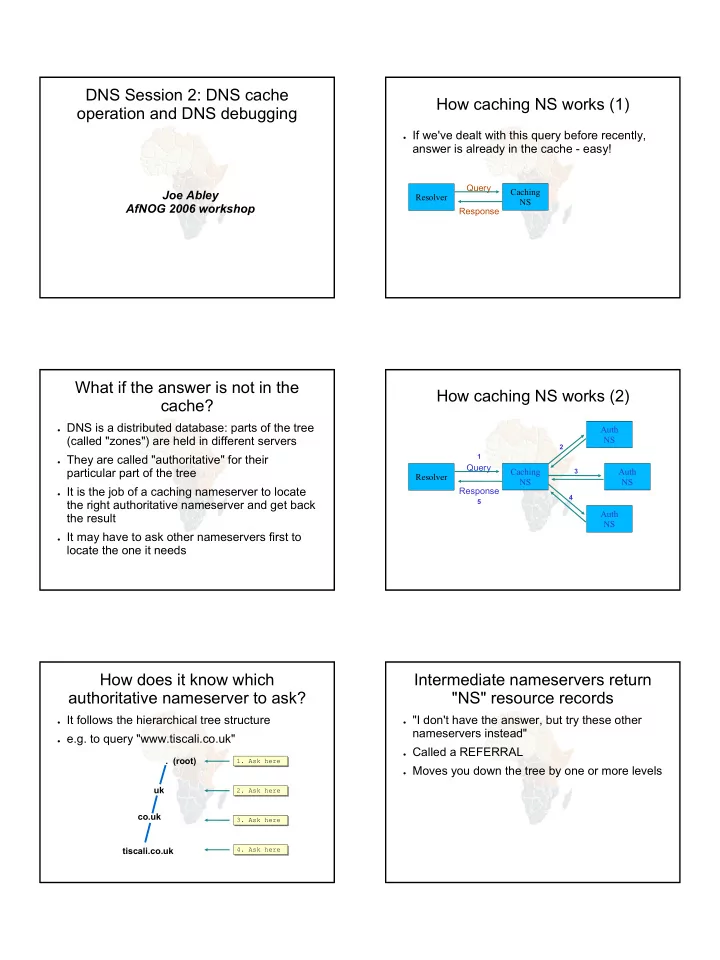
DNS Session 2: DNS cache How caching NS works (1) operation and DNS debugging If we've dealt with this query before recently, answer is already in the cache - easy! Query Caching Joe Abley Resolver NS AfNOG 2006 workshop Response What


slide-1
SLIDE 1

DNS Session 2: DNS cache

  • peration and DNS debugging

Joe Abley AfNOG 2006 workshop

How caching NS works (1)

  • If we've dealt with this query before recently,

answer is already in the cache - easy!

Resolver Caching NS Query Response

What if the answer is not in the cache?

  • DNS is a distributed database: parts of the tree

(called "zones") are held in different servers

  • They are called "authoritative" for their

particular part of the tree

  • It is the job of a caching nameserver to locate

the right authoritative nameserver and get back the result

  • It may have to ask other nameservers first to

locate the one it needs

How caching NS works (2)

Resolver Caching NS Query

1

Auth NS

2

Auth NS

3

Auth NS

4

Response

5

How does it know which authoritative nameserver to ask?

  • It follows the hierarchical tree structure
  • e.g. to query "www.tiscali.co.uk"

. (root) uk co.uk tiscali.co.uk

  • 1. Ask here
  • 1. Ask here
  • 2. Ask here
  • 2. Ask here
  • 3. Ask here
  • 3. Ask here
  • 4. Ask here
  • 4. Ask here

Intermediate nameservers return "NS" resource records

  • "I don't have the answer, but try these other

nameservers instead"

  • Called a REFERRAL
  • Moves you down the tree by one or more levels
slide-2
SLIDE 2

Eventually this process will either:

  • Find an authoritative nameserver which knows

the answer (positive or negative)

  • Not find any working nameserver: SERVFAIL
  • End up at a faulty nameserver - either cannot

answer and no further delegation, or wrong answer!

  • Note: the caching nameserver may happen also to be an

authoritative nameserver for a particular query. In that case it will answer immediately without asking anywhere

  • else. We will see later why it's a better idea to have

separate machines for caching and authoritative nameservers

How does this process start?

  • Every caching nameserver is seeded with a list
  • f root servers

zone "." { type hint; file "named.root"; } . 3600000 NS A.ROOT-SERVERS.NET. A.ROOT-SERVERS.NET. 3600000 A 198.41.0.4 . 3600000 NS B.ROOT-SERVERS.NET. B.ROOT-SERVERS.NET. 3600000 A 128.9.0.107 . 3600000 NS C.ROOT-SERVERS.NET. C.ROOT-SERVERS.NET. 3600000 A 192.33.4.12 ;... etc

/etc/namedb/named.conf /etc/namedb/named.conf /etc/namedb/named.root /etc/namedb/named.root

Where did named.root come from?

  • ftp://ftp.internic.net/domain/named.cache
  • Worth checking every 6 months or so for

updates

Demonstration

  • dig +trace www.tiscali.co.uk.
  • Instead of sending the query to the cache, "dig

+trace" traverses the tree from the root and displays the responses it gets

– dig +trace is a bind 9 feature – useful as a demo but not for debugging

Distributed systems have many points of failure!

  • So each zone has two or more authoritative

nameservers for resilience

  • They are all equivalent and can be tried in any
  • rder
  • Trying stops as soon as one gives an answer
  • Also helps share the load
  • The root servers are very busy

– There are currently 13 of them (each of which is a

large cluster)

Caching reduces the load on auth nameservers

  • Especially important at the higher levels: root

servers, GTLD servers (.com, .net ...) and ccTLDs

  • All intermediate information is cached as well as

the final answer - so NS records from REFERRALS are cached too

slide-3
SLIDE 3

Example 1: www.tiscali.co.uk (on an empty cache)

root server www.tiscali.co.uk (A) referral to 'uk' nameservers uk server www.tiscali.co.uk (A) referral to 'tiscali.co.uk' nameservers tiscali.co.uk server www.tiscali.co.uk (A) Answer: 212.74.101.10

Example 2: smtp.tiscali.co.uk (after previous example)

tiscali.co.uk server smtp.tiscali.co.uk (A) Answer: 212.74.114.61 Previous referrals retained in cache

Caches can be a problem if data becomes stale

  • If caches hold data for too long, they may give
  • ut the wrong answers if the authoritative data

changes

  • If caches hold data for too little time, it means

increased work for the authoritative servers

The owner of an auth server controls how their data is cached

  • Each resource record has a "Time To Live"

(TTL) which says how long it can be kept in cache

  • The SOA record says how long a negative

answer can be cached (i.e. the non-existence of a resource record)

  • Note: the cache owner has no control - but they

wouldn't want it anyway

A compromise policy

  • Set a fairly long TTL - 1 or 2 days
  • When you know you are about to make a

change, reduce the TTL down to 10 minutes

  • Wait 1 or 2 days BEFORE making the change
  • After the change, put the TTL back up again

Any questions?

?

slide-4
SLIDE 4

What sort of problems might occur when resolving names in DNS?

  • Remember that following referrals is in general

a multi-step process

  • Remember the caching

(1) One authoritative server is down

  • r unreachable
  • Not a problem: timeout and try the next

authoritative server

– Remember that there are multiple authoritative

servers for a zone, so the referral returns multiple NS records

(2) *ALL* authoritative servers are down or unreachable!

  • This is bad; query cannot complete
  • Make sure all nameservers not on the same

subnet (switch/router failure)

  • Make sure all nameservers not in the same

building (power failure)

  • Make sure all nameservers not even on the

same Internet backbone (failure of upstream link)

  • For more detail read RFC 2182

(3) Referral to a nameserver which is not authoritative for this zone

  • Bad error. Called "Lame Delegation"
  • Query cannot proceed - server can give neither

the right answer nor the right delegation

  • Typical error: NS record for a zone points to a

caching nameserver which has not been set up as authoritative for that zone

  • Or: syntax error in zone file means that

nameserver software ignores it

(4) Inconsistencies between authoritative servers

  • If auth servers don't have the same information

then you will get different information depending

  • n which one you picked (random)
  • Because of caching, these problems can be

very hard to debug. Problem is intermittent.

(5) Inconsistencies in delegations

  • NS records in the delegation do not match NS

records in the zone file (we will write zone files later)

  • Problem: if the two sets aren't the same, then

which is right?

– Leads to unpredictable behaviour – Caches could use one set or the other, or the union

  • f both
slide-5
SLIDE 5

(6) Mixing caching and authoritative nameservers

  • Consider when caching nameserver contains

an old zone file, but customer has transferred their DNS somewhere else

  • Caching nameserver responds immediately

with the old information, even though NS records point at a different ISP's authoritative nameservers which hold the right information!

  • This is a very strong reason for having

separate machines for authoritative and caching NS

  • Another reason is that an authoritative-only NS has a

fixed memory usage

(7) Inappropriate choice of parameters

  • e.g. TTL set either far too short or far too long

These problems are not the fault of the caching server!

  • They all originate from bad configuration of the

AUTHORITATIVE name servers

  • Many of these mistakes are easy to make but

difficult to debug, especially because of caching

  • Running a caching server is easy; running

authoritative nameservice properly requires great attention to detail

How to debug these problems?

  • We must bypass caching
  • We must try *all* N servers for a zone (a

caching nameserver stops after one)

  • We must bypass recursion to test all the

intermediate referrals

  • "dig +norec" is your friend

dig +norec @1.2.3.4 foo.bar. a Server to query Domain Query type

How to interpret responses (1)

  • Look for "status: NOERROR"
  • "flags ... aa" means this is an authoritative

answer (i.e. not cached)

  • "ANSWER SECTION" gives the answer
  • If you get back just NS records: it's a referral

;; ANSWER SECTION foo.bar. 3600 IN A 1.2.3.4 Domain name TTL Answer

How to interpret responses (2)

  • "status: NXDOMAIN"

– OK, negative (the domain does not exist). You

should get back an SOA

  • "status: NOERROR" with zero RRs

– OK, negative (domain exists but no RRs of the type

requested). Should get back an SOA

  • Other status may indicate an error
  • Look also for Connection Refused (DNS server

is not running or doesn't accept queries from your IP address) or Timeout (no answer)

slide-6
SLIDE 6

How to debug a domain using "dig +norec" (1)

  • 1. Start at any root server: [a-m].root-

servers.net.

  • 1. For a referral, note the NS records returned
  • 2. Repeat the query for *all* NS records
  • 3. Go back to step 2, until you have got the final

answers to the query

dig +norec @a.root-servers.net. www.tiscali.co.uk. a

Remember the trailing dots!

How to debug a domain using "dig +norec" (2)

  • 1. Check all the results from a group of

authoritative nameservers are consistent with each other

  • 2. Check all the final answers have "flags: aa"
  • 3. Note that the NS records point to names, not

IP addresses. So now check every NS record seen maps to the correct IP address using the same process!!

How to debug a domain using "dig +norec" (3)

  • Tedious, requires patience and accuracy, but it

pays off

  • Learn this first before playing with more

automated tools

– Such as:

  • http://www.squish.net/dnscheck/
  • http://www.zonecheck.fr/

– These tools all have limitations, none is perfect

Practical

Worked examples

Building your own caching nameserver

  • Easy!
  • Standard software is "bind" (Berkeley Internet

Name Daemon) from ISC: www.isc.org

  • Most Unixes have it, and already configured as

a cache

– FreeBSD: in the base system – Red Hat: "bind" and "caching-nameserver" RPM

packages

  • Question: what sort of hardware would you

choose when building a DNS cache?

Improving the configuration

  • Limit client access to your own IP addresses
  • nly

– No reason for other people on the Internet to be

using your cache resources

  • Make cache authoritative for queries which

should not go to the Internet

– localhost A 127.0.0.1 – 1.0.0.127.in-addr.arpa PTR localhost – RFC 1918 addresses (10/8, 172.16/12, 192.168/16) – Gives quicker response and saves sending

unnecessary queries to the Internet

slide-7
SLIDE 7

Access control

acl mynetwork { 127.0.0.1; 192.188.58.64/26; };

  • ptions {

directory "/etc/namedb"; recursion yes; # this is the default allow-query { mynetwork; }; # note: use 'allow-recursion' instead if your # nameserver is both caching and authoritative }; zone "." { type hint; file "named.root"; };

/etc/namedb/named.conf /etc/namedb/named.conf

localhost -> 127.0.0.1

zone "localhost" { type master; file "master/localhost"; allow-update { none; }; };

/etc/namedb/named.conf /etc/namedb/named.conf /etc/namedb/master/localhost /etc/namedb/master/localhost

@ SOA localhost. root.localhost. ( 2004022800 ; serial 8h ; refresh 1h ; retry 4w ; expire 1h ) ; negative TTL NS localhost. A 127.0.0.1

127.0.0.1 -> localhost

zone "0.0.127.in-addr.arpa" { type master; file "master/localhost.rev"; allow-update { none; }; };

/etc/namedb/named.conf /etc/namedb/named.conf /etc/namedb/master/localhost.rev /etc/namedb/master/localhost.rev

@ SOA localhost. root.localhost. ( 2004022800 ; serial 8h ; refresh 1h ; retry 4w ; expire 1h ) ; negative TTL NS localhost. 1 PTR localhost. ; Don't forget the trailing dots!

RFC1918 reverse lookups

zone "168.192.in-addr.arpa" { type master; file "master/null.zone"; }; zone "10.in-addr.arpa" { type master; file "master/null.zone"; }; # repeat for 16.172.in-addr.arpa # ... to 31.172.in-addr.arpa

/etc/namedb/named.conf /etc/namedb/named.conf /etc/namedb/master/null.zone /etc/namedb/master/null.zone

@ SOA localhost. root.localhost. ( 2004022800 ; serial 8h ; refresh 1h ; retry 4w ; expire 1h ) ; negative TTL NS localhost.

FreeBSD caching nameserver

  • named_enable="YES"

# in /etc/rc.conf

  • For improved security, by default named is run

inside a "chroot jail" under /var/named

– accesses to /foo are actually to /var/named/foo – There is a symlink from /etc/namedb to

/var/namedb/etc/namedb to make life easier

Managing a caching nameserver

  • /etc/rc.d/named start
  • rndc status
  • rndc reload

– After config changes; causes less disruption than

restarting the daemon

  • rndc dumpdb

– dumps current cache contents to

/var/named/var/dump/named_dump.db

  • rndc flush

– Destroys the cache contents; don't do on a live

system!

slide-8
SLIDE 8

Absolutely critical!

  • tail /var/log/messages

– after any nameserver changes and reload/restart

  • A syntax error may result in a nameserver

which is running, but not in the way you wanted

  • bind is very fussy about syntax

– Beware } and ; – Within a zone file, comments start with semicolon

(;) NOT hash (#)

Practical

  • Build a caching nameserver
  • Examine its operation