Distracted Driver Detection CAN COMPUTER VISION SPOT DISTRACTED - - PowerPoint PPT Presentation

distracted driver detection
SMART_READER_LITE
LIVE PREVIEW

Distracted Driver Detection CAN COMPUTER VISION SPOT DISTRACTED - - PowerPoint PPT Presentation

Distracted Driver Detection CAN COMPUTER VISION SPOT DISTRACTED DRIVERS? BY: CESAR HIERSEMANN Image understanding is hard! Easy for humans, hard for computers Relevant XKCD (posted in 2014) http://xkcd.com/1425/ Outline


slide-1
SLIDE 1

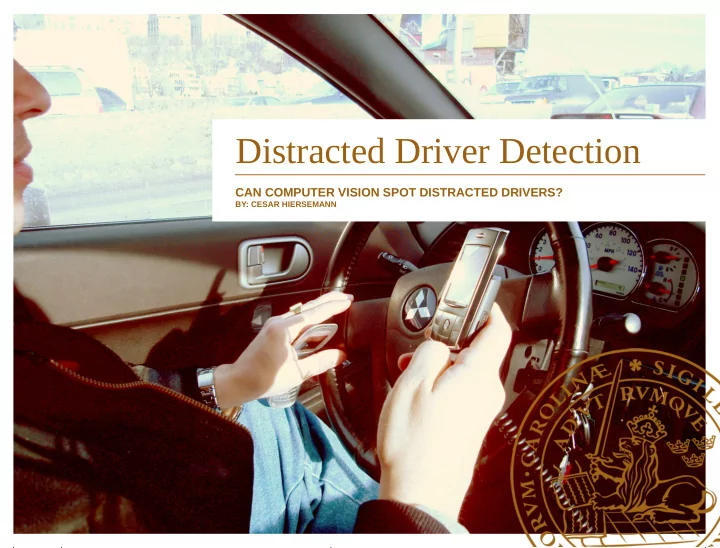
Distracted Driver Detection

CAN COMPUTER VISION SPOT DISTRACTED DRIVERS?

BY: CESAR HIERSEMANN
slide-2
SLIDE 2

Image understanding is hard!

  • ”Easy for humans, hard for

computers”

  • Relevant XKCD (posted in 2014)

http://xkcd.com/1425/

slide-3
SLIDE 3
  • Problem introduction
  • Theory

Neural Networks

ConvNets

Deep Pre-trained with example

  • My approach
  • Challenges
  • Results

Outline

slide-4
SLIDE 4
  • Kaggle – Data science competitions
  • Dataset:

Over 100 000 images (>4 Gb)

100 persons performing 10 different actions (next slides)

Labelled training set with ~20K images, test set ~80K

  • Task is to label test set with probabilities for each class
  • Evaluation by multi-class logloss:

Distracted Drivers competition1

[1]: https://www.kaggle.com/c/state-farm-distracted-driver-detection

L=− 1 N ∑

i=1 N

j=1 M

yij log( pij)

slide-5
SLIDE 5
  • C0:

Driving safely

  • C2:

Talking right

Action classes

  • C1:

Texting right

  • C3:

Texting left

slide-6
SLIDE 6
  • C4:

Talking left

  • C6:

Drinking

Action classes cont.

  • C5:

Operating radio

  • C7:

Reaching back

slide-7
SLIDE 7
  • C8:

Hair and makeup

Action classes cont.

  • C9:

Talking to passenger

slide-8
SLIDE 8

Neural networks

  • One node with

sigmoid activation = logistic regression

  • Many nodes/layers → learns complex input/output

relations with cheap operations Demo2: Link

[2]: Tensorflow Playground: http://playground.tensorflow.org/

slide-9
SLIDE 9

ConvNets

  • Convolution (”faltning”)

Fourier/Laplace transform

Image analysis

Signal Processing

  • Filter on images
  • Ex:

Gaussian Blur

Sharpening

Edge detection

  • ConvNets include convolutional layers

Sharpening filter

slide-10
SLIDE 10

Deep ConvNet, VGG163

  • 16 conv. Layers + 4 fully connected (”normal”) layers
  • > 138 million parameters
  • 2-3 weeks to train on

ImageNet database

  • 1.3 million images

from 1000 classes

VGG16 architecture

[3]: VGG-16 network [http://arxiv.org/abs/1409.1556]

slide-11
SLIDE 11

VGG16 Demo

  • Giant Panda image from

Hong Kong Zoo

  • VGG16 gives output:
  • 99.9999% confidence in class 388:

giant panda, panda, panda bear, coon bear, Ailuropoda melanoleuca

slide-12
SLIDE 12
  • Use pre-trained VGG16 to

extract feature-vectors from images

  • Use first layer after the

convolutions, produces 4096-dimensional vector

  • Every image takes 0.5s to

process → ~20h on laptop

Back to the drivers!

slide-13
SLIDE 13
  • Seperability of classes
  • Mean output over different

classes

  • Seemed to show good

variability → good chance of seperation

  • Promising!

Will it work?

Max activations Class 0 Max activations Class 9

slide-14
SLIDE 14
  • Many similar

images taken within short timeframes → prone to overfitting

  • Seperate persons

in train and test set

  • Network learned

person-specifics → bad results on test!

Classification challenges

Two similar images from C0: safe driving

slide-15
SLIDE 15
  • To recieve accurate test

evaluations, cross-validation is required

  • 26 different persons in train set
  • Split my training set into 5 folds

with 5 persons held out from training

Labelled cross-validation

slide-16
SLIDE 16
  • Now I had a:

train matrix 22424 x 4096

test matrix 79726 x 4096

  • Many approaches to classification:

Support vector machine

Logistic regression

Random forest

Decision Trees

Gradient Boosting

  • SVM and Log.Reg produced best res.

(implemented in scikit-learn)

Classification

slide-17
SLIDE 17
  • Using the entire 4096 feature vector

for every image (testing took time!)

  • Regularization:

Prevents overfitting by limiting size

  • f weights

An additional hyperparameter to

  • ptimize
  • Finding the right hyperparameters

using cross-validation

Training

Train (blue) and validation (red) acc. (top) and logloss (bottom)

slide-18
SLIDE 18
  • 60-65% accuracy, 1.10 logloss →

~250 on current leaderboards

  • Wanted less features per image
  • Reduces training time – more time to
  • ptimize hyperparameters
  • Finding the ”right” features for my specific

task will greatly prevent overfitting

Improvements

slide-19
SLIDE 19
  • Which features were the most important
  • Removing features that coded for person-

specifics

  • Ended up with 887 feature vector → much

faster training/testing and easier on the memory

Dimensionality reduction

slide-20
SLIDE 20
  • Over 80% accuracy and <0.60 logloss on cross-

validation!

  • Sadly nowhere close to <0.2 logloss (top of LB) :(

Final Results

slide-21
SLIDE 21

Thanks!

  • Dennis Medved
  • Pierre Nugues
  • Magnus Oskarsson
  • Have a great summer!