Design representation classification framework formality change - - PDF document

design representation classification framework
SMART_READER_LITE
LIVE PREVIEW

Design representation classification framework formality change - - PDF document

TDT4250 - Modeling of Information Systems, Autumn 2006 What aspects of a UI do we want to capture? Graphical aspects use of colors, fonts, layout etc. Structure hierarchical structure of interaction elements Information


slide-1
SLIDE 1

1

1

1

TDT4250 - Modeling of Information Systems, Autumn 2006

What aspects of a UI do we want to capture?

  • Graphical aspects
  • use of colors, fonts, layout etc.
  • Structure
  • hierarchical structure of interaction elements
  • Information
  • what information is accessible in which parts of the UI
  • what is the relationsship between information in various parts of the UI
  • Behavior
  • when are the various interaction elements active
  • how are changes in the UI triggered by the user

2

TDT4250 - Modeling of Information Systems, Autumn 2006

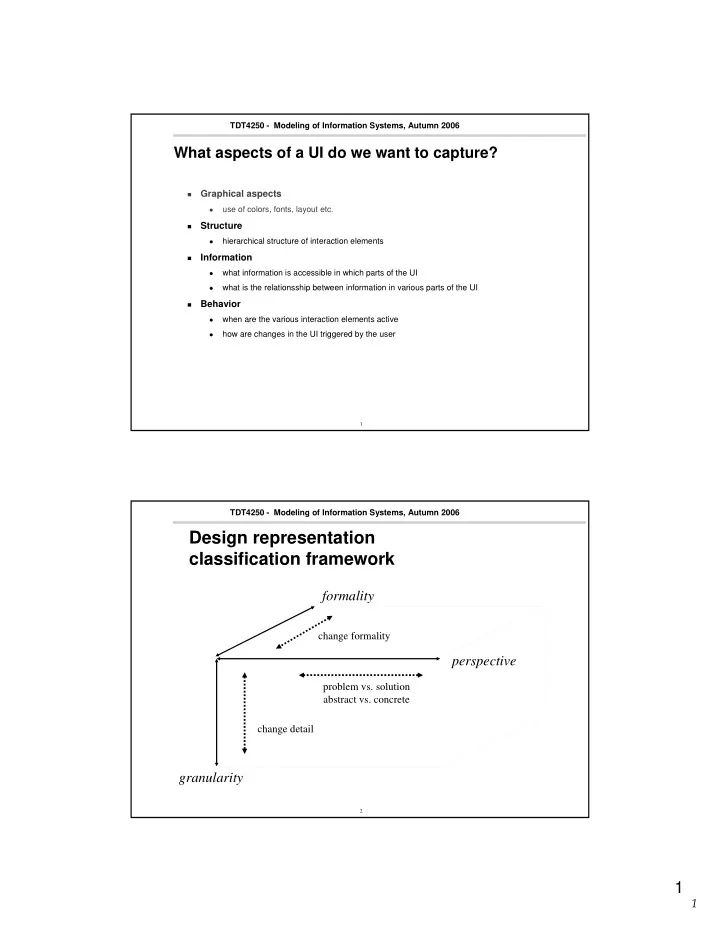
Design representation classification framework

perspective formality granularity

change formality problem vs. solution abstract vs. concrete change detail

slide-2
SLIDE 2

2

2

Intro – UI modelling 3

TDT4250 - Modeling of Information Systems, Autumn 2006

The UI modelling part of MODIS presents two notations for dialog and interaction CAP – Canonical Abstract Prototype Diamodl – Dialog modelling language These cover different aspects of design and different regions of the representation space

4

TDT4250 - Modeling of Information Systems, Autumn 2006

Classification of design representations

  • From problem to solution (perspective)
  • From high to low level (granularity)
  • Level of formality

perspective formality granularity

  • Representation must be tailored to the needs of the design process and

its participants

  • ur

target

slide-3
SLIDE 3

3

3

5

TDT4250 - Modeling of Information Systems, Autumn 2006

Scenario 1 – engineering tradition

Build task model Annotated with information usage contextual information used for decision making data that is operated on Identify dialog structures that support tasks Map AIOs to CIOs rules and heuristics device characteristics

6

TDT4250 - Modeling of Information Systems, Autumn 2006

Scenario 2 – the designer approach

Sketch or prototype with the user Document information flow and behavior express what a concrete design does not complement, not replace concrete description Look for alternative designs for abstract appreciate that concrete prototypes

are not always about concrete design

systematically search for design alternatives

slide-4
SLIDE 4

4

4

7

TDT4250 - Modeling of Information Systems, Autumn 2006

Example: Hybrid GUI/ modelling tool

8

TDT4250 - Modeling of Information Systems, Autumn 2006

Example from CAP lecture

Which elements of this

model could/should have been given a more formal definition/ specifiction

How?

slide-5
SLIDE 5

5

5

9

TDT4250 - Modeling of Information Systems, Autumn 2006

DiaMODL – key features

Abstract model of interaction abstract specification of functional dialog elements visual, compositional and scalable notation platform- and device-independent formal ”enough”, executable but incomplete Particularly weell suited for business applications Hybrid language based on Pisa interactors and UML Statecharts integrated with domain modelling language, e.g. UML

10

TDT4250 - Modeling of Information Systems, Autumn 2006

Generic interaction (Pisa black box)

  • Notation for generic input

and output components

  • Dataflow-oriented
  • Interactor mediates information in

two directions

slide-6
SLIDE 6

6

6

11

TDT4250 - Modeling of Information Systems, Autumn 2006

Scalable notation

  • Specification of functionality
  • utput and input
  • f integers
  • Description of construction
  • composition of sub-interactors
  • string input combined with

parsing and unparsing

  • Same abstract description,

many alternative concrete interaction objects

12

TDT4250 - Modeling of Information Systems, Autumn 2006

Use of UML

Data need for representing configurations of concrete

  • bjects (placeholders for values, i.e. variables)

collaboration diagram elements capture this elements and sets are mapped to

classes and (multi-)objects

Behavior Statecharts was already used scale better than Activity charts

slide-7
SLIDE 7

7

7

13

TDT4250 - Modeling of Information Systems, Autumn 2006

More complex interaction objects

  • Functionality defined in terms of configuration of

domain objects

  • Utilise power of

domain modelling language

  • Output: Set
  • Input: Subset

UML is not ideal for

expressing mathematical relations Alternative implementation

14

TDT4250 - Modeling of Information Systems, Autumn 2006

... and their composition

  • Interactor for

each set

  • Two buttons and

add and remove functions

slide-8
SLIDE 8

8

8

15

TDT4250 - Modeling of Information Systems, Autumn 2006

Java Beans

Properties are

mapped to gates or resources

16

TDT4250 - Modeling of Information Systems, Autumn 2006

Generic tree interactor

slide-9
SLIDE 9

9

9

17

TDT4250 - Modeling of Information Systems, Autumn 2006

javax. swing. JList

18

TDT4250 - Modeling of Information Systems, Autumn 2006

javax. swing. JTree

slide-10
SLIDE 10

10

10

19

TDT4250 - Modeling of Information Systems, Autumn 2006

Configuration of larger elements...

hierarchy message list single message

20

TDT4250 - Modeling of Information Systems, Autumn 2006

... and their composition ...

Selection 1

  • Output:

Mail Node hierarchy

  • Input: Mailbox

Message

  • Output: Message instance

Selection 2

  • Output:

Set of related Messages

  • Input: Message instance
slide-11
SLIDE 11

11

11

21

TDT4250 - Modeling of Information Systems, Autumn 2006

... and detailed specification in terms of domain model

  • Selection 1
  • Output:

Mail Folder hierarchy

  • Input: Mailbox
  • Selection 2
  • Output:

Set av related Messages

  • Input: Message-element
  • Message
  • Output: Message-element
  • Stretches UML’s notation

22

TDT4250 - Modeling of Information Systems, Autumn 2006

Activation and sequencing

slide-12
SLIDE 12

12

12

23

TDT4250 - Modeling of Information Systems, Autumn 2006

State-oriented CIOs

Direct manipulation Web page navigation Mode selection in toolbars Tab folders

24

TDT4250 - Modeling of Information Systems, Autumn 2006

Generic interactors

  • Identify reusable

patterns

  • Generalize

interactor composition

slide-13
SLIDE 13

13

13

25

TDT4250 - Modeling of Information Systems, Autumn 2006

...generic interactors

Instantiate generic

interactor by binding parameters

26

TDT4250 - Modeling of Information Systems, Autumn 2006

...customize generic interactors

Provide interactor for

setting parameter

slide-14
SLIDE 14

14

14

27

TDT4250 - Modeling of Information Systems, Autumn 2006

Patterns

Problem description =

interactor specification

Solution =

interactor composition

28

TDT4250 - Modeling of Information Systems, Autumn 2006

Goal: Hybrid GUI/ modelling tool

slide-15
SLIDE 15

15

15

29

TDT4250 - Modeling of Information Systems, Autumn 2006

Open source Java implementation

Data model simplification and extension of UML’s meta-model use Eclipse Modelling Framework (EMF) Behavior Statechart/interactor machinery Editor first version based on Eclipse (EMF, Graphical Editing Framework (GEF)

and Workbench integration)

second version based on Eclipse’s Graphical Modelling Framework

(GMF), which extends EMF and GEF with lots of features

30

TDT4250 - Modeling of Information Systems, Autumn 2006

Future work

Validation in industry real interest expressed, but not really tried out Hybrid GUI-builder and modelling tool mixed-mode GUI-building and dialog modelling bottom-up user-centered prototyping process Distributed user interface interactor model may be split into parts and

deployed across interconnected devices

XML-based (instant) messaging

slide-16
SLIDE 16

16

16

31

TDT4250 - Modeling of Information Systems, Autumn 2006

Conclusion

DiaMODL language for specifying and documenting dialog design visual and scalable notation partly based on UML Strengths platform/device independent covers several interaction styles Weaknesses executable, but incomplete poor tool support, but it’s on its way too little industry validation