Decimation & Interpolation First define the singal - - PowerPoint PPT Presentation

decimation interpolation
SMART_READER_LITE
LIVE PREVIEW

Decimation & Interpolation First define the singal - - PowerPoint PPT Presentation

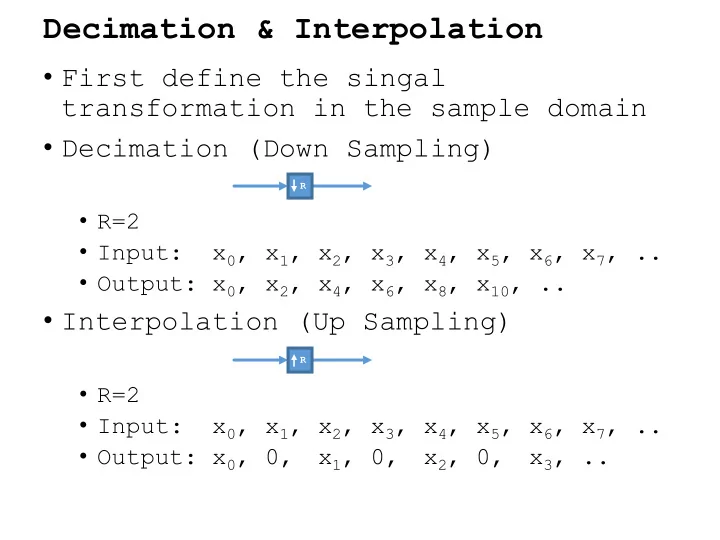
Decimation & Interpolation First define the singal transformation in the sample domain Decimation (Down Sampling) R R=2 Input: x 0 , x 1 , x 2 , x 3 , x 4 , x 5 , x 6 , x 7 , .. Output: x 0 , x 2 , x 4 , x 6 , x 8 , x 10 ,


slide-1
SLIDE 1

Decimation & Interpolation

  • First define the singal

transformation in the sample domain

  • Decimation (Down Sampling)
  • R=2
  • Input: x0, x1, x2, x3, x4, x5, x6, x7, ..
  • Output: x0, x2, x4, x6, x8, x10, ..
  • Interpolation (Up Sampling)
  • R=2
  • Input: x0, x1, x2, x3, x4, x5, x6, x7, ..
  • Output: x0, 0,

x1, 0, x2, 0, x3, ..

R R

slide-2
SLIDE 2

Decimation & Interpolation

  • Mathematical representation in the

sample domain for ratio R:

  • Decimation:

xdec[n] = x[R∙n]

  • Interpolation:

xint[n] = x[n/R], for integer n/2 0, otherwise

R R

slide-3
SLIDE 3

Decimation & Interpolation

  • Mathematical representation in the

normalized freq domain for ratio R.

  • Assuming real sample domain signals.
  • F goes from 0 to 1.
  • Decimation:

Xdec(F) = X(F/R) + X(F/R + 1/R) + ... X(F/R + (R-1)/R)

  • Interpolation:

Xint(F) = X(R*F mod 1))

***Doesn’t account for scaling factors***

R R

slide-4
SLIDE 4

Example Spectrums

  • R=4
  • Decimation
  • Interpolation
slide-5
SLIDE 5

Filtering

  • Decimation
  • Filter before resampling.
  • Interpolation
  • Filter after resampling
slide-6
SLIDE 6

Types of interpolation filters

  • Nearest
  • hR = [ones(R)], h4 = [1 1 1 1]
  • R=4
  • Input: x0, x1, x2, x3, x4, x5, x6, x7, ..
  • Output: x0,0,0,0,x1,0,0,0,x2,0,0,0,x3, ..
  • 1 ,1,1,1

x0

  • 1,1,1,1

x1

  • 1,1,1, 1

x1

  • 1,1, 1,1

x1

  • 1, 1,1,1

x1

  • 1,1,1, 1

x2

  • Filter: x0,x1,x1,x1,x1,x2,..
slide-7
SLIDE 7

Types of interpolation filters

  • linear
  • hR = [ones(R)*ones(R)]/R,
  • h4 = [1 2 3 4 3 2 1]/R
  • R=4
  • Input: x0, x1, x2, x3, x4, x5, x6, x7, ..
  • Output: x0,0,0,0,x1,0,0,0,x2,0,0,0,x3, ..
  • [1 2 3 4 3 2 1]/4

(4x0+0x1)/4

  • [1 2 3 4 3 2 1]/4 (3x0+1x1)/4
  • [1 2 3 4 3 2 1]/4 (2x0+2x1)/4
  • [1 2 3 4 3 2 1]/4 (1x0+3x1)/4
  • [1 2 3 4 3 2 1]/4 (0x0+4x1)/4
slide-8
SLIDE 8

Types of interpolation filters

  • Linear (first order expansion)
  • Alternative approach

x(0) | | | x(1)

  • Expansion about a point half way between

the two points.

xint = x(1/2) + (x(1)-x(0))∙[-.375 -.125 .125 .375] xint = (x(1)+x(0))/2 + (x(1)-x(0))∙[-.375 -.125 .125 .375] xint = x(1)(1/2 + [-.375 -.125 .125 .375]) + x(0)(1/2 - [-.375 -.125 .125 .375])

  • This filter looks like this ...

[.125 .375 .625 .875 .875 .625 .375 .125]

slide-9
SLIDE 9

Types of interpolation filters

  • Second Order Expansion
  • Alternative approach

x(0) | | | x(1) | | | x(2)

  • Expansion about x(1).
  • Approximate x(1) = x(1)
  • Approximate x’(1) = (x(2)-x(0))/2
  • Approximate (1/2)x’’(1) = (x(2)-2x(1)-x(1))/2
  • Evaluate at points
  • n = [-.375 -.125 .125 .375]
  • n2 = [-.3752 -.1252 .1252 .3752]
  • This filter looks like this ...

[-0.1172 -0.0547 0.0703 0.2578 0.8594 0.9844 0.9844 0.8594 0.2578 0.0703 -0.0547 -0.1172]

slide-10
SLIDE 10

Ideal Interpolation Filter

  • Ideally, the filter would retain the

first image without any roll off and completely reject the images.

  • This is a sinc(n/R) filter.
slide-11
SLIDE 11

Frequency Responses

slide-12
SLIDE 12

sinc windowing