CSI 201 - Introduction to expressions will be discussed Complex - - PowerPoint PPT Presentation

csi 201 introduction to
SMART_READER_LITE
LIVE PREVIEW

CSI 201 - Introduction to expressions will be discussed Complex - - PowerPoint PPT Presentation

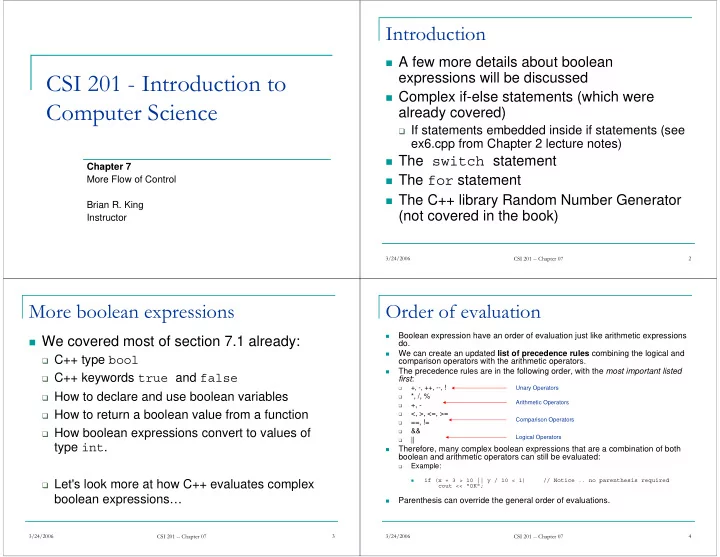
Introduction A few more details about boolean CSI 201 - Introduction to expressions will be discussed Complex if-else statements (which were Computer Science already covered) If statements embedded inside if statements (see ex6.cpp


slide-1
SLIDE 1

CSI 201 - Introduction to Computer Science

Chapter 7 More Flow of Control Brian R. King Instructor

3/24/2006 CSI 201 -- Chapter 07 2

Introduction

A few more details about boolean

expressions will be discussed

Complex if-else statements (which were

already covered)

If statements embedded inside if statements (see

ex6.cpp from Chapter 2 lecture notes)

The switch statement The for statement The C++ library Random Number Generator

(not covered in the book)

3/24/2006 CSI 201 -- Chapter 07 3

More boolean expressions

We covered most of section 7.1 already:

C++ type bool C++ keywords true and false How to declare and use boolean variables How to return a boolean value from a function How boolean expressions convert to values of

type int.

Let's look more at how C++ evaluates complex

boolean expressions…

3/24/2006 CSI 201 -- Chapter 07 4

Order of evaluation

  • Boolean expression have an order of evaluation just like arithmetic expressions

do.

  • We can create an updated list of precedence rules combining the logical and

comparison operators with the arithmetic operators.

  • The precedence rules are in the following order, with the most important listed

first:

  • +, -, ++, --, !
  • *, /, %
  • +, -
  • <, >, <=, >=
  • ==, !=
  • &&
  • ||
  • Therefore, many complex boolean expressions that are a combination of both

boolean and arithmetic operators can still be evaluated:

  • Example:
  • if (x + 3 > 10 || y / 10 < 1) // Notice .. no parenthesis required

cout << "OK";

  • Parenthesis can override the general order of evaluations.

Logical Operators Comparison Operators Arithmetic Operators Unary Operators

slide-2
SLIDE 2

3/24/2006 CSI 201 -- Chapter 07 5

Short-circuit evaluation

  • Boolean expressions joined together by logical operators are evaluated from left to right.
  • Consider a boolean expression that uses a logical OR operator (||)

int x = 4, y = 0; if (x > 0 || y < 0) cout << "ALPHA"; else cout << "BETA";

  • What is the output of the above code? Why?
  • Do both expressions (x > 0) and (y < 0) need to be evaluated in order to determine

the value of the entire expression (x > 0 || y < 0) if we know (x > 0) is true?

  • Why?
  • C++ takes advantage of this to reduce the running time of your program by eliminating

unnecessary computation.

  • The logical AND operator (&&) also has a shortcut evaluation for a false evaluation.

Example:

3/24/2006 CSI 201 -- Chapter 07 6

How can we use this to our advantage?

double pounds, price; cout << "Enter the price of meat: "; cin >> price; cout << "Enter the number of pounds: "; cin >> pounds; if ((pounds != 0) && ((price / pounds) > 10.0)) cout >> "WOW, that's expensive meat!" < endl;

This prevents a possible divide by zero run-

time error from occurring, thereby preventing your program from crashing.

3/24/2006 CSI 201 -- Chapter 07 7

Examples

  • A division by zero in your program will produce a run-time error, and

will cause your program to crash.

  • Does the following code produce a division by zero error?

int j; j = -1; if ((j != -1) && (1/(j+1) > 10)) cout << i << endl;

  • What about this code?

int j; j = 1; if ((j > 0) && (1/(j-1) > 10)) cout << i << endl;

3/24/2006 CSI 201 -- Chapter 07 8

Boolean expression examples

  • Determine the value, either true or false,
  • f the following expressions, or does it

produce an error?:

int count = 0, limit = 10; int x, y;

  • 1. ((count == 0) && (limit < 20))
  • 2. (count == 0 && limit < 20)
  • 3. !(count == 12)
  • 4. (count == 1) && (x < y)
  • 5. ((limit/count) > 7) && (count != 0)
  • 6. (count != 0) && ((limit/count) > 7)

Answers given in class…

slide-3
SLIDE 3

3/24/2006 CSI 201 -- Chapter 07 9

Recap of if and if-else statements

  • We discussed if-else statements in Chapter 2, and also discussed embedded if statements within

if statements. To recap…

  • if statement:

if (boolean_expression) statement; // if with a single statement OR if (boolean_expression) { statement_1; // if with a block statement statement_2; … statement_n; }

  • if-else statement:

if (boolean_expression) statement_a; // if statement (single) else statement_b; // else statement Again, you could have used block statements in place of each statement attached to the if or the else or both.

3/24/2006 CSI 201 -- Chapter 07 10

Nesting if and if-else statements

  • You can have an if statement as one of your statements inside of

an if. For example: if (boolean_expression) if (another_boolean_expression) statement;

This is logically equivalent to:

if (boolean_expression && another_boolean_expression) statement;

Or, you can have another if-else statement as your statement

attached to the else: if (boolean_expression_a) statement_a; else if (boolean_expression_b) statement_b; else statement_c;

3/24/2006 CSI 201 -- Chapter 07 11

Nested if and if-else continued…

  • There is no limit to the hierarchy of if and if-else statements which

you can have nested.

  • You can implement several branches of execution by joining if-else

statements together: if (x <= 1) cout << "x is less than or equal to 1"; else if (x == 2) cout << "x is 2"; else if (x >= 3 && x <= 5) cout << "x is between 3 and 5."; else cout << "x is greater than 5."

  • General rule of thumb is to understand that the compiler always

pairs an else with the nearest previous if that is not already paired with some other else.

  • Be safe! Use braces to create block statements to connect with

specific if statements to eliminate any guessing on your part.

3/24/2006 CSI 201 -- Chapter 07 12

Be careful with nested if-else

Suppose you have:

double fuel_gauge = 0.8;

What is the output of the following:

if (fuel_gauge < 0.75) if (fuel_gauge < 0.25) cout << "Low fuel… less than a quarter left!" << endl; else cout << "Fuel over 3/4 full! Keep going!" << endl;

Clearly not what the programmer intended.

To correct the logic error, use braces:

if (fuel_gauge < 0.75) { if (fuel_gauge < 0.25) cout << "Low fuel… less than a quarter left!" << endl; } else cout << "Fuel over 3/4 full! Keep going!" << endl;

slide-4
SLIDE 4

3/24/2006 CSI 201 -- Chapter 07 13

ex1.cpp

double tax(int net_income) { double five_percent_tax, ten_percent_tax; if (net_income <= 15000) return 0; else if ((net_income > 15000) && (net_income <= 25000)) //return 5% of amount over $15,000 return (0.05*(net_income - 15000)); else //net_income > $25,000 { //five_percent_tax = 5% of income from $15,000 to $25,000. five_percent_tax = 0.05*10000; //ten_percent_tax = 10% of income over $25,000. ten_percent_tax = 0.10*(net_income - 25000); return (five_percent_tax + ten_percent_tax); } }

3/24/2006 CSI 201 -- Chapter 07 14

The switch statement

  • The switch statement provides a more formalized mechanism to

implement a multiway if-else statement.

  • However, a switch statement is restricted to comparing an expression

to constants.

  • The general syntax is:

switch (controlling_expr) { case Constant_1: Statement_sequence_1; break; case Constant_2: Statement_sequence_2; break; … case Constant_n: Statement_sequence_n; break; default: Default_statement_sequence; }

3/24/2006 CSI 201 -- Chapter 07 15

ex2.cpp -- switch statement example

int main( ) { char grade; cout << "Enter your midterm grade and press return: "; cin >> grade; switch (grade) { case 'A': cout << "Excellent. " << "You need not take the final.\n"; break; case 'B': cout << "Very good. "; cout << "Still have to take final.\n"; break; case 'C': cout << "Passing.\n"; break; case 'D': case 'F': cout << "Not good. " << "Go study.\n"; break; default: cout << "That is not a possible grade.\n"; } cout << "End of program.\n"; return 0; }

3/24/2006 CSI 201 -- Chapter 07 16

The switch statement explained

  • Your "controlling expression" must evaluate to an integral type. This

includes one of the following:

  • bool
  • an enum constant (not covered),
  • short, int, long
  • char.
  • The controlling expression is evaluated first.
  • Its value will be compared with each constant in a case statement.
  • If your program finds a match, it executes the statements following that

case, up to the first break statement encountered, or to the end of the switch statement, whichever comes first.

  • If your program does NOT find a match, then your program jumps to the

statements following the default label in the switch statement.

  • If your program does not include the default label, and there is no

match found in the case statements presented, then your program simply jumps out of the switch statement to the code following the closing bracket of the switch statement.

slide-5
SLIDE 5

3/24/2006 CSI 201 -- Chapter 07 17

Restrictions

You can not have two occurrences of a case with the same

constant value after them.

It is not a syntax error to omit the break statement in a case

label, but it might be a logic error! Execution will simply proceed to the next adjacent case. Let's remove a break statement in the previous example program from one of the cases to see what happens…

In fact, there are times when it is desirable to leave a break

statement out. (We'll see an example shortly…) Now, let's modify the program to accept a lower and upper letter for each case to illustrate how to have multiple cases jump to the same statements…

3/24/2006 CSI 201 -- Chapter 07 18

Using a switch for menu options

A popular use for switch statements is

presenting a "menu" of options from which to choose from.

See ex3.cpp for an example… When each case has numerous C++

statements that need to be executed, it is better to supply a separate function for each

  • case. It makes your program much easier to

read.

3/24/2006 CSI 201 -- Chapter 07 19

Example of function calls in branching statements

do { cout << endl << "Choose 1 to see the next homework assignment.\n" << "Choose 2 for your grade on the last assignment.\n" << "Choose 3 for assignment hints.\n" << "Choose 4 to exit this program.\n" << "Enter your choice and press return: "; cin >> choice; switch (choice) { case 1: show_assignment( ); break; case 2: show_grade( ); break; case 3: give_hints( ); break; case 4: cout << "\nEnd of Program.\n"; break; default: cout << "\nNot a valid choice.\n" << "Choose again.\n"; } }while (choice != 4);

3/24/2006 CSI 201 -- Chapter 07 20

Increment and Decrement operators

Increment and decrement operators can actually be

placed on either side of the operand.

i++; vs. ++i; i--; vs. --i; If the operator is on the right side, the expression

(without the operator) is evaluated, and then the

  • peration is performed.

If the operator is on the left side, the operation is

performed first, and then the expression (without the

  • perator) is evaluated.
slide-6
SLIDE 6

3/24/2006 CSI 201 -- Chapter 07 21

Increment and decrement examples

  • What is the output of the following code:

int number = 2; int value_produced = 2*(number++); cout << value_produced << " "; cout << number << endl;

  • What is the output of the following code:

int number = 2; int value_produced = 2*(++number); cout << value_produced << " "; cout << number << endl;

  • What if we change the ++ to a --? Then what is the output of each?

3/24/2006 CSI 201 -- Chapter 07 22

++ and -- operators and loops

  • Increment and decrement operators are particularly useful when setting up loops. Recall…
  • Sometimes we repeat a loop iteration a predetermined number of times

int count = 0; while(count < 10) { cout << count << " "; count++; }

  • Other times we count how often a loop iteration occurs.

int count = 0; double grade; Student st; ifstream in; ofstream out; … while (read_student(st,in) == true) { grade = calc_student_grade(st); print_student(st,grade,out); count++; } cout << count << "students were processed." << endl;

3/24/2006 CSI 201 -- Chapter 07 23

++ and -- operators

We can include the increment and decrement operator right in

the boolean expression used in the loop:

Now, we can repeat a loop iteration a predetermined number of

times with fewer lines of code: int count = 0; while(count++ < 5) cout << count << " ";

What does this output? int count = 0;

while(++count < 5) cout << count << " ";

What does this output? 3/24/2006 CSI 201 -- Chapter 07 24

The for statement

  • The for statement is the third loop mechanism that C++ provides.
  • Technically, the while and do-while statements provide all of the looping

mechanisms you need.

  • But, the for loop simplifies one type of loop that is extremely common in

programming – performing a loop iteration a predetermined number of times.

  • Syntax:

for (Init_Action; Boolean_Expression; Altering_statement) Loop_Body;

1.

The Init_Action statement is executed first

2.

The Boolean_Expression is evaluated

3.

As long as it evaluates to true, the loop body is iterated through once. If it is false, the loop is not iterated through, and your program continues after the loop body.

4.

After the loop body executes, the altering_statement is executed. Go to step two and repeat the process

  • Example:

int count; for (count = 0; count <= 10; count++) cout << count << " ";

  • See ex4.cpp for an example of the factorial program using a for loop
slide-7
SLIDE 7

3/24/2006 CSI 201 -- Chapter 07 25

Compare for loops to while loops

Consider the following for loop:

int number; for(number = 0; number < 10; number++) cout << "Number = " << number << endl;

This is equivalent to the following while loop:

int number; number = 0; while (number < 10) { cout << "Number = " << number << endl; number++; }

3/24/2006 CSI 201 -- Chapter 07 26

Variable declaration in a for statement

C++ allows you to simplify a for loop statement

even further by allowing a variable declaration in the initialization section:

This:

int number; for(number = 0; number < 10; number++) cout << "Number = " << number << endl;

can now become this:

for(int number = 0; number < 10; number++) cout << "Number = " << number << endl;

Variables declared in this fashion have local scope –

they are local to the body of the for loop!

3/24/2006 CSI 201 -- Chapter 07 27

Bodies of a for loop

As with other loops in C++, the body of the

loop can either be a single C++ statement, or a statement block, delimited by { }.

Example:

for (int number = count; number >= 0; number--) { cout << number << " bottles of beer on the wall.\n"; if (number > 0) cout << "Take one down and pass it around.\n"; }

See ex5.cpp

3/24/2006 CSI 201 -- Chapter 07 28

Examples using for loops

  • What is the output of the following?
  • for (int count = 1; count < 5; count++)

cout << (2 * count) << " ";

  • for(double sample = 2; sample > 0; sample -= 0.5)

cout << sample << " ";

  • Rewrite the following using a for loop:
  • int i = 1;

while (i < 10) { cout << i << endl; i = i + 2; }

slide-8
SLIDE 8

3/24/2006 CSI 201 -- Chapter 07 29

The break Statement

  • We've already seen the break statement as a way to exit out of a switch

statement.

  • You can also use a break statement to exit out of a loop early.
  • Example (see ex6.cpp):

while(count-- > 0) { double top, bottom; cout << "Enter the numerator: "; cin >> top; cout << "Enter the denominator: "; cin >> bottom; if (bottom == 0) { cout << "Trying to perform a divide by zero? " cout << "Fine... I quit!\n"; break; } cout << top << "/" << bottom << " = " << top/bottom << endl; }

3/24/2006 CSI 201 -- Chapter 07 30

Nested loops

You can have one loop inside another. Consider the following

code fragment:

for (int hour = 1; hour <= 12; hour++) { for (int minute = 0; minute <= 59; minute++) { cout << hour << ":"; if (minute < 10) cout << "0"; cout << minute << endl; } }

What is the output of the above?

3/24/2006 CSI 201 -- Chapter 07 31

Ending a loop

Many loops are designed to process input data until the end of

the input data has been signaled.

There are four common methods for terminating an input loop

List headed by size

  • If you're reading an input file, have the first line of the input file

contain the number of records in the rest of the file.

Ask before iterating

  • If you're reading data from the user, include statements in the loop to

ask the user if there is any more data. If the user says no, then break; the loop, or set your own boolean flag variable that terminates the loop.

List ended with a sentinel value

  • Choose a value that is guaranteed not to be used in your input data,

and let that value signal the end of your input.

Running out of input

  • When reading data from an input file, use the eof() member

function to determine if any more data is available.

3/24/2006 CSI 201 -- Chapter 07 32

Debugging a loop…

Suppose you have a problem with your loop,

and you can't figure out what's going on.

The problem is most likely related to a

variable used in the boolean expression in the loop.

It may be useful to enter code in your loop to

trace the variable as your loop iterates.

Watching the value of a variable change while the

program is running is called tracing the variable.

slide-9
SLIDE 9

3/24/2006 CSI 201 -- Chapter 07 33

Example of debugging a loop and tracing

Example (from ex7.cpp), look closely at the following loop. The

user wants a loop to read in 5 scores from the user, but only 4 are being read. You could introduce debug code to trace the variable count:

int count = 0, sum = 0, score;

while(++count < 5) { cin >> score; sum += score; // DEBUG code – trace count and score... cout << "count = " << count << ", " << "score = " << score << endl; } cout << "The average score is: " << static_cast<double>(sum)/count << endl;

How would you fix the above code to properly read in 5 scores? 3/24/2006 CSI 201 -- Chapter 07 34

Final thoughts on loops…

  • When thinking about how to design a loop,

answer the following three questions first:

1.

What are the initializing statements for my loop?

2.

What does the body of the loop consist of? (In

  • ther words, what am I trying to accomplish?)

3.

What are the conditions for ending the loop? (You want to be sure to prevent any possible

  • ccurrence of an infinite loop!)

3/24/2006 CSI 201 -- Chapter 07 35

Random numbers

  • The C++ library contains a useful Random Number Generator (RNG), which can

be useful for simulation of errors or noise in data, and for game playing.

  • #include <cstdlib> is required
  • The two predefined functions required to use the RNG are:
  • int rand();
  • This function returns a random number between 0 and RAND_MAX, which is also defined in

<cstdlib>.

  • int srand(unsigned int seed);
  • This function initializes the random number generator with a "seed" value, which is used to

generate a new sequence of "random" numbers based on "seed".

  • Typically, we use the current time from the system clock to initialize the random

number generator.

  • time(NULL) will return the current time in seconds since 1970. It makes a good seed

for the random number generator! (More on NULL later in the course.)

  • #include <ctime> is required to use the time(NULL) function.
  • The following code will initialize the random number generator:
  • void initialize_rng()

{ int seed; seed = time(NULL); srand(seed); }

  • See ex8.cpp for an illustration of using random numbers to simulate rolling dice!

3/24/2006 CSI 201 -- Chapter 07 36

The End